Introduction
Deploying OCI Bastion Service Terraform is one of the simplest ways to securely access private compute instances in Oracle Cloud Infrastructure (OCI). Traditionally, administrators relied on a compute-based bastion host. When working with Oracle Cloud Infrastructure (OCI), one of the common challenges is providing secure access to compute instances in private subnets. Traditionally, administrators used a self-managed bastion host – a public compute instance acting as a jump box.
With OCI Bastion Service, you no longer need to maintain your own bastion VM. Oracle provides a managed service that offers temporary SSH or port-forwarding sessions into private subnets. In this article, we’ll explore how to configure OCI Bastion with Terraform, compare it with a compute-based bastion host, and show real code examples from my GitHub repository: https://github.com/mlinxfeld/terraform-oci-bastion-service
Why Use OCI Bastion Service Terraform?
OCI Bastion Service has several advantages:
No public IPs required – your compute instances remain private.
IAM integration – access controlled by OCI Identity and Access Management.
Time-limited sessions – connections automatically expire after a configurable TTL (up to 3 hours).
No VM management – Oracle runs the service, so no patching or monitoring is needed.
This makes it ideal for ad-hoc administration or granting contractors limited access.
However, note the main limitation: sessions cannot exceed 3 hours. If you require persistent connectivity, you may prefer the compute-based bastion pattern (covered in my flagship course).
Terraform Code Example
Let’s look at how to deploy Bastion Service with Terraform. Full code is available in my GitHub repo: https://github.com/mlinxfeld/terraform-oci-bastion-service
Bastion Resource
resource "oci_bastion_bastion" "bastion" {
  bastion_type     = "STANDARD"
  compartment_id   = var.compartment_id
  target_subnet_id = var.target_subnet_id
  client_cidr_block_allow_list = var.client_cidr_block_allow_list
  name                         = var.bastion_name
  defined_tags                 = var.defined_tags
}
This resource provisions a managed Bastion inside your VCN, restricted by CIDR blocks.
Session Resource
resource "oci_bastion_session" "session" {
  bastion_id = oci_bastion_bastion.bastion.id
  defined_tags = var.defined_tags
  key_details {
    public_key_content = var.ssh_public_key
  }
  target_resource_details {
    session_type        = var.session_type
    target_resource_id  = var.target_resource_id
    target_resource_operating_system_user_name = var.os_user
    target_resource_port = var.target_port
  }
  session_ttl_in_seconds = var.session_ttl
  display_name           = var.session_name
}
This creates a session that connects your laptop to a private instance. The session TTL defines how long the connection lasts (up to 3h).
Connecting Through Bastion
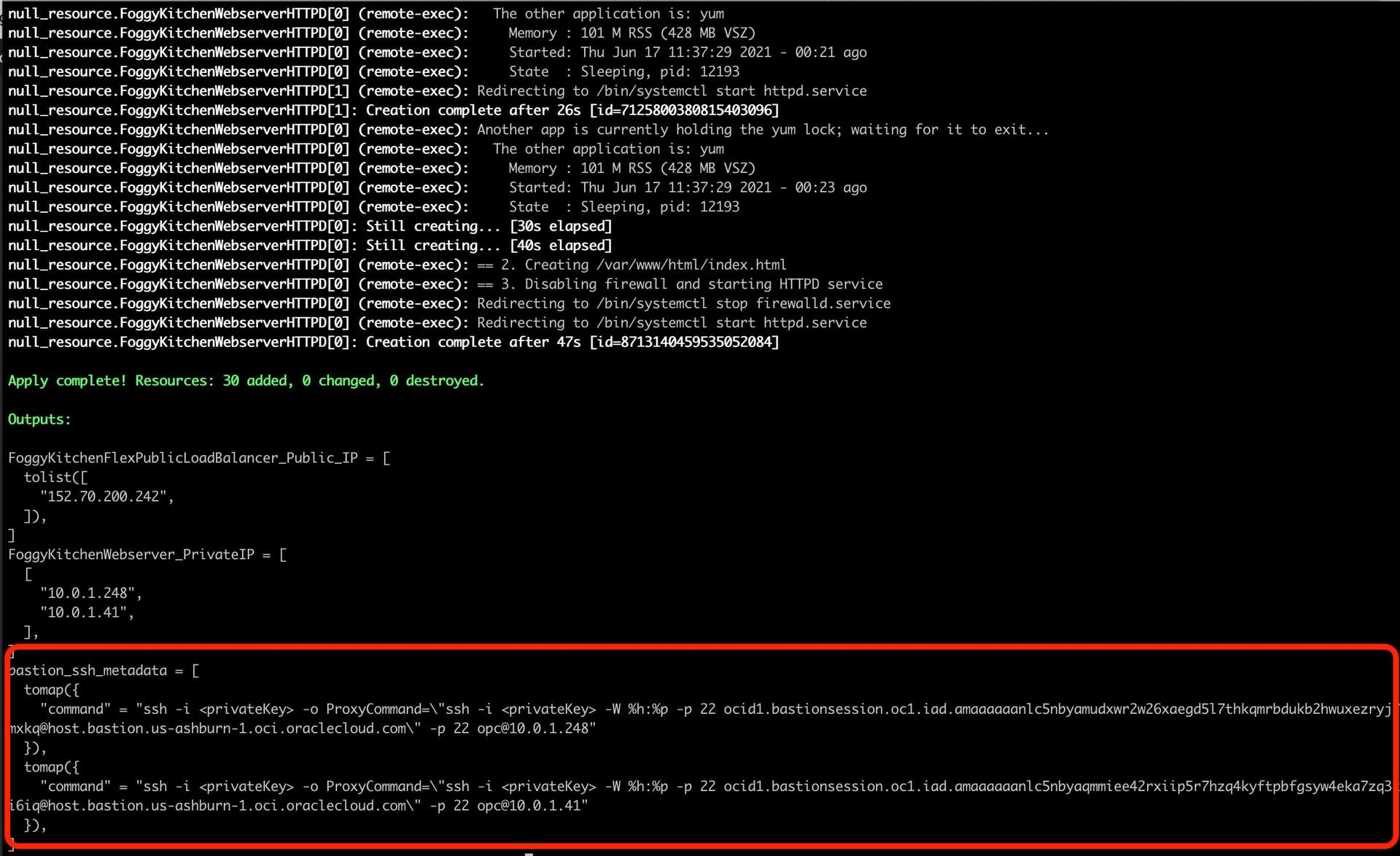
Once deployed with terraform apply, you can generate the SSH command using OCI CLI:
oci bastion session get
  --bastion-session-id ocid1.bastionsession.oc1..xxxx
  --query 'data."ssh-metadata".command'
  --raw-output
Example output:
ssh -i ~/.ssh/id_rsa
  -o ProxyCommand="ssh -W %h:%p -i ~/.ssh/id_rsa -p 22 ocid1.bastionsession...@host.bastion.eu-frankfurt-1.oci.oraclecloud.com"
  [email protected]
This tunnels your SSH traffic securely through Bastion Service into the private subnet.
Complete Architecture
The following diagram shows how OCI Bastion Service integrates into a secure Virtual Cloud Network (VCN). Bastion is placed in its own dedicated subnet and provides controlled access to private instances via temporary sessions. Traffic enters through the Bastion Service without exposing compute instances to the public internet.
-
FoggyKitchenVCN with three availability domains.
-
Private Web and Load Balancer subnets.
-
Dedicated Bastion Subnet hosting the managed Bastion Service.
-
Internet Gateway and NAT Gateway controlling ingress/egress traffic.
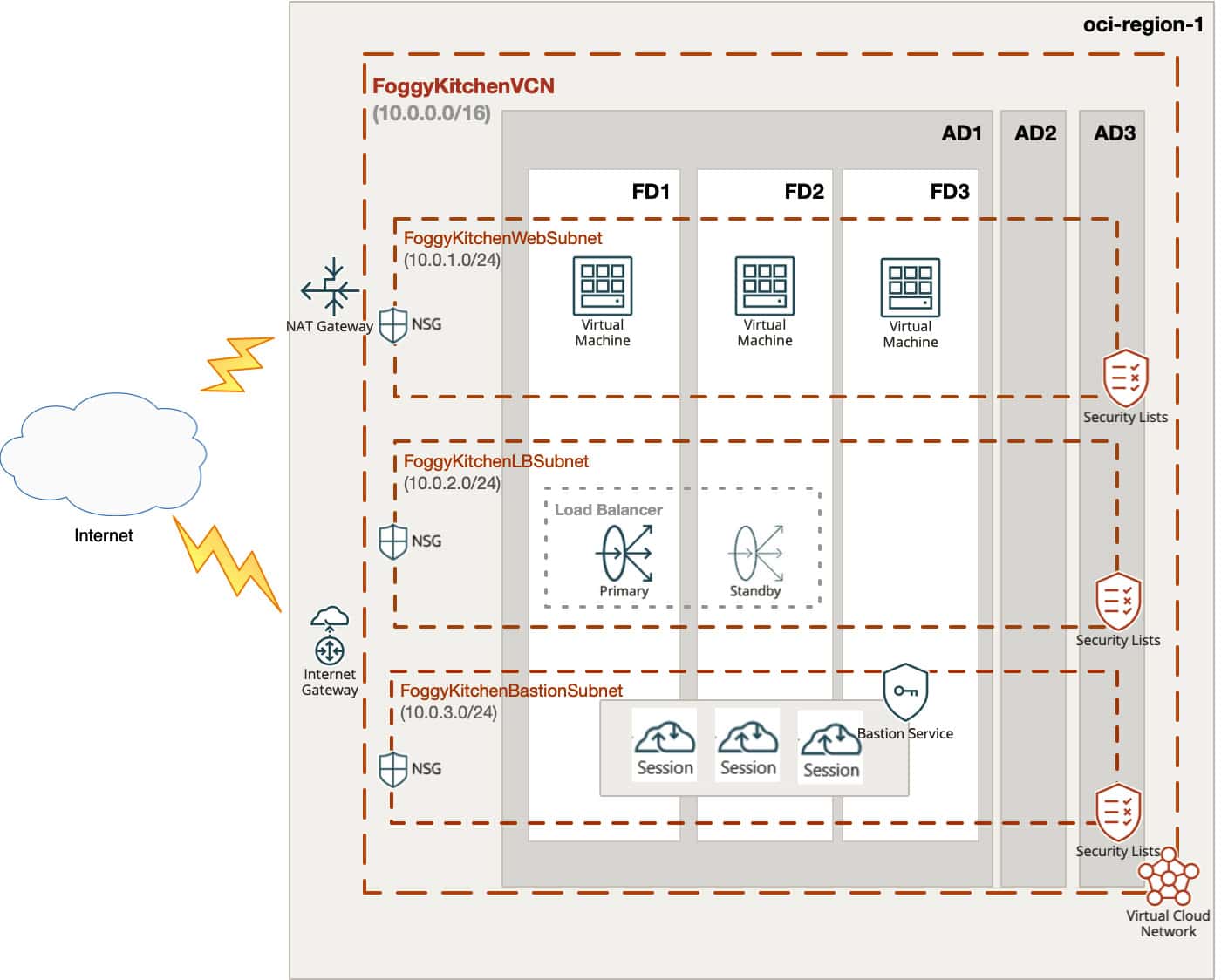
Figure 1. OCI Bastion Service integrated into FoggyKitchen VCN architecture.
OCI Bastion Service provides a secure entry point into your private subnets – no public IPs required, just time-limited, IAM-controlled sessions.
OCI Bastion vs. Compute-based Bastion
🔐 OCI Bastion Service
-
✅ No VM to maintain
-
✅ IAM integration
-
✅ Limited attack surface
-
❌ Sessions expire after max 3 hours
💻 Compute Bastion Host (Jump Box)
-
✅ Persistent connectivity (no session expiry)
-
✅ Good for long-running workflows
-
❌ Requires management and patching
-
❌ Needs a public IP
👉 In many real-world environments, both are used: Bastion Service for ad-hoc tasks and a hardened compute bastion for continuous operations.
Conclusion
OCI Bastion Service Terraform is a simple and secure way to provide controlled access to private subnets in Oracle Cloud Infrastructure. Instead of exposing a public bastion host, you can rely on a managed service that integrates with IAM, enforces session TTL, and keeps your attack surface minimal. For many organizations, this is the easiest path to combine security and automation.
With OCI Bastion Service Terraform automation, you can codify secure access patterns into your infrastructure as code workflows. At the same time, it’s important to understand the limitations. Sessions created through the Bastion Service will always expire after a maximum of three hours. For short-lived administration tasks this is perfect, but for long-running workflows or permanent DevOps pipelines, a compute-based bastion host may still be the better option. This duality is why in many real-world OCI environments, both models coexist: the managed Bastion Service for ad-hoc access, and a hardened compute bastion for persistent connectivity.
By codifying this architecture in Terraform, you ensure repeatability, version control, and consistency across environments. Whether you are deploying a proof of concept, a production VCN, or a multi-region architecture, Infrastructure as Code gives you the flexibility to scale securely.
👉 If you want to experiment right away, check out the full working example in my GitHub repository: terraform-oci-bastion-service.
👉 And if you want to go beyond the Bastion Service and learn how to build a compute-based bastion host with Terraform – including SSH key automation and persistent connectivity – don’t miss my flagship training: How to Automate OCI with Terraform (2025 Edition).
With both approaches in your toolkit, you’ll master secure access patterns in OCI and be ready to design infrastructures that balance convenience, automation, and enterprise-grade security.
👉 Master OCI Automation with Terraform & OpenTofu
Build secure and scalable infrastructures in Oracle Cloud with hands-on labs, real code examples, and step-by-step guidance. In addition to OCI Bastion Service, you’ll also learn how to deploy and automate a classic compute-based Bastion Host with Terraform – giving you persistent connectivity and full control when time-limited sessions are not enough.
🔴 Start Learning Now🔒 Lifetime • ⏱️ Self-paced • 🧪 Real labs