If you want to secure your APIs on Oracle Cloud Infrastructure, combining OCI API Gateway Terraform is a powerful approach. In this tutorial, we’ll build a secure API Gateway deployment with JWT authentication handled by OCI Functions – all provisioned automatically with Terraform. Modern applications live in a connected world: microservices, mobile apps, and third-party integrations all rely on APIs. But with APIs comes a challenge: how do you secure them efficiently, without overloading your backend services?
Oracle Cloud Infrastructure (OCI) provides API Gateway as a managed entry point for your workloads. Out of the box, it supports IAM and IDCS integrations, but in real-world scenarios you often need custom authentication. A common pattern is validating JWT (JSON Web Tokens) issued by an external identity provider.
When building multicloud-ready APIs, OCI API Gateway Terraform helps ensure repeatability and automation.
In this tutorial, I’ll show you how to implement JWT authentication on OCI API Gateway using OCI Functions – all automated with Terraform.
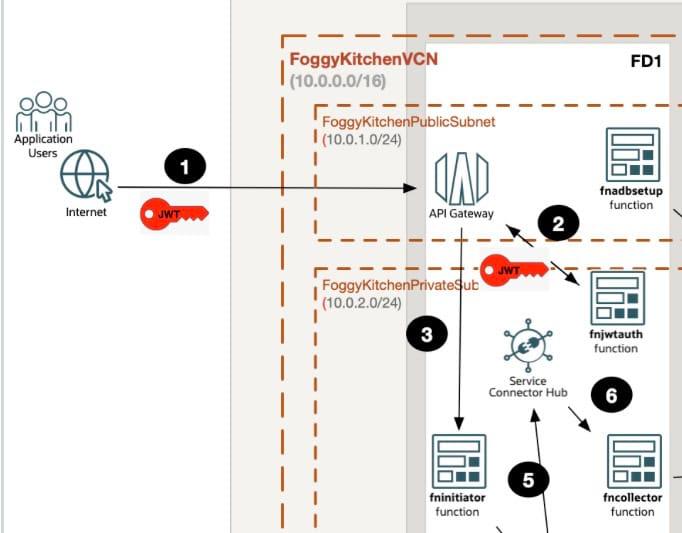
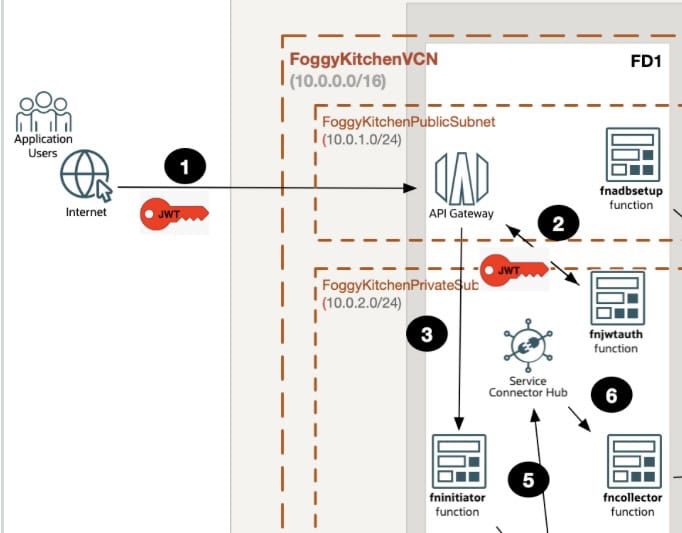
👉 OCI API Gateway Terraform Architecture Overview
The architecture consists of three main building blocks working together to secure your APIs:
-
API Gateway – acts as the single public entry point for all incoming requests. It handles routing, enforces policies, and ensures that traffic is centrally managed instead of exposing individual backend services directly to the internet. This reduces your attack surface and simplifies operations.
-
Custom Authentication Function (JWT Validator) – each incoming request carries a JWT token in the header. The gateway forwards this token to a lightweight serverless function that validates it against a pre-configured secret or public key.
-
✅ If the token is valid, the function returns a positive response and the request continues to the backend.
-
❌ If invalid, the request is blocked immediately with an HTTP 401, ensuring only trusted clients proceed further.
-
-
Backend Functions (Business Logic) – once validated, the request reaches your backend function (for example, data processing, workflow automation, or integration with other OCI services). Because authentication is already handled at the edge, the backend can stay lightweight, focused only on business logic.
This separation of concerns ensures that:
-
Security is enforced at the edge.
-
Authentication logic scales independently of business logic.
-
Backend developers don’t have to implement repetitive auth checks in every function.
Why this matters
High-level takeaways:
-
🔐 Secure APIs at the edge – before requests reach your backend.
-
⚡ Lightweight microservices – let the gateway enforce authentication, not your business logic.
-
🌍 Flexibility – integrate with any identity provider, not only OCI IAM.
-
📜 Compliance-ready – JWT validation helps ensure only trusted, signed requests enter your system.
In other words: this pattern combines security, scalability, and simplicity.
Step 1: Provisioning API Gateway with Terraform
We start with a basic API Gateway resource and a deployment that wires everything together.
resource "oci_apigateway_gateway" "FoggyKitchenAPIGateway" {
  compartment_id = var.compartment_ocid
  endpoint_type  = "PUBLIC"
  subnet_id      = oci_core_subnet.FoggyKitchenPublicSubnet.id
  display_name   = "FoggyKitchenAPIGateway"
}
resource "oci_apigateway_deployment" "FoggyKitchenAPIGatewayDeployment" {
  compartment_id = var.compartment_ocid
  gateway_id     = oci_apigateway_gateway.FoggyKitchenAPIGateway.id
  path_prefix    = "/v1"
  display_name   = "FoggyKitchenAPIGatewayDeployment"
  specification {
    routes {
      backend {
          type        = "ORACLE_FUNCTIONS_BACKEND"
          function_id = module.oci-fk-initiator-function.oci_app_fn.fn_ocid
      }
      methods = ["POST"]
      path    = "/fninitiator"
    }
    request_policies {
      authentication {
        type         = "CUSTOM_AUTHENTICATION"
        function_id  = module.oci-fk-jwt-auth-function.oci_app_fn.fn_ocid
        token_header = "token"
      }
    }
  }
}
👉 Here, the request_policies.authentication section delegates token validation to our custom JWT Auth Function.
Step 2: Deploying the JWT Auth Function with a Terraform Module
Instead of writing long oci_functions_function resources, I use my FoggyKitchen Terraform module to deploy the JWT Auth Function.
module "oci-fk-jwt-auth-function" {
  depends_on               = [
    data.local_file.fnjwtauth_dockerfile,
    data.local_file.fnjwtauth_func_py,
    data.local_file.fnjwtauth_func_yaml,
    data.local_file.fnjwtauth_requirements_txt
  ]
  source                   = "github.com/mlinxfeld/terraform-oci-fk-function"
  tenancy_ocid             = var.tenancy_ocid
  region                   = var.region
  ocir_user_name           = var.ocir_user_name
  ocir_user_password       = var.ocir_user_password
  compartment_ocid         = var.compartment_ocid
  use_my_fn                = true
  fk_fn_name               = "fnjwtauth"
  dockerfile_content       = data.local_file.fnjwtauth_dockerfile.content
  func_py_content          = data.local_file.fnjwtauth_func_py.content
  func_yaml_content        = data.local_file.fnjwtauth_func_yaml.content
  requirements_txt_content = data.local_file.fnjwtauth_requirements_txt.content
  invoke_fn                = false
  use_oci_logging          = false
  use_my_fn_app            = true
  my_fn_app_ocid           = module.oci-fk-initiator-function.oci_app_fn.fn_app_ocid
  use_my_fn_network        = true
  my_fn_subnet_ocid        = oci_core_subnet.FoggyKitchenPrivateSubnet.id
  fn_config                = { "FN_JWT_TOKEN" : "${var.fn_jwt_token}" }
}
This module bundles together:
-
OCI Function code (Dockerfile, Python handler, requirements),
-
networking setup (private subnet),
-
configuration values (JWT secret passed as environment variable).
Step 3: Auth Function code (Python, FDK)
The API Gateway’s CUSTOM_AUTHENTICATION policy invokes our function with a JSON payload containing the client’s token (extracted from the header token).
Our function must respond with {"active": true} to allow the request or {"active": false} to block it.
Here’s the full handler code:
import io
import json
import logging
import datetime
from datetime import timedelta
from fdk import response
def handler(ctx, data: io.BytesIO = None):
    # Defaults for safety
    auth_token = "invalid"
    token = "invalid"
    fnJwtToken = "invalid"
    expiresAt = (datetime.datetime.utcnow() + timedelta(seconds=60))
        .replace(tzinfo=datetime.timezone.utc).astimezone()
        .replace(microsecond=0).isoformat()
    try:
        # JSON body sent by API Gateway: {"token": "..."}
        auth_token = json.loads(data.getvalue())
        token = auth_token.get("token")
        # Function config (set via Terraform: FN_JWT_TOKEN)
        app_context = dict(ctx.Config())
        fnJwtToken = app_context["FN_JWT_TOKEN"]
        # Demo validation: shared secret match
        if token == fnJwtToken:
            return response.Response(
                ctx,
                status_code=200,
                response_data=json.dumps({
                    "active": True,
                    "principal": "foo",
                    "scope": "bar",
                    "clientId": "1234",
                    "expiresAt": expiresAt,
                    "context": {"username": "wally"}
                })
            )
    except (Exception, ValueError) as ex:
        logging.getLogger().info("error parsing json payload: " + str(ex))
    # Reject if anything is off
    return response.Response(
        ctx,
        status_code=401,
        response_data=json.dumps({
            "active": False,
            "wwwAuthenticate": "API-key"
        })
    )
Step 4: Testing the setup
✅ Valid token (success path):
curl -i -X POST -H "token: ${FN_JWT_TOKEN}" "https://your-api-gateway-id.apigateway.Expected: HTTP 200, request reaches backend function.
❌ Invalid token (failure path):
curl -i -X POST -H "token: nope" "https://your-api-gateway-id.apigateway.Expected: HTTP 401 Unauthorized.
FAQ / Q&A
Q: What is OCI API Gateway Terraform used for?
A: It’s used to automate deployment and security of API Gateway in Oracle Cloud Infrastructure, including authentication and backend integration.
Q: Can I secure JWT authentication with OCI API Gateway Terraform?
A: Yes, by combining OCI API Gateway, Functions, and Terraform, you can validate JWT tokens at the edge before traffic hits your backend.
Full source code and training
👉 The full working example of this JWT Authentication pattern is available in my GitHub repo here:
🔗 Lesson 8 – Four Functions, API Gateway, JWT, Streaming, ADB
If you want to go beyond snippets and learn how to combine OCI Functions, API Gateway, JWT validation, Streaming, and Autonomous Database into a real-world serverless architecture, check out my course:
🎓 OCI Serverless Functions with Terraform (2024 Edition)
Wrapping up: Why use OCI API Gateway Terraform for JWT Security
With just a few Terraform resources and a small custom function, you can build a secure API Gateway with JWT authentication in OCI.
This pattern gives you:
better security (only trusted requests reach your backend),
better scalability (auth logic scales serverlessly),
and better maintainability (auth and business logic are separated).
By automating security patterns with OCI API Gateway Terraform, you minimize human error and ensure consistency across environments. f your team is building APIs for production, OCI API Gateway Terraform lets you codify best practices instead of relying on manual steps.
👉 If you’d like to experiment further and see how this fits into larger serverless deployments, hit the button below and explore the full serverless course.
Master JWT-secured APIs with OCI Functions & Terraform
Learn how to combine OCI Functions, API Gateway, JWT validation, and automation into real-world serverless deployments.
👉 Start the Serverless Functions Course