Introduction
In this article, we’ll show how to integrate OCI Streaming Autonomous Database Terraform using serverless functions. In the previous article, we created a producer function that sends messages into OCI Streaming. That gave us the producer side of an event-driven pipeline.
Now it’s time to complete the flow with a consumer function that reads messages from the stream and stores them directly in Oracle Autonomous Database (ADB). With this addition, every event pushed into OCI Streaming becomes instantly queryable with SQL — enabling real-time dashboards, fraud detection, IoT telemetry pipelines, and log ingestion scenarios.
This architecture is a common building block in modern cloud solutions where scalability, durability, and serverless automation matter. Instead of batch ETL, you get continuous data ingestion and can react to events the moment they occur.
Architecture: OCI Streaming to Autonomous Database with Terraform
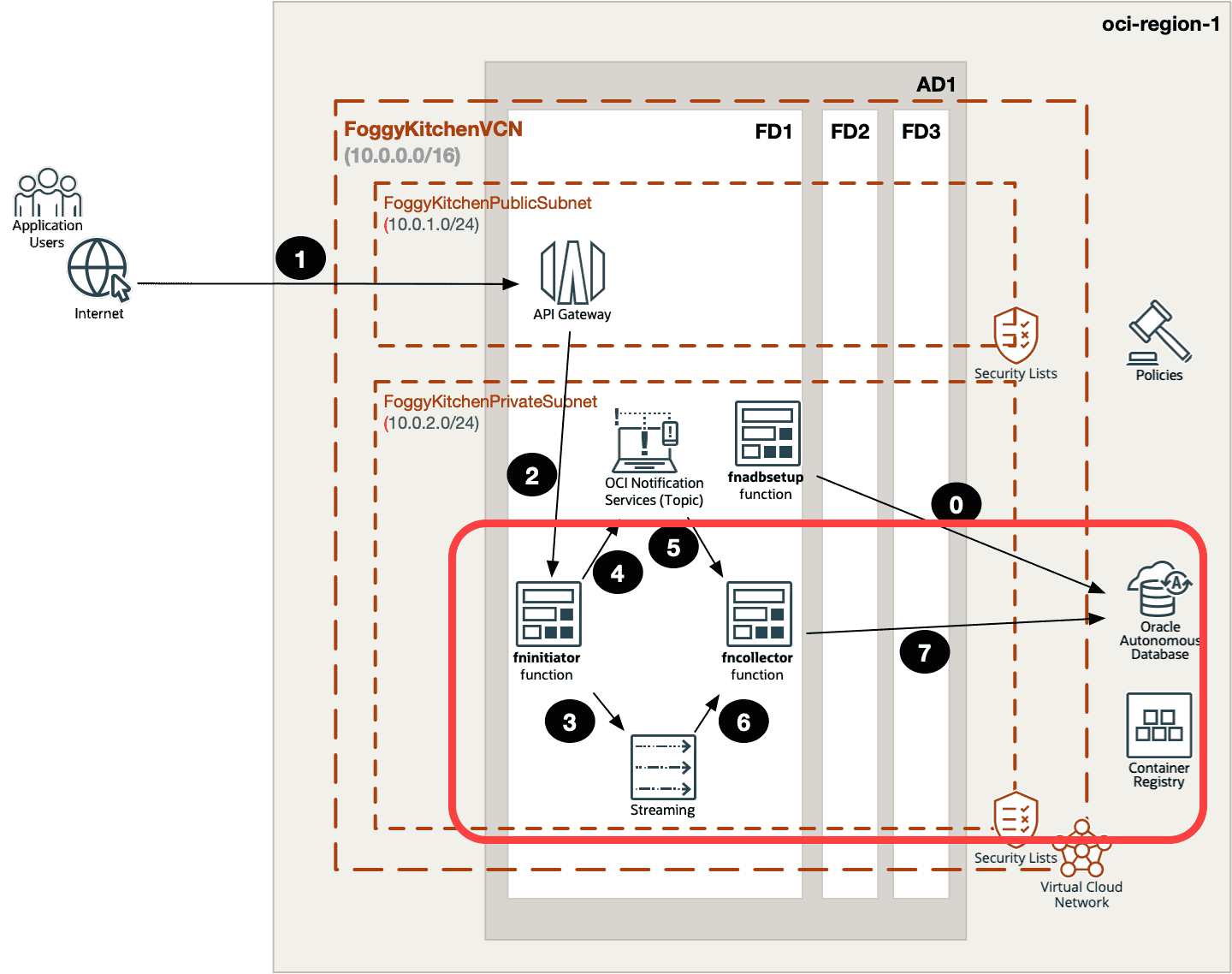
The full pipeline now looks like this:
-
API Gateway receives external requests (for example, HTTP POST).
-
Producer Function (
fninitiator) publishes messages into OCI Streaming. -
OCI Streaming stores events durably, partitioned for scalability.
-
Consumer Function (
fncollector) reads events from the stream. -
The consumer writes the processed data into Oracle Autonomous Database (ADB), where it can be queried or analyzed in real time.
This diagram shows how OCI Streaming Autonomous Database using Terraform integrate using Functions.
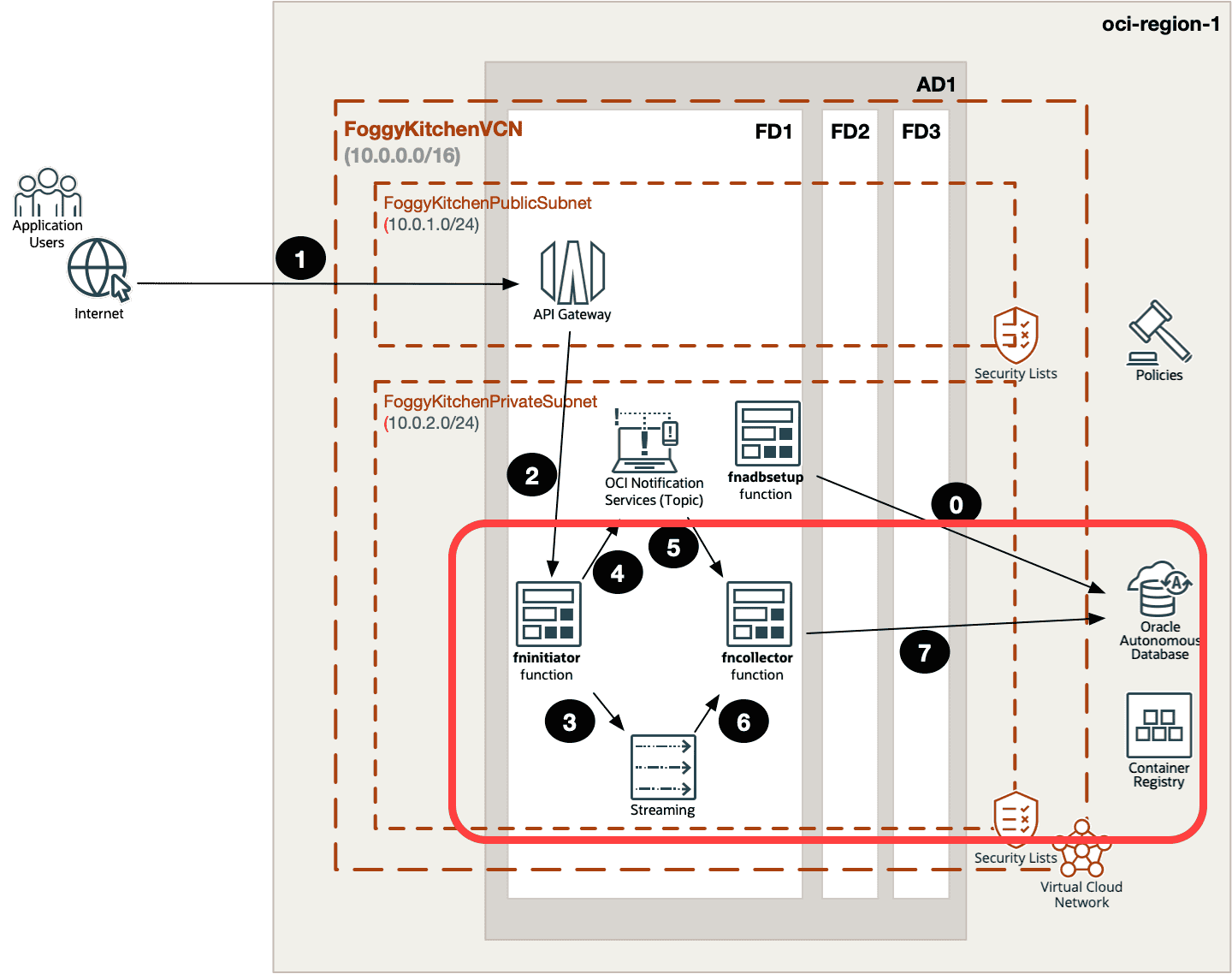
Figure 1. Event-driven pipeline with API Gateway, Producer Function, OCI Streaming, Consumer Function, and Autonomous Database.
Consumer Function (Simplified Example)
Here’s a simplified version of the consumer function:
import io, json, oci, cx_Oracle
from fdk import response
def handler(ctx, data: io.BytesIO = None):
    cfg = oci.config.from_file()
    streaming_client = oci.streaming.StreamClient(cfg)
    # Fetch messages
    get_response = streaming_client.get_messages(
        stream_id="", limit=10, partition=0
    )
    # Connect to ADB
    connection = cx_Oracle.connect(
        user="admin", password="", dsn=""
    )
    cursor = connection.cursor()
    for msg in get_response.data:
        value = msg.value.decode("utf-8")
        cursor.execute(
            "INSERT INTO streaming_events (payload) VALUES (:1)", [value]
        )
    connection.commit()
    cursor.close()
    connection.close()
    return response.Response(
        ctx, response_data=json.dumps({"status": "Messages processed"}),
        headers={"Content-Type": "application/json"}
    )
Fast Deployment with Terraform Module
The consumer function can also be deployed via my Terraform module:
module "oci-fk-collector-function" {
  source           = "github.com/mlinxfeld/terraform-oci-fk-function"
  compartment_ocid = var.compartment_ocid
  fk_fn_name       = "fncollector"
  func_py_content  = data.local_file.fncollector_func_py.content
  fn_config = {
    "STREAM_OCID" = oci_streaming_stream.FoggyKitchenStream.id,
    "ADB_DSN"     = var.adb_dsn
  }
}
👉 Full lesson code: functions_UPDATED.tf
⚠️ This snippet is simplified. In my course, I show the entire integration with API Gateway, Notifications, and IAM.
Wrapping Up
With this article, you’ve seen how to build both the producer and consumer sides of an event-driven pipeline in OCI. Messages generated by a serverless function are published into OCI Streaming, and another function consumes them, inserting the data into Autonomous Database (ADB) for immediate analysis. By using OCI Streaming Autonomous Database Terraform, you can build scalable real-time pipelines. With this setup, your OCI Streaming Autonomous Database using Terraform pipeline can handle IoT, logs, and real-time dashboards
This pattern is more than just a demo — it’s a foundation for real-world use cases such as:
-
real-time dashboards and monitoring,
-
IoT telemetry and sensor data collection,
-
fraud detection and anomaly spotting,
-
log ingestion and analytics at scale.
By combining Terraform/OpenTofu automation with OCI Functions and Streaming, you can create highly scalable, fully managed pipelines without worrying about infrastructure overhead. And since everything is serverless, you only pay for what you use.
👉 Of course, this blog post only scratches the surface. The production-ready scenario — including API Gateway integration, Notifications, IAM policies, and all three functions wired together — is explained step by step in Lesson 6 of my OCI Serverless Functions Course. There you’ll find the full Terraform code, detailed walkthroughs, and real labs you can run on your own tenancy.
🚀 Go Beyond Producer & Consumer
You’ve seen how to connect Functions, OCI Streaming and Autonomous Database.
Now learn the entire production-ready pipeline: 3 Functions, API Gateway, Notifications, Streaming, and ADB — fully automated with Terraform/OpenTofu.