Deploying an OCI Autonomous Database Private Endpoint Terraform is one of the most effective ways to secure your ADB in Oracle Cloud Infrastructure (OCI). By default, Autonomous Databases are deployed with public endpoints, which can expose them to unnecessary risk. To isolate your database and restrict connectivity, you can now provision it with a Private Endpoint — meaning the ADB will only be accessible inside your Virtual Cloud Network (VCN).
In this article, based on Lesson 3 of my course OCI Autonomous Database Serverless with Terraform, I’ll show you how to create an OCI Autonomous Database Private Endpoint with Terraform. We’ll use the FoggyKitchen ADB Terraform Module to simplify the setup and deploy a secure, private ADB instance.
Why use OCI Autonomous Database Private Endpoint with Terraform?
Using an OCI Autonomous Database Private Endpoint Terraform gives you the ability to deploy a database that is both secure and production-ready. Instead of exposing your Autonomous Database with a public IP, all traffic stays inside the Virtual Cloud Network (VCN), ensuring that only trusted resources can reach it. This approach is critical for organizations that must meet strict compliance requirements or operate in regulated industries.
With Terraform, the configuration of the private endpoint is fully automated and repeatable, meaning you can provision the VCN, subnet, and NSGs alongside the database itself, all in a single workflow. This reduces human error, saves time, and keeps your infrastructure consistent across environments. Ultimately, a private endpoint deployed via Terraform helps you combine security, compliance, and Infrastructure as Code best practices into one streamlined process.
Step 1: Define the Autonomous Database in Terraform
Here’s the core snippet from the module configuration:
module "oci-fk-adb" {
  source                                = "github.com/mlinxfeld/terraform-oci-fk-adb"
  adb_database_db_name                  = "FoggyKitchenADB"
  adb_database_display_name             = "FoggyKitchenADB"
  adb_password                          = var.adb_password
  adb_database_db_workload              = "OLTP" # Autonomous Transaction Processing (ATP)
  adb_free_tier                         = false
  adb_database_cpu_core_count           = 1
  adb_database_data_storage_size_in_tbs = 1
  compartment_ocid                      = var.compartment_ocid
  use_existing_vcn                      = false
  adb_private_endpoint                  = true
}
Setting adb_private_endpoint = true ensures that your Autonomous Database is deployed without a public IP, restricted entirely to your private subnet.
Step 2: Network Setup with the Module
One of the advantages of using the FoggyKitchen ADB Terraform Module is that it automatically provisions the VCN, subnet, and NSGs for you, ensuring that the Autonomous Database has a secure private network environment from the start.
If you prefer more control, you can also build your own networking resources separately (custom VCNs, subnets, NSGs) and inject them into the module. This approach is useful if you need to integrate the Autonomous Database into a larger enterprise network topology or align with existing security policies.
Step 3: Confirm in OCI Console
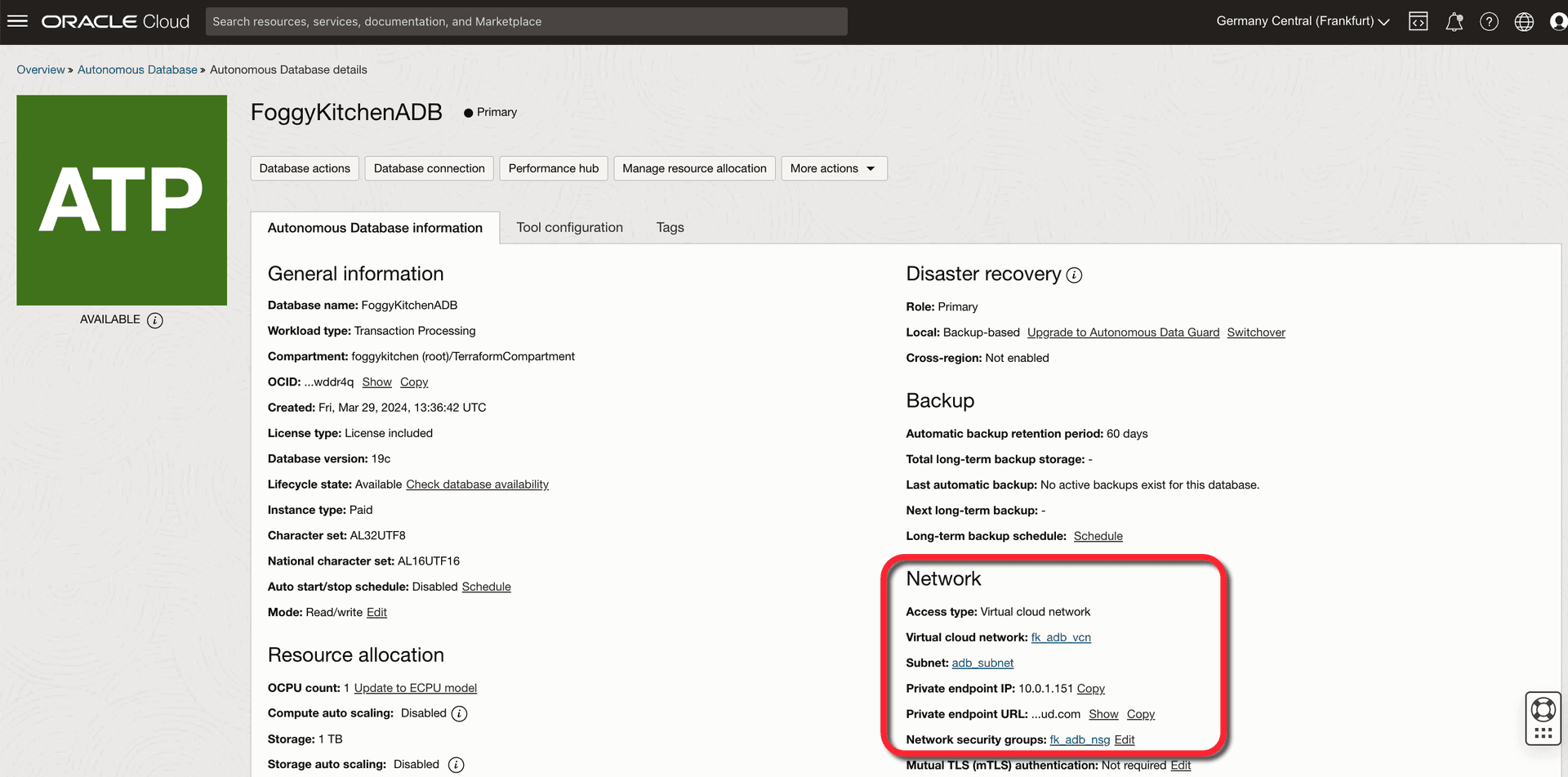
After running terraform apply, you’ll see in the OCI Console that the ADB instance has been provisioned with a Private Endpoint. Instead of a public IP, you’ll see a private IP address from your chosen subnet CIDR.
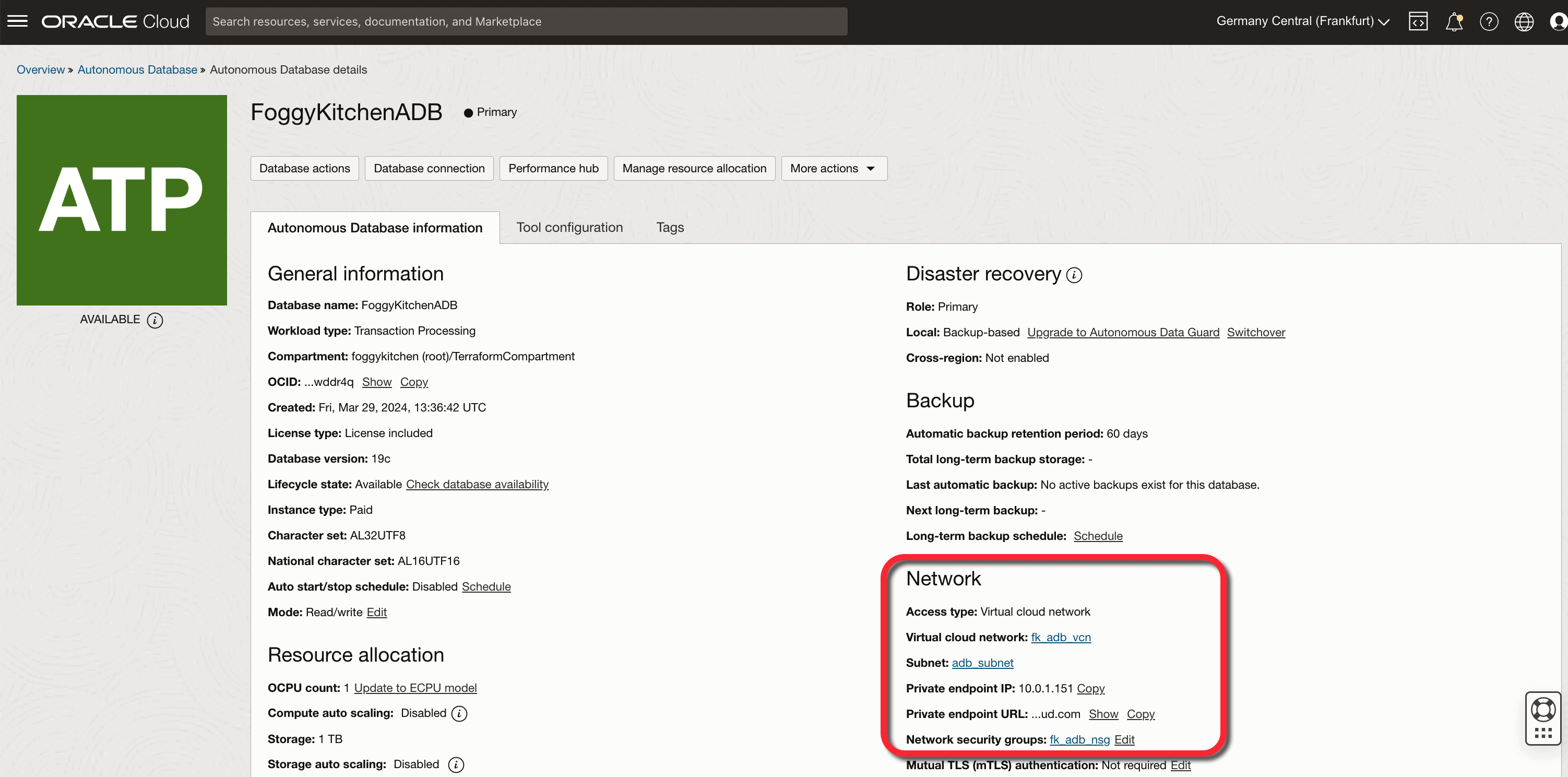
Figure 1. The OCI Console confirms that the Autonomous Database is deployed with a Private Endpoint, showing the assigned private IP, subnet, VCN, and Network Security Group created by the Terraform module.
Benefits of Using a Private Endpoint for ADB
When deploying an OCI Autonomous Database with a Private Endpoint, you gain much more than just isolation from the public internet. Private Endpoints enhance the overall security posture of your workloads and ensure that your database is fully aligned with enterprise-grade networking practices. Here are the key advantages:
-
Stronger Security – Database accessible only inside VCN, no public IP exposure.
-
Compliance – Meets stricter regulatory requirements.
-
Granular Control – Use NSGs to define exactly which VMs or services can reach the database.
-
Terraform Integration – Entirely automated, repeatable, and version-controlled deployment.
Conclusion & Next Steps
By enabling OCI Autonomous Database Private Endpoint Terraform, you ensure that your database is both secure and tightly integrated with your infrastructure-as-code workflows. With OCI Autonomous Database Private Endpoint Terraform, you can automate not only the database but also the surrounding networking components, making the deployment both secure and repeatable.
-
🔹 Check out the full code in Lesson 3 – ADB with Private Endpoint (GitHub)
-
🔹 Want to go deeper? Explore my full course: OCI Autonomous Database Serverless with Terraform
🔒 Secure Your ADB with Private Endpoints
Learn how to deploy OCI Autonomous Database Private Endpoints using Terraform/OpenTofu. Step-by-step automation, best practices, and production-ready labs included in the course.
👉 Enroll in the ADB with Terraform Course