In this guide, I’ll show you how to perform an OCI Autonomous Database Backup Restore Terraform. In production systems, backups aren’t optional — they’re your safety net. Autonomous Database (ADB) on Oracle Cloud Infrastructure (OCI) provides built-in automated backups, but restoring from them manually in the console is tedious and error-prone in real workflows. What you want is Infrastructure as Code (IaC): the ability to define a restore operation in Terraform, combine it with network & security configurations, and run it reliably.
In this post, I'll walk you through Lesson 6 from my course, using the FoggyKitchen Terraform module, to show how to restore an Autonomous Database from a manual backup — all defined in code. You’ll see how the backup appears in the OCI console and how Terraform provisions the restored instance.
Let’s dive in.
Why automate OCI Autonomous Database Backup Restore Terraform?
Manually restoring an Autonomous Database backup through the OCI Console may work for quick experiments, but it doesn’t scale for real production workflows. Every manual click introduces the risk of human error, inconsistent configurations, or missed parameters. By contrast, automating an OCI Autonomous Database Backup Restore with Terraform brings predictability and repeatability. With a single configuration file, you can define not only the database restore itself, but also its networking, security groups, and private endpoints – ensuring your restored database matches enterprise requirements.
Terraform also enables you to version-control your infrastructure, which means every backup restore is fully documented and traceable. This reduces the operational overhead for DBAs and DevOps engineers, and allows you to easily replicate the process across environments such as dev, test, and production. In disaster recovery scenarios, speed and consistency are critical – automation can literally save hours of manual work.
Finally, integrating Autonomous Database restores into a broader Infrastructure as Code strategy makes it easier to maintain compliance and align database management with modern cloud practices.
Step 1: Provision the Source Database
First, you need a source database that will be backed up. Here’s how you define it using my module:
module "oci-fk-adb-source" {
  source                                = "github.com/mlinxfeld/terraform-oci-fk-adb"
  adb_database_db_name                  = "FoggyKitchenADBSource"
  adb_database_display_name             = "FoggyKitchenADB_Source"
  adb_password                          = var.adb_password
  adb_database_db_workload              = "OLTP"
  adb_database_cpu_core_count           = 1
  adb_database_data_storage_size_in_tbs = 1
  compartment_ocid                      = var.compartment_ocid
  adb_private_endpoint                  = true
}
After deployment, the database is active and ready. OCI automatically generates backups, but to ensure a known state for restoration, you can also trigger a manual backup via console or CLI.
Step 1.5: Confirming the Backup for OCI Autonomous Database Restore
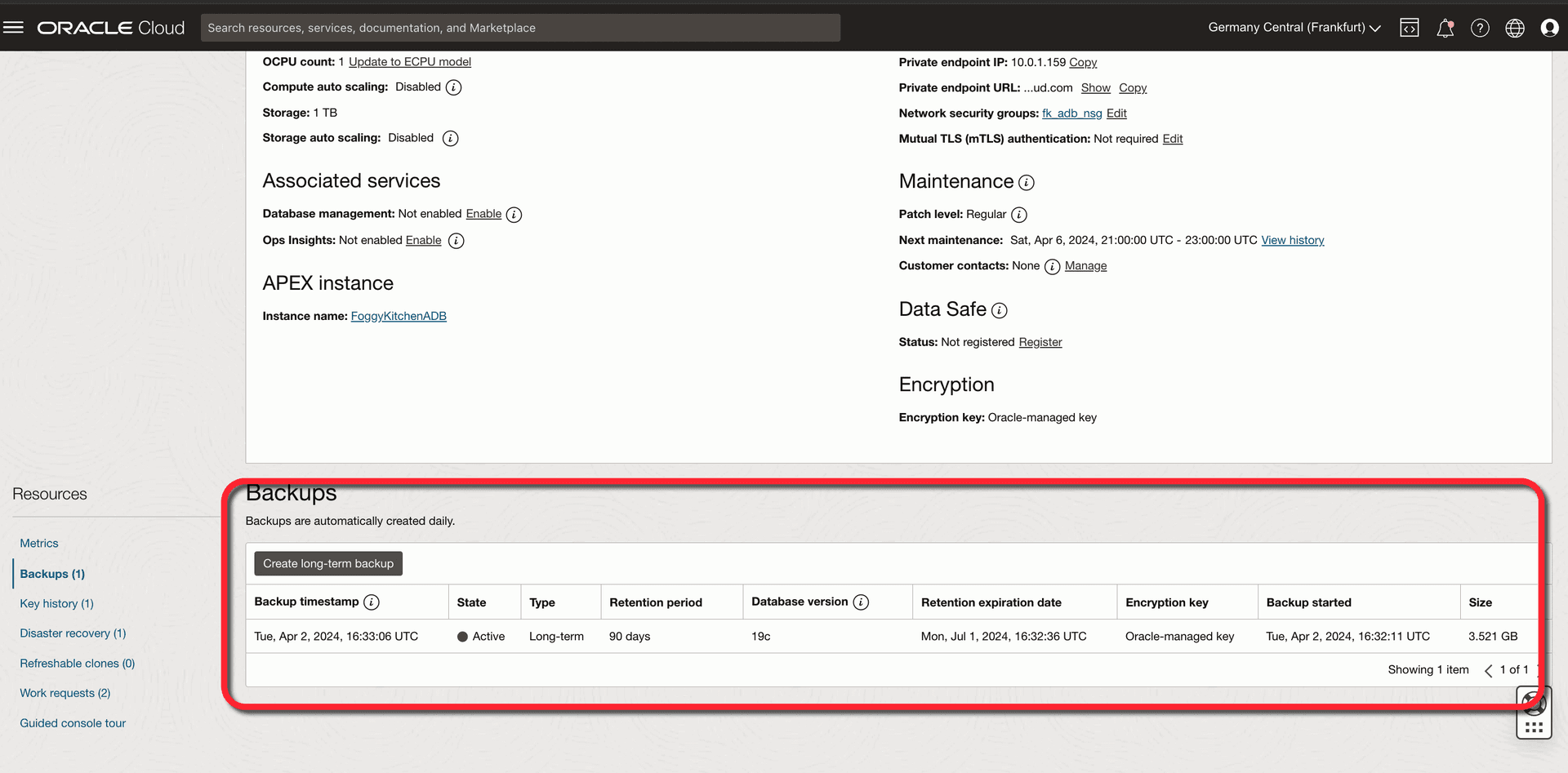
Before restoring, it's useful to confirm the backup exists in the console. The screenshot below is from the Backups section of the Autonomous Database page in OCI:
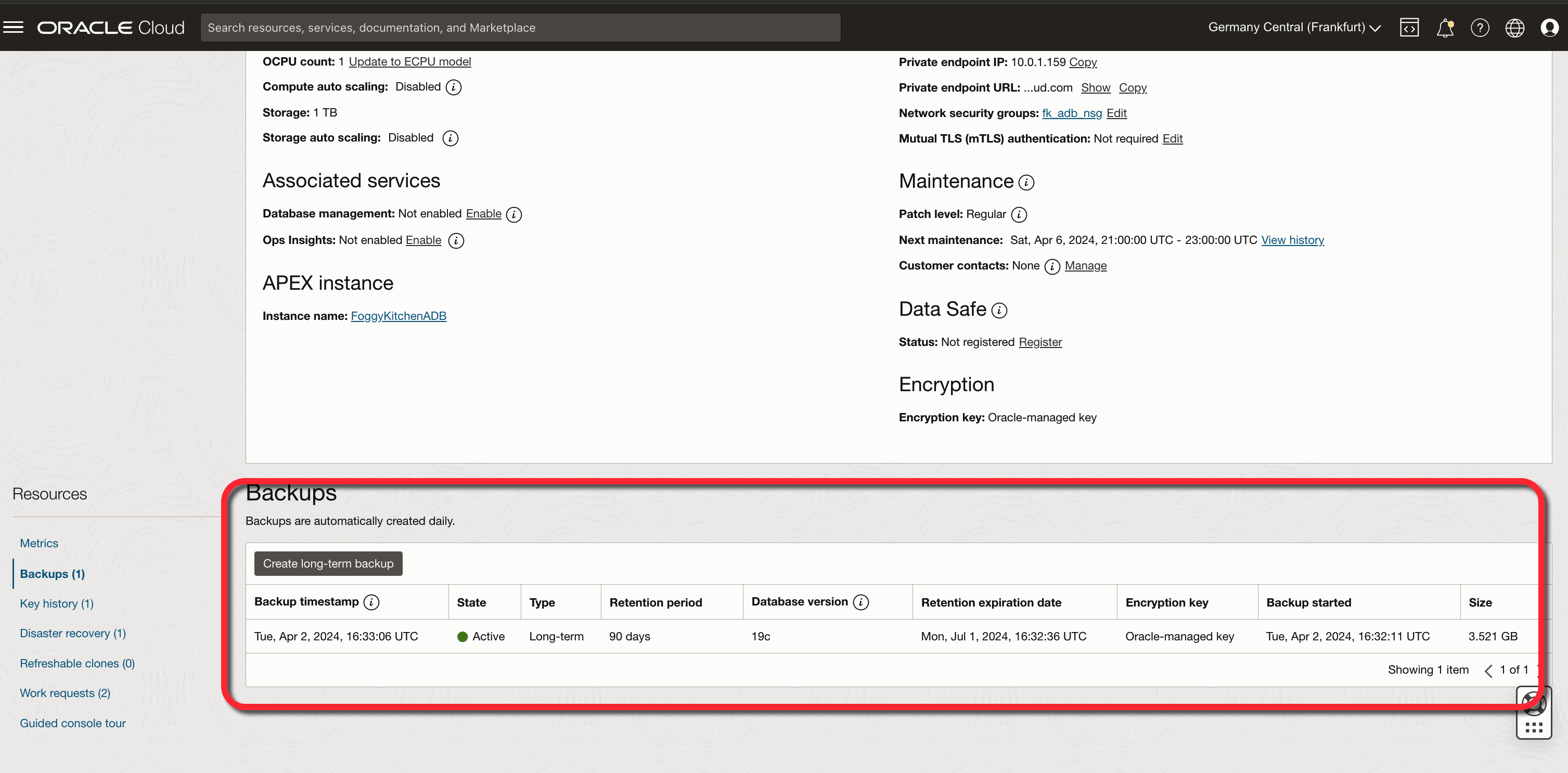
Figure 1. The OCI Console shows a manual backup entry in the “Backups” tab. This backup becomes the source for later Terraform-based restore.
This visual feedback ensures that the backup is ready and can be targeted by Terraform.
Step 2: Restore from a Backup
Once you have the backup OCID, you can provision a new database instance restored from that backup. The important part is specifying clone_type = "FULL" and pointing source_id to the backup OCID:
module "oci-fk-adb-restore" {
  source                                = "github.com/mlinxfeld/terraform-oci-fk-adb"
  adb_database_db_name                  = "FoggyKitchenADBRestore"
  adb_database_display_name             = "FoggyKitchenADB_Restore"
  adb_password                          = var.adb_password
  adb_database_db_workload              = "OLTP"
  adb_database_cpu_core_count           = 1
  adb_database_data_storage_size_in_tbs = 1
  compartment_ocid                      = var.compartment_ocid
  adb_private_endpoint                  = true
  clone_type                            = "FULL"
  source_id                             = var.adb_backup_ocid
}
In this setup:
clone_type = "FULL"indicates a full clone from backup.source_idis the OCID of the backup, not another database instance.
When you apply this Terraform script, it instantiates a new Autonomous Database restored to the backup’s state.
With just a few lines of code, you can execute a fully automated OCI Autonomous Database Backup Restore Terraform, ensuring the restored instance stays consistent with your source environment.
Step 3: Verify in the OCI Console
After deployment, you can visit the OCI Console to confirm that your restored database instance exists. The console will show it as a new database, and you can check its details and configuration to ensure it matches expectations.
This final step ensures your OCI Autonomous Database Backup Restore Terraform completes successfully and can be repeated in future scenarios.
Why this matters
Restoring databases from manual backups as code is a game changer:
✅ Disaster recovery – recover in another region or compartment quickly.
✅ Migration – reinstantiate your ADB in a new environment without manual export/import.
✅ Point-in-time recreation – test features or fixes against exact historical states.
✅ Automation & consistency – treat database provisioning and restore in the same Terraform workflow, making operations reproducible and auditable.
Instead of clicking around in OCI, your entire restore path lives in code and can be versioned, peer-reviewed, and reused.
Conclusion: Automating ADB Backup Restore with Terraform
Restoring Autonomous Databases manually might be fine for testing, but it is not reliable for enterprise scenarios. By using Terraform, you define the entire restore as code, including networking and security. This not only saves time but also ensures repeatability and compliance. Automating OCI Autonomous Database Backup Restore Terraform is therefore a must-have skill for DBAs and DevOps teams.
If you want to master disaster recovery automation, practicing OCI Autonomous Database Backup Restore with Terraform is an essential skill for cloud engineers.
Full code & next steps
You can explore the full working example here:
📂 Lesson 6 – ADB with Manual Backup (GitHub Repository)
If you want to level up further and explore cloning, refreshable clones, private endpoints, etc., you can enroll in the full course:
👉 OCI Autonomous Database Serverless with Terraform (2024 Edition)
When deploying any Autonomous Database clone, securing connectivity is just as important as the cloning method. For a step-by-step guide on provisioning an OCI Autonomous Database Private Endpoint with Terraform, check out this article.
🚀 Master Autonomous Database Backups & Restores
Learn how to automate OCI Autonomous Database operations with Terraform – from creating backups and full restores to advanced scenarios like clones and refreshable clones. Step-by-step, production-ready examples included.
👉 Explore the Full Course