In this tutorial, you’ll learn how to set up OCI scheduled autoscaling Terraform using Quartz cron expressions to scale compute capacity at predictable times. In my previous article on OCI Compute Autoscaling, I showed how to set up autoscaling based on threshold metrics such as CPU utilization.
In this follow-up, we’ll look at schedule-based autoscaling, which allows you to scale your compute capacity at predictable times — for example, during business hours, seasonal peaks, or special events.
Terraform: OCI Scheduled Autoscaling Terraform Policies
Below is a ready-to-use Terraform snippet (from the repo) that defines two scheduled policies on the same Instance Pool:
-
Scale out at 12:00 UTC
-
Scale in at 12:15 UTC
resource "oci_autoscaling_auto_scaling_configuration" "FoggyKitchenScheduledAutoScalingConfiguration" {
  count          = var.enable_scheduled_autoscaling ? 1 : 0
  compartment_id = oci_identity_compartment.FoggyKitchenCompartment.id
  display_name   = "FoggyKitchenScheduledAutoScalingConfiguration"
  auto_scaling_resources {
    id   = oci_core_instance_pool.FoggyKitchenInstancePool[0].id
    type = "instancePool"
  }
  # Scale OUT @ 12:00 UTC (28/10/2025)
  policies {
    display_name = "FoggyKitchenScheduledAutoScalingConfigurationScaleOutPolicy"
    policy_type  = "scheduled"
    capacity {
      min     = 2
      initial = 4
      max     = 4
    }
    execution_schedule {
      type       = "cron"
      timezone   = "UTC"
      expression = "0 0 12 28 10 ? 2025"
    }
  }
  # Scale IN @ 12:15 UTC (28/10/2025)
  policies {
    display_name = "FoggyKitchenScheduledAutoScalingConfigurationScaleInPolicy"
    policy_type  = "scheduled"
    capacity {
      min     = 2
      initial = 2
      max     = 2
    }
    execution_schedule {
      type       = "cron"
      timezone   = "UTC"
      expression = "0 15 12 28 10 ? 2025"
    }
  }
  cool_down_in_seconds = "300"
}
📝 You can find the full file here: instance_autoscaling_scheduled.tf
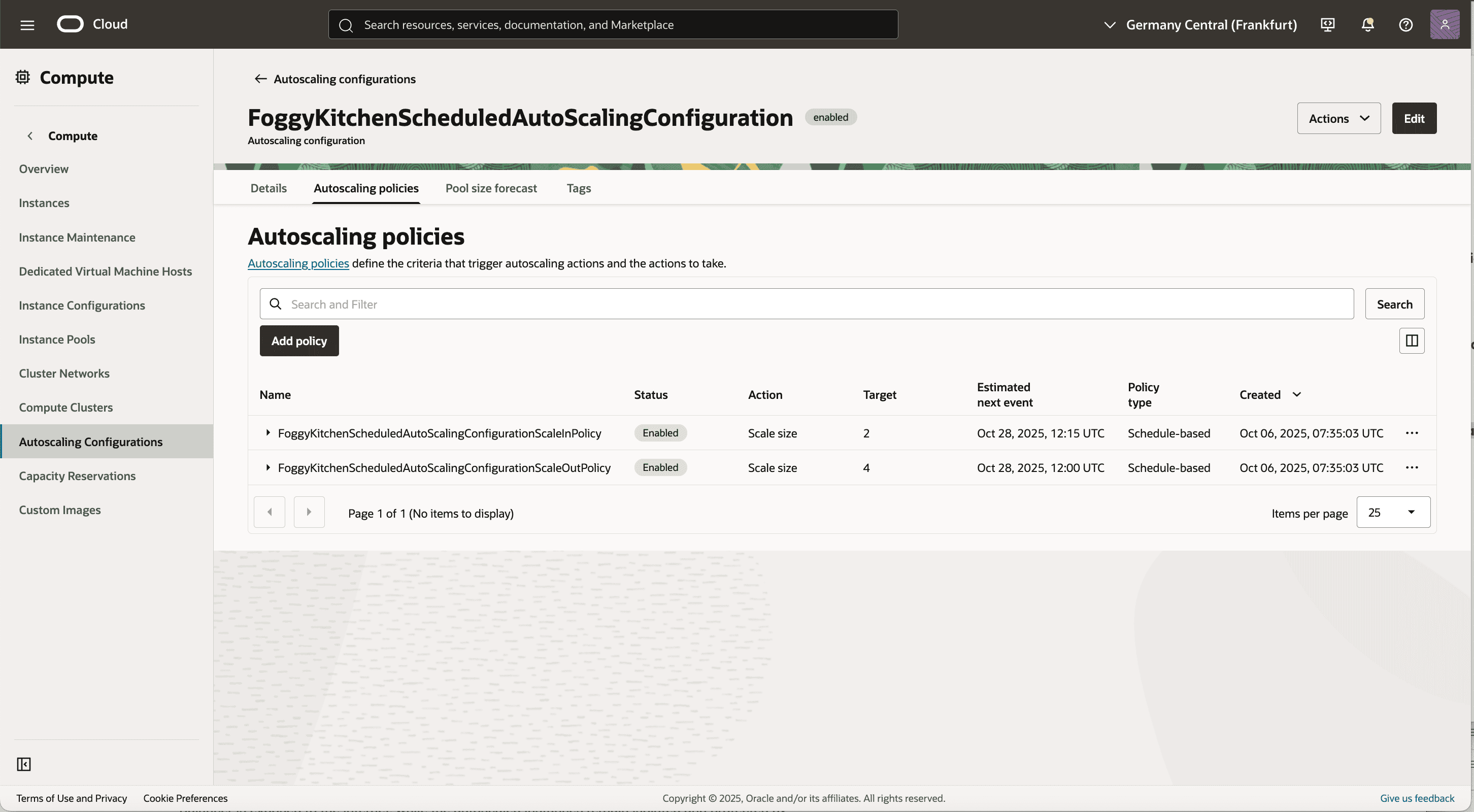
Figure 1 – OCI Console screenshot with scheduled autoscaling policies
How It Works
policy_type = "scheduled" — The scaling action is triggered by a schedule, not by performance metrics.
capacity block — Defines the target pool size after the policy executes.
execution_schedule — Uses Quartz CRON syntax to define the date, time, and timezone.
cool_down_in_seconds — Minimum time between scaling actions (here: 5 minutes).
👉 Note: This repo lets you choose between threshold-based and schedule-based autoscaling via enable_threshold_autoscaling and enable_scheduled_autoscaling variables in terraform.tfvars.
Only one mode should be active at a time.
Quartz CRON Cheat Sheet (OCI Autoscaling)
OCI uses Quartz CRON format:sec min hour day-of-month month day-of-week year
Here are a few useful expressions:
Scenario
CRON Expression
Scale out at 08:00 UTC, Mon–Fri
0 0 8 ? * MON-FRI *
Scale in at 20:00 UTC, Mon–Fri
0 0 20 ? * MON-FRI *
Every Saturday at 10:30 UTC
0 30 10 ? * SAT *
1st of each month at 06:00 UTC
0 0 6 1 * ? *
👉 Use ? in either the day-of-month or day-of-week field, depending on which one you control.
👉 Always set the timezone explicitly (e.g., UTC or Europe/Warsaw).
How to Test
-
Set scale-out and scale-in policies a few minutes in the future (UTC).
-
Run
tofu applyand navigate to Compute → Instance Pools → Scaling Activity. -
Watch the pool size change according to the scheduled policies.
-
If you’re using a Load Balancer, wait for backends to become healthy after scale-out.
Common Pitfalls
-
❌ Using the wrong timezone → Always set it explicitly.
-
❌ Overlapping scale-in and scale-out schedules → Leave a buffer (e.g., 10–15 minutes).
-
❌ Enabling both threshold and schedule modes at the same time → Only one should be
true.
Links & Resources
-
📝 Intro & Threshold-based Autoscaling:
OCI Compute Autoscaling with Terraform -
💻 Repo & full Terraform code:
github.com/mlinxfeld/terraform-oci-autoscale
📚 Take Your OCI Terraform Skills Further
Schedule-based autoscaling is just one piece of the puzzle.
If you want to master OCI networking and compute foundations — from VCNs and Bastion Hosts to backend provisioning and advanced Infrastructure-as-Code patterns — check out my flagship OCI Infrastructure Automation course.
👉 Explore the Flagship Course ›
🚀 Build Your OCI Terraform Foundations
Learn how to design, automate, and scale production-grade infrastructure on Oracle Cloud using Terraform/OpenTofu.
From VCNs and Bastion Hosts to backend provisioning and advanced IaC patterns — step by step.