When building cloud-native applications or migrating existing workloads to Oracle Cloud Infrastructure (OCI), flexibility is key. That's where OCI flexible shapes come into play — giving you complete control over the number of OCPUs and memory allocated to your virtual machines. In this guide, you'll discover how to leverage OCI flexible shapes with Terraform to achieve an ideal balance between performance and cost.
OCI flexible shapes allow you to launch compute instances with as few as 1 OCPU and 1 GB of memory and then dynamically adjust the configuration as your workload evolves. Unlike fixed shapes (e.g., VM.Standard2.1, VM.Standard3.1), OCI flexible shapes like VM.Standard.E4.Flex allow you to define the number of OCPUs and memory size, giving you greater control over resource allocation and cost.
In this hands-on tutorial, you'll see how to:
Deploy an OCI compute instance using flexible shapes
Configure the number of OCPUs and memory with Terraform variables
Save on cloud costs by provisioning only what your workload needs
Adjust resources over time without disrupting the workload
Why Use OCI Flexible Shapes?
Here are a few reasons why flexible shapes are a game-changer in OCI:
✅ Optimize cloud spending – only pay for the CPU and RAM you use
✅ Improve resource efficiency – adjust instance configuration on the fly
✅ Deploy faster – provision right-sized infrastructure in seconds
✅ Eliminate waste – ideal for test environments, CI/CD runners, and variable workloads
In the video tutorial (below), I demonstrate how to define and deploy an instance using Terraform with OCI flexible shape. You’ll see how to configure OCPUs and memory directly in your .tf files and how to use variables to simplify infrastructure changes.
Practical Benefits of Flexible Shapes in OCI
Using OCI flexible shapes like VM.Standard.E4.Flex allows you to allocate exactly the amount of OCPUs and memory your workload needs. This results in better cost optimization and resource efficiency compared to fixed-shape instances. In production environments, this flexibility helps fine-tune performance while avoiding overprovisioning.
For example, if your application only needs 2 OCPUs and 8GB of RAM, there's no need to pay for unused capacity. With Terraform, it's easy to make such granular configurations repeatable and version-controlled across environments.
Sample Terraform Configuration
Here’s a sample Terraform snippet that provisions an OCI compute instance with a flexible shape:
resource "oci_core_instance" "foggykitchen_flex_vm" {
  (...)
  shape = "VM.Standard.E4.Flex"
  shape_config {
    ocpus         = var.ocpus
    memory_in_gbs = var.memory
  }
  (...)
}
You can adjust the ocpus and memory_in_gbs values based on the current needs of your application — making it ideal for dynamic workloads or environments with unpredictable load patterns.
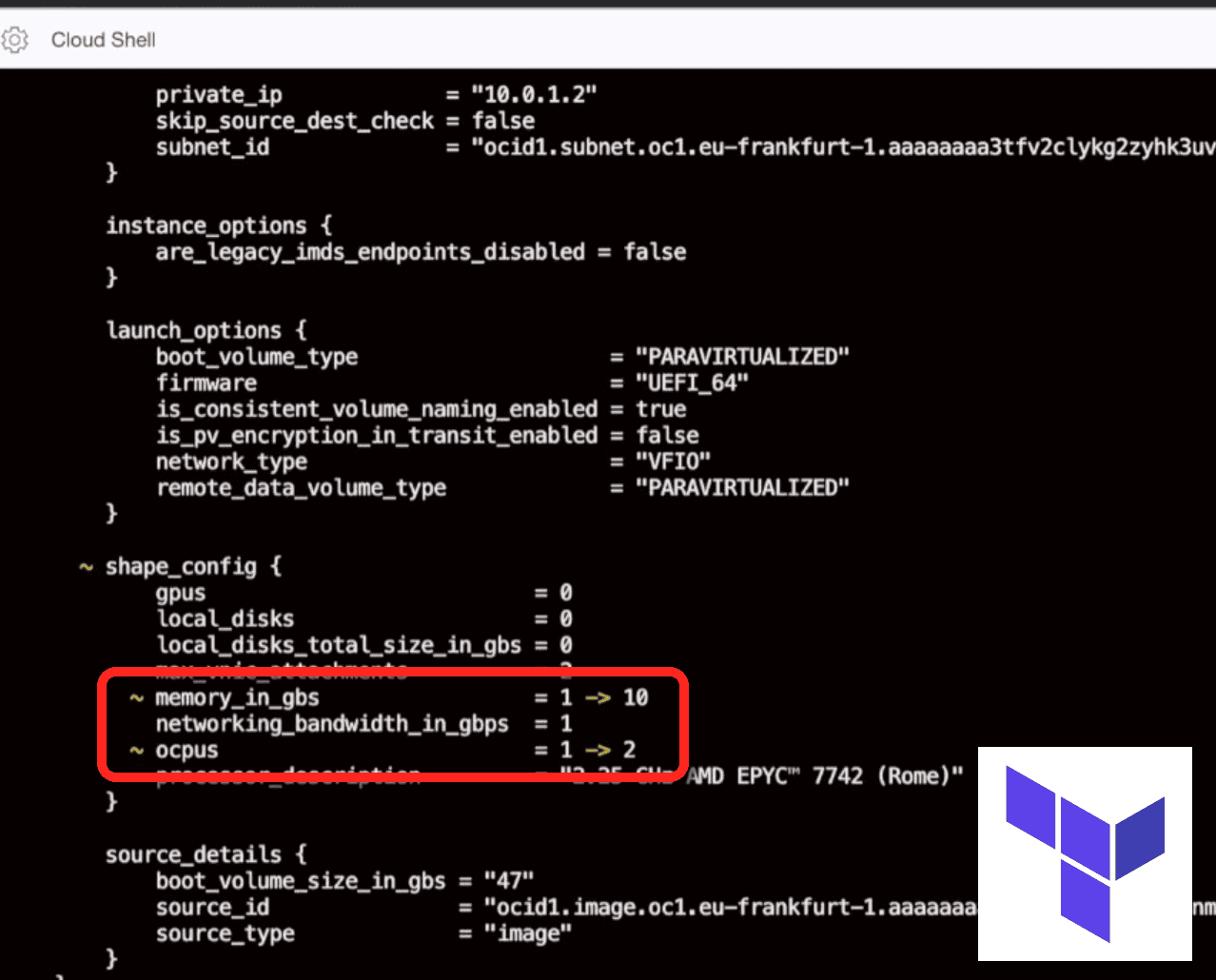
💡 This screenshot comes from OCI Cloud Shell
The image shows how Terraform code is executed directly in the OCI Cloud Shell environment. It's a convenient and secure way to deploy flexible compute shapes (e.g. VM.Standard.E4.Flex) in Oracle Cloud without setting up your local environment. The code configures OCPUs and memory dynamically — perfect for DevOps and self-study labs.
Terraform Tip: Using dynamic_block for Flexible Shapes
When provisioning OCI compute instances with OCI flexible shapes (like VM.Standard.E4.Flex), you can use Terraform’s dynamic block to configure shape_config only when needed. Here's a practical example:
resource "oci_core_instance" "foggykitchen_flex_vm" {
(...)
  shape               = var.shape
  dynamic "shape_config" {
    for_each = local.is_flexible_shape ? [1] : []
    content {
      ocpus         = var.ocpus
      memory_in_gbs = var.memory
    }
  }
(...)
}
# Dictionary Locals
locals {
  compute_flexible_shapes = [
    "VM.Standard.E3.Flex",
    "VM.Standard.E4.Flex",
    "VM.Standard.A1.Flex",
    "VM.Optimized3.Flex"
  ]
  is_flexible_shape = contains(local.compute_flexible_shapes, var.shape)
}
(...)
This dynamic approach ensures your code remains DRY and modular – shape configuration is only applied for flexible shapes like VM.Standard.E4.Flex.
E3 is Out, E4 is In
The VM.Standard.E3.Flex shape is being deprecated, and Oracle Cloud now recommends VM.Standard.E4.Flex for general-purpose workloads. E4 brings better price-performance ratio and is based on newer AMD EPYC processors.
If you're still using OCI Flexible Shape E3 in your Terraform templates, consider updating your defaults to:
variable "Shape" {
  default = "VM.Standard.E4.Flex"
}
Read more about OCI & Terraform
- OCI Providers in Terraform (Multi-Region Setup)
Learn how to define and work with multiple providers and aliases — essential knowledge when deploying compute resources or storage across multiple OCI regions. OCI VCN with Terraform
A foundational guide to building Virtual Cloud Networks, subnets, and routing in OCI – the networking layer every flexible compute shape ultimately runs in.OCI Load Balancer with Terraform
Automating the OCI Load Balancer, including backend sets and health checks — a natural complement when running scalable compute based on Flexible Shapes.OCI Block Volume with Terraform
Step-by-step automation of Block Volumes for your compute instances, including attachment patterns that pair naturally with Flexible Shapes.OCI Block Volume Cross-Region Replication with Terraform
How to protect workloads running on Flexible Shapes by replicating their block volumes across regions for disaster recovery scenarios.
OCI Flexible Shapes with Terraform – What’s Next?
If you're interested in mastering other Terraform automation topics in OCI, check out these courses:
You can also explore the source code examples and exercises in this GitHub repository (if applicable, based on your current setup).
If you want to go beyond compute flexibility, check out my full OCI with Terraform course
🚀 Go Beyond Flexible Shapes: Master Full OCI Automation
This blog gave you a glimpse into OCI compute flexibility.
In the full flagship Terraform course, you’ll:
- Automate complete OCI networks, compute, and load balancers
- Deploy production-ready environments step by step
- Gain lifetime access to 10+ real-world labs