In this guide, you’ll learn how to set up OCI MySQL Terraform to achieve cross-region replication, high availability, and disaster recovery. Modern cloud applications need scalable, resilient, and globally available databases. Oracle Cloud Infrastructure (OCI) MySQL HeatWave Database Service (MDS) provides not only performance and analytics, but also the ability to replicate across regions for disaster recovery and high availability.
In this post, I’ll walk you through how to automate cross-region replication for OCI MDS using Terraform, based on the real-world architecture from my course. By automating cross-region backups with OCI MySQL Terraform, you can reduce manual errors.
Architecture Overview
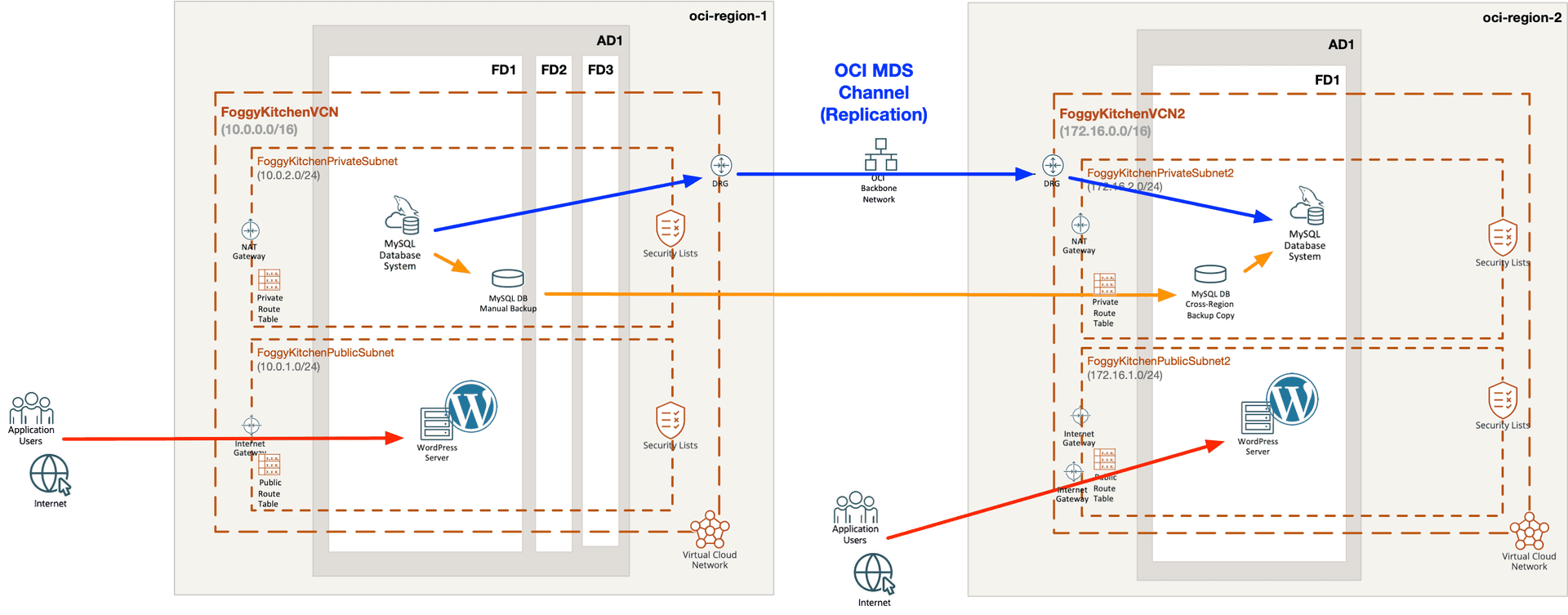
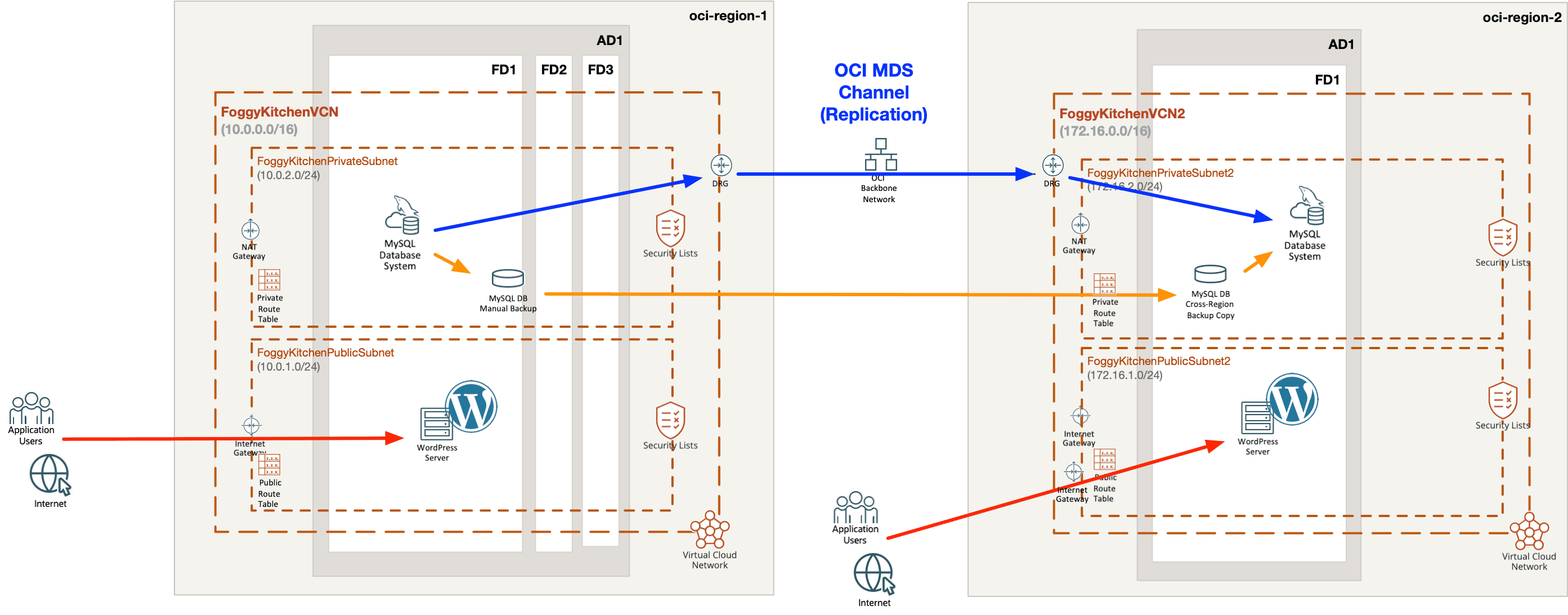
The following diagram shows the high-level flow of replication across two OCI regions:
-
Region 1: The primary MDS instance runs in a private subnet, with manual backups enabled.
-
Region 2: A cross-region backup copy is created, and from it a target clone MDS instance is provisioned.
-
Replication channel: Configured between the primary and target, enabling asynchronous replication of binlogs.
-
Application layer: WordPress CMS uses the replicated database for disaster recovery and failover testing.
👉 This design ensures your WordPress + MySQL stack is resilient, globally distributed, and ready for failover.
Step 1 – Provision the Source OCI MySQL Terraform Instance
The source database is provisioned in region 1, with binlog expiration set to support replication.
module "oci-fk-mds-source" {
  providers = { oci = oci.region1 }
  source    = "github.com/mlinxfeld/terraform-oci-fk-heatwave"
  mds_admin_password                    = var.mds_admin_password
  mds_availability_domain               = var.mds_availability_domain
  mds_compartment_ocid                  = var.mds_compartment_ocid
  mds_shape                             = "MySQL.2"
  mds_display_name                      = "FoggyKitchenMDS"
  mds_description                       = "FoggyKitchen MySQL/Heatwave Database System"
  use_existing_vcn                      = true
  subnet_id                             = oci_core_subnet.FoggyKitchenPrivateSubnet.id
  mds_manual_backup_enabled             = var.mds_manual_backup_enabled
  mds_custom_configuration_enabled      = true
  mds_config_binlog_expire_logs_seconds = 10800 # 3h for replication
}
Step 2 – Create a Cross-Region Backup Copy
Terraform provisions a cross-region manual backup to region 2:
module "oci-fk-x-region-mds-backup" {
  providers = { oci = oci.region2 }
  source    = "github.com/mlinxfeld/terraform-oci-fk-heatwave"
  mds_cross_region_manual_backup_enabled = true
  mds_cross_region_backup_region         = var.region
  mds_cross_region_manual_backup_ocid    = module.oci-fk-mds-source.mds_backup.mds_backup_id
  use_existing_vcn                       = true
}
Step 3 – Provision the Target Clone in Region 2
The backup copy is then used to create a clone MDS instance:
module "oci-fk-mds-target-clone-from-x-region-backup" {
  providers = { oci = oci.region2 }
  source    = "github.com/mlinxfeld/terraform-oci-fk-heatwave"
  mds_defined_source_enabled            = true
  mds_defined_source_type               = "BACKUP"
  mds_defined_source_backup_ocid        = module.oci-fk-x-region-mds-backup[0].mds_backup.mds_cross_region_backup_id
  mds_admin_password                    = var.mds_admin_password
  mds_compartment_ocid                  = var.mds_compartment_ocid
  mds_shape                             = "MySQL.2"
  mds_display_name                      = "FoggyKitchenMDSXRegionClone"
  use_existing_vcn                      = true
  subnet_id                             = oci_core_subnet.FoggyKitchenPrivateSubnet2.id
}
Step 4 – Configure the Replication User
Replication requires a dedicated user set up on the source instance:
module "oci-fk-mds-repl-user-setup" {
  providers = { oci = oci.region1 }
  source    = "github.com/mlinxfeld/terraform-oci-fk-heatwave"
  mds_channel_repl_user_setup_enabled                         = true
  mds_admin_username                                          = var.mds_admin_username
  mds_admin_password                                          = var.mds_admin_password
  mds_channel_source_mysql_database_hostname                  = module.oci-fk-mds-source.mds_database.mds_ip_address
  mds_channel_source_mysql_database_replication_user_name     = var.mds_repl_username
  mds_channel_source_mysql_database_replication_user_password = var.mds_repl_password
  use_existing_vcn                                            = true
}
Step 5 – Establish the Replication Channel
Finally, a replication channel is configured between source and target:
module "oci-fk-mds-channel-source-to-target-clone" {
  providers = { oci = oci.region2 }
  source    = "github.com/mlinxfeld/terraform-oci-fk-heatwave"
  mds_channel_enabled = true
  mds_channel_source_mysql_database_hostname                  = module.oci-fk-mds-source.mds_database.mds_ip_address
  mds_channel_source_mysql_database_replication_user_name     = var.mds_repl_username
  mds_channel_source_mysql_database_replication_user_password = var.mds_repl_password
  mds_channel_target_db_system_id       = module.oci-fk-mds-target-clone-from-x-region-backup[0].mds_database.mds_id
  mds_channel_target_delay_in_seconds   = 1
  use_existing_vcn                      = true
  mds_compartment_ocid                  = var.mds_compartment_ocid
}
A Note on Terraform Resources
Of course, you could build this entire setup manually using the native Terraform resources such as:
-
oci_mysql_mysql_db_system– to provision MySQL HeatWave instances, -
oci_mysql_channel– to configure replication channels, -
oci_mysql_mysql_backup– to manage manual or cross-region backups.
However, wrapping them into a reusable Terraform module makes the process much more reliable and consistent. Instead of wiring all the dependencies yourself, you simply consume a module that automatically handles backup creation, cross-region copy, target clone provisioning, replication user setup, and channel creation.
This abstraction not only saves time, but also ensures repeatability and automation at scale. This module abstracts the low-level resources and makes OCI MySQL Terraform deployments repeatable.
Wrapping Up
By combining OCI MySQL HeatWave with Terraform automation, you can:
-
Build resilient cross-region architectures with minimal effort.
-
Automate replication, backups, and failover for real-world workloads like WordPress CMS.
-
Ensure disaster recovery readiness without manual intervention.
This OCI MySQL Terraform setup helps with DR readiness.
If you’d like to experiment further, check out the full code for this lesson on GitHub:
👉 Lesson 6 – MDS Cross-Region Replication with WordPress
And if you want a structured, step-by-step path, please explore the full OCI MySQL Terraform course:
👉 OCI MySQL HeatWave with Terraform (2025 Edition)
🚀 Take Your MySQL Skills to the Next Level
Deploy, replicate, and scale OCI MySQL HeatWave with Terraform — from Free Tier to cross-region DR.
✔ Learn automation step-by-step with real Terraform modules
✔ Build disaster-ready WordPress + MySQL HeatWave environments
✔ Gain hands-on experience you can apply directly in production