If you're looking for a way to combine OCI OKE OCIR Terraform to deploy containerized apps, this guide is for you. This blog post walks you through a real-world OCI OKE OCIR Terraform use case, where we containerize an application locally, push it to Oracle Container Registry, and deploy it to a fully managed Kubernetes cluster on OCI.
In a previous blog post, we introduced a ready-to-use Terraform module that can provision a fully functional Oracle Kubernetes Engine (OKE) cluster in Oracle Cloud Infrastructure (OCI). This module automates everything – from networking to node pools – and gets you up and running in minutes.
But once your OKE cluster is live, the next question is: what now? How do you actually run your application on it?
Sure, in a real-world scenario, you might set up OCI DevOps Pipelines with automated build and deployment stages (as we teach in our OCI DevOps course). But maybe you're just getting started and want to test a simple app. You have a local Dockerfile, and all you need is to:
Build the image locally
Push it to OCI Container Registry (OCIR)
Pull it in Kubernetes and deploy
Sounds easy? It is — and you can automate the whole thing using Terraform with the help of the null_resource and local-exec.
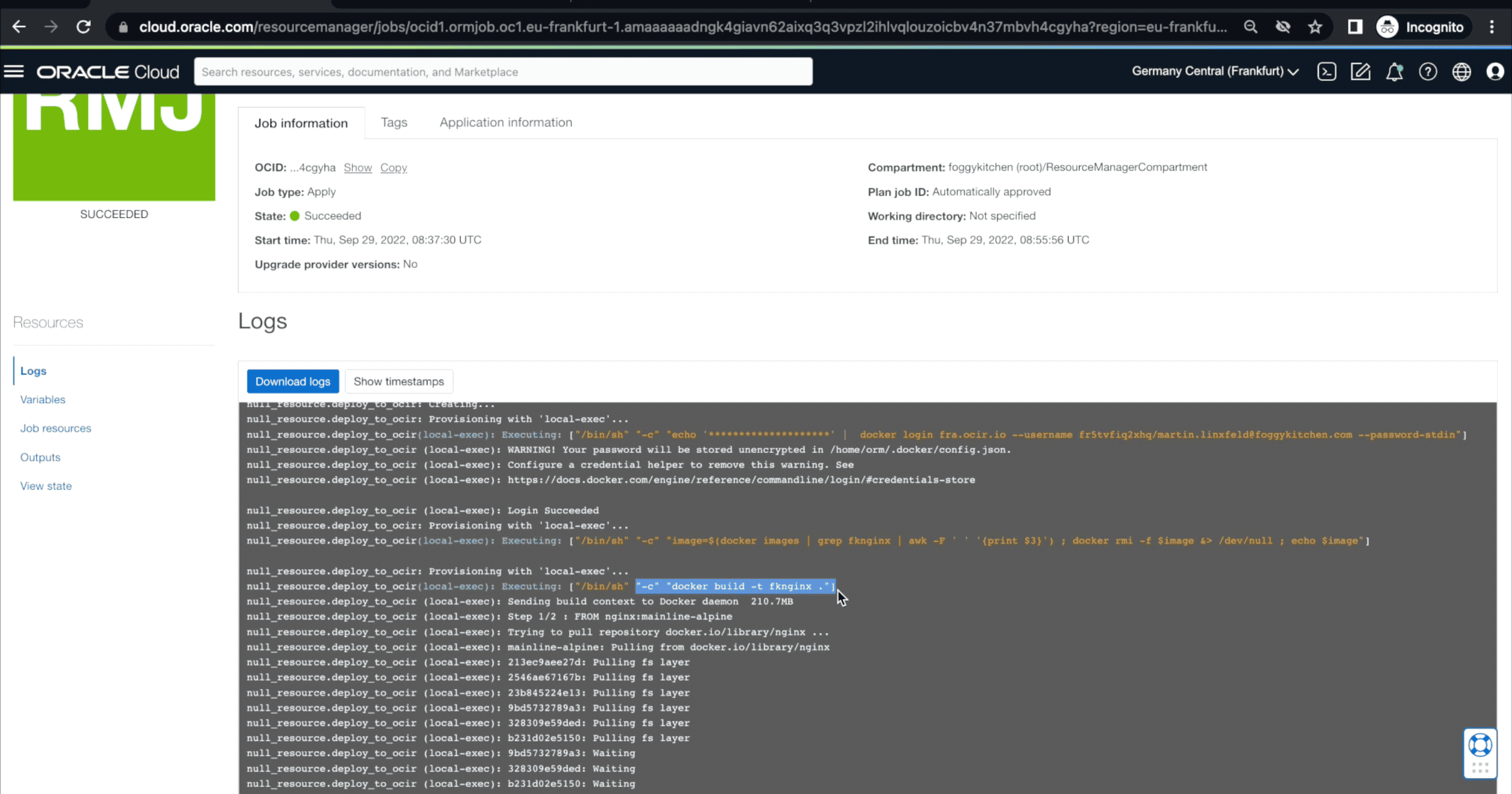
🧑🍳 Curious how to run this lesson hands-on?
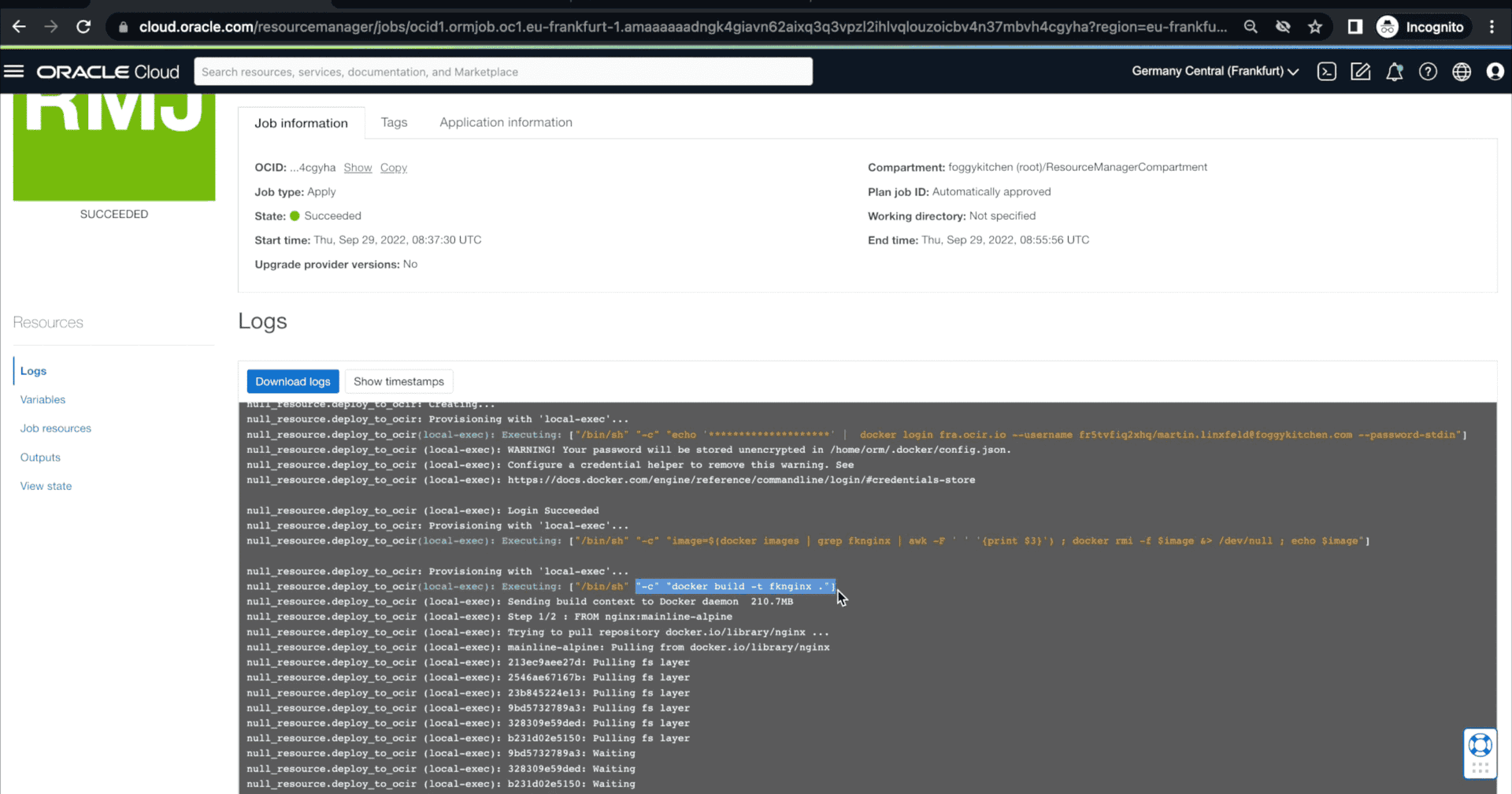
The screenshot above shows lesson 9 running directly in OCI Resource Manager, Oracle’s native Terraform automation service.
If you're new to Resource Manager or want to learn how to automate OCI infrastructure securely and efficiently, check out our dedicated training:
👉 OCI Resource Manager Fundamentals – FoggyKitchen Course
Local Docker to OKE – Terraform-Style
In lesson 9 of our OCI Kubernetes course, we walk you through this exact process:
✅ Use Docker locally to build and tag your image
✅ Push it to OCIR with proper authentication
✅ Configure Kubernetes to pull from OCIR using an image pull secret
✅ Deploy your app into the OKE cluster — all within Terraform
Here's a small preview of how you might automate the image build and push in Terraform:
resource "null_resource" "docker_push" {
  provisioner "local-exec" {
    command = EOT
      docker build -t ${local.image_name} .
      docker tag ${local.image_name} ${local.ocir_image_path}
      docker login ${local.ocir_region} -u '${local.ocir_user}' -p '${data.oci_identity_auth_token.token.token}'
      docker push ${local.ocir_image_path}
    EOT
  }
}
With the help of this logic, you no longer need to jump between your terminal and Terraform. Everything is declarative, repeatable, and version-controlled — just the way Infrastructure-as-Code should be.
This lightweight workflow demonstrates how OCI OKE OCIR Terraform can be used together to ship containerized apps quickly without CI/CD overhead.
Want the Full Recipe for OCI OKE OCIR Terraform combined?
This setup is just a teaser. In lesson 9 of our OCI Kubernetes Engine with Terraform/OpenTofu (2025 Edition) course, we show you every single step — from setting up OCIR to pulling the image in Kubernetes, securely and automatically.
You’ll learn how to:
-
Inject secrets into Kubernetes using Terraform
-
Handle authentication to OCI Container Registry
-
Deploy a Dockerized app into your freshly provisioned OKE cluster
-
Use image pull secrets and deployment manifests, Terraform-native
🎓 Check out the full course here and gain lifetime access to all lessons, templates, and real-world best practices.
Why OCIR Instead of Docker Hub?
While Docker Hub is a popular choice for public container images, when deploying workloads in Oracle Cloud Infrastructure (OCI), the Oracle Cloud Infrastructure Registry (OCIR) is a much better fit — especially for production-grade environments.
Here’s why:
Network Proximity & Performance: Images stored in OCIR are hosted within OCI's data centers, resulting in faster pull times and reduced latency for your OKE clusters.
Security & IAM Integration: OCIR supports fine-grained IAM policies, enabling secure, role-based access to your private container repos — all managed inside OCI without third-party dependencies.
No Rate Limiting: Unlike Docker Hub (which enforces image pull limits for anonymous users), OCIR imposes no such restrictions, ensuring reliability even during scale-out events.
Cost Optimization: Since traffic between OCIR and your OCI resources often remains within the same region, you may avoid unnecessary data egress charges — saving real money at scale.
Compliance & Auditing: OCIR integrates with native OCI auditing and logging services, which helps meet compliance and traceability requirements.
Whether you're pushing your first image or automating multi-stage deployments, OCIR is the native and enterprise-ready choice for container image management on Oracle Cloud.
For more technical details on how Oracle Container Registry works, check out the official OCIR documentation from Oracle.
Related Courses You Might Enjoy
🔧 OCI DevOps Service with Terraform – Master CI/CD pipelines with build and deploy stages
🚀 Terraform/OpenTofu on OCI (Flagship Course) – Learn Terraform from scratch and build reusable cloud automation modules
💡 OCI Kubernetes Terraform deployments don’t have to be complex. Start with the basics, build confidence, and scale from there.
Ready to dive deeper into OCI OKE OCIR Terraform automation? Enroll in the full OCI Kubernetes course and build production-ready pipelines with reusable infrastructure code.
This blog was just the beginning. In the full FoggyKitchen OKE course you’ll learn how to build production-ready clusters, automate pipelines, and manage workloads the smart way.
🚀 Master OCI Kubernetes Terraform the Smart Way
Build and automate your OKE clusters with my step-by-step Terraform module. Join hundreds of engineers already simplifying Kubernetes on OCI with FoggyKitchen.
🔴 Buy Now & Get Instant Access