When you build a serverless data pipeline in OCI, you often need to define OCI IAM Policies Terraform so that your Functions, API Gateway, Streaming, and Autonomous Database can talk to each other — securely and without user credentials.
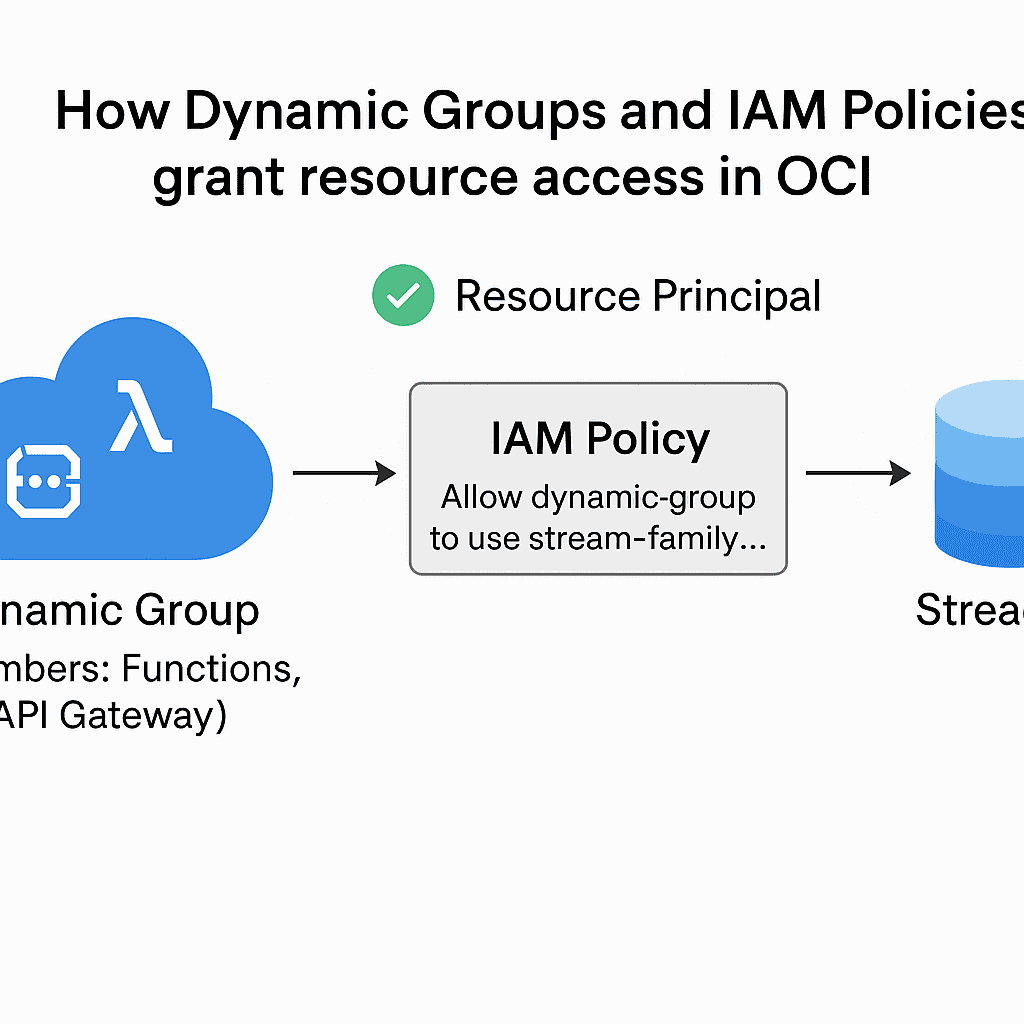
Instead of using user credentials or API keys, Oracle Cloud allows services to authenticate with Resource Principals, which are granted permissions through Dynamic Groups and IAM Policies.
This pattern is essential in modern OCI deployments — it keeps your automation secure, auditable, and keyless.
Step 1 — OCI IAM Policies Terraform: Define a Dynamic Group
Every Function automatically becomes a “resource” in OCI.
To allow it to access other services, we group these resources using a Dynamic Group that filters Functions by compartment.
# Dynamic Group: all Functions in one compartment
resource "oci_identity_dynamic_group" "dg_functions" {
  compartment_id = var.tenancy_ocid
  name           = "dg-foggykitchen-functions"
  description    = "Dynamic group for all Functions in the functions compartment"
  matching_rule  = "ALL {resource.type = 'fnfunc', resource.compartment.id = '${var.compartment_functions_ocid}'}"
}
This enables secure, direct communication between your Functions and Streaming — no tokens, no stored keys.
Step 2 — Grant Functions access to Streaming
With the Dynamic Group ready, you can now allow those Functions to produce or consume data from OCI Streaming.
This is done by attaching a simple, compartment-level IAM policy:
resource "oci_identity_policy" "policy_functions_streaming" {
  compartment_id = var.compartment_streaming_ocid
  name           = "pol-functions-streaming"
  description    = "Allow Functions to publish/consume data from Streaming"
  statements = [
    "Allow dynamic-group ${oci_identity_dynamic_group.dg_functions.name} to use stream-family in compartment id ${var.compartment_streaming_ocid}"
  ]
}
This enables secure, direct communication between your Functions and Streaming — no tokens, no stored keys.
This OCI IAM Policies Terraform snippet shows the minimal configuration needed for Functions to communicate with Streaming.
Step 3 — Allow Functions to access Autonomous Database
When your Function writes to or reads from Autonomous Database (ADB), it usually needs to retrieve connection secrets (for example, from Vault) or invoke the ADB REST endpoint.
IAM handles this too — just extend your policies slightly:
# Optional: Functions can read secrets from Vault (for ADB credentials)
resource "oci_identity_policy" "policy_functions_vault" {
  compartment_id = var.compartment_vault_ocid
  name           = "pol-functions-vault"
  description    = "Allow Functions to read secrets for ADB access"
  statements = [
    "Allow dynamic-group ${oci_identity_dynamic_group.dg_functions.name} to read secret-family in compartment id ${var.compartment_vault_ocid}"
  ]
}
# Allow Functions to connect to Autonomous Database endpoints
resource "oci_identity_policy" "policy_functions_adb" {
  compartment_id = var.compartment_database_ocid
  name           = "pol-functions-adb"
  description    = "Allow Functions to use Autonomous Database in this compartment"
  statements = [
    "Allow dynamic-group ${oci_identity_dynamic_group.dg_functions.name} to use autonomous-database-family in compartment id ${var.compartment_database_ocid}"
  ]
}
Similar OCI IAM Policies Terraform rules can be applied to allow Functions to connect to Autonomous Database securely.
For reference, check the official OCI IAM policy documentation.
Learn the full implementation
This post only scratches the surface.
In OCI Serverless Functions with Terraform (2024 Edition) you’ll deploy:
Three chained Functions behind an API Gateway
Streaming pipelines connected to Autonomous Database
All IAM configurations automated with Terraform
No console clicks, no guesswork — just end-to-end automation.
👉 Join the course and learn how Dynamic Groups and IAM Policies make OCI serverless truly secure and production-ready.
🧩 Explore Related Articles
Deepen your understanding of OCI serverless and event-driven architecture with these Terraform examples:
🔗 OCI Object Storage Events with Terraform — learn how to trigger Functions directly from Object Storage events.
🔗 OCI Streaming to Autonomous Database with Terraform — connect event streams to ADB for real-time analytics.
🔗 OCI Streaming Producer with Terraform — build and deploy your own producer Function for Streaming.
🔗 OCI API Gateway with Terraform — expose your Functions securely through a REST API gateway.
Together, these tutorials form the Serverless & Streaming cluster — a perfect foundation before you dive into full automation in
OCI Serverless Functions with Terraform (2024 Edition).
Build Secure Serverless Pipelines with Terraform
Master OCI Functions, API Gateway, Streaming, and Autonomous Database — all automated with Terraform/OpenTofu. Learn how IAM policies and dynamic groups make it secure and production-ready.
Enroll Now →