
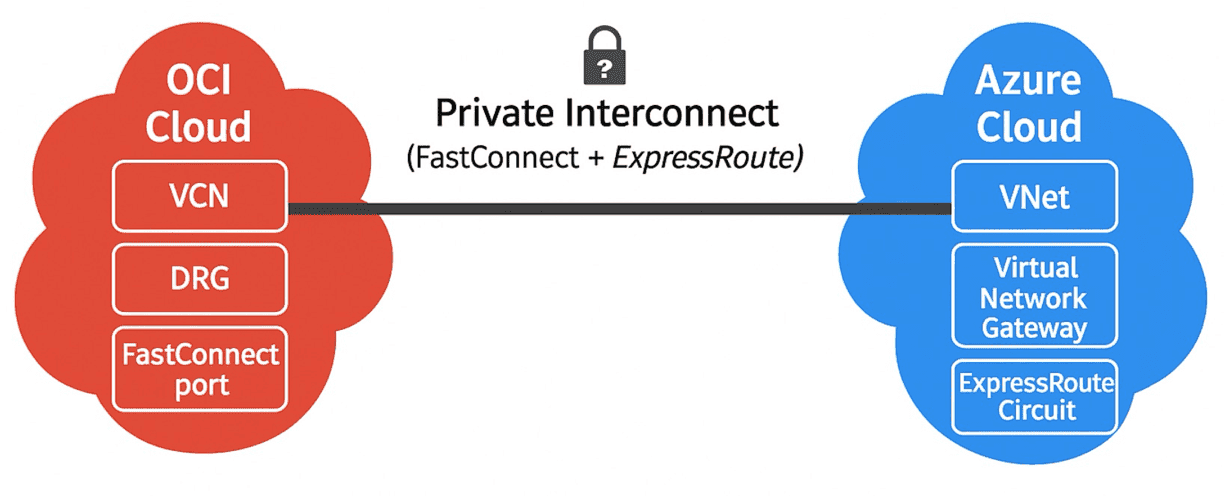
OCI Azure Interconnect Terraform is the foundation for securely linking Microsoft Azure with Oracle Cloud Infrastructure. In this article, we start building an OCI Azure Interconnect with Terraform. The focus of Part 1 is on the Azure side, where we deploy the Virtual Network Gateway and ExpressRoute Circuit. These resources are the foundation of a secure, private connection that links Microsoft Azure with Oracle Cloud Infrastructure. By using Terraform, we ensure the setup is fully automated, reusable, and ready for enterprise deployments. Let’s walk through the process step by step. By the end, you will have a working OCI Azure Interconnect Terraform setup with ExpressRoute and FastConnect.
When you set up an OCI Azure Interconnect with Terraform or OpenTofu, the Azure side always starts with two core resources:
azurerm_virtual_network_gateway– the gateway that anchors your Virtual Network into ExpressRoute.azurerm_express_route_circuit– the private dedicated circuit that establishes the link between Microsoft Azure and Oracle FastConnect.
These two resources form the backbone of the Azure side. Without them, there is no private connectivity – just the public Internet.
1. OCI Azure Interconnect Terraform – Virtual Network Gateway
The Virtual Network Gateway (VNG) in Azure is the entry point for secure, private connectivity from your virtual network to external environments such as OCI. Without this gateway, there’s no way to terminate an ExpressRoute connection inside your Azure VNet.
It plays several critical roles:
Encryption and tunneling: manages IPsec/IKE or ExpressRoute sessions.
Routing: ensures that private subnets in Azure can exchange traffic with OCI workloads.
Scalability: supports high-throughput configurations needed for production workloads.
In short, if you’re serious about building an OCI Azure Interconnect with Terraform, deploying a Virtual Network Gateway is non-negotiable. It requires:
A dedicated subnet called
GatewaySubnet.A Public IP resource, used by the gateway for communication.
BGP configuration (ASN and peering details) to exchange routes with OCI.
Terraform snippet:
resource "azurerm_virtual_network_gateway" "vng" {
  name                = "foggykitchen_virtual_network_gateway"
  location            = azurerm_resource_group.foggykitchen_rg1.location
  resource_group_name = azurerm_resource_group.foggykitchen_rg1.name
  type     = "ExpressRoute"
  vpn_type = "PolicyBased"
  sku      = "Standard"
  ip_configuration {
    name                          = "foggykitchen_vng_ipconf"
    public_ip_address_id          = azurerm_public_ip.foggykitchen_public_ip_to_oci.id
    subnet_id                     = azurerm_subnet.foggykitchen_gateway_subnet.id
  }
  depends_on = [
    azurerm_public_ip.foggykitchen_public_ip_to_oci
  ]
}
2. OCI Azure Interconnect Terraform – ExpressRoute Circuit
The next piece of the puzzle is the ExpressRoute Circuit. This resource represents the dedicated, enterprise-grade link on the Azure side. When paired with OCI FastConnect, the ExpressRoute Circuit bypasses the public internet, providing low latency, predictable performance, and SLA-backed reliability. The OCI Azure Interconnect Terraform configuration ensures that the ExpressRoute Circuit is deployed consistently and can be reused across different environments.
Here’s how it fits into the picture:
You define the ExpressRoute Circuit in Terraform, specifying bandwidth, peering location, and SKU.
This circuit becomes the physical/logical path between Azure and Oracle’s FastConnect port.
Once provisioned, the two providers (Microsoft and Oracle) connect their respective networks using the shared backbone.
This direct integration is what transforms Azure and OCI from two isolated environments into a unified multicloud ecosystem. The ExpressRoute Circuit is the dedicated pipe between Azure and Oracle. You define:
Peering location (where Microsoft and Oracle interconnect physically).
Bandwidth (in Mbps).
Provider service (in this case, Oracle Cloud FastConnect).
Terraform snippet:
resource "azurerm_express_route_circuit" "erc" {
  name                  = "foggykitchen_express_route_circuit"
  location              = azurerm_resource_group.foggykitchen_rg1.location
  resource_group_name   = azurerm_resource_group.foggykitchen_rg1.name
  service_provider_name = "Oracle Cloud FastConnect"
  peering_location      = var.azure_express_route_peering_location
  bandwidth_in_mbps     = var.azure_express_route_bandwidth_in_mbps
  sku {
    tier   = "Standard"
    family = "MeteredData"
  }
  allow_classic_operations = false
}
Common pitfalls in Terraform config
While defining the OCI Azure Interconnect with Terraform is straightforward, there are a few common pitfalls to watch for:
Mismatched parameters – Ensure the peering location and bandwidth match between your ExpressRoute and FastConnect configurations.
Gateway SKU selection – Choosing a Basic or unsupported SKU for the Virtual Network Gateway will break ExpressRoute integration. Always pick a supported VPN/ER SKU.
Dependencies in Terraform – Use
depends_onwhere appropriate to avoid race conditions between gateway and circuit creation.Route propagation – Verify that route tables in both Azure and OCI subnets are updated to propagate routes via the Interconnect.
Catching these early will save you hours of troubleshooting.
Frequently Asked Questions (FAQ)
What is an OCI Azure Interconnect Terraform deployment?
An OCI Azure Interconnect Terraform deployment automates the connection between Microsoft Azure and Oracle Cloud Infrastructure, ensuring secure and repeatable setups.Why use Terraform for Azure–OCI Interconnect?
Terraform provides automation, consistency, and reusability, which reduces manual errors and speeds up deployment across both clouds.What do I need before starting an OCI Azure Interconnect Terraform setup?
You’ll need access to both an Azure subscription and an Oracle Cloud tenancy, with permissions to create networking and connectivity resources.
What’s next?
In this first article, we’ve seen how to configure the Azure Virtual Network Gateway and ExpressRoute Circuit using Terraform. These two resources establish the Azure half of the OCI Azure Interconnect with Terraform. This guide shows how to implement an OCI Azure Interconnect Terraform deployment step by step. By leveraging an OCI Azure Interconnect Terraform deployment, engineers can reduce manual steps and focus on validating connectivity between Azure VNets and OCI VCNs.
In the next part of the series, we’ll move over to the OCI side, where we’ll configure the Dynamic Routing Gateway (DRG) and FastConnect resources. Together, these will complete the private, SLA-backed connectivity between the two clouds.
With this step completed, you now have the foundation of an OCI Azure Interconnect Terraform setup, ready to be extended with FastConnect and advanced routing options.
If you’d like to skip ahead and see the entire setup—including both sides fully automated with Terraform—check out my dedicated course: OCI–Azure Interconnect with Terraform.
Mastering an OCI Azure Interconnect Terraform setup is essential for engineers working in hybrid and multicloud environments. If you’d like to take this further and see the complete deployment (including both Azure and OCI side), check out my full hands-on course below:
🚀 Master the OCI–Azure Interconnect with Terraform/OpenTofu
Build a production-ready OCI Azure Interconnect Terraform deployment step by step. Join hundreds of engineers already automating multicloud networking with FoggyKitchen.
🔥 Buy Now & Get Instant Access


