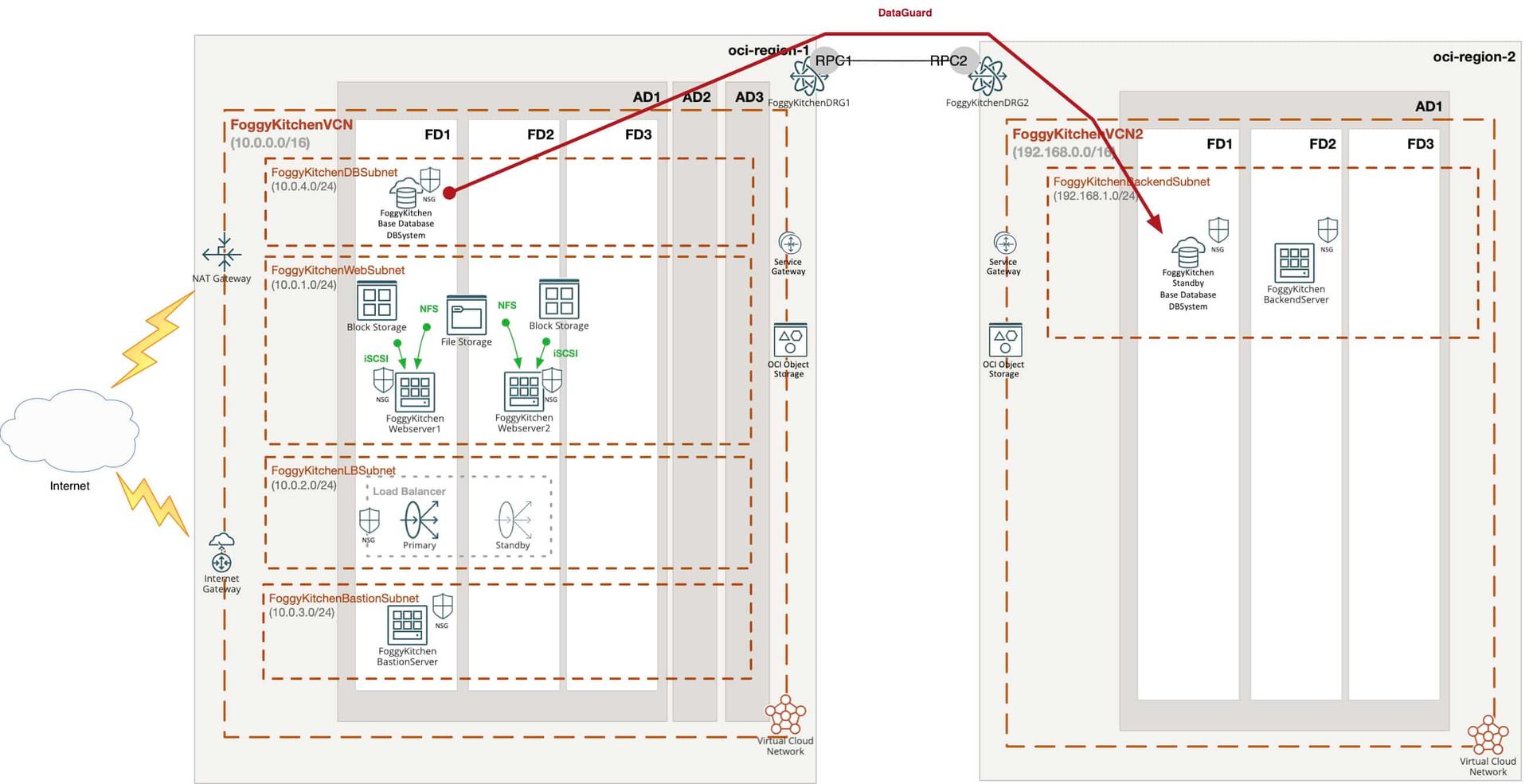
Business continuity is one of the key aspects of any production database landscape. While a single region setup in Oracle Cloud Infrastructure (OCI) already provides high availability, true disaster recovery (DR) requires replicating your database to another region. Oracle Data Guard makes this possible by maintaining a standby database system that can take over in case of failover or switchover.
👉 In this tutorial, we focus specifically on Oracle BaseDB (DBSystem) and show how to configure cross-region OCI Data Guard Terraform. Please note: this does not apply to Autonomous Database (ADB), which has its own managed DR model and separate configuration options.
The idea is simple:
Define two providers – one for the primary region and one for the secondary region.
Fetch availability domains dynamically from both regions.
Provision a primary DB System (BaseDB) in the first region.
Create a standby DB System in the second region via Data Guard Association.

👉 Please note: in this blog post, we won’t go into the details of networking (VCNs, subnets, security groups). All of that is explained in depth in my flagship training, where we build complete multiregion architectures step by step.
Why this matters
High availability inside a single region is not enough when it comes to true disaster recovery. A regional outage, compliance requirement, or business continuity mandate may force you to keep a standby database in another region.
Cross-region OCI Data Guard Terraform automation ensures:
🔄 Minimal downtime (RTO) – you can switchover or failover in minutes.
🛡️ Data protection (RPO) – asynchronous replication keeps standby almost in sync.
📜 Compliance ready – many industries require cross-region DR for critical workloads.
By automating this with Terraform, you get repeatable, version-controlled infrastructure that can be rebuilt or tested anytime.
Step 1: Defining Providers for Primary and Secondary Regions
To work with two OCI regions in a single Terraform project, we need to configure two providers with different aliases – primary and secondary.
provider "oci" {
  alias            = "primary"
  region           = var.primary_region
  tenancy_ocid     = var.tenancy_ocid
  user_ocid        = var.user_ocid
  fingerprint      = var.fingerprint
  private_key_path = var.private_key_path
}
provider "oci" {
  alias            = "secondary"
  region           = var.secondary_region
  tenancy_ocid     = var.tenancy_ocid
  user_ocid        = var.user_ocid
  fingerprint      = var.fingerprint
  private_key_path = var.private_key_path
}
👉 Of course, both the primary and standby DBSystems must be attached to subnets inside a VCN. In this example, you will see references to FoggyKitchenDBSubnet and FoggyKitchenBackendSubnet.
What is important to know is that Data Guard replication traffic uses the OCI backbone, so you don’t need to configure additional VPNs or tunnels.
For more complex multicloud or multi-VCN topologies, you will likely need to build a Remote Peering Connection (RPC) and configure route tables and security lists accordingly. This is something I explain step by step in my flagship training, where we cover advanced DR architectures in depth.
Step 2: Fetching Availability Domains
Before creating the DBSystems, it’s good practice to fetch the list of availability domains in both regions. This way, we can dynamically assign the AD names instead of hardcoding them.
# Gets a list of Availability Domains in region2 (secondary)
data "oci_identity_availability_domains" "R2-ADs" {
  provider       = oci.secondary
  compartment_id = var.tenancy_ocid
}
# Gets a list of Availability Domains in region1 (primary)
data "oci_identity_availability_domains" "R1-ADs" {
  provider       = oci.primary
  compartment_id = var.tenancy_ocid
}
Step 3: Provisioning the Primary DB System for OCI Data Guard Terraform
Next, we define our primary BaseDB system. This resource sets up the compute shape, database edition, storage, and initial database parameters. Automatic backups are enabled to ensure recoverability.
# Primary DBSystem
resource "oci_database_db_system" "FoggyKitchenDBSystemPrimary" {
  provider            = oci.primary
  availability_domain = var.availability_domain_name == "" ? lookup(data.oci_identity_availability_domains.R1-ADs.availability_domains[0], "name") : var.availability_domain_name
  compartment_id      = oci_identity_compartment.FoggyKitchenCompartment.id
  cpu_core_count      = var.CPUCoreCount
  database_edition    = var.DBEdition
  db_home {
    database {
      admin_password = var.DBAdminPassword
      db_name        = var.DBName
      character_set  = var.CharacterSet
      ncharacter_set = var.NCharacterSet
      db_workload    = var.DBWorkload
      pdb_name       = var.PDBName
      db_backup_config {
        auto_backup_enabled = true
      }
    }
    db_version   = var.DBVersion
    display_name = var.DBDisplayName
  }
  disk_redundancy         = var.DBDiskRedundancy
  shape                   = var.DBNodeShape
  subnet_id               = oci_core_subnet.FoggyKitchenDBSubnet.id
  ssh_public_keys         = [tls_private_key.public_private_key_pair.public_key_openssh]
  display_name            = var.DBSystemDisplayName
  domain                  = var.DBNodeDomainName
  hostname                = var.DBNodeHostName
  nsg_ids                 = [oci_core_network_security_group.FoggyKitchenDBSystemSecurityGroup.id]
  data_storage_percentage = "40"
  data_storage_size_in_gb = var.DBDataStorageSizeInGB
  license_model           = var.DBLicenseModel
  node_count              = var.DBNodeCount
}
At this point, your primary DBSystem is provisioned and ready for cross-region OCI Data Guard Terraform association.
Step 4: Creating the Standby DB System with Data Guard
Finally, we establish a Data Guard Association that provisions a new standby DB System in the secondary region. This setup uses Maximum Performance mode with Async transport, which is recommended for cross-region deployments.
# Standby DBSystem via Data Guard Association
resource "oci_database_data_guard_association" "FoggyKitchenDBSystemStandby" {
  provider                         = oci.primary
  creation_type                    = "NewDbSystem"
  cpu_core_count                   = var.CPUCoreCount
  database_admin_password          = var.DBAdminPassword
  database_id                      = oci_database_db_system.FoggyKitchenDBSystemPrimary.db_home[0].database[0].id
  protection_mode                  = "MAXIMUM_PERFORMANCE"
  transport_type                   = "ASYNC"
  delete_standby_db_home_on_delete = "true"
  availability_domain = var.availability_domain_name2 == "" ? lookup(data.oci_identity_availability_domains.R2-ADs.availability_domains[0], "name") : var.availability_domain_name2
  display_name        = var.DBStandbySystemDisplayName
  hostname            = var.DBStandbyNodeHostName
  nsg_ids             = [oci_core_network_security_group.FoggyKitchenDBSystemSecurityGroup2.id]
  shape               = var.DBStandbyNodeShape
  subnet_id           = oci_core_subnet.FoggyKitchenBackendSubnet.id
}
👉 Important note:
The Data Guard Association is always created from the Primary region provider (oci.primary). This tells OCI to extend the existing database into a Data Guard configuration.
But – the reason OCI knows to place the standby in the Secondary region is because you pass in resources (subnet_id, nsg_ids, availability_domain) that belong to provider oci.secondary. In this way, Terraform links the two regions: the API call is made from Primary, but the networking parameters point to Secondary.
Also remember: the standby DBSystem will always be created in the same compartment as the Primary, since compartment scope is defined by the association itself.
This completes the cross-region OCI Data Guard Terraform deployment, ensuring your BaseDB is resilient against regional outages.
Wrapping Up
With just a few resources, we’ve defined a cross-region OCI Data Guard Terraform deployment for BaseDB (DBSystem) fully automated with Terraform. This setup ensures that your critical workloads can fail over to another region in case of a disaster, providing business continuity and peace of mind. This tutorial demonstrated how to configure a cross-region OCI Data Guard Terraform setup for Oracle BaseDB.
👉 If you want to see how this works in a real-life scenario, including testing failover and switchover operations, check out my flagship course: How to Automate OCI with Terraform/OpenTofu (2025 Edition).
In Lesson 9a, we walk through the entire Data Guard configuration and DR testing step by step.
👉 If you’d like to take this lab further and build a production-ready disaster recovery setup, including real failover and switchover testing, simply hit the button below and join my flagship course today.
🚀 Master Cross-Region Data Guard in OCI with Terraform
Build a production-ready Oracle BaseDB disaster recovery setup across OCI regions.Learn how to deploy, configure, and test failover/switchover operations with Terraform and OpenTofu.
👉 Join hundreds of engineers already learning OCI automation with FoggyKitchen.
🔴 Buy Now & Get Instant Access