When working with cloud networking, one of the most common needs is internal name resolution. In this post, I’ll show how to implement OCI Private DNS Terraform to automate private zones and records. Hard-coding IPs is fragile. You want internal services to discover each other using hostnames. That’s exactly what OCI Private DNS Terraform delivers.
I had already published a GitHub repo demonstrating how to set this up. But when I revisited it in 2025, something surprising happened: the code no longer worked.
The OCI Terraform provider had changed. What once used the resource oci_dns_record now requires oci_dns_rrset. This forced me to refactor my code — and I thought it was the perfect moment to write an updated blog post
Why DNS Changed
Earlier Terraform code looked like this:
resource "oci_dns_record" "example_record" { ... }That syntax is now outdated. The provider has moved to Resource Record Sets (RRSet), meaning you define all records for a given domain + type inside a single oci_dns_rrset with an items { ... } block.
This blog post is therefore both a refresh of my old repo and a reminder that infrastructure-as-code evolves. If your Terraform stopped working recently, this might be why.
Step 1 — Network Foundation
Our lab network looks like this:
VCN (
10.20.0.0/16) — the overarching virtual network that contains all our subnets and gateways.Public subnet (
10.20.10.0/24) — for resources that need Internet access, connected through an Internet Gateway.Private subnet (
10.20.20.0/24) — for backend workloads, isolated from direct Internet exposure, using a NAT Gateway for outbound traffic.Gateways — Internet Gateway for ingress/egress and NAT Gateway for private egress. Together they establish controlled connectivity between OCI and the outside world.
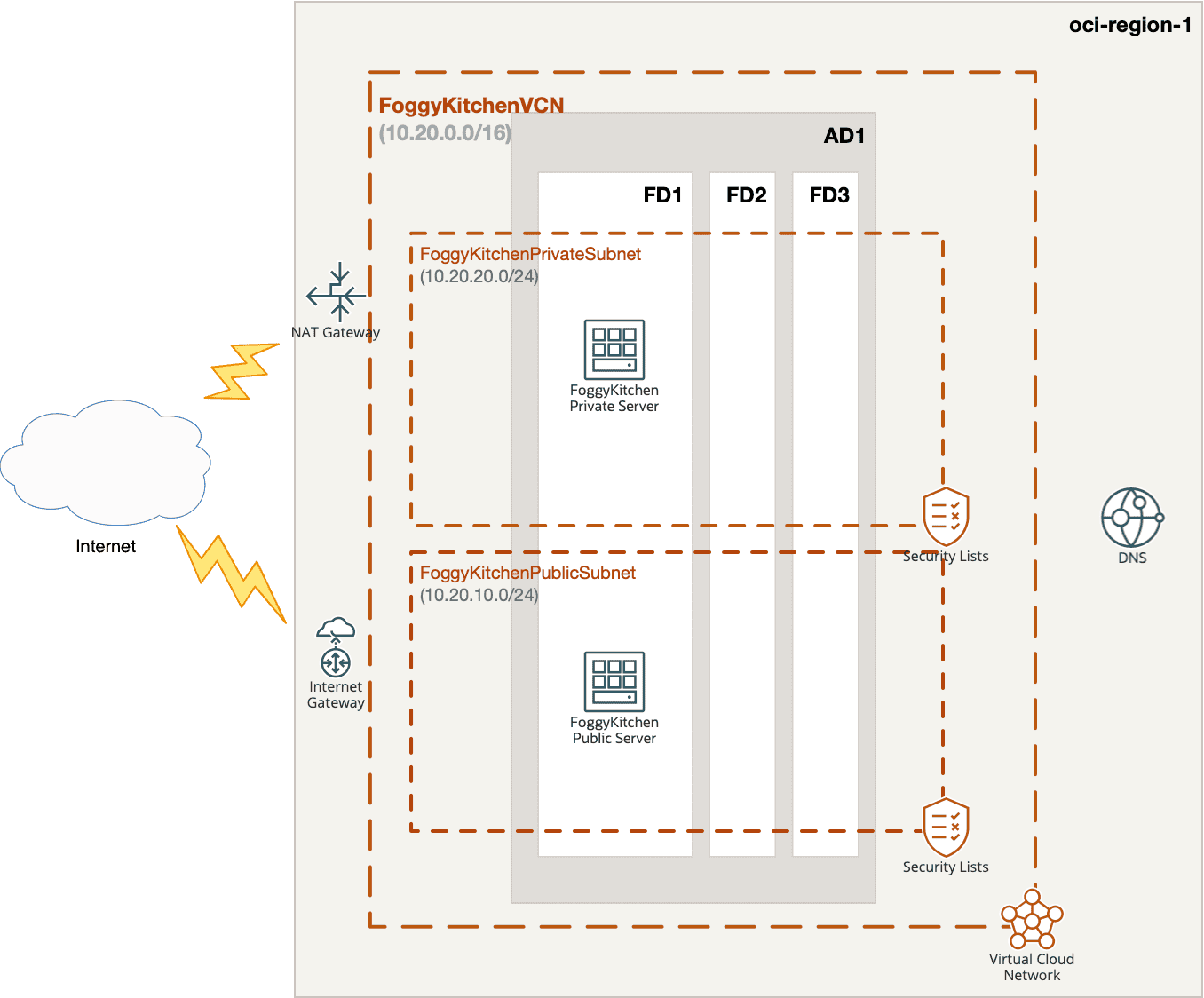
Figure 1: A simplified VCN with public and private subnets. Private DNS will attach to the default resolver.
Terraform code:
resource "oci_core_vcn" "FoggyKitchenVCN" {
  provider       = oci.targetregion
  cidr_block     = "10.20.0.0/16"
  compartment_id = oci_identity_compartment.FoggyKitchenCompartment.id
  display_name   = "FoggyKitchenVCN"
  dns_label      = "fkvcn"
}
resource "oci_core_subnet" "FoggyKitchenPublicSubnet" {
  provider                   = oci.targetregion
  cidr_block                 = "10.20.10.0/24"
  compartment_id             = oci_identity_compartment.FoggyKitchenCompartment.id
  display_name               = "FoggyKitchenPublicSubnet"
  dns_label                  = "pubsub"
  vcn_id                     = oci_core_vcn.FoggyKitchenVCN.id
  prohibit_public_ip_on_vnic = false
  route_table_id             = oci_core_route_table.FoggyKitchenVCNPublicRouteTable.id
  dhcp_options_id            = oci_core_vcn.FoggyKitchenVCN.default_dhcp_options_id
}
resource "oci_core_subnet" "FoggyKitchenPrivateSubnet" {
  provider                   = oci.targetregion
  cidr_block                 = "10.20.20.0/24"
  compartment_id             = oci_identity_compartment.FoggyKitchenCompartment.id
  display_name               = "FoggyKitchenPrivateSubnet"
  dns_label                  = "privsub"
  vcn_id                     = oci_core_vcn.FoggyKitchenVCN.id
  prohibit_public_ip_on_vnic = true
  route_table_id             = oci_core_route_table.FoggyKitchenVCNPrivateRouteTable.id
  dhcp_options_id            = oci_core_vcn.FoggyKitchenVCN.default_dhcp_options_id
}
Step 2 — Configuring OCI Private DNS with Terraform (View, Zone, and RRSet)
We define:
a Private View,
a Private Zone (
fkdns.mein this demo),two A records — one for the public server, one for the private server.
resource "oci_dns_view" "FoggyKitchenDNSView" {
  provider       = oci.targetregion
  compartment_id = oci_identity_compartment.FoggyKitchenCompartment.id
  scope          = "PRIVATE"
  display_name   = "FoggyKitchenDNSView"
}
resource "oci_dns_zone" "FoggyKitchenDNSZone" {
  provider       = oci.targetregion
  compartment_id = oci_identity_compartment.FoggyKitchenCompartment.id
  name           = "fkdns.me"
  zone_type      = "PRIMARY"
  scope          = "PRIVATE"
  view_id        = oci_dns_view.FoggyKitchenDNSView.id
}
resource "oci_dns_rrset" "FoggyKitchenDNSPublicServerRRSet" {
  domain          = "foggykitchenpublicserver.fkdns.me"
  rtype           = "A"
  zone_name_or_id = oci_dns_zone.FoggyKitchenDNSZone.id
  items {
    domain = "foggykitchenpublicserver.fkdns.me"
    rtype  = "A"
    rdata  = oci_core_instance.FoggyKitchenPublicServer.private_ip
    ttl    = var.dns_a_record_ttl
  }
  scope   = "PRIVATE"
  view_id = oci_dns_view.FoggyKitchenDNSView.id
}
resource "oci_dns_rrset" "FoggyKitchenDNSPrivateServerRRSet" {
  domain          = "foggykitchenprivateserver.fkdns.me"
  rtype           = "A"
  zone_name_or_id = oci_dns_zone.FoggyKitchenDNSZone.id
  items {
    domain = "foggykitchenprivateserver.fkdns.me"
    rtype  = "A"
    rdata  = oci_core_instance.FoggyKitchenPrivateServer.private_ip
    ttl    = var.dns_a_record_ttl
  }
  scope   = "PRIVATE"
  view_id = oci_dns_view.FoggyKitchenDNSView.id
}
Note (2025): If you still see examples with oci_dns_record, update them. The correct resource is now oci_dns_rrset.
Step 3 — Attaching the View to the Correct Resolver
Each VCN has a default private resolver created by OCI. To avoid mistakes in multi-VCN environments, we explicitly look up the resolver associated with our VCN:
data "oci_core_vcn_dns_resolver_association" "FoggyKitchenVCNDNSResolverAssociation" {
  vcn_id   = oci_core_vcn.FoggyKitchenVCN.id
  provider = oci.targetregion
}
resource "oci_dns_resolver" "FoggyKitchenDNSResolver" {
  provider   = oci.targetregion
  resolver_id = data.oci_core_vcn_dns_resolver_association.FoggyKitchenVCNDNSResolverAssociation.dns_resolver_id
  scope       = "PRIVATE"
  attached_views {
    view_id = oci_dns_view.FoggyKitchenDNSView.id
  }
}
Step 4 — Validating in the Console and with nslookup
After terraform apply, you can confirm everything works via the OCI Console:
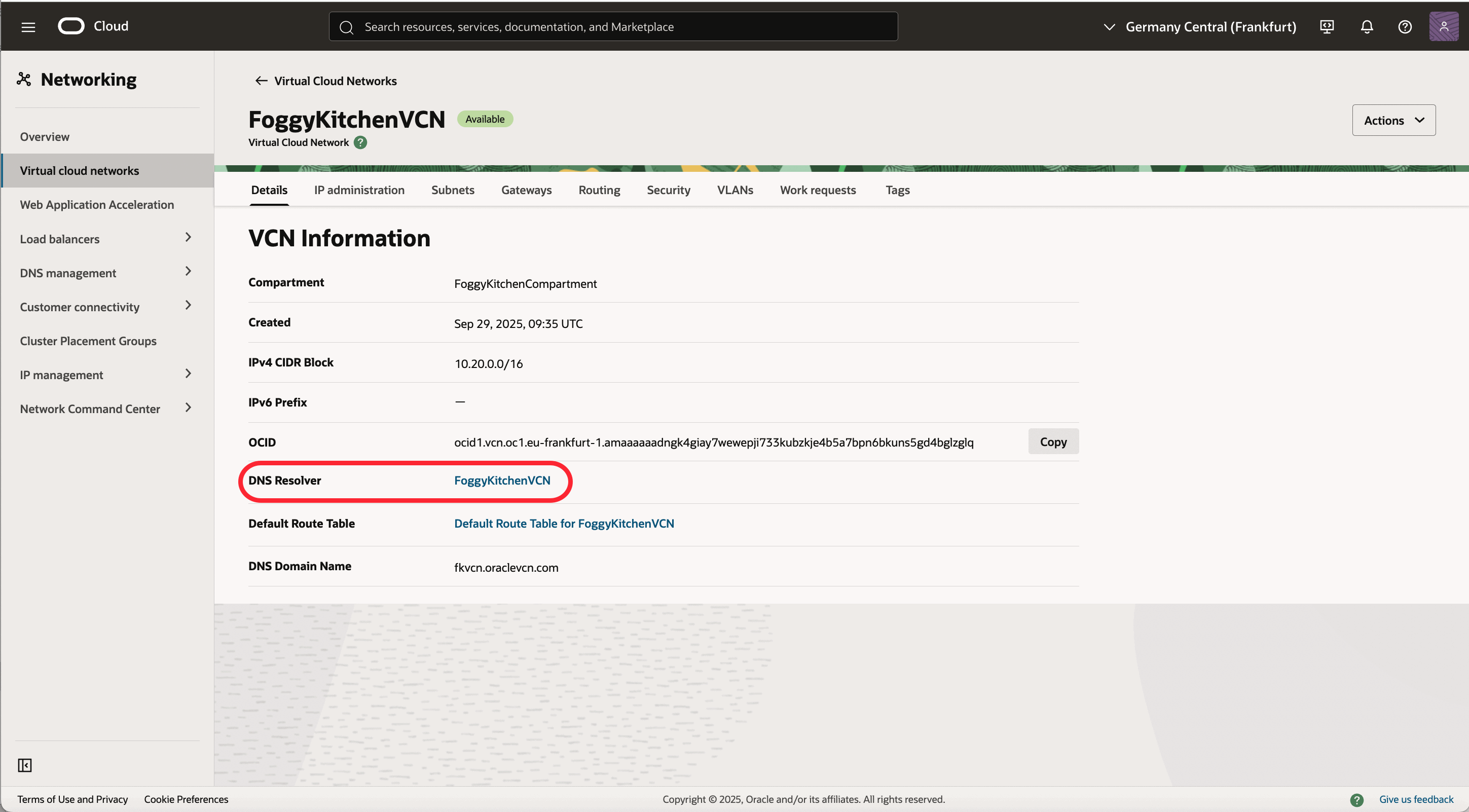
VCN Details — Resolver:
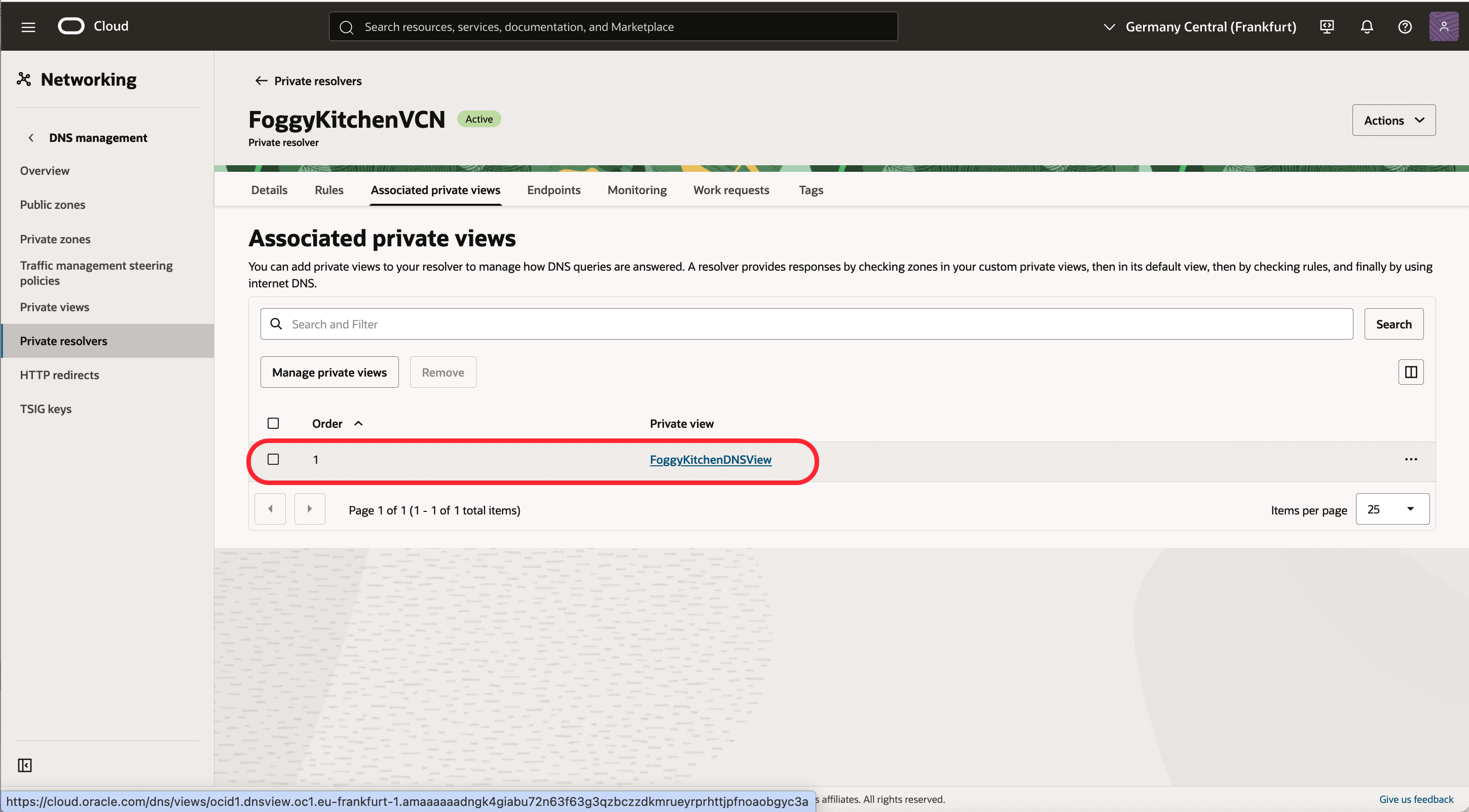
- Private View associated with Resolver:
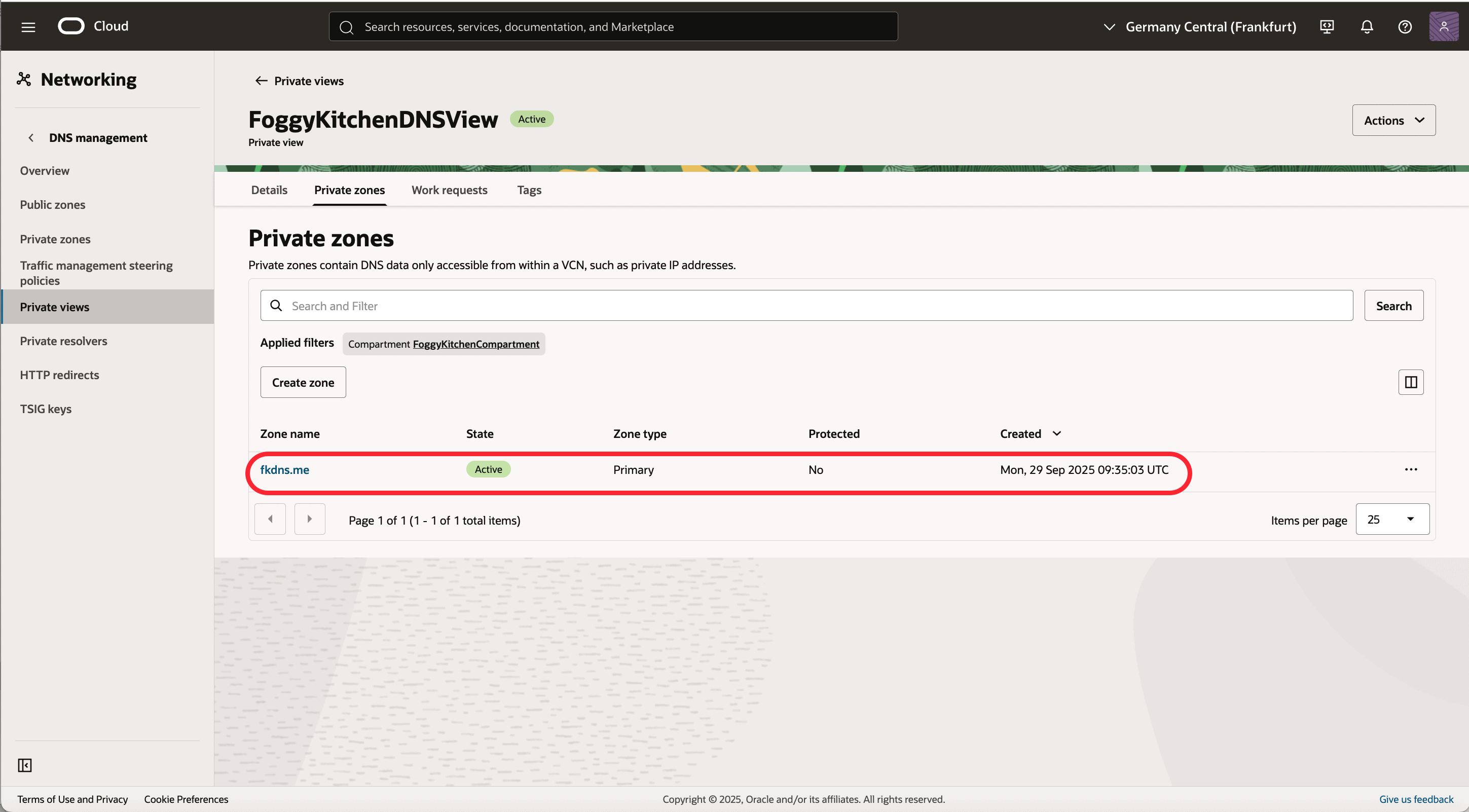
- Private Zone within Private View:
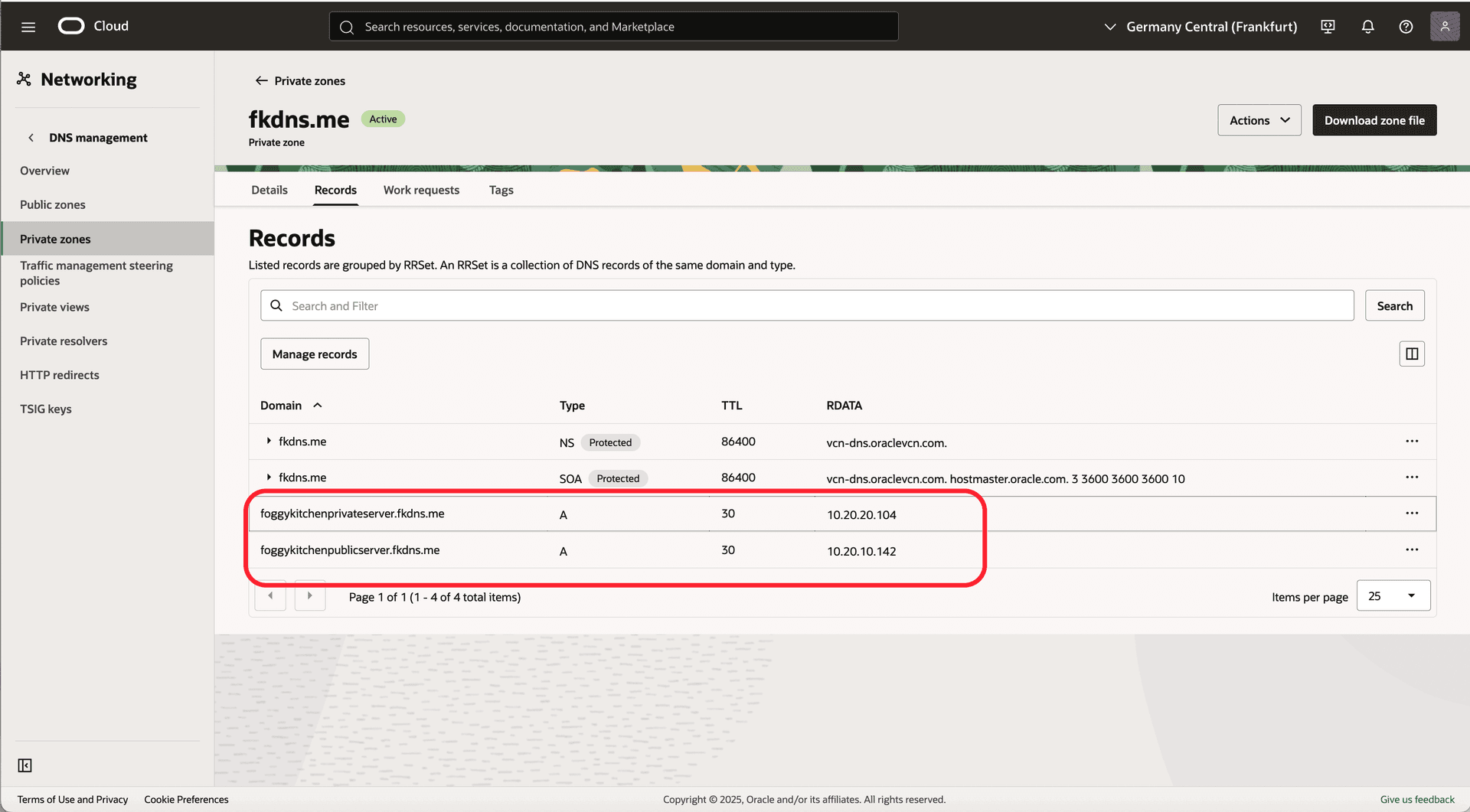
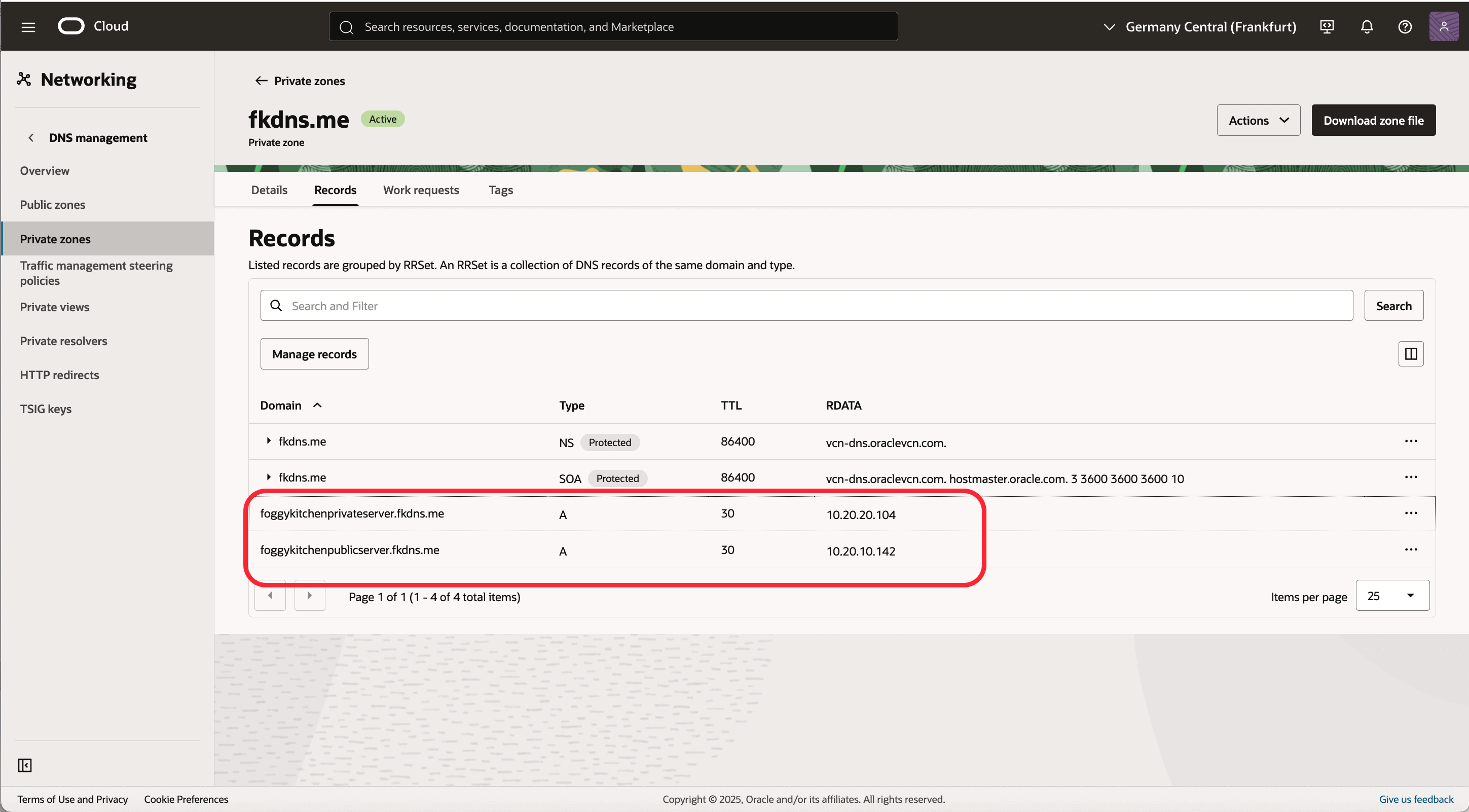
- Private Zone Records
Finally, test from inside the VCN:
[opc@foggykitchenpublicserver ~]$ nslookup foggykitchenprivateserver.fkdns.me
Server:         169.254.169.254
Address:        169.254.169.254#53
Non-authoritative answer:
Name:   foggykitchenprivateserver.fkdns.me
Address: 10.20.20.104
[opc@foggykitchenpublicserver ~]$ nslookup foggykitchenpublicserver.fkdns.me
Server:         169.254.169.254
Address:        169.254.169.254#53
Non-authoritative answer:
Name:   foggykitchenpublicserver.fkdns.me
Address: 10.20.10.142
The lookups are answered by OCI’s VCN Resolver (169.254.169.254), confirming that the private zone works as expected.
Step 5 — Production Considerations
The demo above is minimal. A production-grade setup should include:
inbound/outbound resolver endpoints,
conditional forwarding to on-prem or multicloud DNS,
multiple views/zones for segmentation and split-horizon,
IAM policies limiting who can edit records,
monitoring, alerting, redundancy, and CI/CD integration.
Wrapping Up
This post refreshed my old repo and showed how to make it work with the current provider. We built a VCN, added a private DNS view/zone, published records using oci_dns_rrset, and attached everything to the correct resolver.
The key lesson? Terraform code evolves. If your old IaC stopped working, check provider changes before pulling your hair out.
👉 And if you want to build a solid foundation in OCI + Terraform — IAM, VCNs, routing, compute, modules, state, and automation best practices — that’s exactly what you’ll find in my Flagship OCI + Terraform Training.
Take Your OCI + Terraform Skills to the Next Level
Beyond Private DNS: gain the skills to automate VCNs, compute, security, storage, and advanced networking — all with Terraform/OpenTofu.
👉 Explore the Flagship Training