Azure Files Private Endpoint Terraform example using reusable modules.
🔵 Terraform Azure Private Endpoint Example (Module-Based)
This is a minimal working example of Azure Private Endpoint
using the FoggyKitchen Terraform modules:
- Private Endpoint for Azure Files (module-based)
- Private DNS integration
- Access from private VM inside a VNet
This example uses reusable modules instead of raw resources.
module "storage" {
  source = "github.com/foggykitchen/terraform-az-fk-storage"
  # storage account config
}
module "private_endpoint" {
  source = "github.com/foggykitchen/terraform-az-fk-private-endpoint"
  target_resource_id = module.storage.storage_account_id
  subresource_name   = "file"
}
⚠️ This example shows only the storage layer in isolation. It does NOT include compute, networking boundaries, or access control across modules.
👉 Full working example:
🔗 View on GitHubUse this when:
✓ Private-only storage access
✓ Reusable Terraform modules
✓ Production-ready setup
Avoid if:
• Just testing Terraform basics
👉 Full architecture (compute + networking + access patterns):
Azure Fundamentals course.
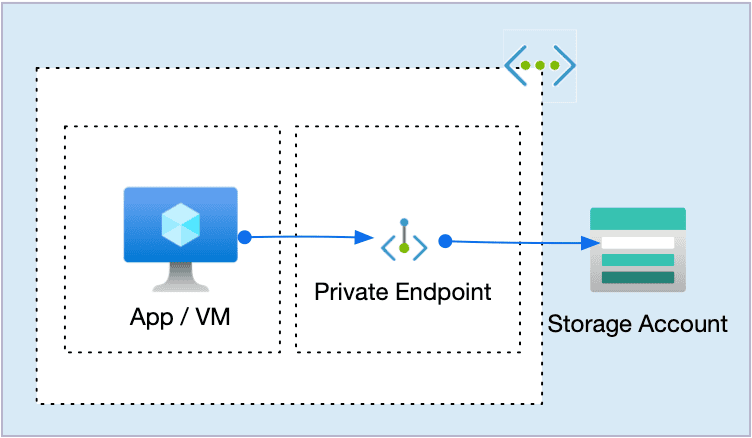
Private Endpoint as a boundary between compute and storage (no public exposure)
Azure Files Private Endpoint Terraform is one of the cleanest ways to expose shared storage to private compute in Azure.
This article builds on the minimal example above and shows how this fits into a real architecture.
- Mount it.
- Point your workloads at it.
- Done.
In reality, shared storage is never just about storage.
It is about network boundaries, access paths, and who is allowed to talk to what — and how.
In this article, we build a clean, private Azure Files baseline using:
Private VMs
Azure Files
Private Endpoint
Private DNS
Terraform / OpenTofu
This is not a Kubernetes tutorial.
And it’s not about RWX scaling tricks.
This is about getting the foundation right before AKS, autoscaling, or “real workloads” even enter the picture.
Why this example exists
Before shared storage shows up in AKS, WordPress, CI pipelines, or legacy workloads, it almost always starts here:
a private VM
a shared filesystem
a controlled access path
no public exposure
Yet most examples online either:
expose storage publicly,
skip DNS entirely,
or jump straight into AKS without explaining the underlying model.
This example exists to answer one question clearly:
How should Azure Files be consumed from private compute — correctly, cleanly, and intentionally?
Architecture overview: Azure Files Private Endpoint Terraform
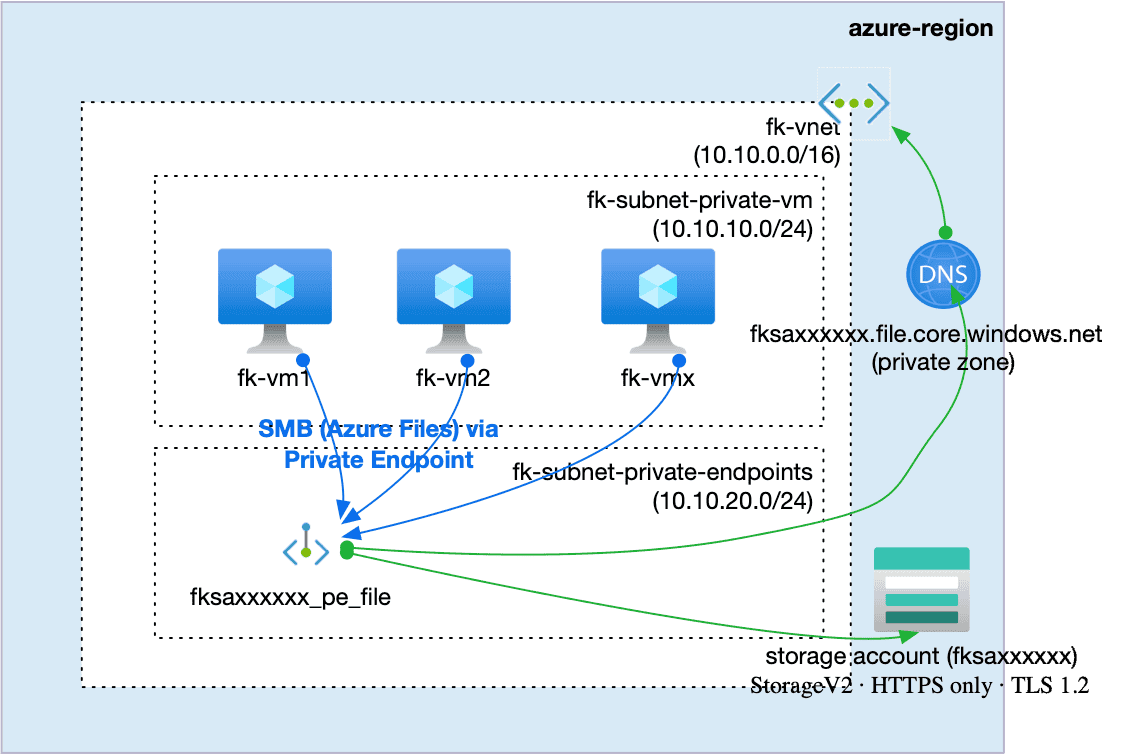
In this example we deploy:
A Storage Account (StorageV2)
An Azure File Share
A Private Endpoint for the File subresource
A Private DNS Zone (
fksaxxxxxx.file.core.windows.net)A Virtual Network with two subnets:
private VMs
private endpoints
Two private Linux VMs mounting the same File Share via SMB
All traffic stays inside the Azure backbone.
No public storage endpoint is exposed.
This architecture intentionally separates compute, networking, and storage access paths. Azure Files is consumed as a private service, not a public endpoint with restrictions. Private Endpoint + Private DNS define a clear trust boundary before introducing higher-level platforms like AKS.
👉 See the full Azure infrastructure with Terraform architecture model: Azure Infrastructure with Terraform – Architecture Model
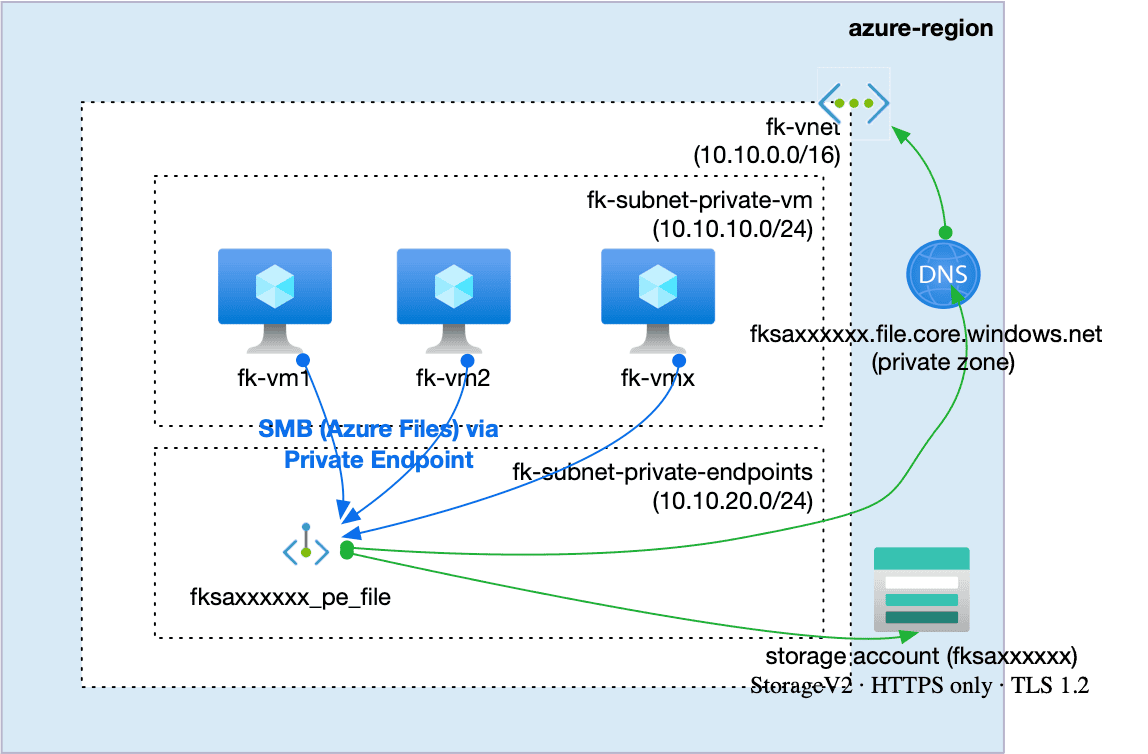
Figure 1. Azure Files consumed from private Linux VMs via a Private Endpoint and Private DNS. All storage traffic stays inside the Azure backbone. The public storage endpoint is not exposed.
The storage layer — using a reusable module
Instead of raw azurerm_storage_account resources, this example uses the FoggyKitchen storage module:
terraform-az-fk-storageThe module is responsible for:
creating the Storage Account,
enforcing TLS and HTTPS-only access,
applying Network Rules,
creating the File Share.
Storage module usage (excerpt)
module "storage" {
  source = "github.com/foggykitchen/terraform-az-fk-storage"
  name                = local.storage_account_name
  location            = azurerm_resource_group.foggykitchen_rg.location
  resource_group_name = azurerm_resource_group.foggykitchen_rg.name
  account_tier             = var.account_tier
  account_replication_type = var.account_replication_type
  account_kind             = var.account_kind
  https_traffic_only_enabled = true
  min_tls_version            = "TLS1_2"
  public_network_access_enabled = true
  enable_network_rules          = true
  network_rules = {
    default_action = "Deny"
    ip_rules       = [var.my_public_ip]
    virtual_network_subnet_ids = [
      module.vnet.subnet_ids["fk-subnet-private-vm"]
    ]
    bypass = ["AzureServices"]
  }
  create_file_shares = true
  file_shares        = var.file_shares
  create_containers = false
  tags = var.tags
}
This keeps the example focused on architecture, not boilerplate.
Private Endpoint + DNS — the real access boundary
The File Share is not accessed via the public endpoint.
Instead:
a Private Endpoint is created for
file,Azure assigns it a private IP,
name resolution is handled by a Private DNS Zone.
From the VM’s perspective:
storage.file.core.windows.netresolves to a private IP inside the VNet.
No routing tricks.
No firewall exceptions.
No public exposure.
Mounting Azure Files on private VMs
Each VM mounts the File Share using cloud-init during provisioning.
Key characteristics:
SMB 3.0
credentials stored securely
mount persisted via
/etc/fstabmount waits for DNS resolution before proceeding
As a verification step, each VM writes a small file into the share.
You can confirm the mount directly from the Azure Portal using Run Command:
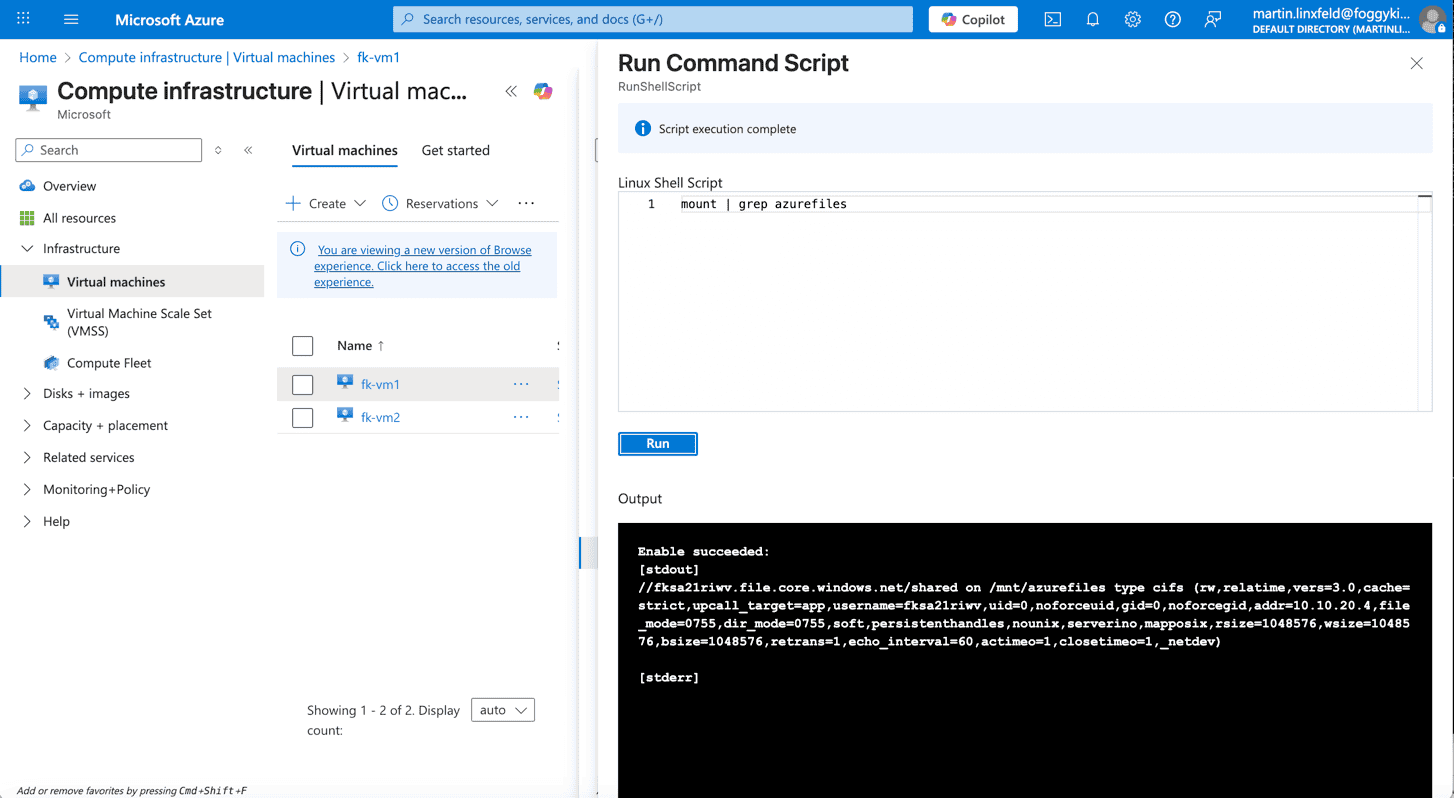
Figure 2. The output shows the File Share mounted via CIFS and resolved through the private endpoint.
Design context: Private VMs before shared storage
If this setup feels deliberate, that’s because it is.
Private VMs, Private Endpoints, and controlled access paths are not “security features” you toggle later — they are design decisions.
If you want a deeper explanation of why private compute matters before scaling or Kubernetes, this short Design Notes video explains the architectural intent:
🎥 Design Notes: Azure Private VMs — The Foundation Before Scaling
(design-level discussion, not a step-by-step tutorial)
This mental model becomes critical once:
AKS enters the picture,
multiple consumers access the same storage,
or workloads start scaling.
How this connects to AKS (but doesn’t replace it)
If you are looking for RWX storage inside AKS, this example intentionally stops before Kubernetes.
AKS consumes storage differently:
through CSI drivers,
with different failure modes,
and different scaling constraints.
For that path, see: 👉 AKS File Share with Terraform — RWX Storage for Multi-Replica Applications
This article builds the infrastructure baseline that AKS later relies on — not the workload layer itself.
Code & example repository
The full, runnable example is available here:
👉 terraform-az-fk-storage — Example 06: Private Endpoint + File Share + Private VMs
Each example in the repository is designed as a learning building block, not a production landing zone.
What comes next
Today, this example naturally leads into:
- private storage boundaries in Azure
- secure service-to-service connectivity
- DNS-based resolution inside virtual networks
Soon, it becomes part of:
- a complete Azure platform built with Terraform/OpenTofu
- a structured architecture: networking → compute → storage → private connectivity
The goal is not to show everything in one place —
but to build correct mental models that scale with complexity.
Network foundation
Private storage boundaries rely on a stable network contract.
In practice, Private Endpoints for services like Azure Files typically live inside a purpose-driven virtual network layout such as the one described here:
👉 Azure VNet Terraform Module – Explained
Designing the network first ensures that shared storage can be introduced without redesigning subnet boundaries later.
Private Endpoints for Azure Files also rely on Azure Private DNS to resolve storage endpoints to private IP addresses inside the Virtual Network.
If you want to understand how this DNS layer works and how to deploy it with Terraform/OpenTofu, see:
👉 Azure Private DNS with Terraform
Summary
Azure Files is not “just storage”
Private Endpoints define who can talk to what
DNS is part of the security boundary
Shared storage should be introduced before, not inside, AKS
Reusable modules make intent explicit
Getting this layer right makes everything above it simpler.
From Private File Access to Secure Azure Architecture
Azure Files with private endpoints is not just shared storage — it defines how workloads securely access data inside your platform.
This pattern is a core building block of real-world Azure architectures.
👉 Build Secure Azure Storage with Terraform (Hands-On)