Azure infrastructure Terraform is often presented as a set of individual resources — but real platforms are built as connected architectural layers.
When engineers start working with Azure and Terraform, most examples focus on individual resources.
A Virtual Network here. A VM there. Maybe a Load Balancer on top.
But real Azure platforms are not built from isolated resources.
They are built from connected architectural layers.
Over the past months, I published a series of Terraform/OpenTofu guides that together form a complete, production-aligned Azure infrastructure.
This article brings all those pieces together — into one coherent architecture.
Azure Infrastructure Terraform: The Architecture Model
A production-ready Azure platform built with Infrastructure as Code usually consists of a few core layers:
- Network boundary (VNet, subnets)
- Security boundaries (Network Security Groups)
- Outbound connectivity (NAT Gateway)
- Compute layer (Virtual Machines, VM Scale Sets)
- Storage layer (Disks, Files, Blob)
- Private connectivity (Private Endpoints and DNS)
Each layer solves a different problem.
Together, they form a system.
The key idea is simple:
- You are not deploying resources.
- You are defining contracts between layers.
Explore the official Azure Architecture Center. (Microsoft Docs)
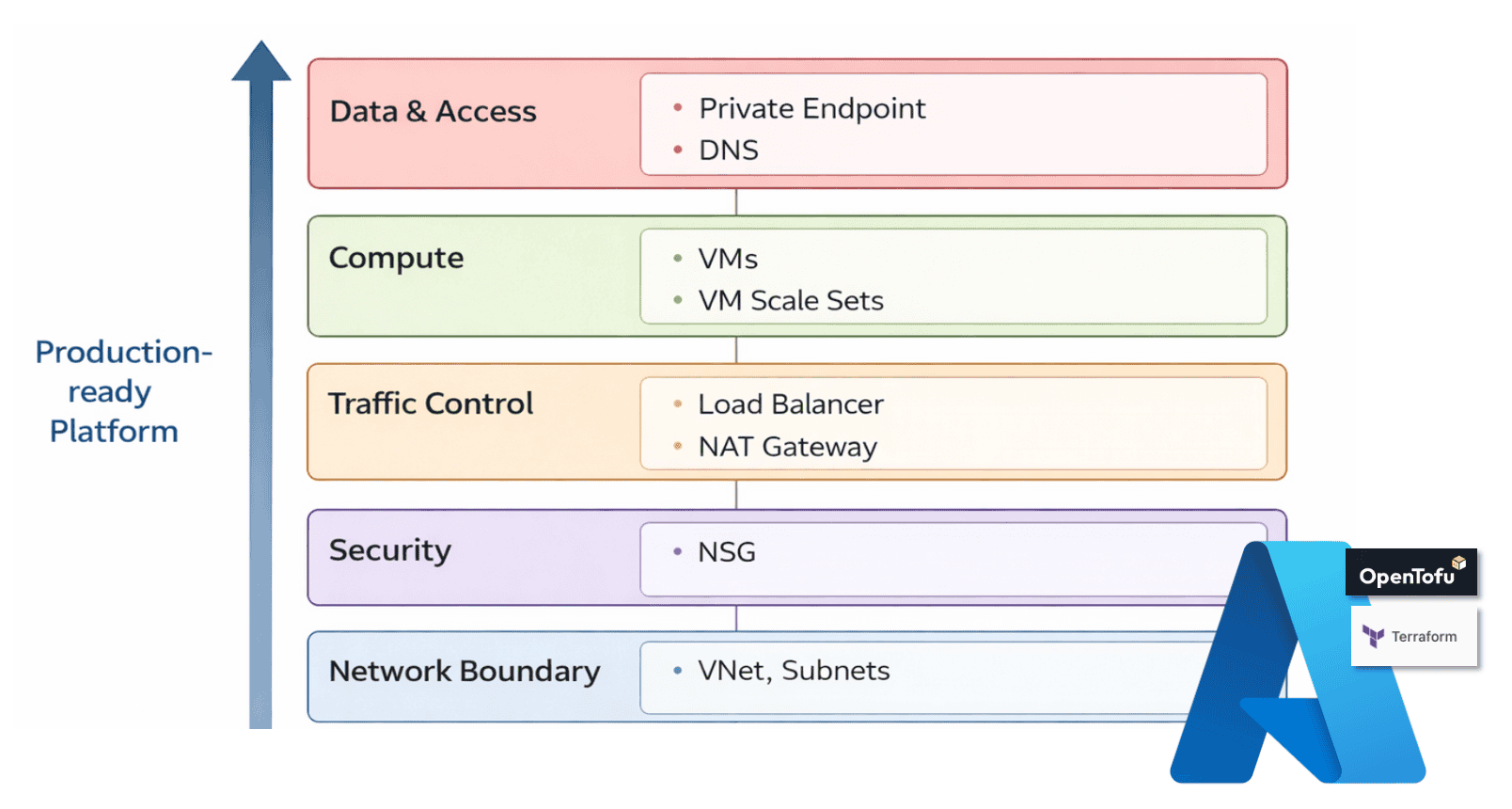
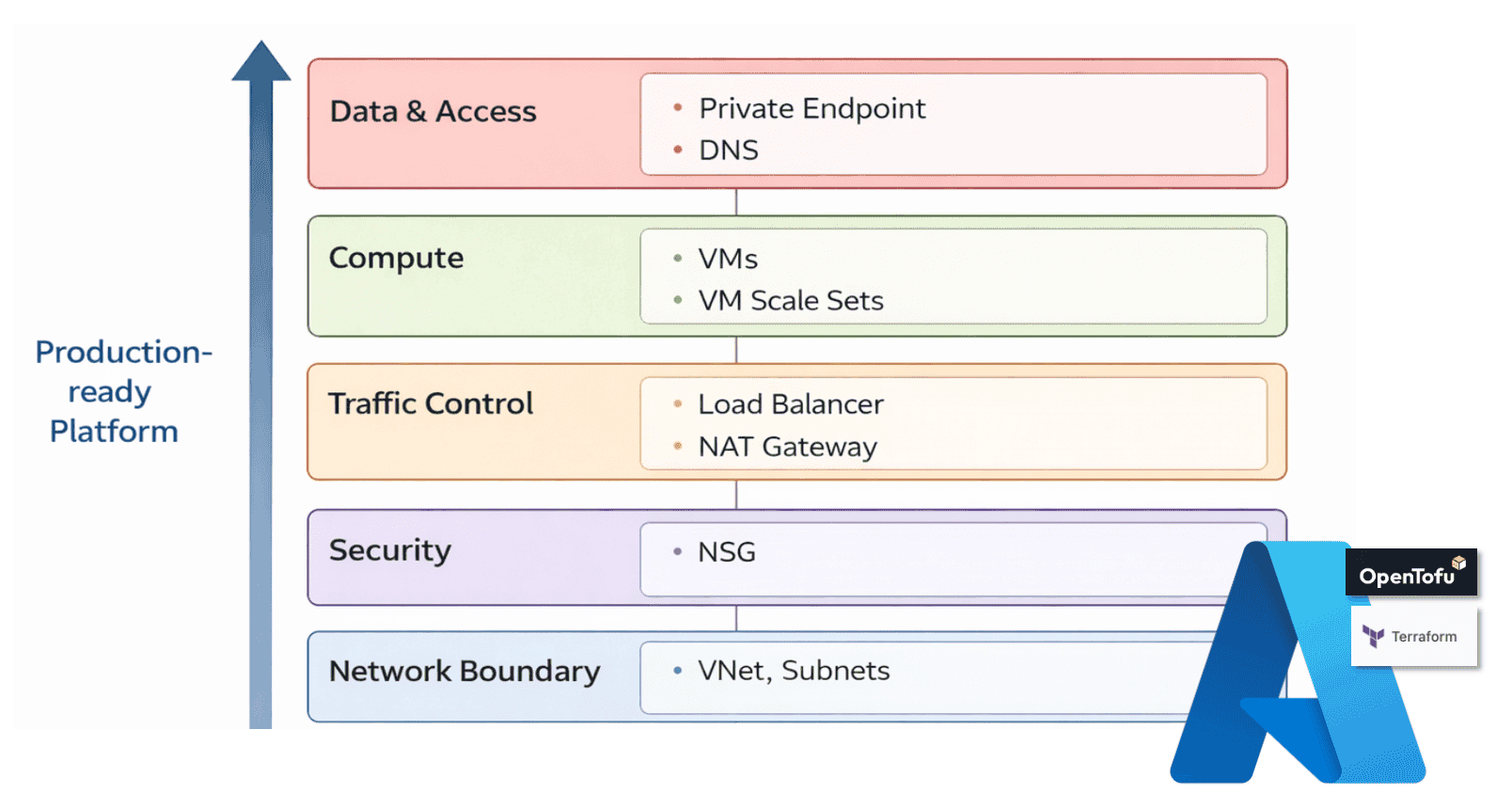
Figure 1. Layered Azure architecture model — from network boundary to data & access, defining contracts between infrastructure layers
Network Foundation — The VNet as an Isolation Boundary
Everything starts with the Virtual Network. The VNet defines:
- the address space of your platform
- how workloads are separated into subnets
- where connectivity is allowed and where it is not
A well-designed VNet is not just a container. It is a long-term contract for your architecture. If the network is unclear, everything built on top becomes fragile. If the network is clean, everything else becomes predictable.
Read the full guide: https://foggykitchen.com/2025/12/18/azure-vnet-terraform-module/
Security Boundaries — Defining Traffic Intent with NSG
Once the network is defined, security must become explicit. Network Security Groups define:
- what traffic is allowed
- what is denied
- where boundaries exist between tiers
This is where architecture starts to become visible. You are no longer deploying infrastructure. You are defining intent.
A common mistake is mixing responsibilities between subnet-level and NIC-level rules.
A clean design treats NSG as a boundary, not a patch.
Read the full guide: https://foggykitchen.com/2026/02/06/azure-nsg-design-patterns/
Outbound Connectivity — NAT Gateway as an Egress Contract
Most architectures focus on inbound traffic. But real systems also need controlled outbound access. NAT Gateway provides:
- a stable outbound IP
- controlled internet access for private workloads
- separation between internal resources and the public internet
It defines how your workloads leave the system. Without it, outbound traffic becomes unpredictable and hard to control.
Read the full guide: https://foggykitchen.com/2026/02/13/azure-nat-gateway-terraform/
Compute Layer — From Private VM to Scalable Workloads
With networking and security in place, compute can be introduced. This layer evolves in stages. First, a single private VM:
- no public exposure
- access via Bastion
- controlled environment for administration
Then, multiple VMs behind a Load Balancer:
- separation of user traffic from management access
- basic horizontal scaling
Finally, Virtual Machine Scale Sets:
- autoscaling
- workload replication
- production-ready compute layer
Each step builds on the previous one. This is not a shortcut. It is the actual path Azure engineers follow.
Read the guides:
- Private VM: https://foggykitchen.com/2025/12/23/azure-private-vm-terraform/
- VMSS autoscaling: https://foggykitchen.com/2025/12/29/azure-vmss-autoscaling-terraform/
Storage Layer — Data as a First-Class Concern
Compute without storage is incomplete. Azure provides different storage patterns depending on workload needs:
- Managed Disks — for stateful compute
- Azure Files — for shared access across VMs
- Blob Storage — for object storage and application data
Each of these plays a different role in architecture. The key is not choosing one. The key is understanding when and why each is used.
Read the guides:
- Managed Disks: https://foggykitchen.com/2026/01/21/azure-managed-disks-terraform/
- Azure Files with Private Endpoint: https://foggykitchen.com/2026/01/16/azure-files-private-endpoint-terraform/
- Azure Blob with Private Endpoint: https://foggykitchen.com/2026/01/19/azure-blob-private-endpoint-terraform/
Private Connectivity — Services Without Public Exposure
Production platforms avoid exposing services publicly whenever possible. Private Endpoints and Private DNS enable:
- access to Azure services via private IP
- internal name resolution
- secure communication between platform components
This is where architecture becomes truly “private-first”. Without DNS, Private Endpoints do not work correctly. Without Private Endpoints, services remain exposed. This layer connects everything together.
Read the guides:
- Private Endpoint: https://foggykitchen.com/2026/01/19/azure-blob-private-endpoint-terraform/
- Private DNS: https://foggykitchen.com/2026/03/18/azure-private-dns-terraform-vnet-link/
Putting It All Together
When combined, these layers form a clear architecture:
Network → Security → Connectivity → Compute → Storage → Private Access
Each Terraform module represents one layer. Together, they create a production-ready system.
This is the difference between: deploying resources and designing architecture
From Individual Components to Real Azure Architecture
If you followed the articles above, you already built individual parts of Azure infrastructure.
You configured a VNet. You defined NSG rules. You deployed compute. You exposed services privately.
But production environments are not built as isolated steps.
They are built as connected systems:
- modules working together
- consistent design decisions
- repeatable deployment patterns
This is the missing layer between tutorials and real-world engineering.
Next Step — From Architecture to Full Platform
If your goal is to move beyond individual Terraform examples and understand how these pieces fit together into a real platform:
this is exactly what I cover in the Azure Fundamentals course.
The course builds a complete Azure architecture step by step:
- from network design
- through security and connectivity
- to scalable compute and real workloads
No shortcuts. No portals.
Just Terraform/OpenTofu and real architecture decisions.
👉 Start here: https://foggykitchen.com/courses/azure-fundamentals-terraform-course/
Chef’s Corner
Infrastructure is not a collection of resources.
It is a set of decisions.
Terraform doesn’t create architecture.
It reveals whether you have one.
Ready to build this architecture yourself?
This article showed the architectural model behind production-ready Azure platforms.
In the course, we implement each layer step by step using Terraform/OpenTofu modules — from network boundary to private connectivity.
👉 Start building Azure architecture (hands-on)