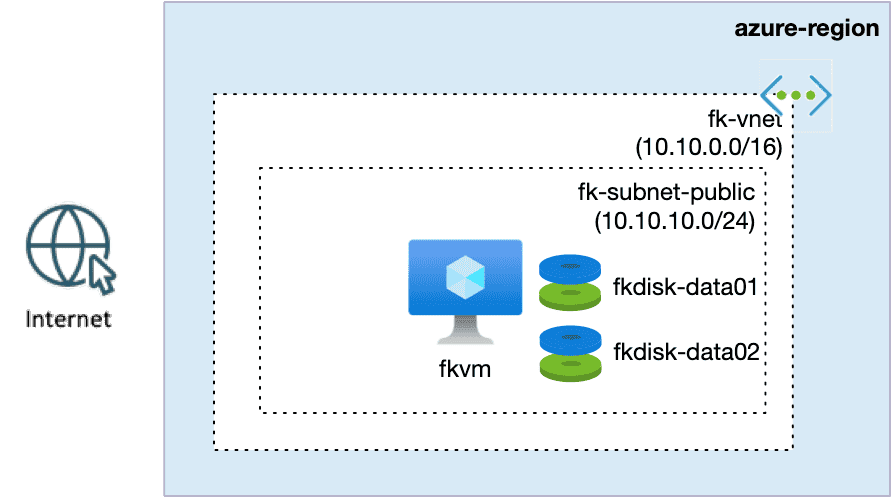
Azure Managed Disks Terraform allow you to design Virtual Machine persistence explicitly, using independent data disks, predictable LUN mapping, and clean lifecycle separation.
When you deploy a single Azure Virtual Machine with one disk, storage feels trivial.
The moment you attach a second disk, Azure stops being “just a VM” and becomes a storage architecture problem.
This article shows how to design multi-disk persistence for Azure VMs using Terraform / OpenTofu — cleanly, explicitly, and without mixing concerns.
We focus on real disk semantics: LUNs, performance tiers, lifecycle separation, and reusable infrastructure patterns.
Why one disk is never enough in real workloads
In production environments, a single disk quickly becomes a limitation:
application data competes with logs
unpredictable I/O impacts performance
resizing or migration becomes risky
backup and restore granularity is lost
Azure Managed Disks are independent infrastructure resources, not just VM properties.
Treating them as such is the difference between a demo VM and a designed system.
🧭 Architecture overview: Azure Managed Disks Terraform
This example deploys:
one Linux Virtual Machine
one OS disk (managed by Azure)
two independent data disks, each with its own size, SKU, and LUN
no Load Balancer
no autoscaling
no platform abstractions
The goal is to establish a clear persistence model, not to build a platform.
Key architectural decisions:
disks are separate Azure resources
LUNs are assigned explicitly
compute and storage lifecycles are decoupled
networking is assumed to exist already
👉 See the full Azure infrastructure with Terraform architecture model: Azure Infrastructure with Terraform – Architecture Model
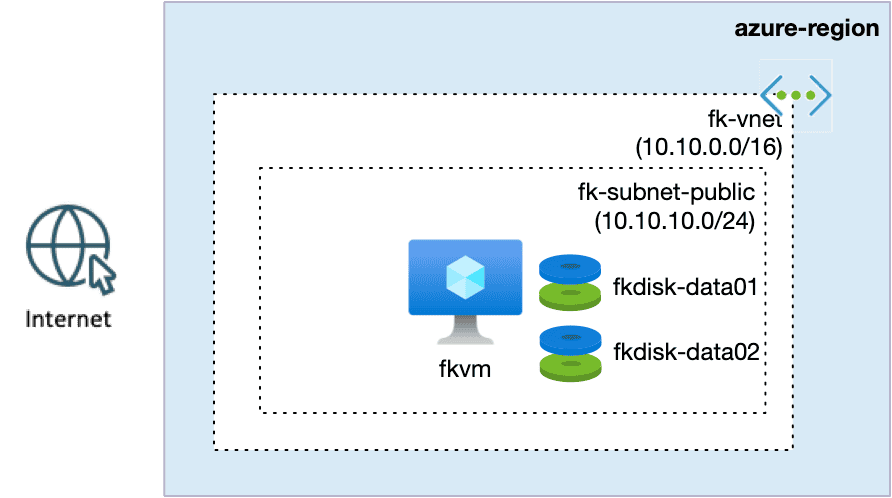
Figure 1. Azure Virtual Machine with multiple Managed Data Disks — explicit LUN-based persistence design.
What Azure actually creates (Portal view)
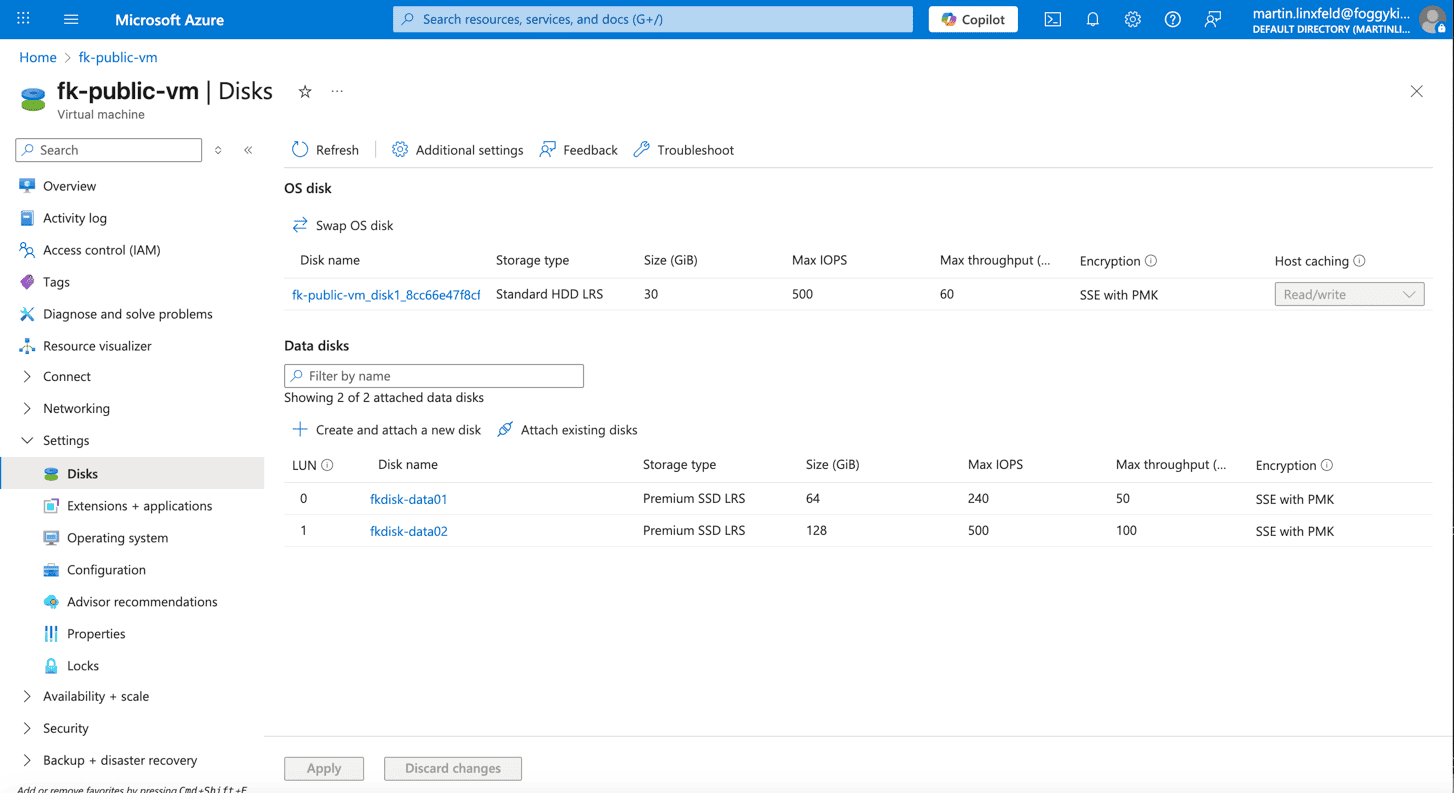
Figure 2. Azure Portal view of a Virtual Machine with multiple Managed Data Disks attached via explicit LUN assignments.
After deployment, Azure shows exactly what this architecture implies:
You can clearly see:
the OS disk (Standard HDD)
fkdisk-data01attached as LUN 0fkdisk-data02attached as LUN 1each disk with its own performance envelope
This is not cosmetic.
These disks behave independently during:
resizing
snapshotting
backup
VM recreation
LUNs are not details — they are contracts
A LUN is not “just a number”.
It is a contract between infrastructure and the operating system:
which device appears where
which filesystem mounts to which path
which workload uses which disk
Changing LUNs later breaks assumptions at every layer above.
That’s why LUNs must be:
deterministic
explicit
defined as part of the architecture, not left to chance
🧩 Attaching multiple disks using a reusable Terraform module
The core of this example is not defining disks inline inside the VM resource.
Instead, disks are created and attached using the dedicated terraform-az-fk-disk module.
This keeps responsibilities clear:
compute logic stays in the compute module
persistence logic lives in the disk module
disk lifecycle is independent from the VM
Module usage
module "data_disk" {
  for_each = var.data_disks
  source   = "github.com/foggykitchen/terraform-az-fk-disk"
  name                = "${var.disk_name}-${each.key}"
  resource_group_name = azurerm_resource_group.foggykitchen_rg.name
  location            = azurerm_resource_group.foggykitchen_rg.location
  tags                = var.tags
  disk_size_gb         = each.value.size_gb
  storage_account_type = each.value.sku
  attach_to_vm = true
  vm_id        = module.compute.vm_id
  lun     = each.value.lun
  caching = "ReadOnly"
}
Each disk is:
created as a standalone Azure Managed Disk
attached explicitly to the VM
controlled independently from compute logic
Declarative disk definition
Disks are defined as input data — not hardcoded resources:
variable "data_disks" {
  type = map(object({
    size_gb = number
    sku     = string
    lun     = number
  }))
}
Example configuration:
data_disks = {
  data01 = {
    size_gb = 64
    sku     = "Premium_LRS"
    lun     = 0
  }
  data02 = {
    size_gb = 128
    sku     = "Premium_LRS"
    lun     = 1
  }
}
This gives you:
predictable device mapping
clear performance intent
easy extension without touching the VM
safe refactoring and scaling
Why this separation matters
This pattern mirrors how Azure actually works.
Managed Disks are:
first-class resources
independent from compute
reusable across scenarios
With this design:
the VM can be recreated without destroying data
disks can be resized independently
snapshots and backups are simpler
migration paths are safer
Most importantly: storage decisions become visible and intentional.
From single VM to platforms
This example is deliberately simple — but foundational.
The same model applies to:
database VMs
stateful application nodes
AKS worker persistence
VM Scale Sets (with appropriate constraints)
Before introducing:
autoscaling
load balancing
Kubernetes
platform services
…it is critical to understand how persistence works at the VM level.
🚀 How to run this example
cd examples/02_vm_multiple_disks
tofu init
tofu plan
tofu apply
The deployment is minimal, runnable, and self-contained.
🧠 Final thoughts
The moment you attach a second disk, you are no longer just deploying a VM. You are designing:
- data boundaries
- performance guarantees
- lifecycle independence
This is where infrastructure starts becoming architecture.
👉 Persistence is not just about storage. It is about how your system evolves over time.
🚀 If you want to see how compute, storage, networking, and private connectivity come together into a real Azure platform — built step by step with Terraform/OpenTofu:
➡️ Explore the Azure Fundamentals course: https://foggykitchen.com/courses/azure-fundamentals-terraform-course/
🔗 Related resources
From VM Storage to Real Azure Architecture
This example shows how data persistence is modeled at the VM level — but real Azure platforms require consistent design across compute, storage, and networking.
These patterns are part of a larger architecture built step by step with Terraform/OpenTofu.
👉 Build Azure Architecture with Terraform (Hands-On)