OCI Autonomous Database Full Clone Terraform is one of the most powerful features available in Oracle Autonomous Database (ADB). It allows you to create a copy of an existing database for development, testing, analytics, or troubleshooting scenarios without touching the production system. While you can always create clones manually through the OCI Console, it quickly becomes repetitive and error-prone in real workflows.
That’s where Infrastructure as Code (IaC) comes in. With Terraform, we can provision OCI Autonomous Database Full Clones automatically, making the process consistent, repeatable, and easy to integrate into larger environments.
In this post, I’ll walk you through Lesson 8 from my OCI Autonomous Database Course. We’ll use the FoggyKitchen ADB Module and a simple configuration to create a Full Clone of an Autonomous Transaction Processing (ATP) database.
Why choose an OCI Autonomous Database Full Clone Terraform?
At first glance, a full clone might look similar to a clone from a backup (covered in Lesson 6). But there’s an important difference:
Clone from backup – creates a new database from a specific point in time, but it’s detached from the source immediately. Useful for recovery and historical snapshots.
Full clone – duplicates the entire source database, including its configuration and networking. It becomes a fully independent instance, which can be scaled, secured, and backed up just like any other ADB.
In practice, a Full Clone is perfect when you need:
Development or QA environments with the same schema and data as production
Long-term sandbox environments that evolve independently
Independent scaling of CPU and storage, separate from the source database
Step 1: Provision the Source ADB
We start by provisioning the source Autonomous Database. Using my module, the code looks like this:
module "oci-fk-adb-source" {
  source                                = "github.com/mlinxfeld/terraform-oci-fk-adb"
  adb_database_db_name                  = "FoggyKitchenADBSource"
  adb_database_display_name             = "FoggyKitchenADB_Source"
  adb_password                          = var.adb_password
  adb_database_db_workload              = "OLTP" # Autonomous Transaction Processing (ATP)
  adb_free_tier                         = false
  adb_database_cpu_core_count           = 1
  adb_database_data_storage_size_in_tbs = 1
  compartment_ocid                      = var.compartment_ocid
  adb_private_endpoint                  = true
}
This creates the primary Autonomous Transaction Processing instance, which will serve as the source for our clone.
Step 2: Create the Full Clone
Now let’s define the clone itself. Notice the parameter clone_type = "FULL", which makes this a complete duplication of the source database.
module "oci-fk-adb-fullclone" {
  source                                = "github.com/mlinxfeld/terraform-oci-fk-adb"
  adb_database_db_name                  = "FoggyKitchenADBFullClone"
  adb_database_display_name             = "FoggyKitchenADB_FullClone"
  adb_database_db_workload              = "OLTP"
  adb_free_tier                         = false
  adb_database_cpu_core_count           = 1
  adb_database_data_storage_size_in_tbs = 1
  compartment_ocid                      = var.compartment_ocid
  use_existing_vcn                      = true
  vcn_id                                = module.oci-fk-adb-source.adb_database_network.adb_database_vcn_id[0]
  adb_subnet_id                         = module.oci-fk-adb-source.adb_database_network.adb_database_subnet_id[0]
  adb_nsg_id                            = module.oci-fk-adb-source.adb_database_network.adb_database_nsg[0]
  adb_private_endpoint                  = true
  adb_private_endpoint_label            = "fkadbfullc"
  clone_type                            = "FULL"
  source_id                             = module.oci-fk-adb-source.adb_database.adb_database_id
}
With just a few lines of Terraform, we’ve declared a new Full Clone that mirrors the source.
Step 3: Verify the Full Clone in the OCI Console
After applying the configuration, log in to the OCI Console to confirm the new database instance.
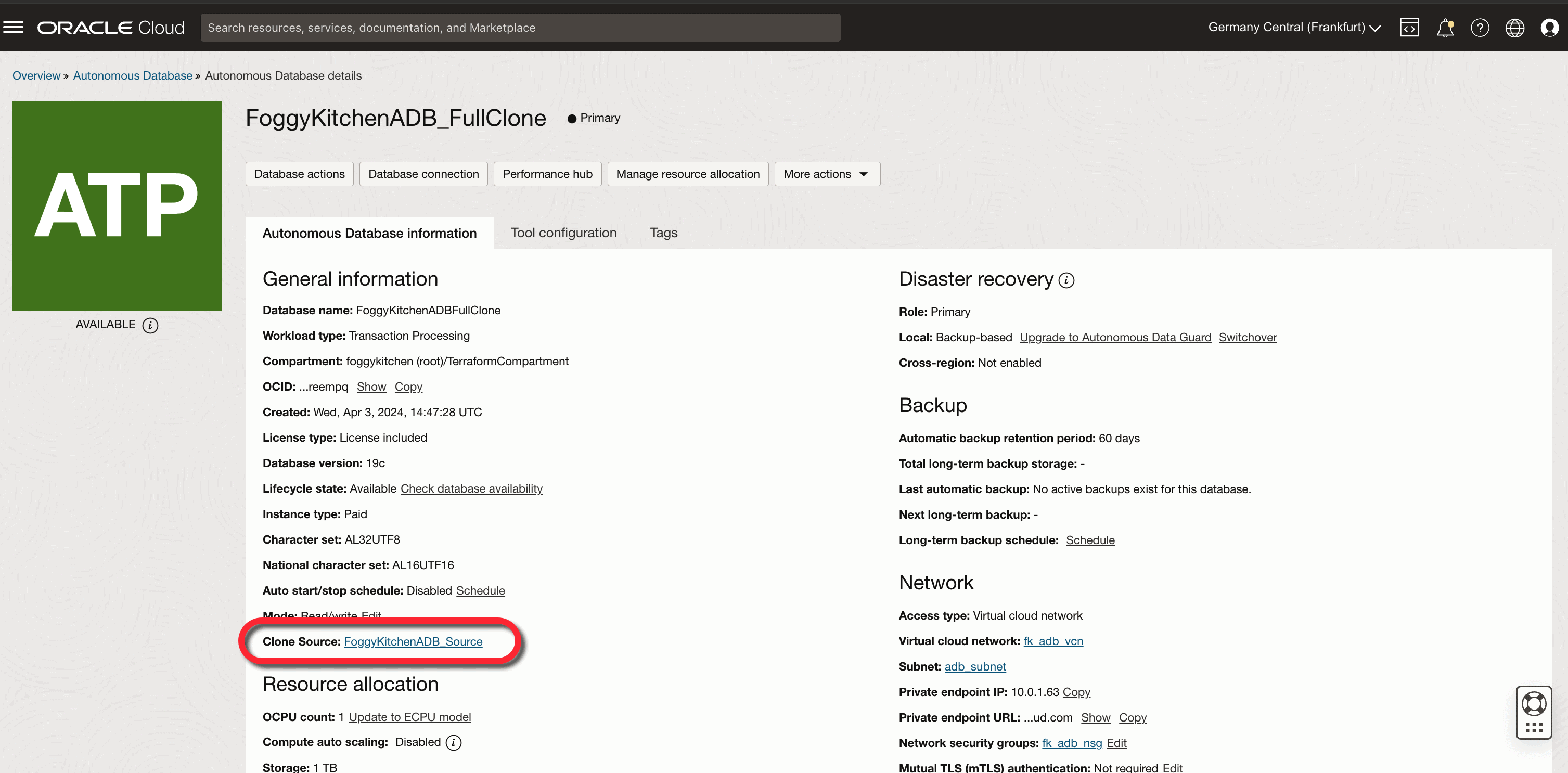
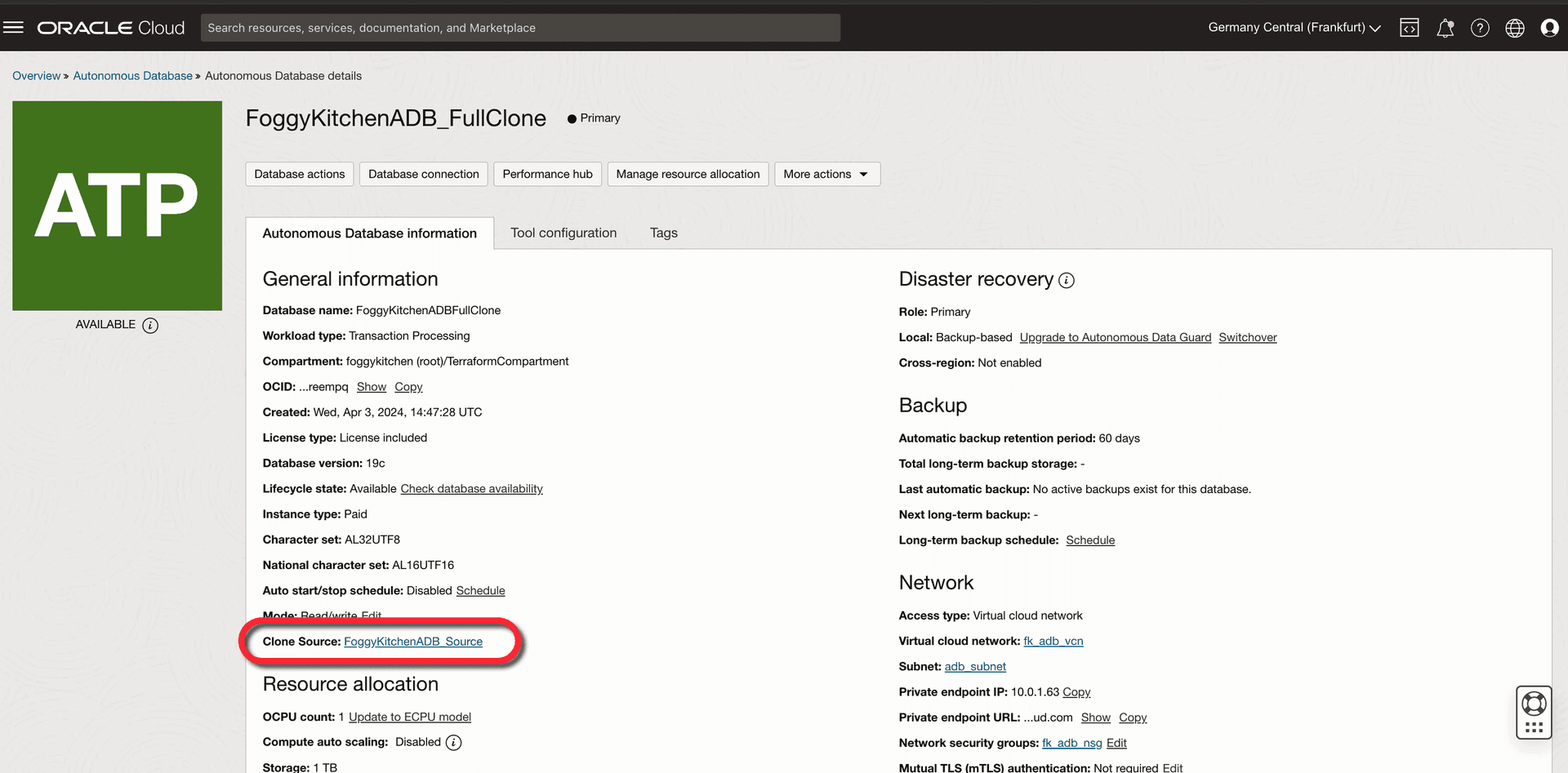
Figure 1. The OCI Console confirms the Autonomous Database Full Clone, showing the source database reference.
In the Autonomous Database details page, you’ll see the clone type marked as Full Clone, along with the reference to the source database.
This verification ensures that the clone has been created successfully and is now independent. From here, you can:
Scale OCPUs or storage independently
Manage security, backups, and networking separately
Use the clone for dev/test without touching production
Benefits of Automating OCI Autonomous Database Full Clone Terraform
Automating an OCI Autonomous Database Full Clone Terraform provides several important benefits that go far beyond manual cloning through the OCI Console:
Consistency – Every clone is created with the same configuration, networking, and security rules, reducing the risk of human error.
Repeatability – You can re-run your Terraform plan to create identical environments anytime, whether for dev, test, or staging.
Speed – Full Clones can be provisioned in minutes with a single
terraform apply, compared to the slower manual process.Integration – Fits naturally into CI/CD pipelines and Infrastructure as Code workflows, ensuring clones are tracked in version control.
Scalability – Enables teams to create multiple Full Clones for parallel testing or analytics scenarios without additional manual work.
In short, using OCI Autonomous Database Full Clone Terraform transforms what was once a tedious console task into a production-ready, automated process that aligns with modern cloud engineering practices.
Conclusion & Next Steps
With Terraform, creating an OCI Autonomous Database Full Clone becomes a one-command operation. This gives you consistent, production-ready clones that are easy to manage and integrate into your wider automation workflows. By using Terraform, creating an OCI Autonomous Database Full Clone becomes repeatable, automated, and production-ready. This approach ensures consistency and simplifies lifecycle management in Oracle Cloud.
🔹 Explore the complete example here: Lesson 8 – ADB with Full Clone (GitHub)
🔹 Want to master OCI ADB automation with Terraform? Check out my full course: OCI Autonomous Database Serverless with Terraform
When deploying any Autonomous Database clone, securing connectivity is just as important as the cloning method. For a step-by-step guide on provisioning an OCI Autonomous Database Private Endpoint with Terraform, check out this article.
🚀 Master OCI Autonomous Database Automation
Learn step-by-step how to deploy, manage, and clone Autonomous Databases in Oracle Cloud using Terraform. Includes real labs like Full Clone, Backup Restore, and Refreshable Clone.
👉 Explore the Full Course