OCI Autonomous Database Refreshable Clone Terraform is a powerful way to keep your cloned databases in sync with the source. Cloning Autonomous Databases in OCI is not new. In earlier posts, I described how to create one-time clones from backups or from an existing instance. But these copies are static — once created, they don’t stay in sync with the source.
With the introduction of Refreshable Clones, Oracle delivers a much more powerful option: a database clone that can be refreshed on demand to synchronize with changes in the primary Autonomous Database.
This is extremely valuable for:
✅ Development & testing environments that need production-like data
✅ Reporting or analytics databases that should always reflect the source
✅ Disaster recovery scenarios with minimal data lag
In this article, I’ll show you how to deploy a Refreshable Clone with Terraform, using my FoggyKitchen ADB module. This is the same code you can find in Lesson 9 of my OCI Autonomous Database course.
Why use OCI Autonomous Database Refreshable Clone Terraform?
Using OCI Autonomous Database Refreshable Clone Terraform provides clear advantages when working with production and non-production environments. Unlike one-time clones, refreshable clones can be kept in sync with the source, which means less manual work and fewer risks.
Here are the most common use cases:
✅ Development & testing – developers can always work on a clone updated with the latest production data.
✅ Reporting & analytics – BI systems get near real-time access to changes from the primary ADB without impacting its performance.
✅ Disaster recovery – a refreshable clone can serve as a standby system that can be synchronized on demand.
✅ Data consistency – ensures that environments are always aligned, avoiding mismatches between dev, test, and production.
In short, this approach improves reliability, reduces operational overhead, and makes Autonomous Database environments much easier to manage.
Step 1: Provision the Source ADB
We start by deploying the source Autonomous Database using my module:
module "oci-fk-adb-source" {
  source                                = "github.com/mlinxfeld/terraform-oci-fk-adb"
  adb_database_db_name                  = "FoggyKitchenADBSource"
  adb_database_display_name             = "FoggyKitchenADB_Source"
  adb_password                          = var.adb_password
  adb_database_db_workload              = "OLTP" # Autonomous Transaction Processing (ATP)
  adb_free_tier                         = false
  adb_database_cpu_core_count           = 1
  adb_database_data_storage_size_in_tbs = 1
  compartment_ocid                      = var.compartment_ocid
  use_existing_vcn                      = false
  adb_private_endpoint                  = true
}
This creates a standard ATP instance with its own networking (VCN, subnet, NSG).
Step 2: Provision the Refreshable Clone
Next, we add a refreshable clone of that ADB. Notice the key differences:
module "oci-fk-adb-refreshable-clone" {
  count                                 = var.adb_refreshable_clone_enabled ? 1 : 0
  source                                = "github.com/mlinxfeld/terraform-oci-fk-adb"
  adb_database_db_name                  = "FoggyKitchenADBRefClone"
  adb_database_display_name             = "FoggyKitchenADB_RefreshableClone"
  adb_database_db_workload              = "OLTP"
  adb_free_tier                         = false
  adb_database_cpu_core_count           = 1
  adb_database_data_storage_size_in_tbs = 1
  compartment_ocid                      = var.compartment_ocid
  # Networking inherited from the source DB
  use_existing_vcn                      = true
  vcn_id                                = module.oci-fk-adb-source.adb_database_network.adb_database_vcn_id[0]
  adb_subnet_id                         = module.oci-fk-adb-source.adb_database_network.adb_database_subnet_id[0]
  adb_nsg_id                            = module.oci-fk-adb-source.adb_database_network.adb_database_nsg[0]
  adb_private_endpoint                  = true
  adb_private_endpoint_label            = "fkadbperc"
  # Refreshable clone settings
  source_type                           = "CLONE_TO_REFRESHABLE"
  source_id                             = module.oci-fk-adb-source.adb_database.adb_database_id
  refreshable_mode                      = var.adb_refreshable_mode
}
The important parts are:
-
source_type = "CLONE_TO_REFRESHABLE" -
source_idpointing to the source ADB -
refreshable_modecontrolling how the synchronization works
This makes the clone refreshable on demand from its parent database.
Step 2.1: Verify in the OCI Console
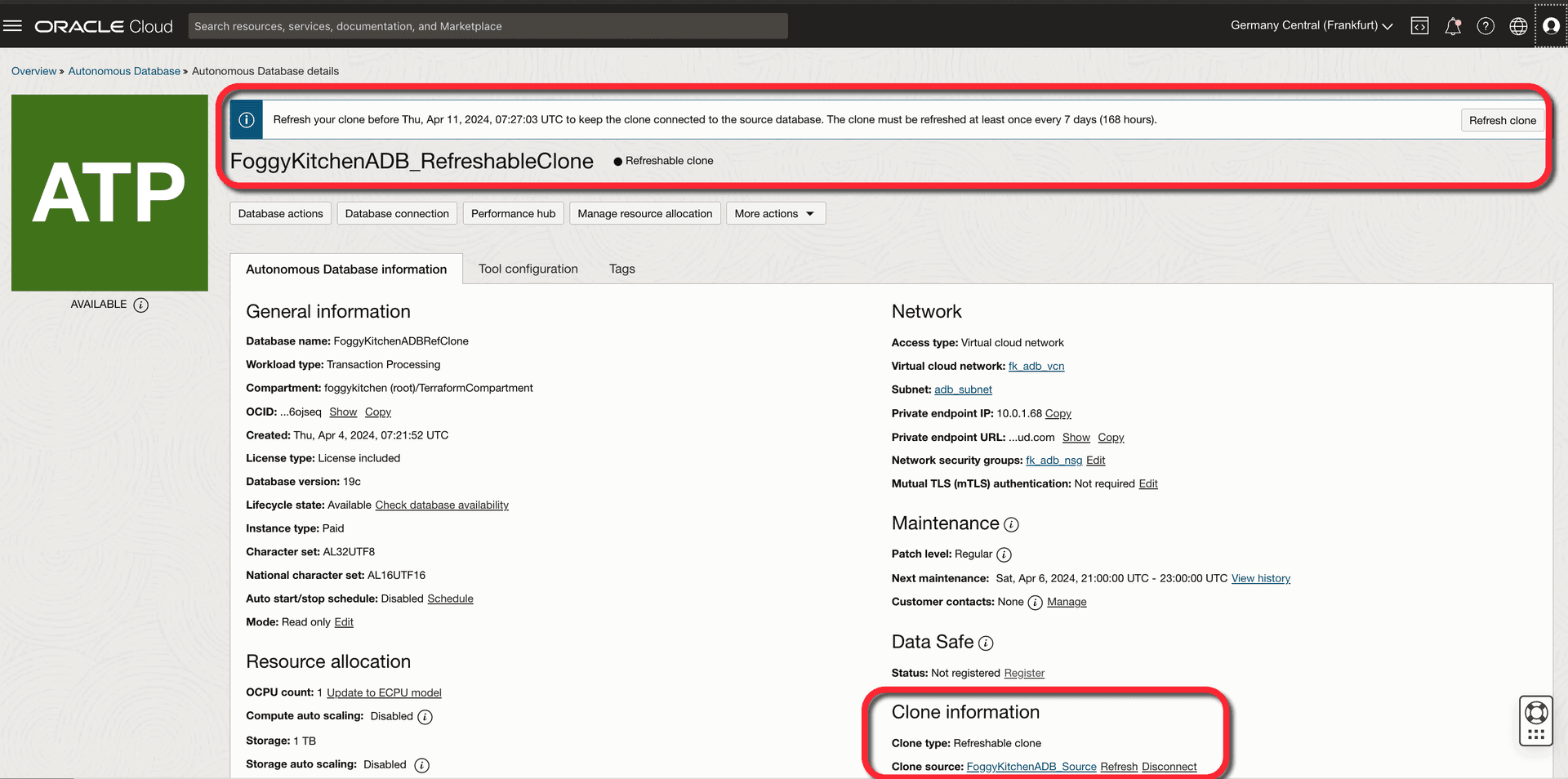
After provisioning, you can confirm that the clone is indeed refreshable directly in the OCI Console. with the source at all times.
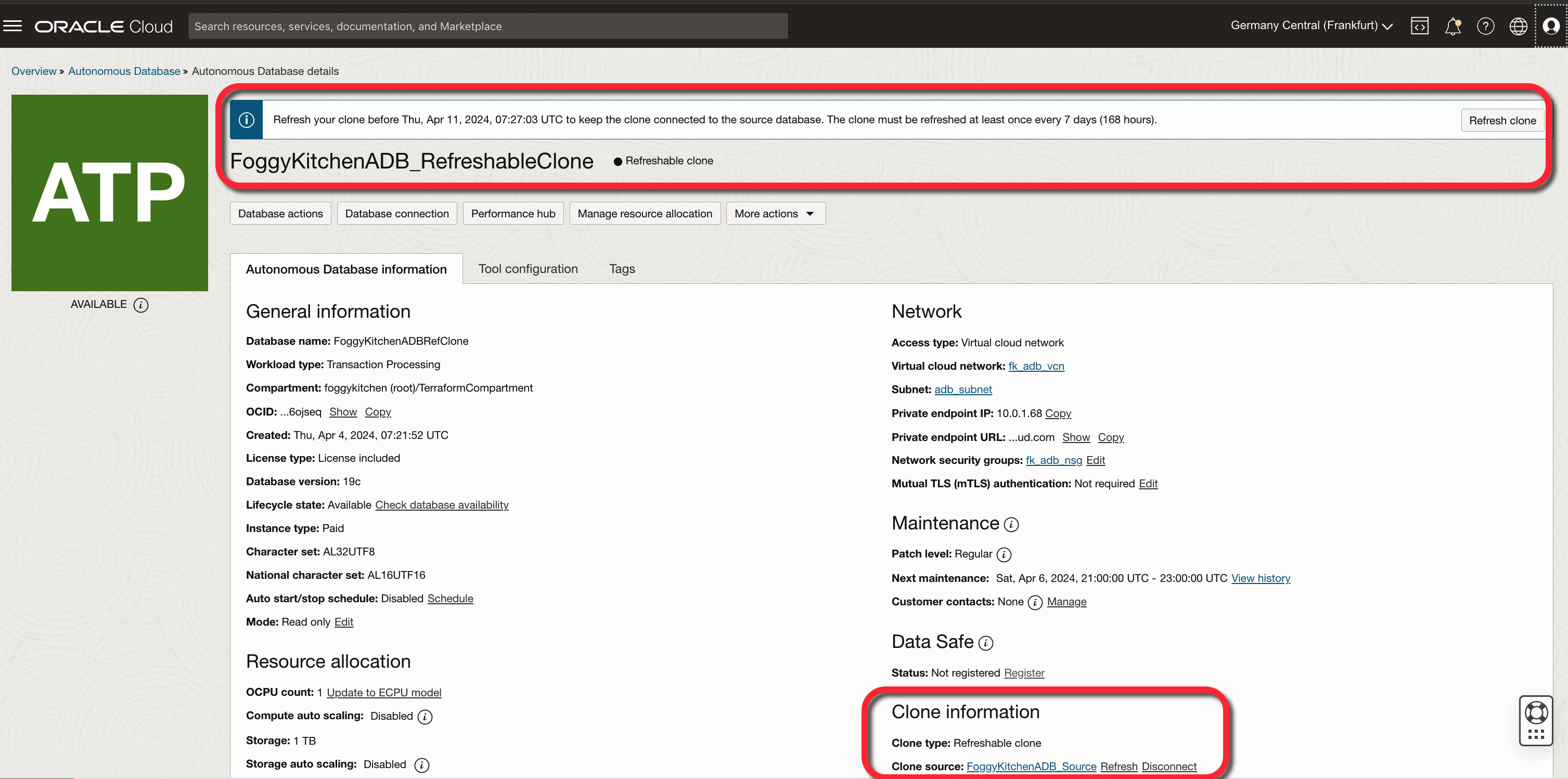
Figure 1. The OCI Console confirms this is an Autonomous Database Refreshable Clone: it shows the clone type, the source database, and a reminder that the clone must be refreshed at least once every 7 days.
Step 3: Refreshing the Clone
Once provisioned, the clone can be refreshed through:
The OCI Console
The OCI CLI (
oci db autonomous-database refresh)Or by reapplying with Terraform
This ensures the refreshable clone stays aligned with the primary ADB whenever you need it.
With OCI Autonomous Database Refreshable Clone Terraform, you can automate not only the initial provisioning but also the refresh process, making sure secondary databases stay aligned with the source at all times.
With OCI Autonomous Database Refreshable Clone Terraform, the refresh operation becomes part of your automated workflow.
Why this matters
Choosing OCI Autonomous Database Refreshable Clone Terraform is not only about convenience — it is about building a robust and future-proof database strategy in the cloud. Refreshable clones reduce the risks tied to manual refresh processes and provide a controlled, automated way to keep secondary environments aligned.
For teams running mission-critical systems, this means:
Faster adoption of continuous integration and continuous delivery (CI/CD) pipelines with real data.
More predictable testing and QA cycles, since environments stay close to production state.
A foundation for hybrid and multicloud scenarios, where refreshable clones can act as reliable replicas across different environments.
By integrating refreshable clones into your Terraform workflows, you ensure that every environment — from dev to DR — can be reproduced consistently, strengthening both agility and compliance.
Adopting OCI Autonomous Database Refreshable Clone Terraform as part of your workflow strengthens compliance, simplifies DevOps pipelines, and ensures consistent database environments across development, testing, and disaster recovery.
Full code & next steps
📂 Check out the complete example here:
Lesson 9 – ADB with Refreshable Clone (GitHub)
🎓 Want to master ADB automation with Terraform?
👉 Explore the full course: OCI Autonomous Database Serverless with Terraform (2024 Edition)
When deploying any Autonomous Database clone, securing connectivity is just as important as the cloning method. For a step-by-step guide on provisioning an OCI Autonomous Database Private Endpoint with Terraform, check out this article.
👉 From Refreshable Clones to Full ADB Automation
This lesson showed you how to deploy an OCI Autonomous Database Refreshable Clone with Terraform. In the full course, you’ll learn the entire lifecycle: creating source databases, configuring networking, private endpoints, security, and advanced automation scenarios.
Explore the Full Course