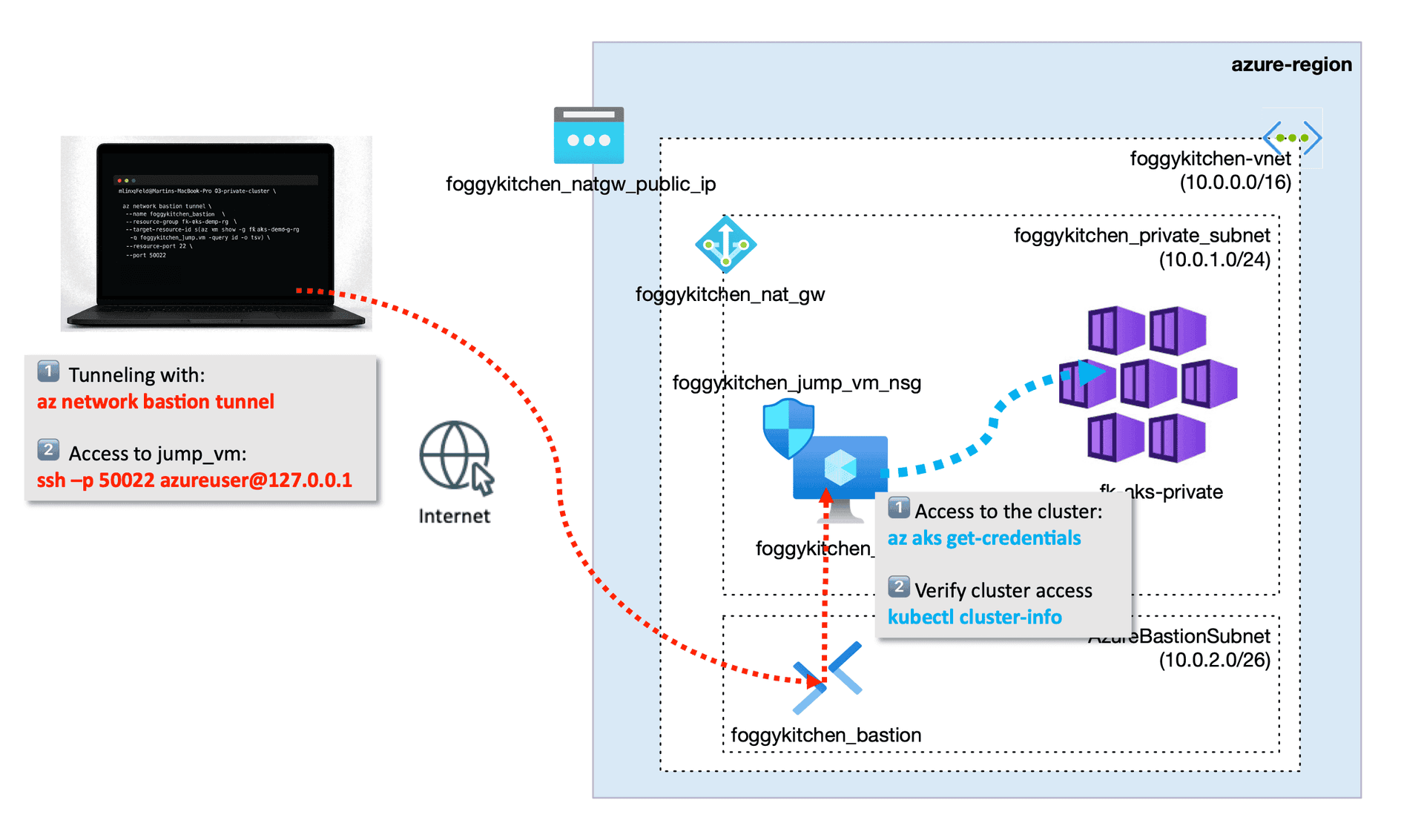
Deploying AKS in private mode is where Azure Bastion Terraform becomes essential. The public API endpoint disappears, your nodes sit deep inside a private subnet, and suddenly the big question is:
How do you get inside — safely — without punching holes in your network?
That’s exactly where Azure Bastion earns its keep.
It gives you a clean, controlled, Azure-native path to reach your cluster — without exposing a single public IP on your jump VM or worker nodes.
⭐ Why Azure Bastion Terraform matters when you go “private” with AKS
When you switch your AKS cluster into private mode, you remove the public API endpoint. Great for security — but it means:
No kubectl from your laptop
Nodes live in a private subnet with no public IPs
You still need Azure CLI access to get cluster credentials
Azure Bastion solves all of that in a simple, Azure-native way.
It gives you secure SSH access directly inside the VNet — without exposing anything publicly.
In my upcoming AKS training, Bastion is used as the controlled entry point to the cluster. The pattern is simple:
A dedicated
AzureBastionSubnetA managed Bastion host with a static public IP
Bastion tunnel → jump VM
Jump VM → private AKS API
That’s the core idea.
The full lesson covers the entire network flow, Terraform configuration, and a real tunneling demo.
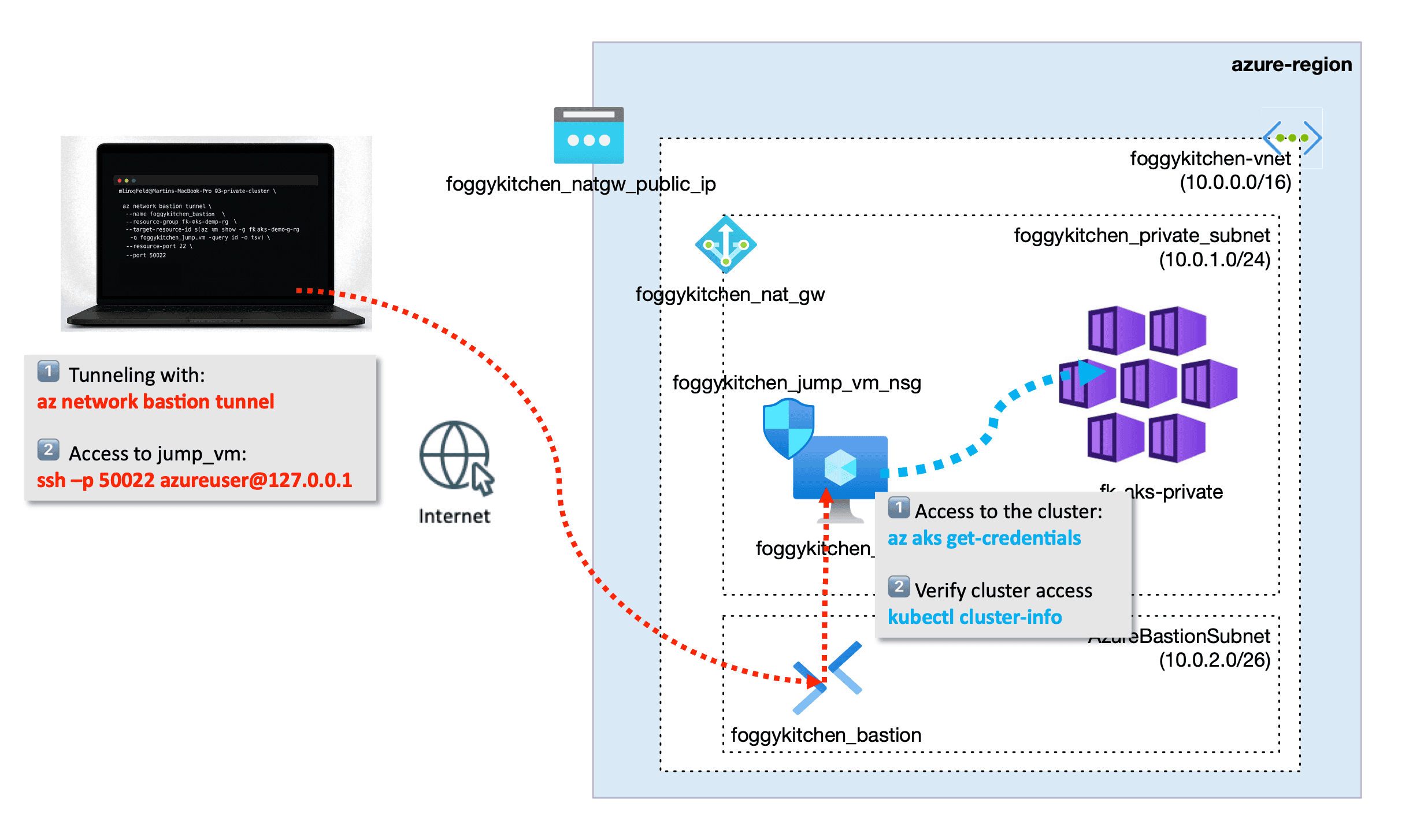
Figure 1. — Conceptual access flow for a private AKS cluster using Azure Bastion. Bastion provides a secure, managed entry point into the VNet, enabling SSH access to a jump VM and private connectivity to the AKS API server.
🧩 Terraformizing Azure Bastion (the mini-preview)
Here’s a tiny preview of the infrastructure you’ll see in the upcoming full AKS training:
resource "azurerm_subnet" "foggykitchen_bastion_subnet" {
  name                 = "AzureBastionSubnet"
  resource_group_name  = azurerm_resource_group.foggykitchen_rg.name
  virtual_network_name = azurerm_virtual_network.foggykitchen_vnet.name
  address_prefixes     = ["10.0.2.0/26"]
}
resource "azurerm_public_ip" "foggykitchen_bastion_public_ip" {
  name                = "foggykitchen_bastion_public_ip"
  sku                 = "Standard"
  allocation_method   = "Static"
}
And a fragment of the Bastion host definition:
resource "azurerm_bastion_host" "foggykitchen_bastion" {
  name                = "foggykitchen_bastion"
  resource_group_name = azurerm_resource_group.foggykitchen_rg.name
  ip_configuration {
    subnet_id            = azurerm_subnet.foggykitchen_bastion_subnet.id
    public_ip_address_id = azurerm_public_ip.foggykitchen_bastion_public_ip.id
  }
}
That’s it — just enough to see how Azure Bastion fits into the Terraform model.
In the full AKS lesson, you’ll see how this Bastion host becomes the entry point for:
SSH tunneling
Jump VM access
Private AKS authentication
az aks get-credentialsandkubectl cluster-infobehind a private endpoint
…all orchestrated automatically via the FoggyKitchen IaC module.
🎯 Want to see the full setup?
Here’s the preview architecture from the training module:
👉 https://github.com/foggykitchen/terraform-az-fk-aks/tree/main/training/03-private-cluster
This post covers the high-level concept. The full step-by-step walkthrough — with Terraform code review, AZ CLI workflow, and the live SSH tunnel demo is a part of the AKS Fundamentals with Terraform/OpenTofu .
🔄 Related Azure articles
Azure VNet with Terraform - A guided walkthrough of creating a clean virtual network topology in Azure, with subnets, address planning, and resource group structure — perfect if you want to understand how AKS fits inside larger VNet designs.
Azure Managed Disk Terraform - Deep dive into provisioning managed disks using Terraform, attaching them to compute, and understanding disk SKUs, redundancy options, and lifecycle behaviours.
Azure File Storage NFS Terraform - Hands-on example of NFS volumes on Azure Files — ideal for workloads that require shared storage, persistent volumes, or multi-node access patterns.
Azure PostgreSQL Terraform - A full Terraform deployment of Azure PostgreSQL Flexible Server, including networking, storage, HA settings, and private access configuration.
🌩 Multicloud perspective
If you work with OCI as well, here’s the matching article on OCI Bastion:
OCI Bastion Service Terraform - If you’re working in OCI as well, this article shows the equivalent secure-access pattern using OCI Bastion Service — including a managed SSH session, a private network flow, and a Terraform-first configuration for controlled entry into private OKE environments.
🚀 AKS Fundamentals with Terraform/OpenTofu Course
If you enjoyed this tutorial and want to build production-grade AKS environments step-by-step, check out my full hands-on course:
👉 Azure Kubernetes Service (AKS) with Terraform/OpenTofu — Hands-On Fundamentals
This post is just a teaser. The full hands-on lesson includes:
Complete network topology
Jump VM with Azure CLI + kubectl bootstrap
NAT Gateway
UDR dependencies
Private AKS provisioning
Bastion tunneling walkthrough
Master Private AKS Networking with Terraform/OpenTofu
Learn how to deploy secure, production-ready AKS clusters with private API endpoints, Bastion access, jump hosts, and fully automated Terraform workflows.
Includes real-world scenarios: private clusters, NAT Gateway, UDR routing, Azure CNI, ACR integration, autoscaling, and persistent storage.
Learn AKS with Terraform🔒 Lifetime • ⏱️ Self-paced • 🧪 Real labs