Introduction
When building Azure Kubernetes Service (AKS) clusters with Terraform or OpenTofu, networking isn’t just configuration — it’s architecture.
AKS supports two main network plugins: Kubenet and Azure CNI.
Your choice between them determines how pods receive IPs, how traffic is routed, and how your cluster integrates with existing VNets.
In this post, we’ll compare AKS Kubenet vs Azure CNI, using real Terraform examples from the AKS Fundamentals with Terraform/OpenTofu series.
Kubenet and Azure CNI – the basics
Kubenet
Lightweight, default network plugin for AKS.
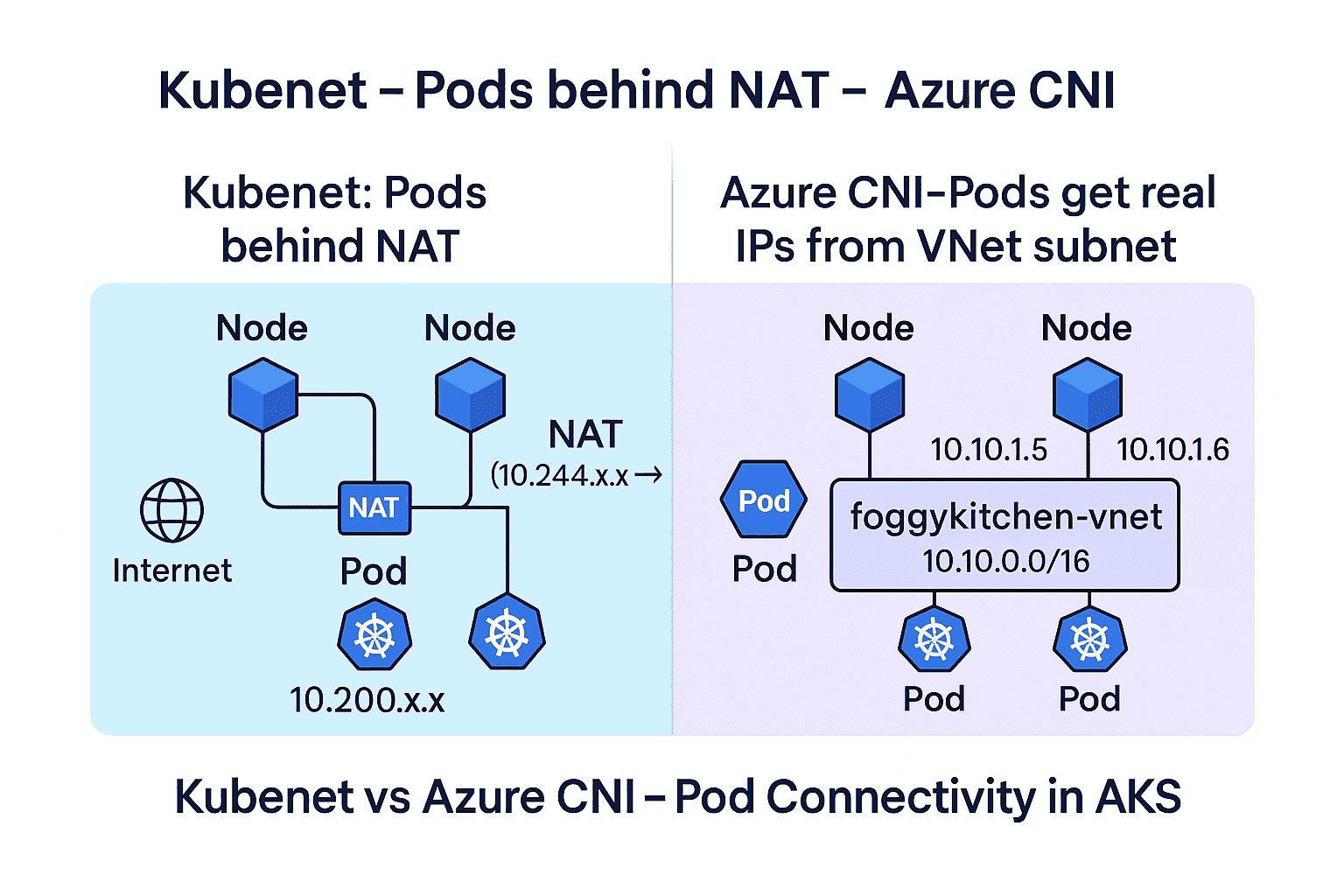
Pods get IPs from a separate, non-VNet address space and communicate with other resources through Source Network Address Translation (SNAT).
The translation happens at the node level, handled by the Linux
iptablessystem.✅ Pros: simple setup, minimal IP usage, quick to provision.
⚠️ Cons: limited VNet integration, no direct pod-level routing, scalability constrained by UDR limits (~400 routes).
Azure CNI
Each Pod receives an IP directly from the same subnet as the AKS nodes.
There’s no NAT translation — Pods become routable across the VNet just like any Azure VM.
✅ Pros: full VNet integration, hybrid and enterprise-ready, predictable routing.
⚠️ Cons: higher IP consumption and more subnet planning required.
Kubenet vs Azure CNI – technical comparison
Aspect
Kubenet
Azure CNI
Pod IP allocation
Separate CIDR (not part of VNet)
IPs from the same VNet subnet
Outbound traffic
Translated by SNAT on each node
Routed directly, no NAT
Pod visibility in VNet
Hidden behind node IP
Fully routable and discoverable
Integration with VNets
Limited
Full
Scalability limits
~400 UDR entries per route table
None (managed by Azure fabric)
Ideal for
Dev/Test, low-scale workloads
Production and hybrid setups
Complexity
Low
Moderate
This comparison highlights the architectural trade-offs between AKS Kubenet vs Azure CNI — simplicity vs full network integration.
How traffic flows under the hood
To understand the difference between Kubenet and Azure CNI, let’s look at how network packets move inside an AKS node.
Kubenet: SNAT performed by iptables
Pods receive addresses from a separate CIDR, such as
10.244.0.0/16, which is not part of the Azure VNet.Each node has a primary IP from the VNet (e.g.,
10.0.0.4).When a Pod sends traffic outside its node, iptables performs Source NAT (SNAT) — rewriting the packet’s source from
10.244.x.x→10.0.0.4.As a result, Pods are not directly routable in the VNet — only node IPs are visible.
Microsoft Docs (2025):
“Pods receive an IP address from a logically different address space to the Azure virtual network subnet of the nodes. Network address translation (NAT) is then configured so the pods can reach resources on the Azure virtual network.”
— AKS Kubenet documentation
Azure CNI: native VNet routing
Each Pod receives a real IP address from the subnet (e.g.,
10.10.1.5), the same range used by the AKS nodes.Traffic from Pods is routed directly within the Azure VNet fabric — no NAT, no iptables translation.
Every Pod becomes a first-class citizen of the Azure network, routable to and from any connected subnet or peered VNet.
Microsoft Docs (2025):
“Pods get full virtual network connectivity and can be directly reached via their private IP address from connected networks.”
— AKS Azure CNI documentation
Mechanism
Kubenet
Azure CNI
Pod IP space
Separate CIDR (10.244.0.0/16)
Shared with VNet (10.10.0.0/16)
Translation
iptables performs SNAT per node
None
Pod visibility
Hidden behind node IP
Fully routable
Performance
Slight NAT overhead
Direct routing
Scalability
Limited by UDRs
Scales with Azure network fabric
💡 In short:
Kubenet = iptables performs SNAT → pods hidden.
Azure CNI = native routing → pods visible and routable.
Terraform/OpenTofu examples
Both models can be deployed using the same FoggyKitchen AKS module: terraform-az-fk-aks
You can switch from Kubenet to Azure CNI by changing one parameter.
Kubenet example
Here is a snippet of the Terraform code where we deploy an AKS cluster using the kubenet network plugin.
This configuration creates a simple, public AKS cluster — ideal for testing Terraform automation before moving to production.
module "aks" {
  source              = "github.com/foggykitchen/terraform-az-fk-aks"
  name                = "fk-aks-demo"
  create_rg           = false
  location            = azurerm_resource_group.foggykitchen_rg.location
  resource_group_name = azurerm_resource_group.foggykitchen_rg.name
  create_networking = true
  network_plugin    = "kubenet"
}
After applying this configuration, the AKS cluster is deployed using Kubenet networking:
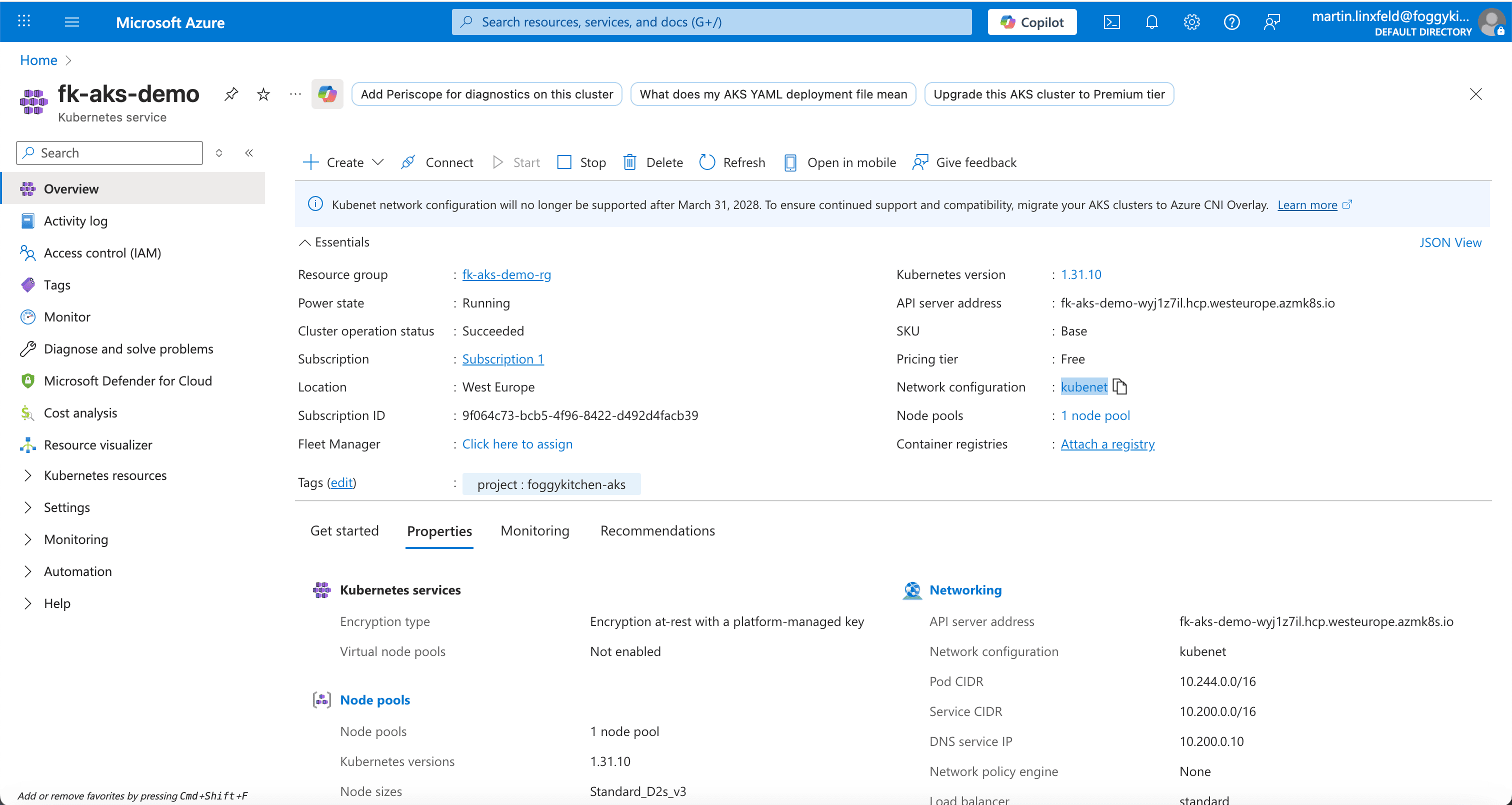
Figure 1. AKS cluster deployed with Kubenet networking (Terraform example).
Azure CNI example
Now, let’s switch to Azure CNI.
In this setup, Pods receive IPs directly from the VNet subnet, becoming fully routable in the Azure environment.
module "aks" {
  source              = "github.com/foggykitchen/terraform-az-fk-aks"
  name                = "fk-aks-cni"
  location            = azurerm_resource_group.foggykitchen_rg.location
  resource_group_name = azurerm_resource_group.foggykitchen_rg.name
  network_plugin = "azure"
  vnet_id        = azurerm_virtual_network.foggykitchen_vnet.id
  subnet_id      = azurerm_subnet.foggykitchen_public_subnet.id
  default_node_count   = 2
  default_node_vm_size = "Standard_D2s_v3"
}
In the Azure Portal, this deployment shows Azure CNI under “Network configuration”:
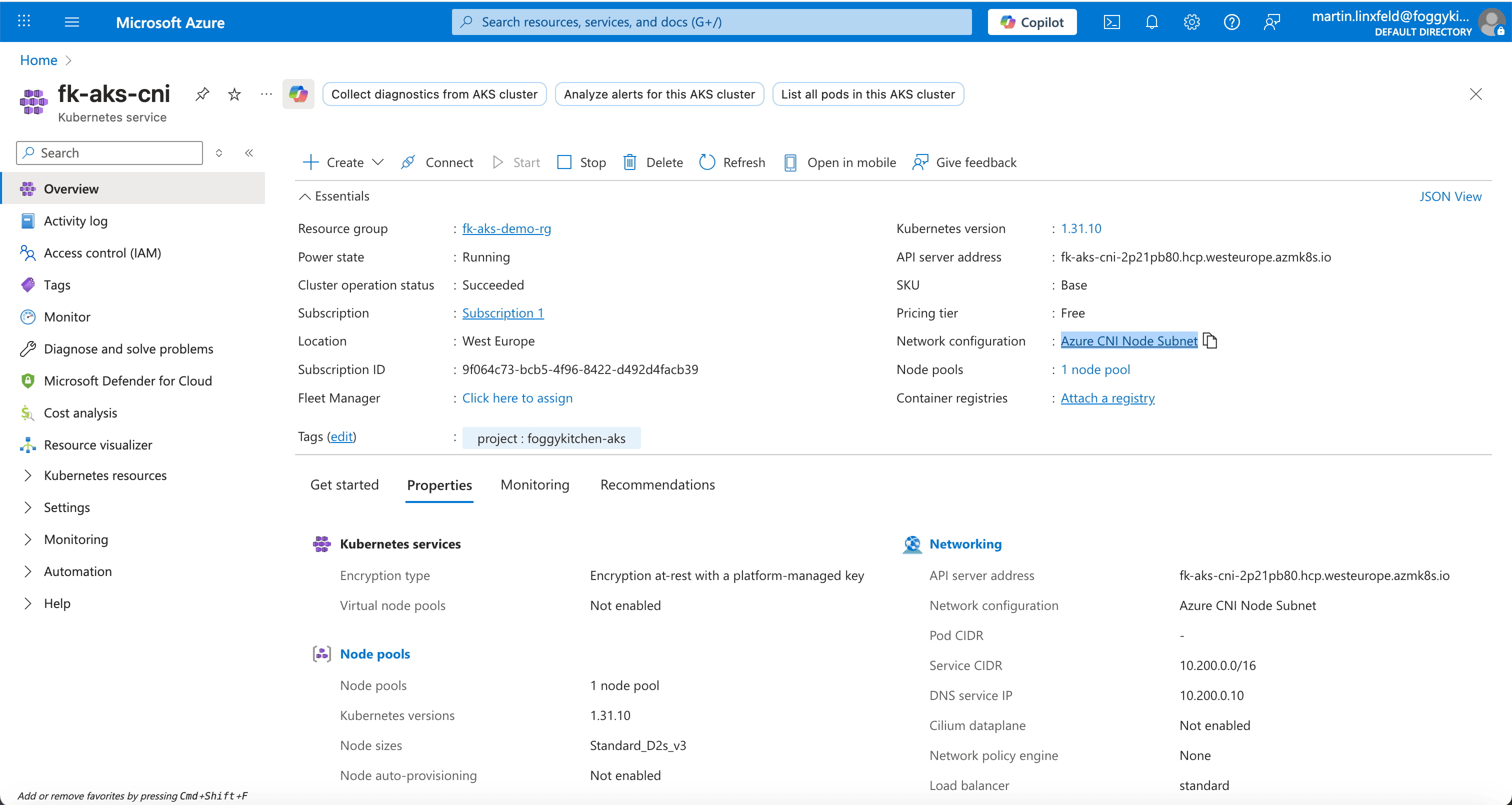
Figure 2. AKS cluster integrated with existing VNet using Azure CNI.
When to choose which
🟩 Use Kubenet if:
You’re building a lightweight, non-production AKS cluster.
You have limited IP space.
You just need a quick Terraform deployment to explore AKS.
🟦 Use Azure CNI if:
You’re deploying into an enterprise VNet (hub-and-spoke or peered).
You need direct routing between Pods and other Azure or on-prem resources.
You require observability, NSG control, or hybrid readiness.
📐 Design notes
Most comparisons between Kubenet and Azure CNI focus on features and configuration.
In reality, choosing a CNI defines a network contract that shapes how your entire AKS platform behaves — long before workloads, private endpoints, or hybrid connectivity are introduced.
If you want to understand why this decision matters architecturally, watch this short Design Notes video below.
https://youtu.be/f-dHF-zOeY4This design-level discussion complements the hands-on Terraform implementation described above.
Summary
Choosing between AKS Kubenet vs Azure CNI is not just about a Terraform variable — it’s a design choice that impacts performance, scalability, and hybrid connectivity.
By experimenting with both configurations using the FoggyKitchen AKS module, you’ll gain a deep, practical understanding of Kubernetes networking in Azure.
Read more about production AKS patterns with Terraform
🔗 AKS Log Analytics with Terraform — Azure Monitor without manual wiring
Learn how to enable Azure Monitor and Container Insights for AKS using Terraform/OpenTofu only. This guide shows how the FoggyKitchen AKS module provisions a Log Analytics Workspace and wires observability into your cluster — without any manual steps in the Azure Portal.
🔗 Creating an Additional AKS Node Pool with Terraform/OpenTofu
See how to split workloads across dedicated AKS node pools using labels, taints, and separate VM sizes. This article walks through isolating workloads, scaling node groups independently, and validating scheduling behavior in production-ready AKS clusters.
🔗 Persistent Volumes in AKS with Terraform — The Role of Azure Managed Disks
Understand how AKS provisions persistent storage using the Azure CSI driver and how to automate disk-backed PersistentVolumes with Terraform/OpenTofu. This is the baseline pattern for running stateful workloads on AKS in production.
🔗 Azure Bastion with Terraform — Secure Access to Private AKS Clusters
A hands-on guide to deploying Azure Bastion with Terraform — including the required subnets, NSG rules, and a practical workflow for connecting securely to private AKS nodes. If you're planning a private AKS cluster, this article explains the exact infrastructure you will need. It also includes screenshots and troubleshooting steps directly from the Azure Portal.
Ready to Go Deeper?
If you enjoyed this tutorial and want to build production-grade AKS environments step-by-step, check out my full hands-on course:
👉 Azure Kubernetes Service (AKS) with Terraform/OpenTofu — Hands-On Fundamentals
Learn Kubenet, Azure CNI, private clusters, ACR integration, autoscaling, persistent storage, and real Terraform automation.
🎓 Included in the course:
Full AKS networking (Kubenet & Azure CNI)
Private cluster architecture
ACR integration & automated image builds
Autoscaling & additional node pools
Persistent storage with Azure Disk & Azure Files
100% real Terraform/OpenTofu labs
Master AKS Networking with Terraform/OpenTofu
Learn how to deploy Azure Kubernetes Service clusters using Kubenet, Azure CNI, and private networking — fully automated with Terraform/OpenTofu.
Includes full AKS networking: Kubenet, Azure CNI, private clusters, ACR, autoscaling, and persistent storage.
Learn AKS with Terraform🔒 Lifetime • ⏱️ Self-paced • 🧪 Real labs