In the previous article, we built a dedicated user node pool in Azure Kubernetes Service (AKS). In this post, we take the next step and introduce the AKS autoscaler Terraform configuration that transforms a static cluster into an elastic one. That setup is already a huge improvement over running everything on the default system pool. But a fixed-size node pool has one unavoidable problem:
You always pay for the maximum number of nodes — even when the cluster is idle.
Autoscaling solves this.
In this article, we extend the previous setup and turn our user node pool into an autoscaling pool. Instead of a static replica of VM nodes, AKS dynamically grows or shrinks capacity based on workload demand.
This guide focuses on the concepts and architecture of node pool autoscaling.
The full Terraform workflow, live testing under load, and detailed provisioning steps are covered inside the course:
“Azure Kubernetes Service (AKS) with Terraform/OpenTofu — Hands-On Fundamentals (2025 Edition)”
1. Why Autoscaling Matters in AKS
A second node pool allows you to isolate workloads.
Autoscaling transforms that pool into an elastic capacity layer.
With autoscaling enabled:
The cluster adds new nodes when pods cannot be scheduled.
It removes nodes when capacity is no longer needed.
You define safe boundaries:
min_countandmax_count.AKS handles the rest using the Cluster Autoscaler.
This is one of the most important concepts in real AKS architectures — especially when traffic changes throughout the day, or when workloads scale based on replicas (HPA) or queued jobs.
2. Architecture Overview: Autoscaling a User Node Pool
Autoscaling changes the way your AKS cluster behaves at runtime. Instead of treating your user node pool as a fixed block of capacity, you promote it into an elastic compute group that automatically grows or shrinks based on actual workload pressure. This is especially powerful when your applications experience traffic spikes, run periodic jobs, or scale replicas dynamically through Kubernetes HPA.
With an autoscaling user pool, your cluster becomes far more efficient:
You keep the system pool stable and lightweight.
You let the user pool expand during high demand.
You reduce infrastructure cost during quiet periods.
And you avoid manual resizing or overprovisioning.
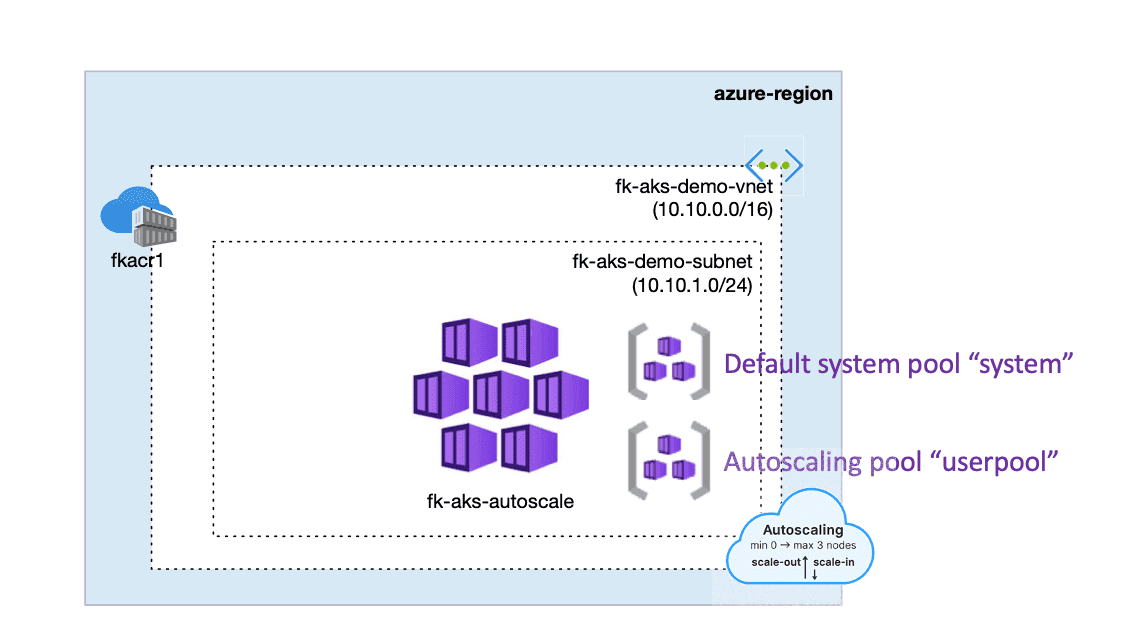
In the architecture on the right, we extend the model from the previous article by enabling autoscaling on the same dedicated user node pool, while preserving the clean isolation between system components and application workloads.
This architecture illustrates how the AKS autoscaler Terraform setup integrates with an isolated user node pool to enable elastic scaling.
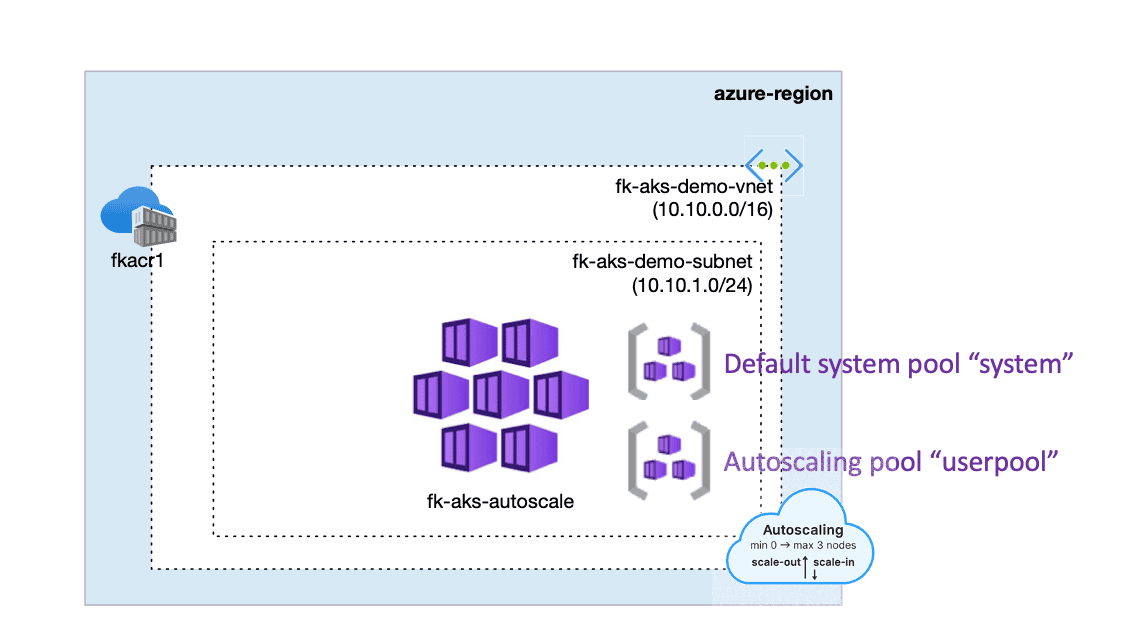
Figure 1. AKS cluster extended with an autoscaling user node pool.
3. AKS Autoscaler Terraform Setup (Terraform Definition)
Below is a simplified conceptual example. The code snippet below shows how the AKS autoscaler Terraform parameters are passed into the module using enable_auto_scaling, min_count, and max_count. The actual module used in the course is more advanced, but the idea is the same:
additional_node_pools = [
  {
    name                = "userpool"
    vm_size             = "Standard_D2s_v3"
    mode                = "User"
    enable_auto_scaling = true
    min_count           = 1
    max_count           = 5
    node_count          = null
    labels = {
      workload = "apps"
    }
    taints = [
      "dedicated=user:NoSchedule"
    ]
  }
]
Passing the Autoscaling Configuration Into the AKS Module
Just like in the previous article, we keep the infrastructure clean and modular by passing our node pool configuration directly into the AKS module. The only difference is that now the additional_node_pools variable contains autoscaling parameters such as enable_auto_scaling, min_count, and max_count.
module "aks" {
  source              = "github.com/mlinxfeld/terraform-az-fk-aks"
  name                = "fk-aks-autoscale"
  resource_group_name = azurerm_resource_group.foggykitchen_rg.name
  location            = azurerm_resource_group.foggykitchen_rg.location
  create_networking   = true
  network_plugin      = "kubenet"
  additional_node_pools = var.additional_node_pools
}
This invocation instructs Terraform to provision:
the base AKS cluster,
the default system pool,
and the autoscaling user pool defined in
var.additional_node_pools.
All autoscaling logic is declaratively controlled through this single variable structure, while the module takes care of creating the underlying Azure resources in a consistent and repeatable way.
4. How the AKS Cluster Autoscaler Responds to Workload Pressure
Once autoscaling is enabled, AKS continuously analyzes:
pending pods,
requested resources,
scheduling constraints (labels, taints, nodeSelector),
workload behavior over time.
Scale-up example
You increase deployment replicas from 2 → 20.
Pods attempt to schedule only on the tainted/labeled userpool.
Some pods go Pending because there is not enough capacity.
Cluster Autoscaler detects the pressure.
It adds new nodes (up to
max_count).Pending pods move to Running.
Scale-down example
The workload drops back to baseline.
Some nodes become underutilized.
Autoscaler drains and removes them (above
min_count).
The system pool remains untouched — it always stays at its fixed size.
5. Validating Autoscaling in Azure Portal
Once autoscaling is active, Azure Portal gives a clear overview of:
autoscale events,
scale-up triggers,
target vs ready nodes,
pool-level status.
This validation step is important when learning AKS — you can literally see nodes being created and removed as your workloads change.
In the course, we walk through a full demonstration of:
generating load,
forcing scale-up,
observing autoscaler logs,
watching nodes drain during scale-down.
When testing the AKS autoscaler Terraform configuration, Azure Portal becomes the easiest way to verify scale-up events.
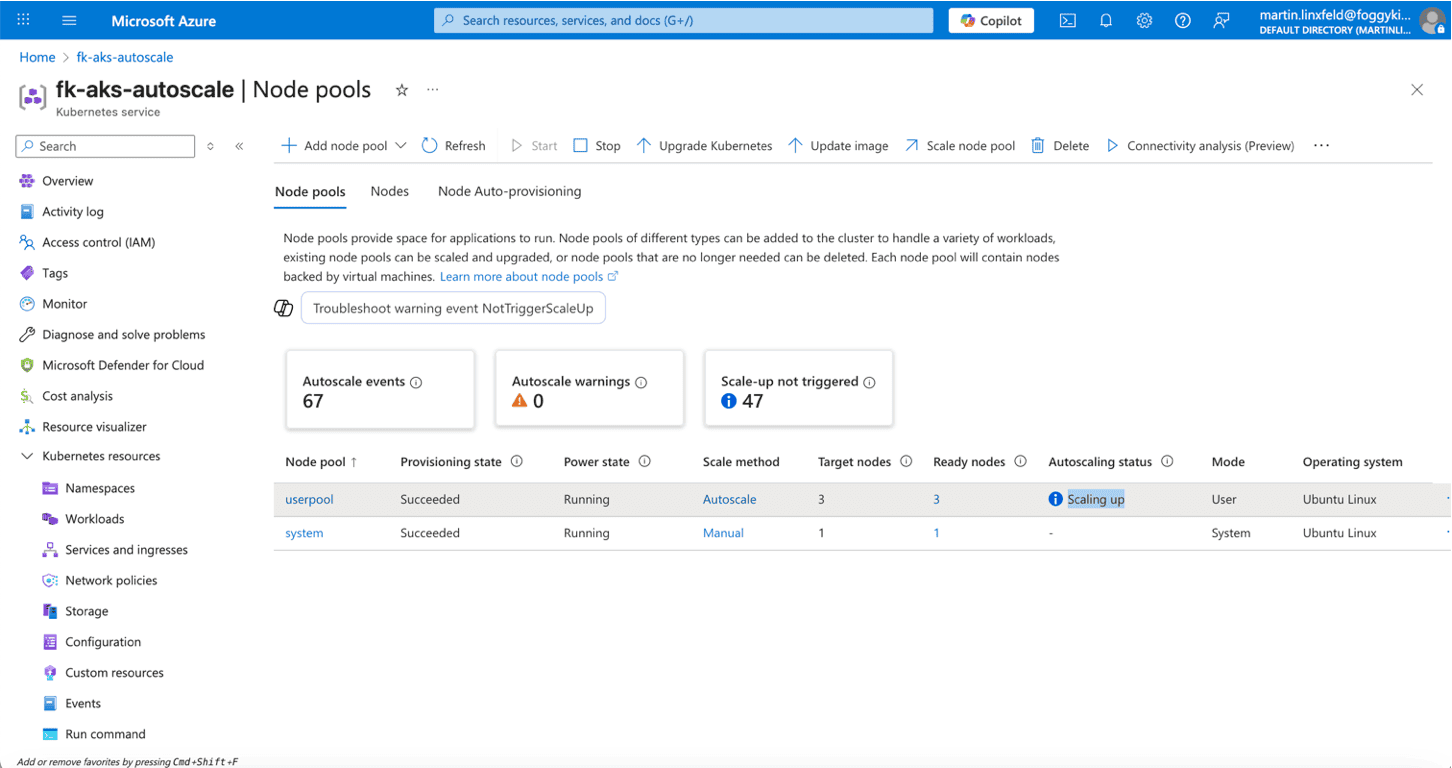
Figure 2. Autoscaling in progress — the userpool dynamically increases node count.
6. Practical Guidelines for Autoscaling Node Pools
Keep the system pool stable
System-critical components must not be scheduled on nodes that scale up and down.
Autoscale only the pools that host application workloads
This gives you predictable behavior and cost control.
Choose realistic min/max values
min_countshould reflect your smallest meaningful baseline.max_countshould reflect budget, capacity, and SLA expectations.
Combine autoscaling with HPA
HPA scales pods.
Cluster Autoscaler scales nodes.
Together, they create a complete elasticity strategy.
7. Where This Fits in the AKS Terraform Course
This article is designed as a teaser, not as a full tutorial.
Inside the complete course you will find:
A hands-on walkthrough of autoscaling scenarios,
Load-testing examples that force scale-up,
Terraform module internals for AKS node pools,
Real-time debugging and log inspection,
How autoscaling interacts with networking, storage, and RBAC,
How to avoid common misconfigurations that block the autoscaler.
If you’re building modern AKS environments, understanding autoscaling is essential — and this lesson is one of the most practical pieces of the entire Fundamentals course.
8. Recommended Reading — Earlier Parts of This AKS Terraform Series
To better understand how this autoscaler node pool fits into the bigger picture, here are the previous lessons:
🔗 Azure Bastion with Terraform
A fully automated, secure jump-host pattern for connecting to private AKS clusters.
🔗 AKS: Kubenet vs Azure CNI
A hands-on comparison of Pod IPs, routing models, and Terraform differences between Kubenet and Azure CNI.
🔗 Azure Container Registry with Terraform
Provision ACR, push images securely, and integrate it with AKS using managed identities.Together, these articles form a strong foundation for the full AKS + Terraform automation journey.
9. What’s Next?
With autoscaling in place, the next step is to explore:
persistent storage,
volume provisioning,
and production-ready storage classes in AKS.
This will be the topic of the next article in the AKS Terraform series.
Master AKS Autoscaling with Terraform/OpenTofu
Learn how to build elastic, production-ready node pools, test real scaling scenarios, and automate the entire AKS lifecycle the right way.
Go beyond this autoscaler preview: deep-dive into scaling strategies, HPA integration, node pool design, and full IaC automation inside the AKS Fundamentals course.
👉 Learn AKS with Terraform🔒 Lifetime • ⏱️ Self-paced • 🧪 Real labs