If you're exploring AKS persistent storage Terraform, one of the first questions you encounter is the same one developers have been asking for years:
“Where do we put the data?”
Containers are ephemeral. Pods restart. Nodes churn.
Yet your application needs logs, caches, indexes, uploads — anything that must survive lifecycle events.
In AKS, the most common answer is simple:
Use a PersistentVolumeClaim backed by an Azure Managed Disk.
This blog is a high-level introduction to how AKS provisions disks using the
disk.csi.azure.com driver — and how we automate the entire workflow using Terraform/OpenTofu in Lesson 8 of the AKS Terraform course.
1. Why Azure Managed Disks Fit Stateful Workloads in AKS
Managed Disks are the ideal choice when:
one pod needs exclusive, low-latency storage,
you want predictable IOPS and durability,
the workload behaves like a small database, queue, indexer or app server.
Their Kubernetes limitation is also their strength:
Azure Disks = ReadWriteOnce (RWO)
Only one pod mounts the disk at a time — perfect for single-instance workloads.
This is the opposite of the shared-filesystem pattern (RWX), which will be the topic of a separate blog.
2. Architecture at a Glance
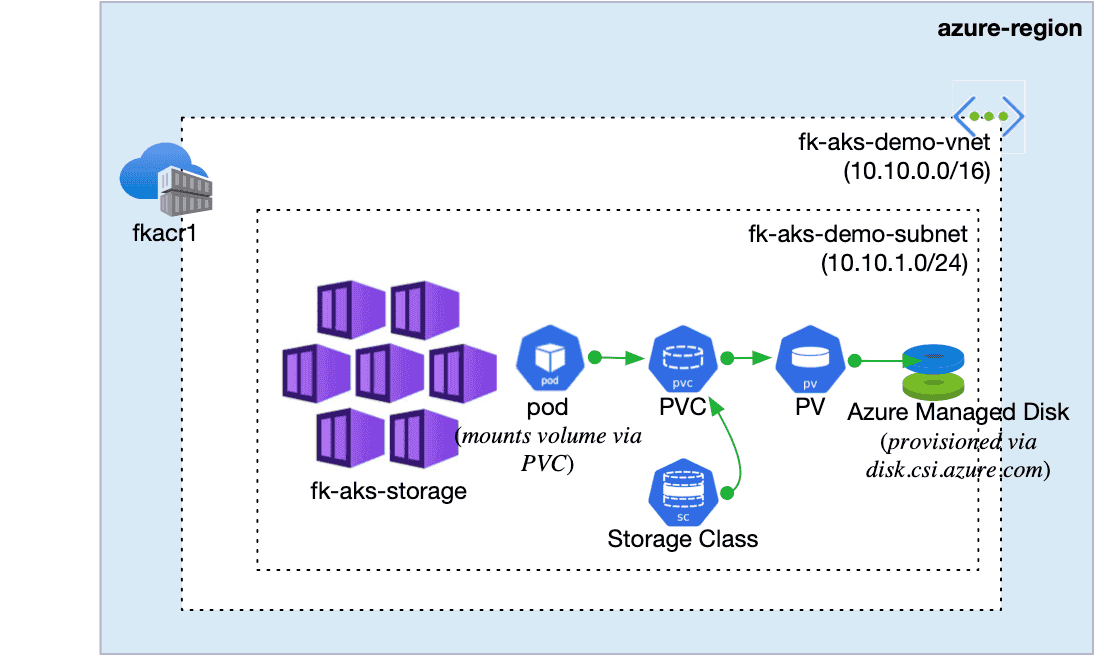
Here’s the essential idea behind AKS persistent storage:
When the pod starts:
the PVC requests storage from the cluster,
the StorageClass provisions a brand-new Azure Managed Disk using the CSI driver,
a PersistentVolume is created and bound to that PVC,
Kubernetes attaches the disk to the correct AKS node before the container is scheduled,
and finally, the pod mounts the disk exactly where the application expects it.
This flow happens automatically — no manual disk creation, no node-level configuration, and no custom scripting.
Once you understand this lifecycle, switching between Managed Disks, Files, or other storage backends in AKS becomes straightforward.
That’s the full mental model you need before diving into Terraform and Kubernetes manifests.
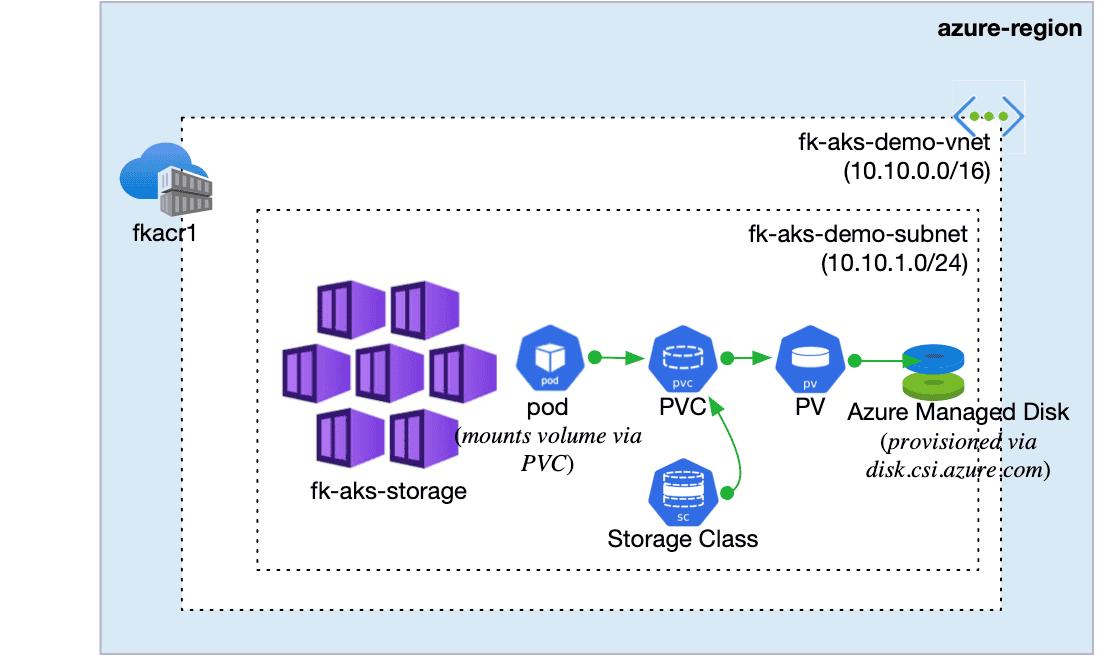
Figure 1. AKS storage workflow: a Pod uses a PVC, which triggers a StorageClass to provision a Managed Disk via the Azure Disk CSI driver.
3. Terraform’s Role in the Workflow
One of the nice things about AKS is:
👉 The Azure Disk CSI driver is already enabled.
You don’t configure it manually.
What Terraform does manage is:
the AKS cluster itself,
node pools (including zonal placement),
identity permissions AKS uses to create disks,
the Kubernetes manifests (StorageClass, PVC, Deployments).
Example of module invocation (only to show the structure):
module "aks" {
  source = "github.com/foggykitchen/terraform-az-fk-aks"
  name   = "fk-aks-disks"
  location = azurerm_resource_group.foggykitchen_rg.location
  additional_node_pools = var.additional_node_pools
}
The actual storage configuration is covered step-by-step in the course.
4. A Teaser of the Kubernetes Side (Just the Essentials)
StorageClass (conceptually):
provisioner: disk.csi.azure.com
parameters:
  skuName: Premium_LRS
PVC:
accessModes: [ReadWriteOnce]Deployment (fragment):
volumeMounts:
  - mountPath: /var/appdata
In the course, we build the full YAML set, apply it with Terraform,
and verify the resulting disk in Azure Portal.
Here, the goal is simply to understand what connects to what.
5. How to Validate the Disk Was Created
When AKS provisions a disk:
kubectl get pvc→ status changes to BoundAzure Portal → Disks → appears as
kubernetes-dynamic-pvc-*The disk attaches to the node where the pod runs
This gives you a complete audit trail from IaC → Kubernetes → Azure.
6. When Should You Use Azure Managed Disks?
Choose RWO disks when your workload:
needs fast block storage,
does not require shared access,
shouldn’t run in multiple replicas simultaneously.
Examples:
lightweight database instances
per-replica app state
queues / indexing / background workers
local caches that must persist across pod restarts
If your application needs multiple replicas sharing the same directory,
that’s the domain of Azure Files (RWX) — and the topic of the next blog.
7. Read more about production AKS patterns with Terraform
If you’re following the AKS Terraform series, here are the previous articles:
🔗 AKS Kubenet vs Azure CNI — Networking trade-offs explained with Terraform
Understand how AKS networking choices impact Pod IP addressing, traffic flow, scalability, and what you actually observe in Azure Monitor. This guide explains the real production trade-offs between Kubenet and Azure CNI using Terraform examples.
🔗 AKS + Azure Container Registry with Terraform — Secure image supply chain for production clusters
Learn how to provision Azure Container Registry and integrate it with AKS using Terraform/OpenTofu. This guide covers private image pulls, secure authentication, and the baseline container supply chain for production AKS environments.
🔗 Creating an Additional AKS Node Pool with Terraform/OpenTofu
See how to split workloads across dedicated AKS node pools using labels, taints, and separate VM sizes. This article walks through isolating workloads, scaling node groups independently, and validating scheduling behavior in production-ready AKS clusters.
🔗 Azure Bastion with Terraform — Secure Access to Private AKS Clusters
A hands-on guide to deploying Azure Bastion with Terraform — including the required subnets, NSG rules, and a practical workflow for connecting securely to private AKS nodes. If you're planning a private AKS cluster, this article explains the exact infrastructure you will need. It also includes screenshots and troubleshooting steps directly from the Azure Portal.
8. Read More about Azure Storage with Terraform
To prepare for this topic, you may want to revisit:
🔗 Azure Managed Disk with Terraform
A hands-on walkthrough of provisioning Azure Managed Disks directly with Terraform (outside AKS), including creation and VM attachment — useful to understand the underlying storage that AKS provisions automatically via the CSI driver.
🔗 Azure File Storage + NFS with Terraform
A Terraform-first approach to Azure Files and NFS, showing how shares, permissions, and private endpoints work before AKS abstracts them behind file.csi.azure.com and RWX PersistentVolumes.
9. What’s Next: Shared Filesystems for Multi-Replica Apps (RWX)
Azure Managed Disks solve the single-pod state problem.
But many real applications (nginx, WordPress, backend services) need:
shared uploads
shared configuration
shared logs
multiple pods mounting the same filesystem
This requires file.csi.azure.com and ReadWriteMany (RWX) storage.
That will be the next article — and the second part of Lesson 8.
⭐ Want the full implementation?
Everything shown here is just the conceptual layer.
The complete IaC workflow, real YAML files, Portal validation and edge cases
are all demonstrated in:
👉 AKS with Terraform/OpenTofu — Hands-On Fundamentals (2025 Edition)
Lesson 8: Persistent Storage
Master AKS Persistent Storage with Terraform/OpenTofu
Learn how to deploy production-grade volumes in AKS: PVCs, StorageClasses, real Managed Disk provisioning via the Azure Disk CSI driver, and end-to-end automation for stateful workloads.
👉 Learn AKS Storage with Terraform🔒 Lifetime • ⏱️ Self-paced • 🧪 Real labs