Azure NSG design patterns are not about opening ports — they are about defining security boundaries in your network architecture.
🔵 Azure NSG vs Firewall — What’s the Difference? (Terraform Example)
module "compute" {
  source = "github.com/foggykitchen/terraform-az-fk-compute"
  attach_nsg_to_nic = true
  nsg_id            = module.nsg.id
}
module "private_subnet_nsg" {
  source = "github.com/foggykitchen/terraform-az-fk-nsg"
  rules = [(...)]
  subnet_associations = {
    private_subnet = {
      subnet_id = module.vnet.subnet_ids["fk-subnet-private"]
    }
  }
}
⚠️ This example shows only the network security layer (NSG) in isolation.
It does NOT include centralized traffic control (Azure Firewall), routing, or full architecture context.
👉 Full working example:
🔗 View on GitHubNSG protects traffic at the resource level, while Azure Firewall controls traffic at the network boundary.
In real architectures:
- NSG protects individual resources
- Firewall controls traffic between networks and external systems
They are used together — not instead of each other.
👉 Full architecture (compute + networking + access patterns):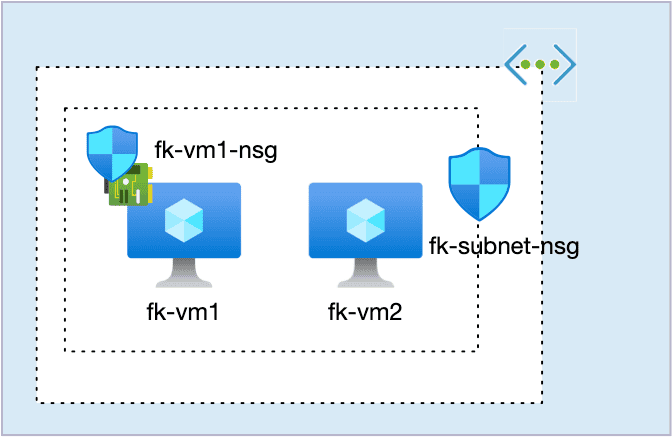
Over the years I’ve seen Azure Network Security Groups used everywhere — and understood almost nowhere.
Most discussions focus on rules: ports, protocols, priorities.
But in real-world Azure platforms, the more important question is:
Where does the security boundary live?
In Azure, NSGs can be attached at two fundamentally different scopes:
NIC-level (workload-scoped boundary)
Subnet-level (tier-scoped boundary)
These two choices lead to very different architectures, operational models, and failure modes.
Let’s walk through both — using real, runnable Terraform / OpenTofu examples.
NSG is not a firewall
An Azure NSG is not a firewall appliance.
It is a policy boundary evaluated by the Azure fabric at specific attachment points.
The same rule set means something very different when attached to:
a single VM NIC, versus
an entire subnet containing a tier of workloads.
If you don’t design this boundary explicitly, you don’t have a security model — you have a collection of ports.
Azure NSG design patterns: NIC-level security boundary
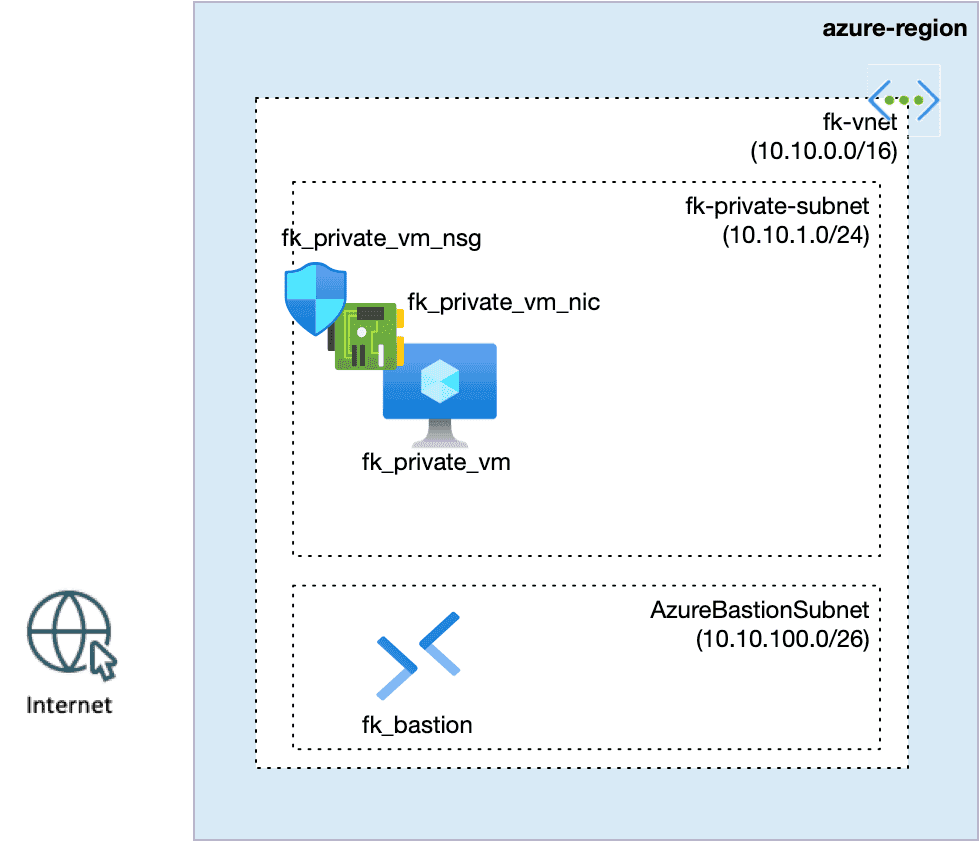
In the first design pattern, the NSG is attached directly to a single VM network interface.
This shifts the security boundary from a shared network zone (subnet) to an individual workload identity. The VM becomes its own trust boundary, independent of other workloads deployed into the same subnet.
This pattern is useful when:
the workload is security-sensitive or operationally critical,
access must be tightly scoped to a small set of operator endpoints,
the VM should not inherit broad subnet-level policies,
you want to avoid “accidental exposure” when additional workloads appear in the same subnet later.
Architecturally, this means that security intent is expressed at the workload level, not the network tier level. The NSG becomes part of the workload definition itself, similar to how security groups work in other clouds.
This pattern scales poorly for large backend tiers, but it is ideal for:
administrative VMs,
jump hosts,
bastion-adjacent management nodes,
or any workload that must remain isolated even inside a trusted subnet.
In Terraform, this looks like:
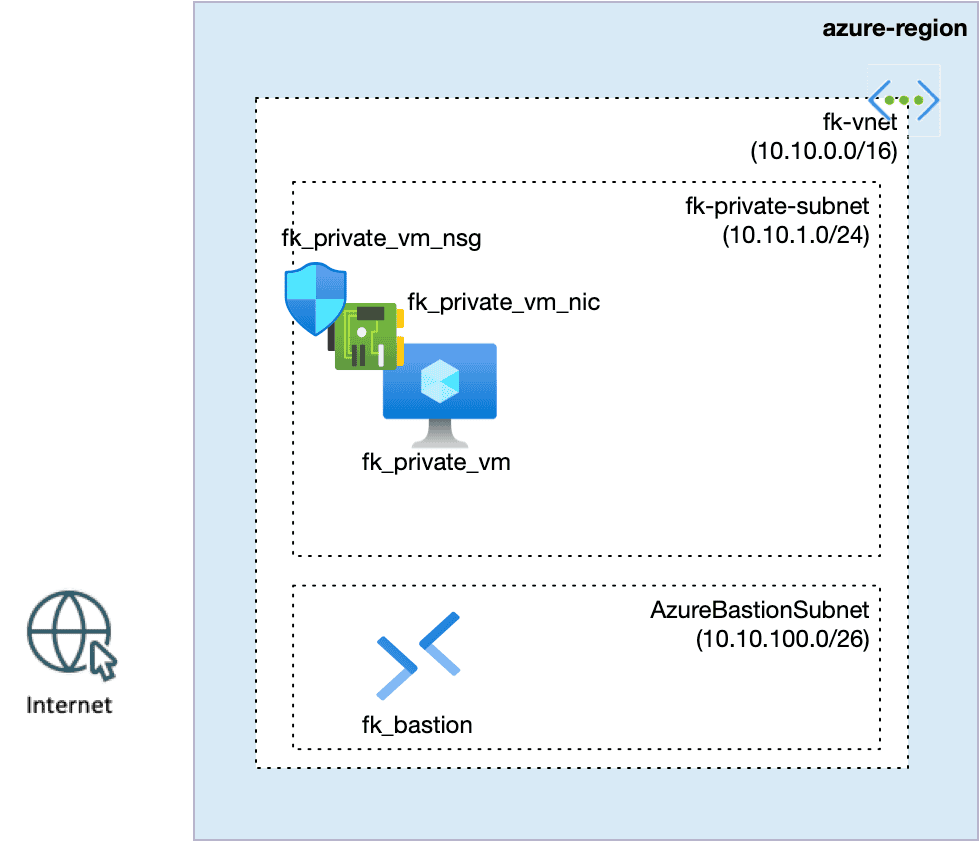
Figure 1. NIC-level security boundary for a private workload.
The NSG is attached to the VM’s network interface, defining a workload-scoped trust boundary independent of the subnet.
module "vm_nsg" {
  source = "git::https://github.com/foggykitchen/terraform-az-fk-nsg.git?ref=v1.0.0"
  name                = "fk-private-vm-nsg"
  location            = azurerm_resource_group.foggykitchen_rg.location
  resource_group_name = azurerm_resource_group.foggykitchen_rg.name
  rules = [
    {
      name                       = "allow-ssh-from-bastion"
      priority                   = 100
      direction                  = "Inbound"
      access                     = "Allow"
      protocol                   = "Tcp"
      source_port_range          = "*"
      destination_port_range     = "22"
      source_address_prefix      = "10.10.100.0/26" # AzureBastionSubnet
      destination_address_prefix = "*"
      description                = "Allow SSH only from Azure Bastion."
    }
  ]
}
# NIC-level attach is configured via compute module.
module "compute" {
  source = "github.com/foggykitchen/terraform-az-fk-compute"
  (...)
  attach_nsg_to_nic = true
  nsg_id            = module.vm_nsg.id
  (...)
}
Characteristics:
No public IP on the VM
Access via Azure Bastion
NSG rules scoped to a single workload
Tight blast radius
This is ideal for:
jump hosts
admin VMs
isolated management components
It does not scale well for backend tiers.
Azure NSG design patterns: Subnet-level security boundary
In the second design pattern, the NSG is attached to the subnet, not to individual NICs.
This defines a shared security boundary for an entire workload tier. Every virtual machine deployed into this subnet automatically inherits the same network policy, regardless of its individual role or sensitivity.
This pattern is useful when:
the subnet represents a homogeneous tier (e.g. backend pool, application tier),
workloads scale horizontally and are managed as a group,
security rules should evolve together with the tier, not per workload,
operational simplicity and consistency are more important than per-VM isolation.
Architecturally, the subnet becomes the trust boundary.
Security intent is expressed at the tier level, not at the workload identity level.
This pattern scales naturally with backend pools and VM Scale Sets, but it also introduces implicit trust:
any new VM deployed into the subnet automatically becomes part of the same security zone.
This makes subnet-level NSGs a powerful tool for:
backend service tiers,
load-balanced compute pools,
horizontally scaled workloads,
infrastructure that is managed as a unit rather than as individual pets.
In Terraform, this looks like:
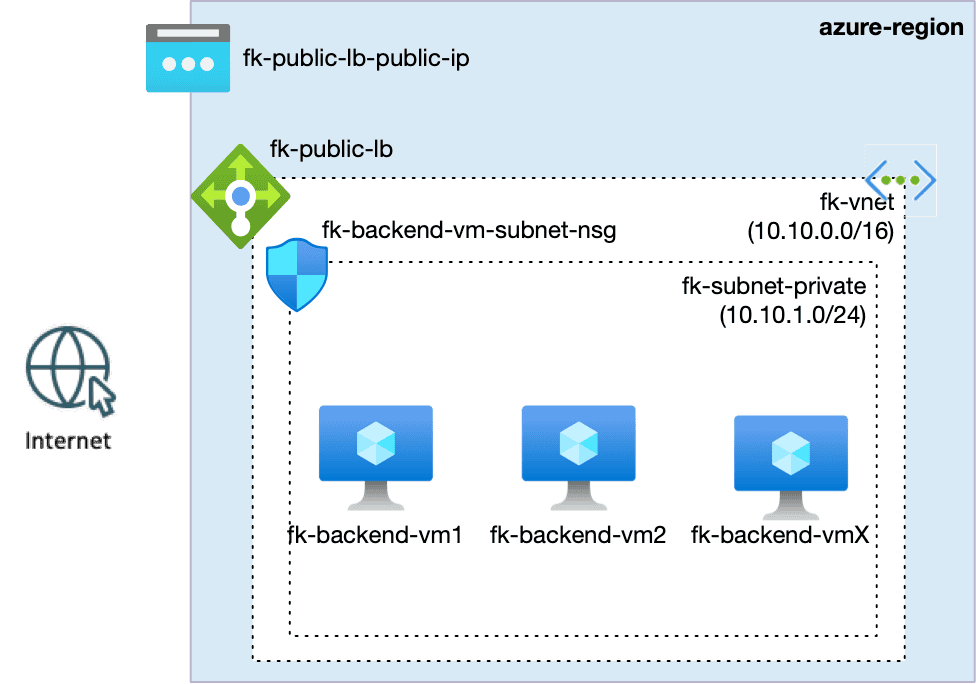
Figure 2. Tier-scoped security boundary using subnet-level NSG.
The subnet defines the trust zone for the entire backend tier, with security policy applied uniformly to all workloads.
module "private_subnet_nsg" {
  source = "git::https://github.com/foggykitchen/terraform-az-fk-nsg.git?ref=v1.0.0"
  name                = "fk-backend-subnet-nsg"
  location            = azurerm_resource_group.foggykitchen_rg.location
  resource_group_name = azurerm_resource_group.foggykitchen_rg.name
  rules = [
    {
      name                       = "allow-http-from-azure-lb"
      priority                   = 100
      direction                  = "Inbound"
      access                     = "Allow"
      protocol                   = "Tcp"
      source_port_range          = "*"
      destination_port_range     = "80"
      source_address_prefix      = "AzureLoadBalancer"
      destination_address_prefix = "*"
      description                = "Allow HTTP only from Azure Load Balancer."
    }
  ]
  subnet_associations = {
    private_subnet = {
      subnet_id = module.vnet.subnet_ids["fk-subnet-private"]
    }
  }
}
Characteristics:
No NSGs on NICs
One policy applied to all backend VMs
Natural fit for Load Balancer fan-in
Operationally scalable
This is how most backend tiers should be secured.
NIC-level vs Subnet-level NSG: architectural comparison
Dimention
NIC-level NSG
Subnet-level NSG
Scope
Single workload
Entire tier
Blast radius
Very small
Tier-wide
Operational model
Per-VM policy
Shared policy
Scaling behavior
Poor (rule duplication)
Good (inheritance)
Typical use cases
Jump hosts, admin VMs
Backend tiers, AKS nodes
Works well with Load Balancer
❌ Not naturally
✅ Natural fit
Risk of misconfiguration
Localized
Tier-wide
Architecture intent
Workload identity
Trust zone definition
This is not about which is better.
It’s about which boundary you are actually designing.
The common mistake: mixing scopes without intent
One of the most common anti-patterns:
NSG on subnet
NSG on NIC
No clear ownership of which boundary is authoritative
This leads to:
duplicated rules
debugging nightmares
security rules that no one fully understands
If you use both scopes, it should be because you intentionally designed two security layers — not because “the tutorial had both”.
Network context
In Azure architectures, NSG boundaries rarely exist on their own — they live inside a deliberately designed virtual network.
If you want to see how subnet boundaries are defined first, see:
👉 Azure VNet Terraform Module – Explained
Once the network contract exists, NSG rules can express security intent at either NIC or subnet scope.
Terraform as architecture, not YAML generator
Infrastructure as Code is not about automating clicks.
It is about making architectural intent explicit.
In both examples above:
the NSG attachment scope is visible in code,
the security boundary is part of the design,
not an afterthought.
If you want runnable references for both patterns, the examples are available in:
Example 01: NIC-level private access
Example 02: Subnet-level backend tier with Load Balancer
These are deliberately small, clean building blocks — not full platforms.
👉 See the full Azure infrastructure with Terraform architecture model: Azure Infrastructure with Terraform – Architecture Model
Final thought
Azure NSGs don’t secure ports. They define where your trust boundaries live.
If you can’t clearly explain why an NSG is attached at a specific scope (NIC vs subnet), you don’t have a security model — you have a rule collection.
These decisions become even more critical when you move beyond isolated resources
and start designing full Azure platforms.
👉 Networking is not just connectivity. It is the foundation of how your system is structured, secured, and evolved.
🚀 If you want to see how these patterns fit into a complete Azure architecture — built step by step with Terraform/OpenTofu:
➡️ Explore the Azure Fundamentals course:
https://foggykitchen.com/courses/azure-fundamentals-terraform-course/
From NSG Design Patterns to Real Azure Architecture
These NSG boundary patterns define how real Azure platforms are structured, secured, and evolved — across networking, compute, storage, and private connectivity.
👉 Build Azure with Terraform / OpenTofu (Hands-On)