
Introduction
Azure Firewall Terraform is often introduced as a simple security component, but in real Azure architectures it plays a much deeper role. Most Azure environments eventually reach a point where everything appears to work.
Virtual networks are deployed. Subnets are separated. Network Security Groups are configured. Virtual machines can access the Internet.
At that stage, it is very easy to assume that the network is complete. In reality, this is where the real problem begins. Connectivity is already solved. What is still missing is control.
In this post, we introduce Azure Firewall as the first step towards controlled outbound traffic using Terraform/OpenTofu and a deliberately simple architecture.
What This Example Really Shows
This example demonstrates a complete outbound traffic flow inside a single Virtual Network:
- a workload virtual machine placed in a dedicated subnet
- a route table redirecting all outbound traffic
- Azure Firewall acting as a centralized inspection point
- basic firewall rules enabling DNS and web access
There are no spokes and no peering. This is not a production architecture. This is the smallest setup where Azure Firewall actually becomes part of the data path.
🏗️ Azure Firewall Terraform Architecture Overview
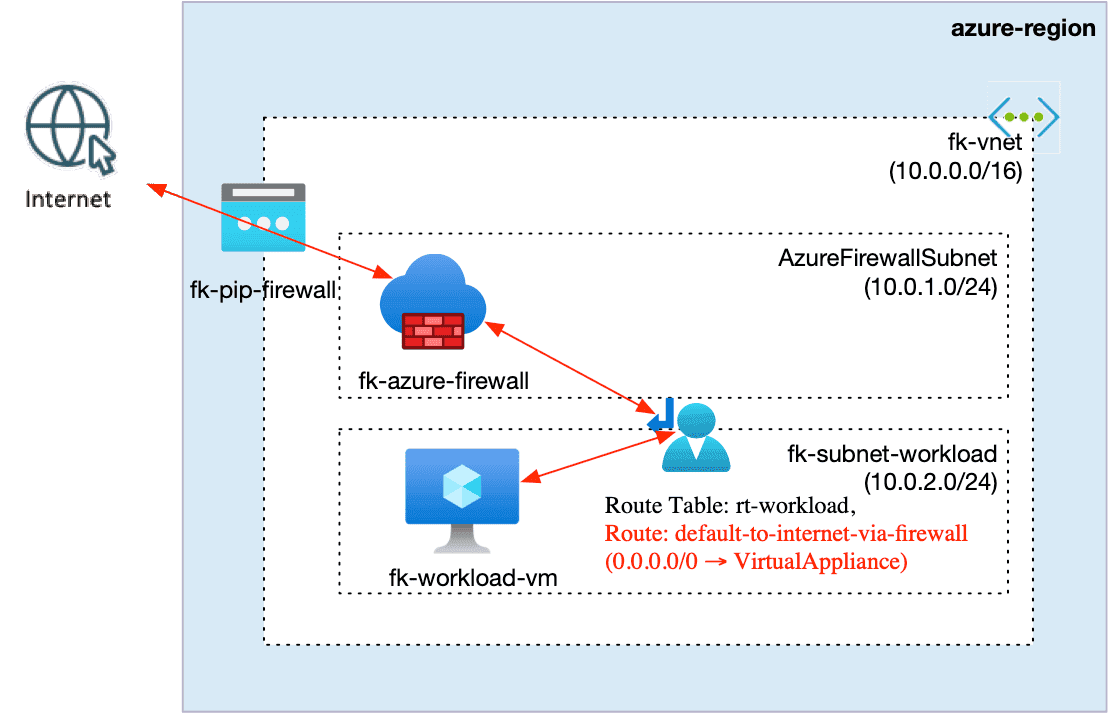
This diagram shows the simplest possible Azure Firewall deployment where traffic is not only allowed, but explicitly controlled.
A workload virtual machine is deployed in a dedicated subnet and does not have direct Internet access.
Instead, a route table forces all outbound traffic (0.0.0.0/0) to the private IP address of Azure Firewall using the VirtualAppliance next hop.
As a result:
- all outbound traffic from the workload must pass through Azure Firewall
- the firewall becomes the single egress point
- traffic is inspected before leaving the Virtual Network
- the public IP observed externally is the firewall public IP, not the VM
This design introduces a critical architectural shift:
👉 outbound connectivity is no longer implicit — it is enforced and controllable
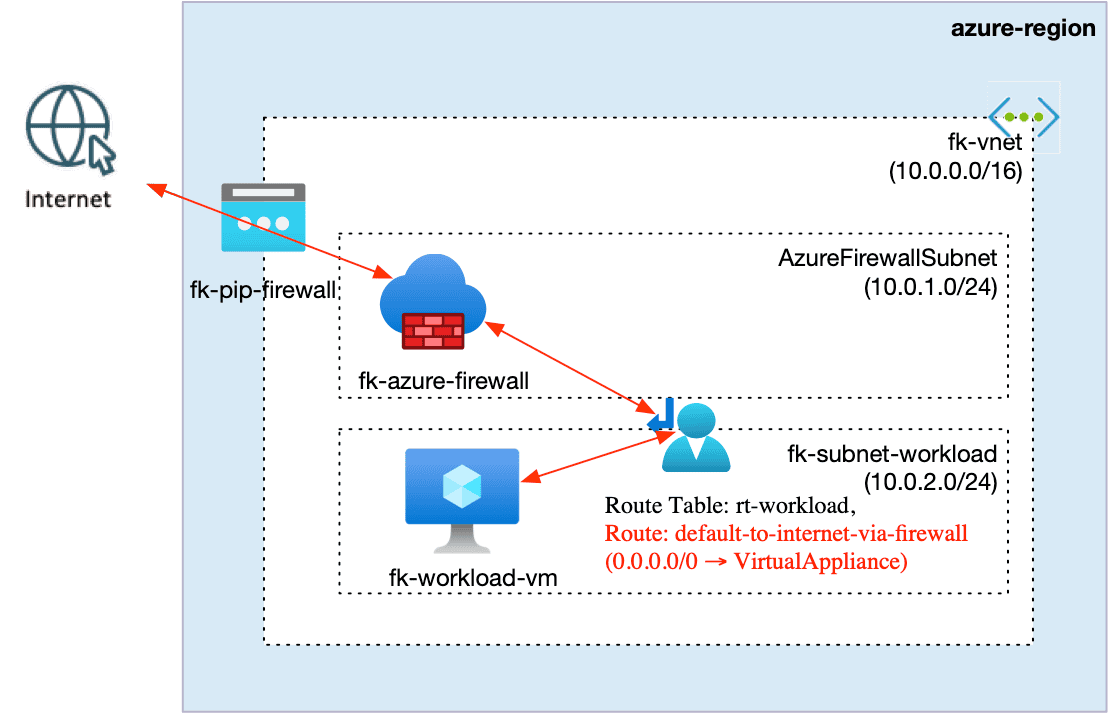
Figure 1. Enforcing outbound traffic through Azure Firewall using UDR
🧩 Module Composition
This example is composed using FoggyKitchen Terraform/OpenTofu modules.
Each module represents a separate concern in the architecture.
Modules Used
terraform-az-fk-vnet
Defines the Virtual Network and both subnetsterraform-az-fk-public-ip
Creates the public IP for Azure Firewallterraform-az-fk-firewall
Deploys Azure Firewall and rule collectionsterraform-az-fk-compute
Provisions the workload VMterraform-az-fk-routing
Defines routing and associates the route table
How Modules Create Architecture
The modules themselves are independent.
The architecture emerges from how they are connected.
At a high level:
- the firewall module provides a private IP
- the routing module uses that IP as the next hop
- the workload subnet is associated with that route
This creates a deterministic flow:
workload → routing → firewall → internet
Example: Firewall Module (Structure)
module "firewall" {
  source = "git::https://github.com/foggykitchen/terraform-az-fk-firewall.git"
  name                = "fk-azure-firewall"
  firewall_subnet_id  = module.vnet.firewall_subnet_id
  public_ip_id        = module.public_ip.id
  # rule collections omitted
}
Example: Routing Integration (Concept Only)
module "routing" {
  source = "git::https://github.com/foggykitchen/terraform-az-fk-routing.git"
   route_tables = {
    rt-workload = {
      routes = [
        {
          name           = "default-to-internet-via-firewall"
          address_prefix = "0.0.0.0/0"
          next_hop_type  = "VirtualAppliance"
          next_hop_ip    = module.firewall.firewall_private_ip
        }
      ]
    }
  }
}
👉 Notice that the routing module depends on the firewall output, but the full wiring is intentionally abstracted.
🔐 Rule Design
The firewall configuration is intentionally simple.
It allows:
- outbound DNS traffic
- outbound HTTP and HTTPS traffic
Example structure:
network_rule_collections = [
    {
      name     = "allow-dns"
      priority = 100
      action   = "Allow"
      rules = [
        {
          name                  = "allow-dns-outbound"
          protocols             = ["UDP", "TCP"]
          source_addresses      = ["10.0.0.0/16"]
          destination_addresses = ["8.8.8.8", "1.1.1.1"]
          destination_ports     = ["53"]
        }
      ]
    }
  ]
This is enough to:
- validate the architecture
- confirm traffic inspection
- demonstrate control
⚠️ Important
The snippets above illustrate the structure of the configuration. They are not a complete deployment.
The full working setup, including module wiring, routing dependencies and validation flow, is covered step by step in the course.
What This Example Validates
After deployment, you should be able to confirm that:
- the workload subnet routes traffic to Azure Firewall
- outbound connectivity works
- the observed public IP matches the firewall public IP
This proves that traffic is no longer leaving the network directly.
🔥 What This Example Does NOT Solve
This example introduces a control point, but it does not yet represent a real architecture.
It does not cover:
- hub-and-spoke topology
- multi-VNet routing
- centralized firewall patterns
- forced tunneling
- DNS and private endpoints
These are the areas where Azure Firewall becomes a real architectural component.
🧠 From Basic Firewall to Real Architecture
In real environments, this pattern evolves into:
- hub-and-spoke design
- centralized firewall in a hub VNet
- multiple spoke VNets
- enforced traffic inspection across environments
At that point, the firewall becomes the core of network control.
Conclusion
This example introduces a critical shift. It moves from connectivity to control.
Azure Firewall is not just deployed. It is placed into the traffic path and becomes enforceable.
👉 What’s Next
If you want to understand the Azure baseline first:
👉 Azure Fundamentals with Terraform/OpenTofu
If you want to build real network control with hub-and-spoke topology, UDRs, Private Endpoints, Private DNS, RBAC, and Azure Firewall:
👉 Azure Advanced Networking with Terraform/OpenTofu
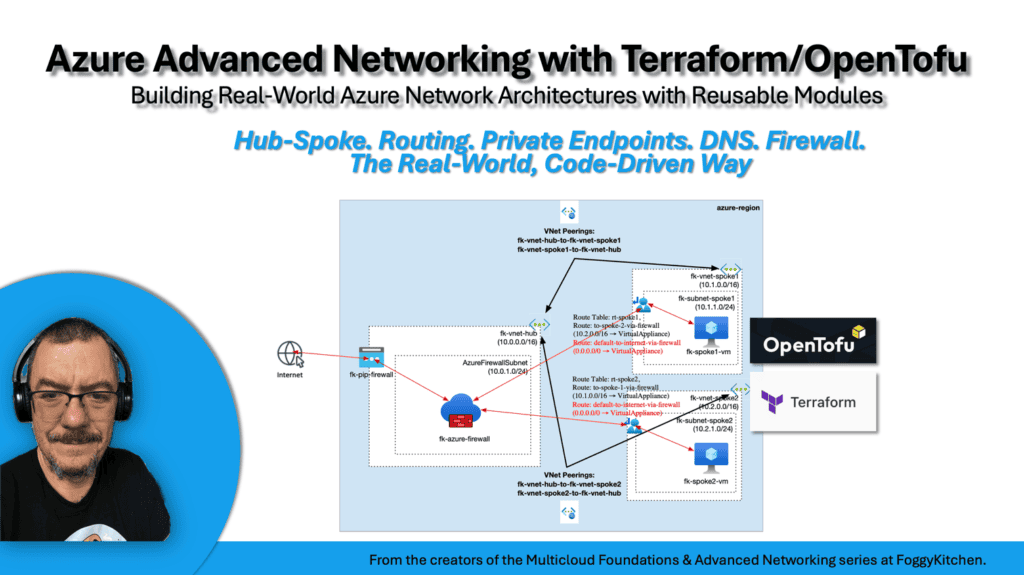
Build Azure Advanced Networking the Real-World Way
You’ve seen how Azure Firewall can introduce controlled outbound traffic in Azure. Now go deeper and build the full architecture: hub-and-spoke networking, User Defined Routes, Private Endpoints, Private DNS, RBAC, and centralized inspection with Azure Firewall — all using Terraform and OpenTofu.
👉 Start Azure Advanced Networking


