
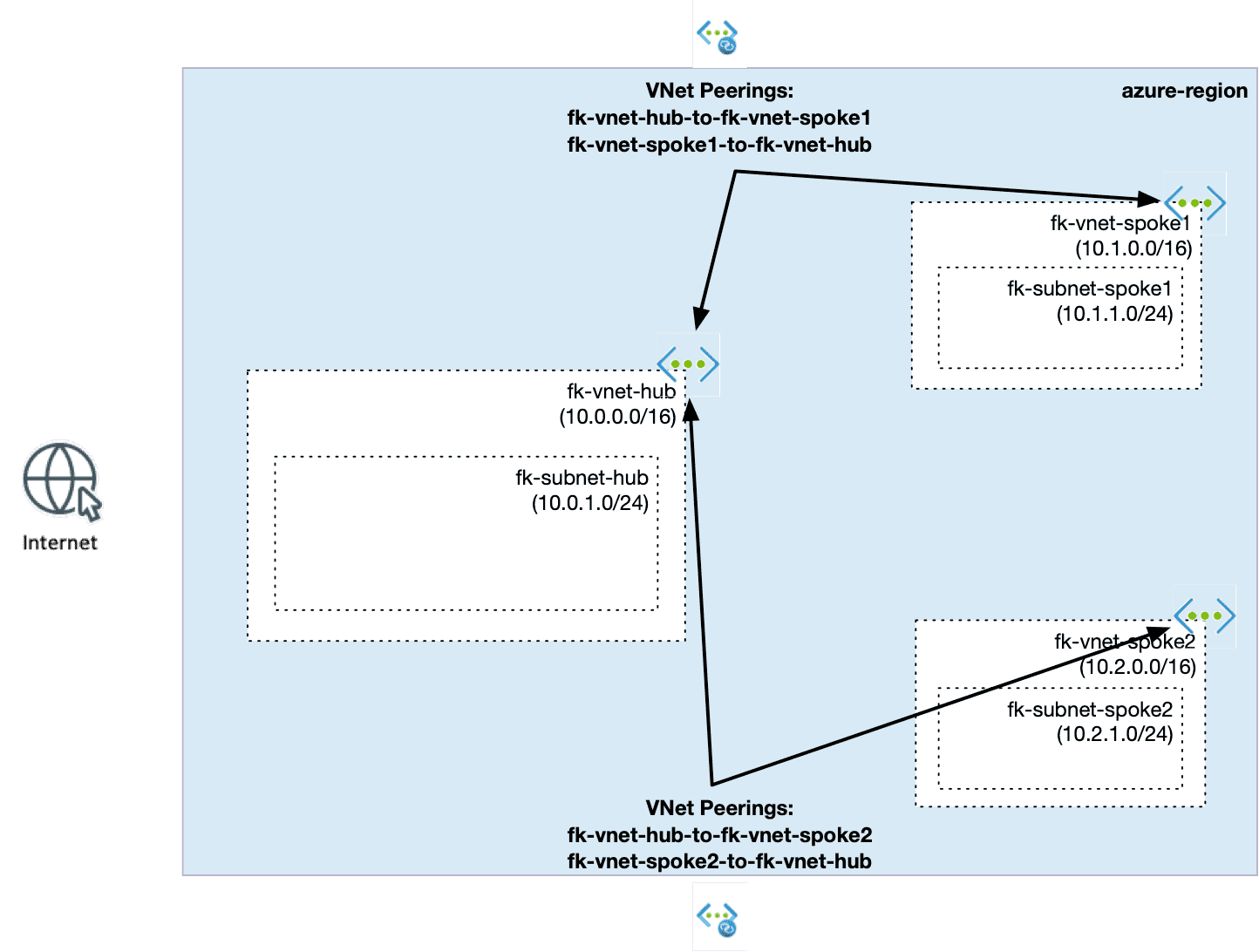
In this guide, we explore how Azure VNet peering Terraform works in real-world hub-and-spoke architectures.
When engineers start building hub-and-spoke architectures in Azure, there is one assumption that almost always appears:
If both spokes are connected to the hub, they should be able to communicate with each other.
That assumption is wrong.
And understanding why it is wrong is one of the most important steps in moving from basic Azure networking to real architecture design.
🔗 From Multicloud Comparison to Azure-First Design
If you’ve been following FoggyKitchen, you might have seen my earlier post:
👉 Azure VNet Peering vs OCI Local Peering with Terraform
That article focused on a multicloud comparison, showing how similar concepts are implemented differently in Azure and OCI.
In OCI, connectivity is heavily driven by explicit routing rules and LPGs.
In Azure, connectivity is defined much more by topology and relationships between VNets.
In this post, we take a different approach.
Instead of comparing platforms, we focus purely on Azure networking design and answer a much more practical question:
What actually happens when you build hub-and-spoke with VNet peering?
🧱 Azure VNet Peering Terraform in Hub-and-Spoke Architecture
Let’s start with a simple but very common architecture pattern in Azure networking. In this setup:
- A central hub VNet acts as a shared connectivity and control layer
- Two spoke VNets represent isolated environments (for example, applications or workloads)
- Each spoke is connected to the hub using VNet peering
At first glance, this looks like a fully connected topology. But in reality, Azure VNet peering behaves in a very specific way. Each peering connection is explicit and point-to-point. There is no implicit routing between VNets beyond what you define.
This means:
- Spoke1 can communicate with the hub
- Spoke2 can communicate with the hub
- But Spoke1 cannot communicate with Spoke2 through the hub
This is a key architectural characteristic of Azure networking. The architecture shown on the right is exactly what is implemented in the example:
👉 https://github.com/foggykitchen/terraform-az-fk-vnet-peering/tree/main/examples/02_hub_spoke_peering
And built using the reusable module:
👉 https://github.com/foggykitchen/terraform-az-fk-vnet-peering
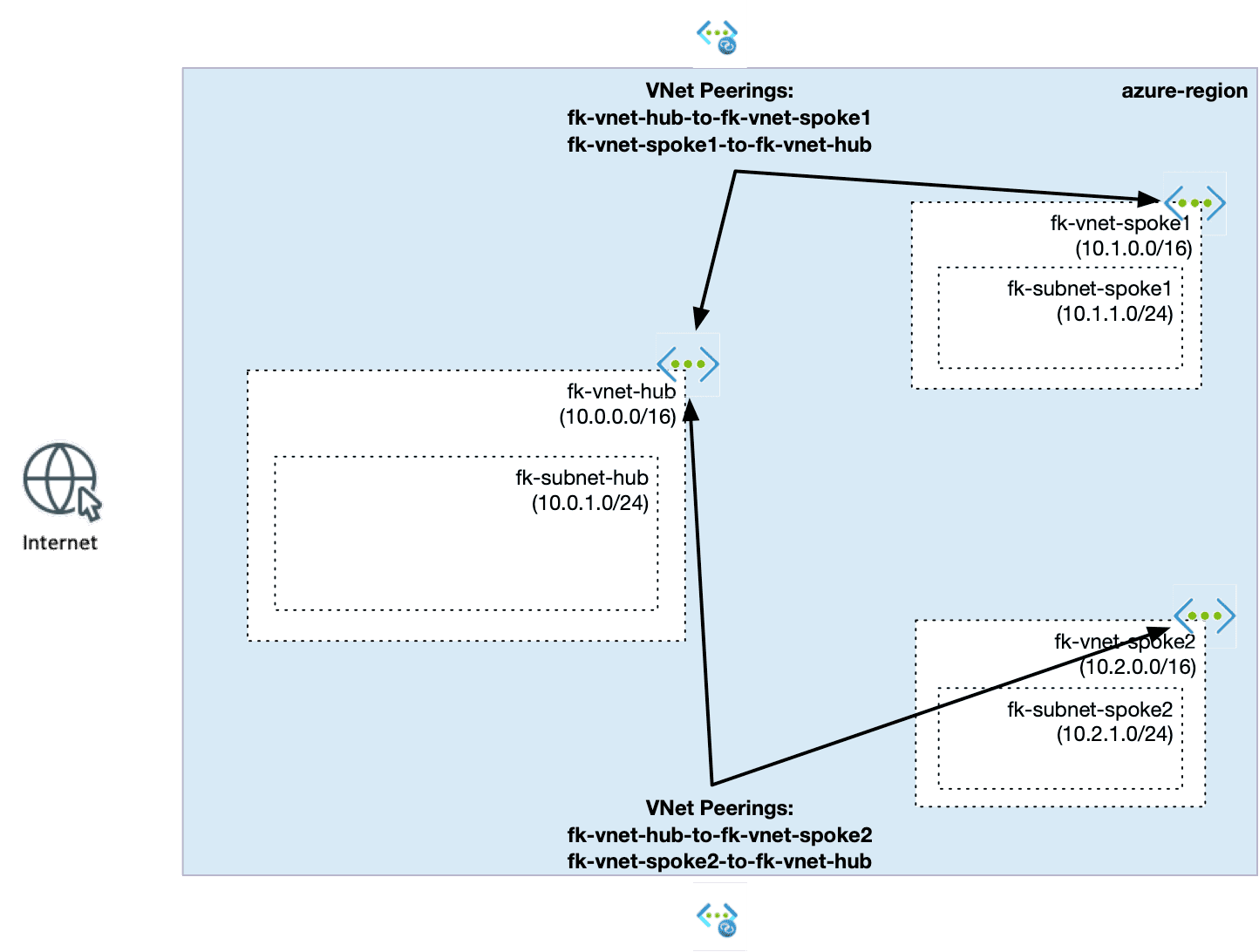
Figure 1. Azure hub-and-spoke architecture using VNet peering (non-transitive connectivity model)
⚙️ Terraform: Defining Connectivity as a Contract
In FoggyKitchen modules, networking is not just about resources.
It is about defining connectivity as an explicit contract between components.
Let’s look at how this hub-and-spoke architecture is expressed in Terraform/OpenTofu.
🧱 Step 1: Define isolated network boundaries
We start by creating three independent VNets using the terraform-az-fk-vnet module - one hub and two spokes. Each VNet defines its own address space and internal structure:
# HUB
module "vnet_hub" {
  source = "github.com/foggykitchen/terraform-az-fk-vnet"
  name                = "fk-vnet-hub"
  location            = azurerm_resource_group.fk_rg.location
  resource_group_name = azurerm_resource_group.fk_rg.name
  address_space       = ["10.0.0.0/16"]
  subnets = {
    fk-hub-subnet = {
      name             = "fk-hub-subnet"
      address_prefixes = ["10.0.1.0/24"]
    }
  }
}
# SPOKE 1
module "vnet_spoke1" {
  source = "github.com/foggykitchen/terraform-az-fk-vnet"
  name                = "fk-vnet-spoke1"
  location            = azurerm_resource_group.fk_rg.location
  resource_group_name = azurerm_resource_group.fk_rg.name
  address_space       = ["10.1.0.0/16"]
  subnets = {
    fk-subnet-spoke1 = {
      name             = "fk-subnet-spoke1"
      address_prefixes = ["10.1.1.0/24"]
    }
  }
}
# SPOKE 2
module "vnet_spoke2" {
  source = "github.com/foggykitchen/terraform-az-fk-vnet"
  name                = "fk-vnet-spoke2"
  location            = azurerm_resource_group.fk_rg.location
  resource_group_name = azurerm_resource_group.fk_rg.name
  address_space       = ["10.2.0.0/16"]
  subnets = {
    fk-subnet-spoke2 = {
      name             = "fk-subnet-spoke2"
      address_prefixes = ["10.2.1.0/24"]
    }
  }
}
At this point, all VNets are completely isolated.
There is no connectivity between them — and that is intentional.
🔗 Step 2: Define explicit connectivity contracts
Now we introduce connectivity using the terraform-az-fk-vnet-peering module:
# HUB  SPOKE 1
module "peering_hub_spoke1" {
  source = "github.com/foggykitchen/terraform-az-fk-vnet-peering"
  resource_group_name = azurerm_resource_group.fk_rg.name
  vnet_1_id   = module.vnet_hub.vnet_id
  vnet_1_name = module.vnet_hub.vnet_name
  vnet_2_id   = module.vnet_spoke1.vnet_id
  vnet_2_name = module.vnet_spoke1.vnet_name
  allow_forwarded_traffic = true
}
# HUB  SPOKE 2
module "peering_hub_spoke2" {
  source = "github.com/foggykitchen/terraform-az-fk-vnet-peering"
  resource_group_name = azurerm_resource_group.fk_rg.name
  vnet_1_id   = module.vnet_hub.vnet_id
  vnet_1_name = module.vnet_hub.vnet_name
  vnet_2_id   = module.vnet_spoke2.vnet_id
  vnet_2_name = module.vnet_spoke2.vnet_name
  allow_forwarded_traffic = true
}
🧠 What this really means
Each module call defines a point-to-point connectivity contract:
- Hub ↔ Spoke1 → allowed
- Hub ↔ Spoke2 → allowed
- Spoke1 ↔ Spoke2 → not defined → not allowed
There is no implicit routing. No hidden behavior. No transitive connectivity.
🆚 Azure vs OCI (Mental Model Shift)
This is where your earlier multicloud comparison becomes important.
In OCI:
- Routing rules define connectivity
- LPG / DRG allow transitive traffic
In Azure:
- Topology defines connectivity
- Peering does NOT imply routing
👉 This leads to a key principle:
In OCI, routing defines connectivity.
In Azure, topology defines connectivity.
🚧 What You Need for Transitive Connectivity
If you actually want:
👉 Spoke1 → Spoke2
You must introduce a routing layer, for example:
- Azure Firewall
- Network Virtual Appliance (NVA)
- Virtual WAN (advanced scenario)
And then:
- add UDR (User Defined Routes)
- forward traffic through the hub
👉 Without that:
hub-and-spoke is NOT transitive by design
🧩 Where This Fits in Azure Architecture
At this point, your mental model should look like this:
- VNet = isolation boundary
- Peering = connectivity contract
- Routing (Firewall/UDR) = traffic control layer
- Private Endpoint = service exposure
- DNS = resolution layer
👉 And that is exactly how production Azure platforms are built.
🎓 Where to Go Next
🎓 Where to Go Next
If you want to continue this journey:
- go deeper into Azure hub-and-spoke networking
- understand why VNet peering is not transitive by default
- control traffic paths with User Defined Routes
- connect Private Endpoints across VNets with Private DNS
- centralize inspection with Azure Firewall
That is exactly what the Azure Advanced Networking with Terraform/OpenTofu course is built for.
👉 Azure Fundamentals gives you the baseline.
👉 Azure Advanced Networking takes you into real multi-VNet architecture.
☕ Chef’s Corner
VNet peering does not define architecture.
It defines relationships.
The architecture emerges only when you understand:
- what connects
- what does not
- and why
Terraform doesn’t build architecture.
It makes the invisible layers visible.
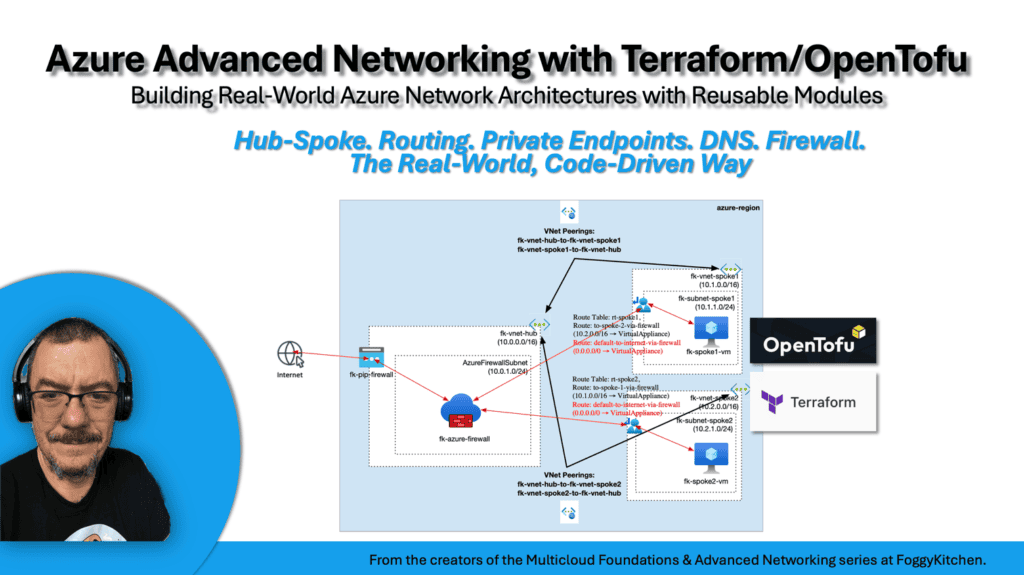
Build Real Azure Hub-and-Spoke Networking with Terraform/OpenTofu
You’ve seen why VNet peering alone does not create transitive routing.
Now build the full Azure advanced networking architecture step by step — hub-and-spoke topology, VNet peering, User Defined Routes, Private Endpoints, Private DNS, RBAC, and Azure Firewall.
This course turns isolated networking concepts into a real multi-VNet architecture lab.


