
Introduction
Azure hub spoke private endpoint Terraform setups are where simple designs start to break. In a previous article, I showed how to build hub-and-spoke routing in Azure using Terraform/OpenTofu modules. That setup introduced a key idea:
Hub-and-spoke is not about peering. It is about controlling traffic flow.
But that is only the foundation. In real architectures, workloads do not communicate only with each other. They also need access to platform services — such as Azure Storage. And this is where things stop being obvious.
What Changes When You Add Private Access?
In the base hub-and-spoke setup:
- traffic flows between VNets
- routing is centralized via the hub
- control is achieved using UDR + Virtual Appliance
Once you introduce Private Endpoint, the problem changes.
You are no longer just routing between networks.
You are now dealing with:
- PaaS services
- DNS resolution
- identity (attached to compute)
- permissions (defined via RBAC)
At this point, the architecture is no longer just networking.
It becomes:
a system where multiple layers must align
And this alignment is where most real deployments break.
Architecture Overview
Compared to the base hub-and-spoke design, this setup introduces a key shift.
We are no longer just connecting networks. We are integrating services into the network through:
- Private Endpoint (Azure Blob Storage)
- Private DNS (privatelink.blob.core.windows.net)
- RBAC (access control)
The core remains unchanged:
- hub VNet with a Virtual Appliance
- spoke VNets
- VNet peering
- UDR-based routing
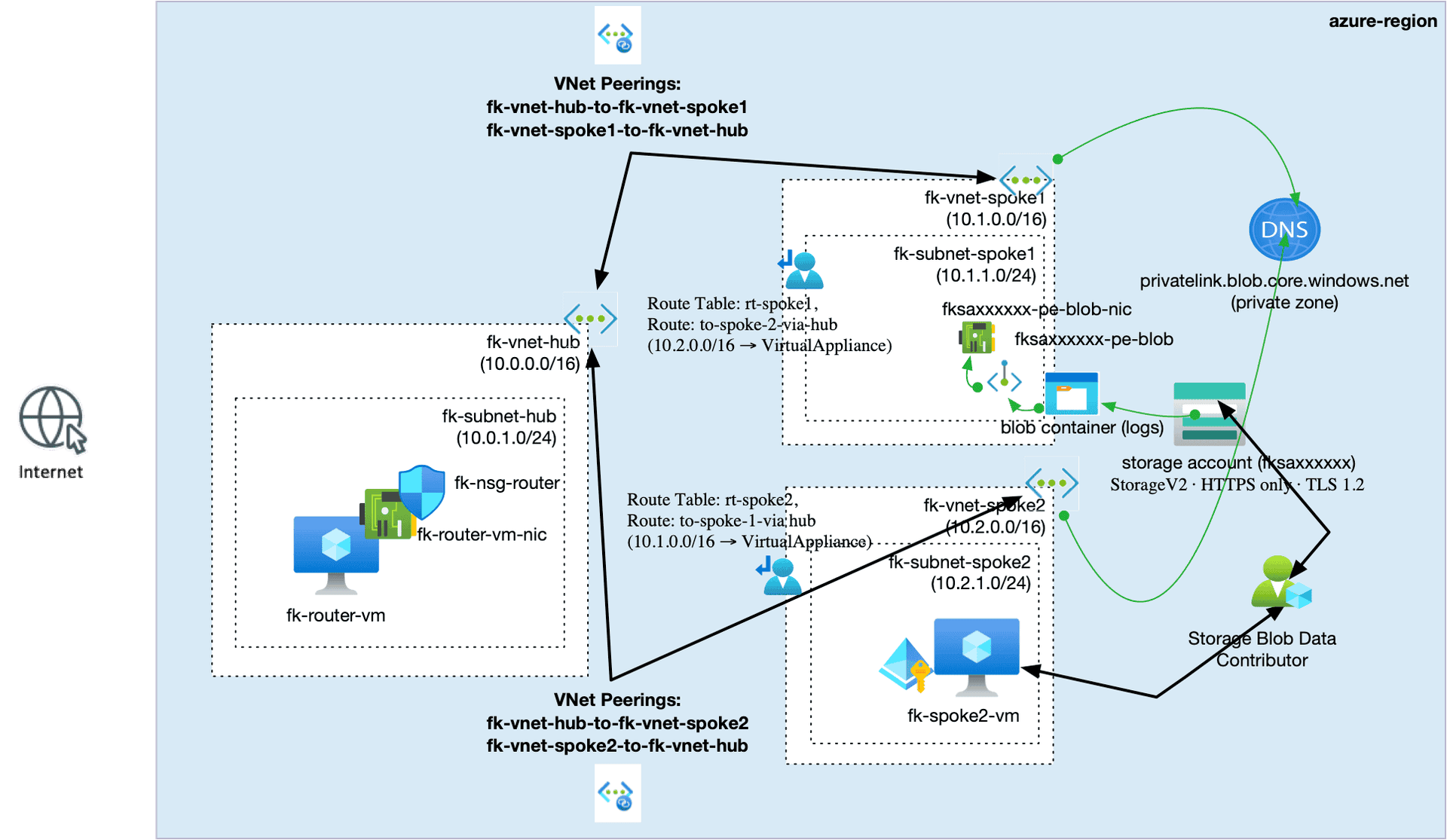
👉 The diagram below shows how these layers interact in practice.
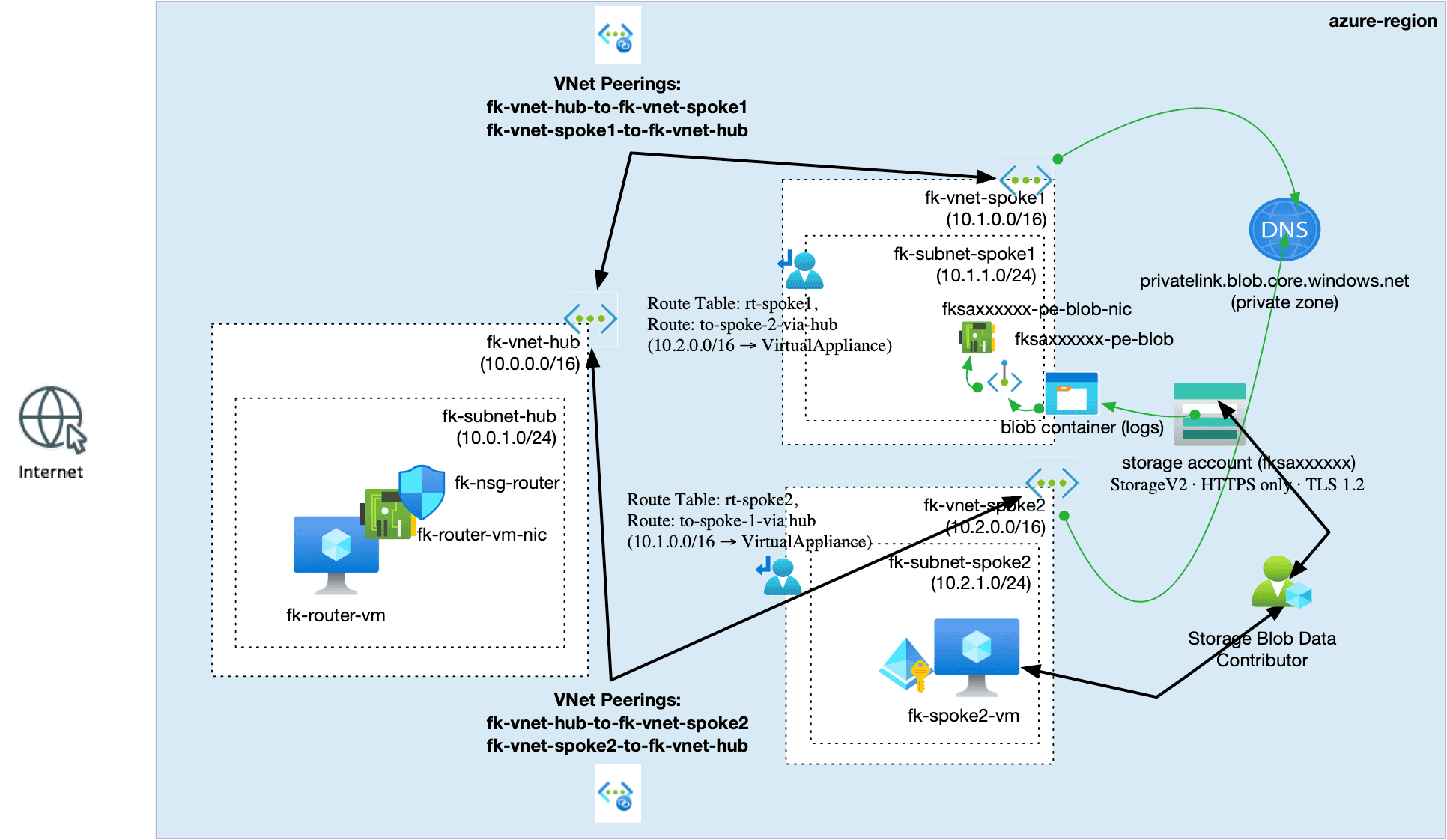
Figure 1. Hub-and-spoke routing extended with Private Endpoint, DNS, and RBAC
Terraform Modules: Architecture as Composition
This entire setup is built using Terraform/OpenTofu modules:
terraform-az-fk-vnet← network boundary / address space definitionterraform-az-fk-vnet-peering← connectivity contract between VNetsterraform-az-fk-compute← compute + managed identityterraform-az-fk-routing← routing control planeterraform-az-fk-storage← data boundary (Blob/File)terraform-az-fk-private-endpoint← private service exposure inside VNetterraform-az-fk-private-dns← name resolution control for private servicesterraform-az-fk-nsg← traffic filtering at subnet/NIC levelterraform-az-fk-rbac← permissions layer
There are no raw azurerm_* resources.
Because the challenge is not resource creation.
It is:
making all layers behave as one system
A Minimal Composition Example
The point is not a single resource. The point is how compute, routing, storage, private connectivity, DNS, and permissions are composed together.
module "spoke1_vm" {
  source = "github.com/foggykitchen/terraform-az-fk-compute"
  vm_name       = "fk-spoke1-vm"
  subnet_id     = module.spoke1_vnet.private_subnet_id
  enable_system_assigned_identity = true
}
module "storage" {
  source = "github.com/foggykitchen/terraform-az-fk-storage"
  storage_account_name = var.storage_account_name
  blob_containers      = ["data"]
}
module "private_endpoint_blob" {
  source = "github.com/foggykitchen/terraform-az-fk-private-endpoint"
  subnet_id          = module.spoke2_vnet.private_subnet_id
  target_resource_id = module.storage.storage_account_id
  subresource_names  = ["blob"]
}
module "private_dns_blob" {
  source = "github.com/foggykitchen/terraform-az-fk-private-dns"
  private_dns_zone_name = "privatelink.blob.core.windows.net"
  vnet_ids = [
    module.hub_vnet.vnet_id,
    module.spoke1_vnet.vnet_id
  ]
}
module "spoke_routing" {
  source = "github.com/foggykitchen/terraform-az-fk-routing"
  routes = [{
    address_prefix         = var.spoke2_cidr
    next_hop_type          = "VirtualAppliance"
    next_hop_in_ip_address = var.hub_router_ip
  }]
}
module "storage_rbac" {
  source = "github.com/foggykitchen/terraform-az-fk-rbac"
  scope        = module.storage.storage_account_id
  principal_id = module.spoke1_vm.principal_id
  role_definition_name = "Storage Blob Data Contributor"
}
In this setup:
- identity is attached to compute
- routing is explicit
- storage is private
- DNS controls resolution
- permissions are defined separately
Everything works only if these layers align.
The Illusion of “Simple Storage Access”
Accessing Azure Blob Storage looks trivial. Until you make it private. Now it depends on:
- routing
- DNS
- identity
- permissions
- network placement
And none of these layers are independent. A small misalignment can result in:
- timeouts
- public endpoint fallback
- access denied errors
This is where most architectures break.
Private Endpoint: Not Just a Feature
Private Endpoint creates a NIC inside your VNet. But that does not guarantee correct access. What matters is:
👉 how traffic reaches it
👉 how DNS resolves it
Without that, the endpoint exists… but the system does not work.
Private DNS: Where Things Quietly Break
Private DNS is often treated as a checkbox. In reality:
- resolution can appear correct
- while traffic still flows incorrectly
Or:
- DNS falls back to public resolution
These issues are subtle. And difficult to debug without understanding the full system.
Routing: The Control Plane
Routing is defined via terraform-az-fk-routing. This is where architecture becomes real. You explicitly define:
- traffic paths between spokes
- how services are reached
- what paths are allowed
But this is also where hidden issues appear:
- asymmetric routing
- unintended bypass
- incorrect next hop assumptions
From the outside, everything looks correct. From inside the system, it is not.
Storage: A Boundary, Not a Resource
With terraform-az-fk-storage, storage becomes part of the architecture. Not just a service. But:
a controlled boundary inside the system
Once private:
- it depends entirely on your network
- it is no longer globally reachable
Which means: 👉 access is defined by your design
Identity and Permissions: Where Access Fails
In this architecture:
- identity is attached to compute (
terraform-az-fk-compute) - permissions are defined via RBAC (
terraform-az-fk-rbac)
On paper, this is simple. In practice, this is where things fail:
- identity exists but is not used
- permissions are correct but ineffective
- network works, but access is denied
Because: access is not a single layer it is the result of all layers working together
The Real Problem
Most architectures do not fail because resources are missing.
They fail because: 👉 network, DNS, identity, and permissions do not align
Each part works. The system does not.
Key Insight
Azure makes connectivity easy. But it does not guarantee correctness.
Correctness emerges from alignment
And alignment is not visible in diagrams.
From Network to System Design
Hub-and-spoke gives you control over traffic. But once you introduce:
- Private Endpoint
- DNS
- identity
- permissions
You are no longer designing a network. You are designing a system boundary.
Conclusion
Hub-and-spoke routing is the foundation. But real architectures require:
- controlled routing
- correct DNS
- properly attached identity
- correctly scoped permissions
Without alignment: 👉 the system behaves unpredictably
Even if everything is deployed correctly.
🚀 Continue Your Journey
If you want to understand the Azure baseline first:
👉 Azure Fundamentals with Terraform/OpenTofu
But if you are ready to go deeper into real private connectivity across VNets:
👉 Azure Advanced Networking with Terraform/OpenTofu
In the full course, we build hub-and-spoke topology, VNet peering, User Defined Routes, Private Endpoints, Private DNS, RBAC, and Azure Firewall step by step.
This article shows one of the most important lessons in Azure architecture: network reachability is not the same as access.
Private Endpoint gives you a private network path. Private DNS makes the service resolvable across VNets. RBAC decides whether the workload is actually allowed to use the service.
Azure Advanced Networking brings these layers together into one complete multi-VNet architecture.
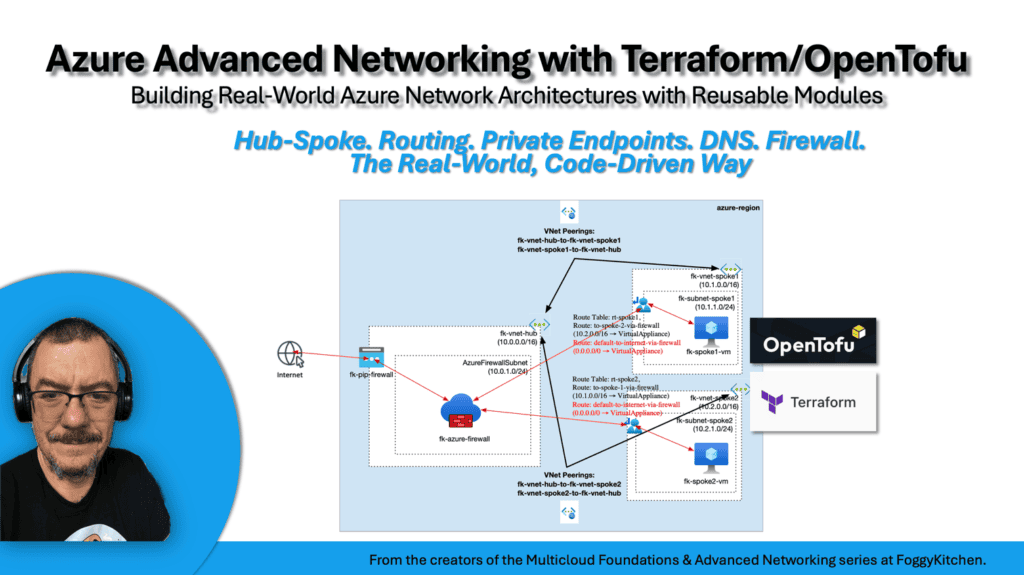
Build Private Azure Connectivity Across VNets
You’ve seen how Private Endpoint, Private DNS, and RBAC work together in a hub-and-spoke architecture. Now build the full Azure Advanced Networking lab with Terraform and OpenTofu: hub-and-spoke topology, VNet peering, User Defined Routes, Private Endpoints, Private DNS, RBAC, and Azure Firewall. This course shows how private connectivity becomes part of real Azure network architecture — not just a single-resource configuration.
🚀 Start Azure Advanced Networking


