

Don’t mix Terraform and manual deployments – three use-cases in OCI
- Posted by Martin Linxfeld
- Categories terraform, Best Practices, Oracle Cloud Infrastructure (OCI)
- Date September 18, 2020
- Comments 4 comments
- Tags Best Practices, oci, Oracle Cloud, State File, terraform
Mixing Terraform manual deployments OCI is a common mistake that leads to state drift and broken automation. In this article, I’ll show you why this happens and how to avoid it. The idea for this blog post came during a recent Zoom webinar I delivered for a large team inside Oracle. After a 1-hour presentation, we had a Q&A session — and one of the questions immediately caught my attention:
“Please tell me if this approach is valid — can we mix Terraform code and actions in Cloud UI?”
This is a great question. And my answer was as simple as it is firm: “No — avoid mixing Terraform and manual deployments in OCI at all costs.”
Even though Terraform is extremely powerful and flexible, it cannot predict or automatically reconcile every manual change you make through the OCI Console. Mixing both approaches leads to state drift, broken deployments, and hours of unnecessary troubleshooting.
For more details on Terraform state management, check out the official Terraform documentation.
In this article, I will walk you through three real use-cases from OCI that demonstrate why mixing Terraform and manual deployments is a bad idea. You will see how Terraform reacts, what it can fix automatically, and where you will be left cleaning up the mess in your state file by hand.
Why mixing Terraform manual deployments OCI is dangerous
When you use Terraform to provision infrastructure in Oracle Cloud Infrastructure (OCI), it maintains a state file that represents the desired configuration. If you start making manual changes via the OCI Console, Terraform has no way to immediately track them. The next time you run terraform plan or tofu plan, Terraform will try to reconcile the differences between its state file and the real state exposed via the OCI REST API.
This often results in:
Unwanted resource recreation (Terraform thinks something is “missing” and re-creates it)
Plan output that is difficult to interpret
Broken dependencies between resources
“Manual” settings being silently overwritten or destroyed
Let’s see three concrete scenarios.
Three real-world OCI examples
1️⃣ Renaming a VCN manually
Imagine you deploy a Virtual Cloud Network (VCN) with Terraform and later decide to rename it directly in the OCI Console. On your next terraform plan, Terraform will detect the mismatch between its state and the actual configuration and try to revert the name to the one defined in code.
👉 Result: Terraform will overwrite the manual change. No big disaster, but this creates confusion and unnecessary churn.
2️⃣ Deleting a subnet manually
Let’s say someone deletes a subnet through the Console. The Terraform state file still thinks the subnet exists. When you run terraform plan, Terraform will attempt to re-create the missing subnet. If other resources depend on that subnet, the plan can become quite messy, requiring manual intervention.
👉 Result: Terraform can fix it — but you must understand why it’s happening and potentially clean up dependencies.
3️⃣ Changing security rules in an NSG
This one can get nasty. Suppose you manually add or remove rules in a Network Security Group (NSG). Depending on the type of change, Terraform may either:
overwrite your manual rules,
or throw a plan that forces replacement of the entire NSG, potentially disrupting traffic.
👉 Result: manual changes to NSGs can lead to destructive replacements — something you really don’t want in production.
How Terraform reacts to state drift
Terraform’s plan mechanism is powerful, but it’s not magic. In each of the examples above, Terraform simply compares its local state file with OCI’s real state and takes action based on the differences.
Some drifts can be auto-corrected with minimal impact (e.g., name changes).
Others trigger recreation (e.g., deleted resources).
Some lead to unexpected replacements, forcing you to clean the state file manually or import changes with
terraform import.
This is why my general recommendation is clear:
Stick to code. Don’t mix manual deployments with Terraform in OCI.
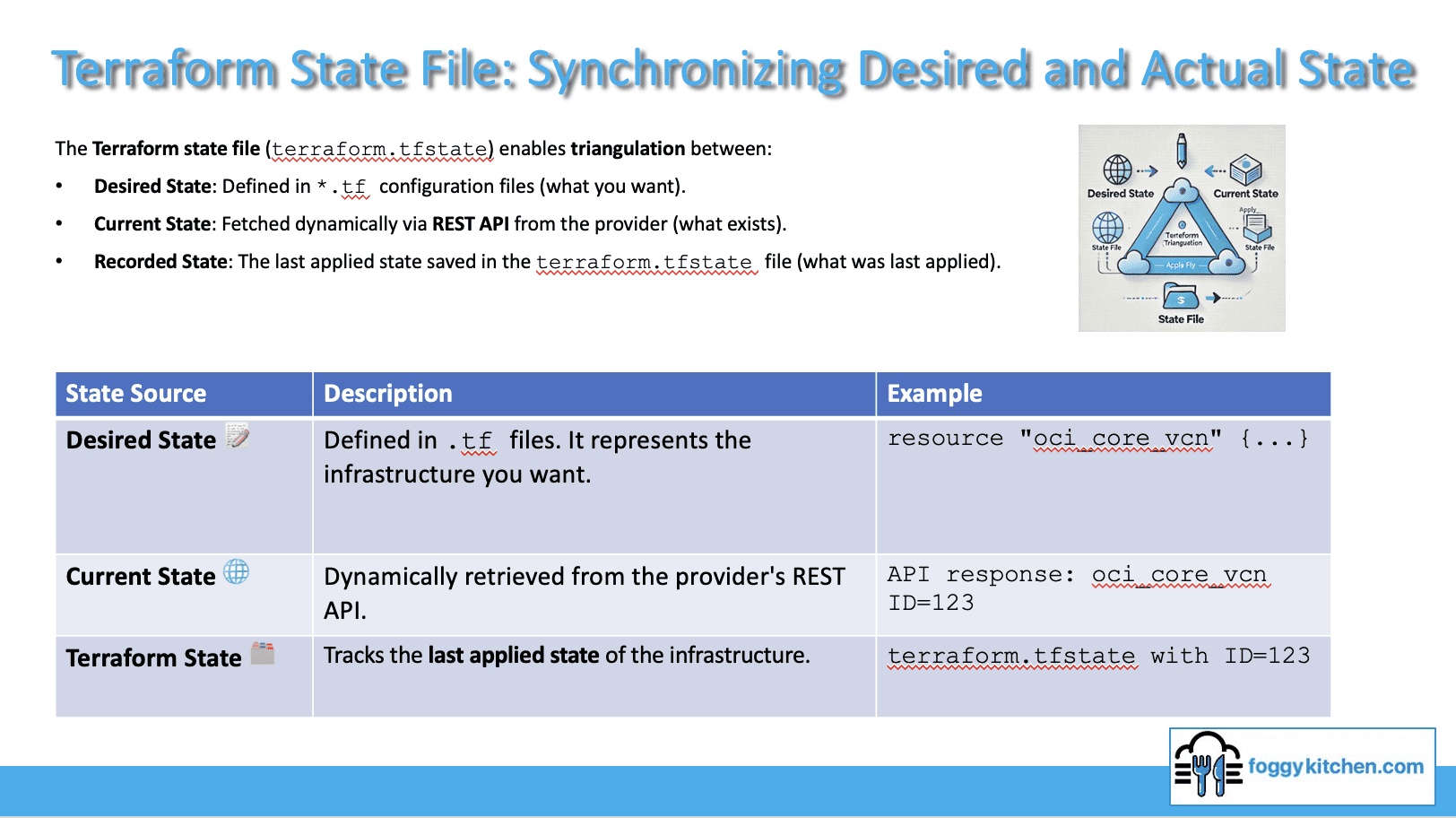
Figure 1: Terraform triangulates between Desired State (.tf files), Current State (via REST API), and Recorded State (terraform.tfstate). Mixing manual changes with Terraform in OCI breaks this synchronization.
Want to master Terraform state management in OCI?
👉 Check out the Flagship Terraform Course
Watch the hands-on demo 🎥
In this short video, I showcase all three scenarios live in my FoggyKitchen lab. You’ll see exactly how Terraform reacts and where things can go wrong:
Key takeaways
✅ Mixing Terraform and manual deployments in OCI leads to state drift.
✅ Some drifts can be auto-fixed, others require manual state repair.
🚫 Avoid manual changes to NSGs, subnets, or other critical resources.
🧠 Keep your infrastructure fully code-driven to stay in control.
Final thoughts
Terraform is brilliant at keeping your cloud infrastructure consistent — but only if you let it be the single source of truth. Once you start making manual changes in the OCI Console, you undermine Terraform’s power and open the door to confusing, time-consuming troubleshooting.
So next time you’re tempted to “just change that one thing manually,” think twice 😉
Stick to code. Let Terraform do its job.
👉 Master Terraform on OCI — the Right Way
Avoid painful state drift and broken deployments. Learn how to build and manage OCI infrastructure entirely as code with the flagship Terraform course. Through real labs and hands-on exercises, you’ll master Terraform state management, automation, and production-grade deployments in OCI.
🔒 Lifetime • ⏱️ Self-paced • 🧪 Real labs
Check also other courses:


Tag:Best Practices, oci, Oracle Cloud, State File, terraform

Leave A Reply Cancel reply
You must be logged in to post a comment.
4 Comments
Sorry guys, but watching video is almost impossible. Constantly buffering (same behavior from my laptop with wi-fi connection as well as from my cell phone via LTE).
Hi Peter, I have verified that from my laptop (wi-fi) and IPhone with LTE. Everything looks fine. Can you please check our YouTube channel? This video has been published there as well: https://youtu.be/QjPKBTIieXM
In depth explanation. Great !!!