In this article we’ll focus on OCI Streaming Terraform to show how easy it is to build your first producer function. Oracle Cloud Infrastructure (OCI) Streaming is a Kafka-compatible, fully managed messaging service designed for real-time data pipelines and event-driven architectures. Instead of managing your own Kafka cluster, you can spin up a stream in OCI, publish messages from your applications, and consume them with minimal effort.
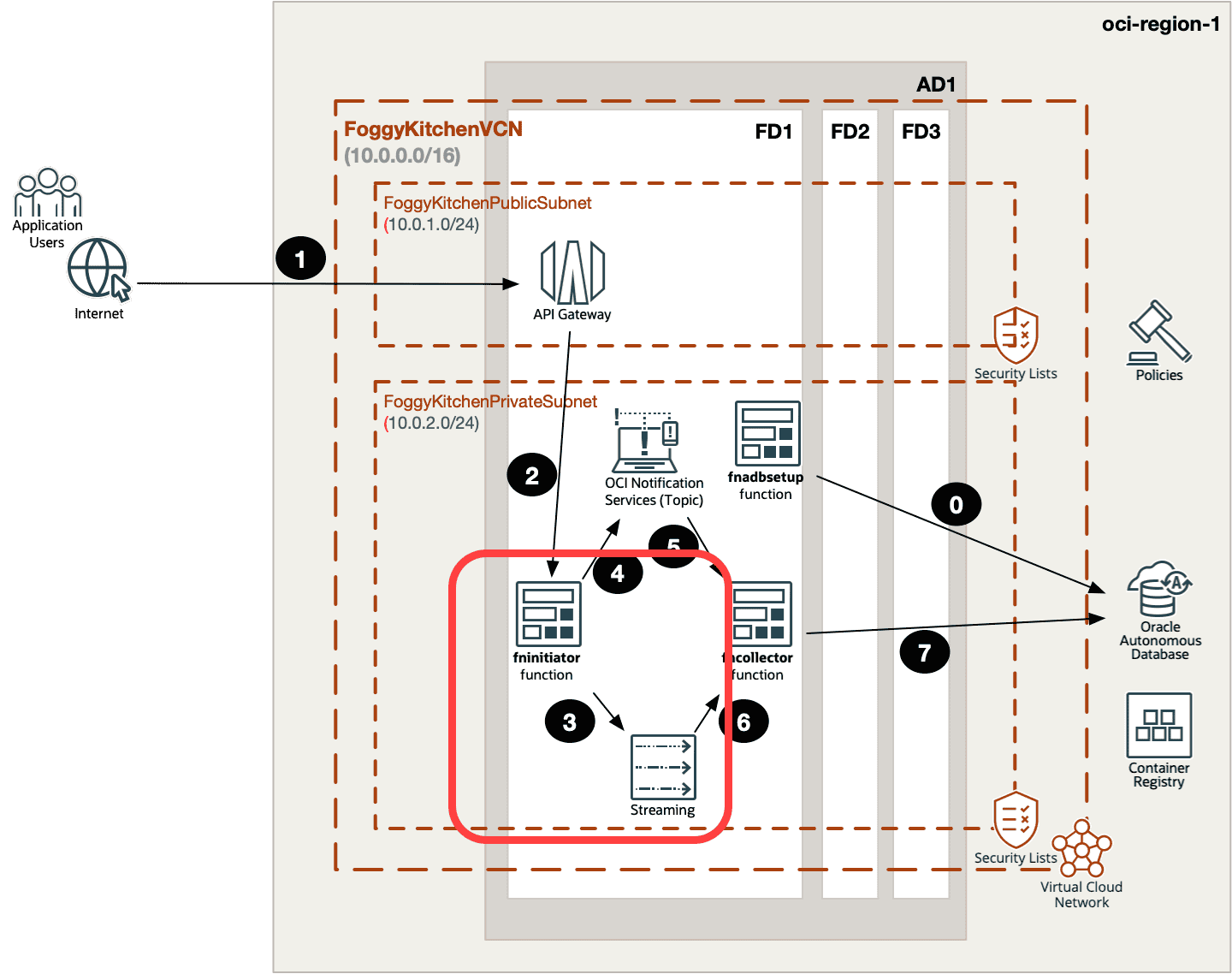
In this post, we’ll use Terraform to provision OCI Streaming and then build a serverless producer function that pushes events into the stream. This is just a starting point — the full architecture (including consumer functions, Autonomous Database integration, and Notifications) is covered in Lesson 6 of my OCI Serverless Functions Course.
Figure 1. High-level architecture of OCI Streaming with Terraform and Functions.
Provisioning OCI Streaming with Terraform
Let’s start by creating a Stream Pool and a Stream:
oci streaming stream message get \
  --stream-id  \
  --partition 0
Before You Start
Make sure your IAM configuration is in place — the entire producer workflow relies on proper Dynamic Groups and policies. See OCI IAM Policies Terraform Example to learn how Functions securely access Streaming and other services without user credentials.
Wrapping Up
In this post, we’ve built the producer side of an event-driven architecture on Oracle Cloud Infrastructure. With Terraform we provisioned a Stream Pool and a Stream, and then deployed a serverless function that pushes messages into the stream. We also verified the flow using the OCI CLI.
This is the foundation of real-time pipelines — producers send events into OCI Streaming where they can be consumed by other services, functions, or databases.
In the next article, we’ll extend this architecture with a consumer function that reads events from the stream and stores them inside Autonomous Database (ADB), enabling real-time analytics and dashboards.
👉 The complete scenario — including three functions, API Gateway integration, Notifications, Streaming, and ADB — is explained step by step in Lesson 6 of my OCI Serverless Functions Course. It’s a hands-on lab where you’ll learn how to automate everything with Terraform/OpenTofu and test the entire pipeline end-to-end.
🚀 Take the Next Step with OCI Functions
Learn how to build the full event-driven pipeline: API Gateway → Functions → Streaming → Autonomous Database.
All explained step by step in Lesson 6 of my OCI Serverless Functions Course.