Handling Object Storage Events with Functions and Streaming
- Posted by Martin Linxfeld
- Categories OCI Streaming, Object Storage Events, Serverless Functions
- Date September 28, 2024
- Comments 0 comment
- Tags Event-driven architecture, OCI Events, OCI Functions, OCI Object Storage, OCI Streaming, OCI Terraform, Oracle Cloud Infrastructure, Serverless on OCI
Introduction
So far in this series we have:
Part 1 – built a producer function that publishes into OCI Streaming.
Part 2 – created a consumer function that writes events into Autonomous Database.
Now let’s explore another ingestion path: OCI Object Storage Event Terraform integration. With OCI Events and a serverless function, any file uploaded into a bucket can trigger downstream processing. In this article, we’ll wire a bucket event → function → streaming pipeline using Terraform.
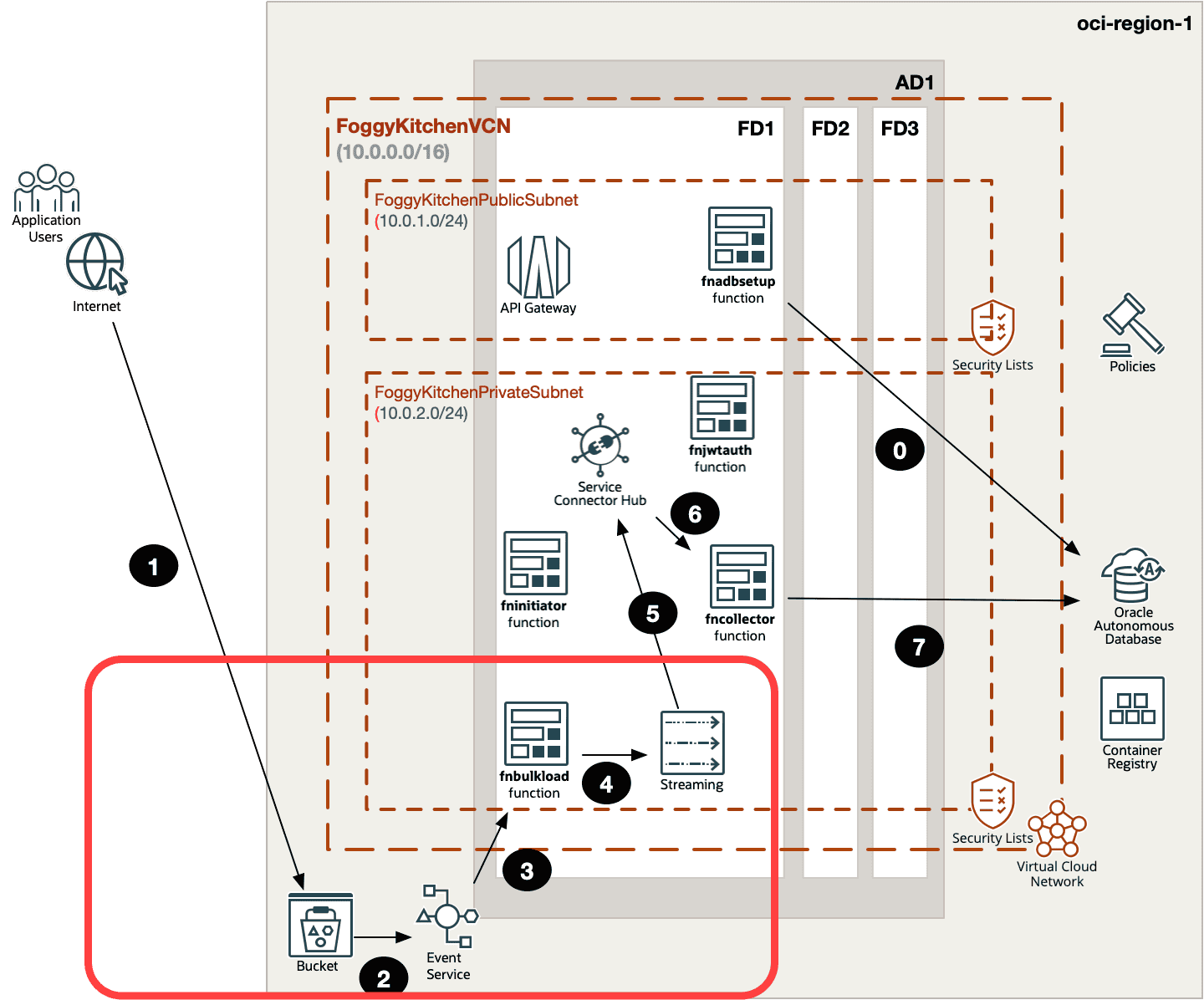
OCI Object Storage Event Terraform Architecture (Steps 1–4)
- Object Storage Bucket – whenever a new file (for example, a CSV dataset) is uploaded, it lands in the bucket. In many real-world scenarios, Object Storage is the natural landing zone for raw data ingested from external systems.
- Event Service – OCI Events detects the
ObjectCreatedaction on the bucket. Instead of polling for changes, the service automatically emits an event as soon as the object arrives, making the pipeline reactive and efficient. - fnbulkload Function – this serverless function is triggered by the event. It doesn’t process the whole file directly. Instead, it extracts metadata (object name, bucket, namespace, etc.) and builds a compact message. This design keeps the function lightweight and cost-effective.
- OCI Streaming – the function publishes this compact payload into an OCI Stream. From here, downstream consumers (like another function, a Service Connector Hub target, or even Autonomous Database) can pick it up asynchronously.
This example demonstrates how to configure an OCI Object Storage Event Terraform that triggers a function and publishes messages into OCI Streaming.
Figure 1. Object Storage event triggers a function that pushes to OCI Streaming.
Step 1: The Bucket
First, we need a bucket in Object Storage.
data "oci_objectstorage_namespace" "ns" {
  compartment_id = var.compartment_ocid
}

resource "oci_objectstorage_bucket" "fk_bucket" {
  compartment_id      = var.compartment_ocid
  namespace           = data.oci_objectstorage_namespace.ns.namespace
  name                = var.bucket_name         # e.g. "fk-streaming-ingest"
  storage_tier        = "Standard"
  public_access_type  = "NoPublicAccess"

  freeform_tags = {
    "app" = "foggykitchen"
    "env" = var.env
  }
}
Step 2: The Event Rule
Next, an OCI Events rule listens for ObjectCreated in the bucket and invokes the function.
resource "oci_events_rule" "os_create_to_fnbulkload" {
  display_name   = "os-create-to-fnbulkload"
  compartment_id = var.compartment_ocid
  is_enabled     = true

  condition = jsonencode({
    eventType = ["com.oraclecloud.objectstorage.createobject"]
    data = {
      additionalDetails = {
        bucketName = oci_objectstorage_bucket.fk_bucket.name
        namespace  = data.oci_objectstorage_namespace.ns.namespace
      }
    }
  })

  actions {
    actions = [{
      actionType = "FAAS"
      isEnabled  = true
      functionId = module.oci-fk-bulk-load-function.oci_fn.fn_id
    }]
  }
}
This ensures that whenever a file is uploaded to the bucket, the event is forwarded to our function.
Step 3: The fnbulkload Function
We deploy the function using my reusable Terraform module.
module "oci-fk-bulk-load-function" {
  depends_on = [
    data.local_file.fnbulkload_dockerfile,
    data.local_file.fnbulkload_func_py,
    data.local_file.fnbulkload_func_yaml,
    data.local_file.fnbulkload_requirements_txt
  ]

  source           = "github.com/mlinxfeld/terraform-oci-fk-function"
  tenancy_ocid     = var.tenancy_ocid
  region           = var.region
  ocir_user_name   = var.ocir_user_name
  ocir_user_password = var.ocir_user_password
  compartment_ocid = var.compartment_ocid

  use_my_fn        = true
  fk_fn_name       = "fnbulkload"

  dockerfile_content       = data.local_file.fnbulkload_dockerfile.content
  func_py_content          = data.local_file.fnbulkload_func_py.content
  func_yaml_content        = data.local_file.fnbulkload_func_yaml.content
  requirements_txt_content = data.local_file.fnbulkload_requirements_txt.content

  invoke_fn         = false
  use_oci_logging   = false

  # Reuse the same Functions application as the producer
  use_my_fn_app     = true
  my_fn_app_ocid    = module.oci-fk-initiator-function.oci_app_fn.fn_app_ocid

  # Private networking
  use_my_fn_network = true
  my_fn_subnet_ocid = oci_core_subnet.FoggyKitchenPrivateSubnet.id

  fn_config = {
    "DEBUG_MODE"      = var.fn_debug_mode
    "STREAM_OCID"     = oci_streaming_stream.FoggyKitchenStream.id
    "STREAM_ENDPOINT" = data.oci_streaming_stream_pool.FoggyKitchenStreamPool.endpoint_fqdn
  }
}
The function receives bucket events and publishes a clean message into Streaming.
Why This Matters
With this setup:
Every bucket upload becomes a trigger.
The fnbulkload function converts Object Storage events into stream messages.
Multiple consumers (ADB, analytics, dashboards) can subscribe to the stream.
This pattern decouples producers from consumers, scales easily, and provides durability and replay capabilities.
Wrapping Up
We’ve now completed the third path in our series:
Part 0: IAM & Dynamic Groups — The Foundation
Part 1: Producer → Streaming
Part 2: Consumer → ADB
Part 3 (this post): Bucket Events → Function → Streaming
👉 The complete five-function scenario — with Object Storage triggers, Streaming, Notifications, and Autonomous Database integration — is available step by step in Lesson 9 of my OCI Serverless Functions Course.
🚀 Go Deeper into Event-Driven Pipelines
Learn how to combine Object Storage triggers, Functions, Streaming, and Autonomous Database into a full end-to-end ingestion flow.
Step-by-step explained in Lesson 9 of my OCI Serverless Functions Course.
🔒 Lifetime • ⏱️ Self-paced • 🧪 Real labs