AKS Log Analytics Terraform is one of the cleanest ways to enable Azure Monitor and Container Insights for your Kubernetes clusters. In this article, I’ll show how the FoggyKitchen AKS module automatically creates a Log Analytics Workspace and connects it to your cluster without any manual steps.
Monitoring is one of the first capabilities you eventually need in any AKS deployment. Container logs, node metrics, pod inventory — all of this lives inside a Log Analytics Workspace. And without it, visibility into your Kubernetes environment is extremely limited.
In this short teaser (based on Lesson 5 of my upcoming AKS Terraform course), I’ll show how the FoggyKitchen AKS module enables Azure Monitor integration with minimal configuration, and how it automatically provisions the required azurerm_log_analytics_workspace resource.
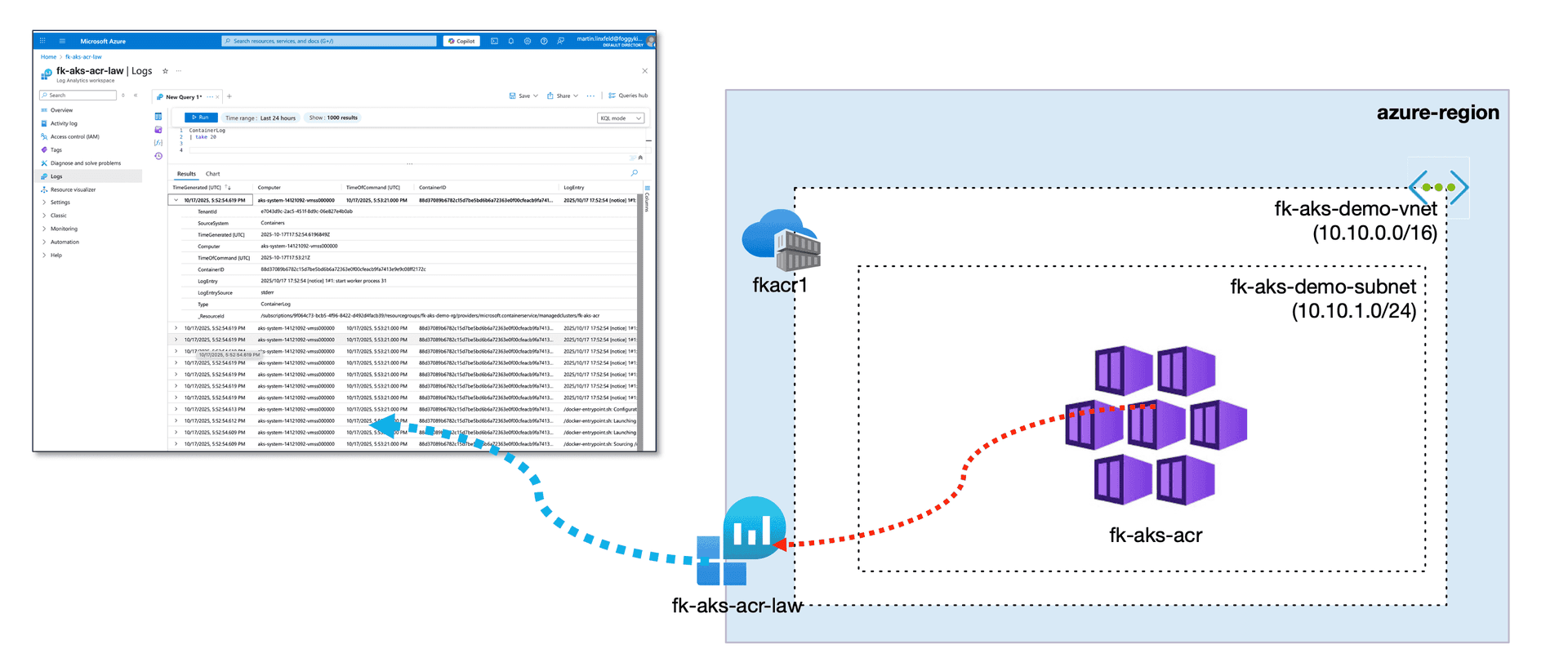
AKS + ACR + Log Analytics Workspace
This example builds directly on the AKS + ACR setup from Lesson 4.
The only new component is a Log Analytics Workspace, connected to the AKS cluster through the OMS monitoring extension.
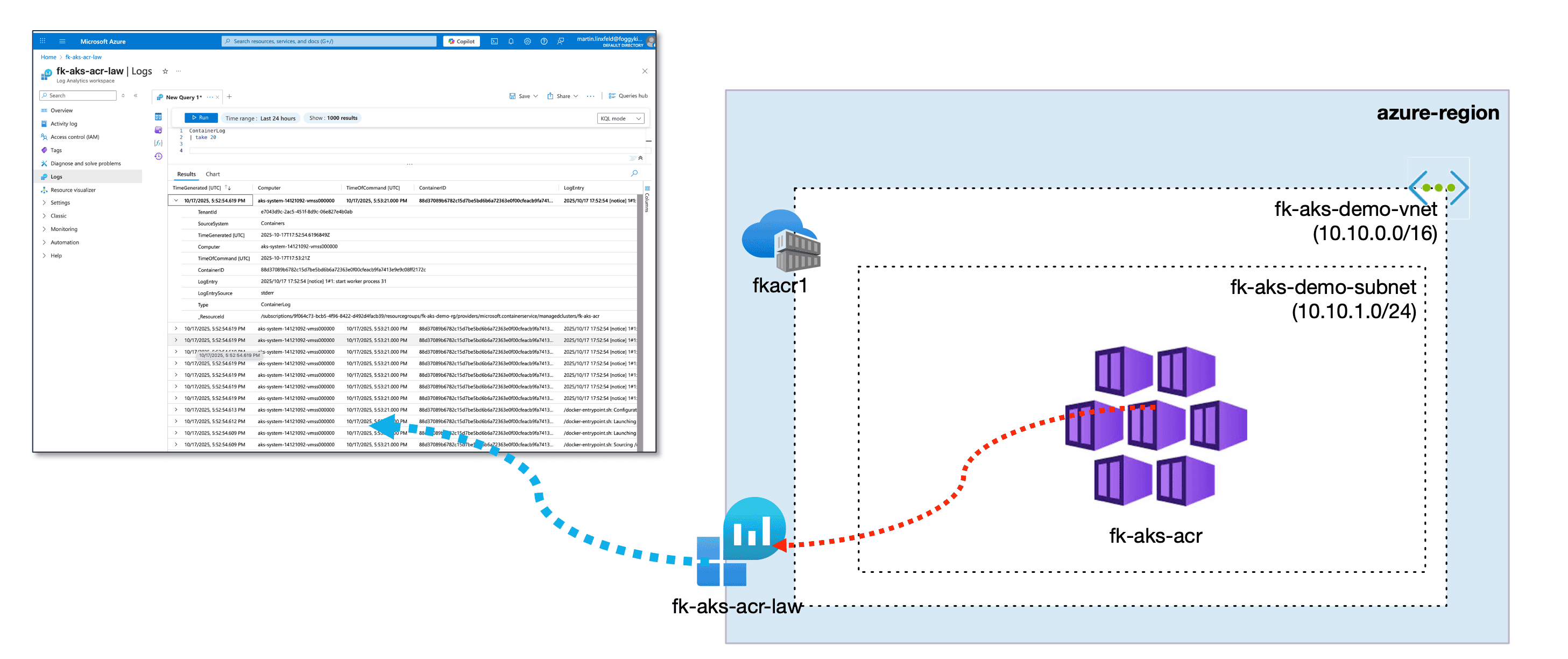
Figure 1. AKS + ACR + Log Analytics Workspace
Terraform configuration — simple module interface
Here is the exact module block used for this lesson:
module "aks" {
  source              = "github.com/foggykitchen/terraform-az-fk-aks"
  name                = "fk-aks-acr"
  location            = azurerm_resource_group.foggykitchen_rg.location
  resource_group_name = azurerm_resource_group.foggykitchen_rg.name
  create_networking = true
  network_plugin    = "kubenet"
  enable_log_analytics = true
  create_law           = true
  monitoring_mode      = "oms"
}
When these three monitoring parameters are enabled, the module:
creates a Log Analytics Workspace (
azurerm_log_analytics_workspace),retrieves its ID,
attaches the workspace to the AKS cluster automatically,
and enables Container Insights without any manual portal configuration.
Everything happens behind a clean and minimal interface.
Terraform plan — workspace creation
When running tofu plan, you’ll see that Terraform is preparing a new workspace:
# module.aks.azurerm_log_analytics_workspace.law[0] will be created
  + resource "azurerm_log_analytics_workspace" "law" {
      + allow_resource_only_permissions = true
      + daily_quota_gb                  = -1
      + id                              = (known after apply)
      + internet_ingestion_enabled      = true
      + internet_query_enabled          = true
      + local_authentication_disabled   = false
      + location                        = "westeurope"
      + name                            = "fk-aks-acr-law"
      + primary_shared_key              = (sensitive value)
      + resource_group_name             = "fk-aks-demo-rg"
      + retention_in_days               = 30
      + secondary_shared_key            = (sensitive value)
      + sku                             = "PerGB2018"
      + tags                            = {
          + "project" = "foggykitchen-aks"
        }
      + workspace_id                    = (known after apply)
    }
This confirms that monitoring is part of the cluster provisioning flow, not a separate manual step.
Azure Portal verification
After deployment, the monitoring setup is visible immediately.
AKS → Integrations
In the AKS blade, under Integrations, you should see:
Container Insights: Enabled
Workspace Resource ID pointing to the newly created workspace
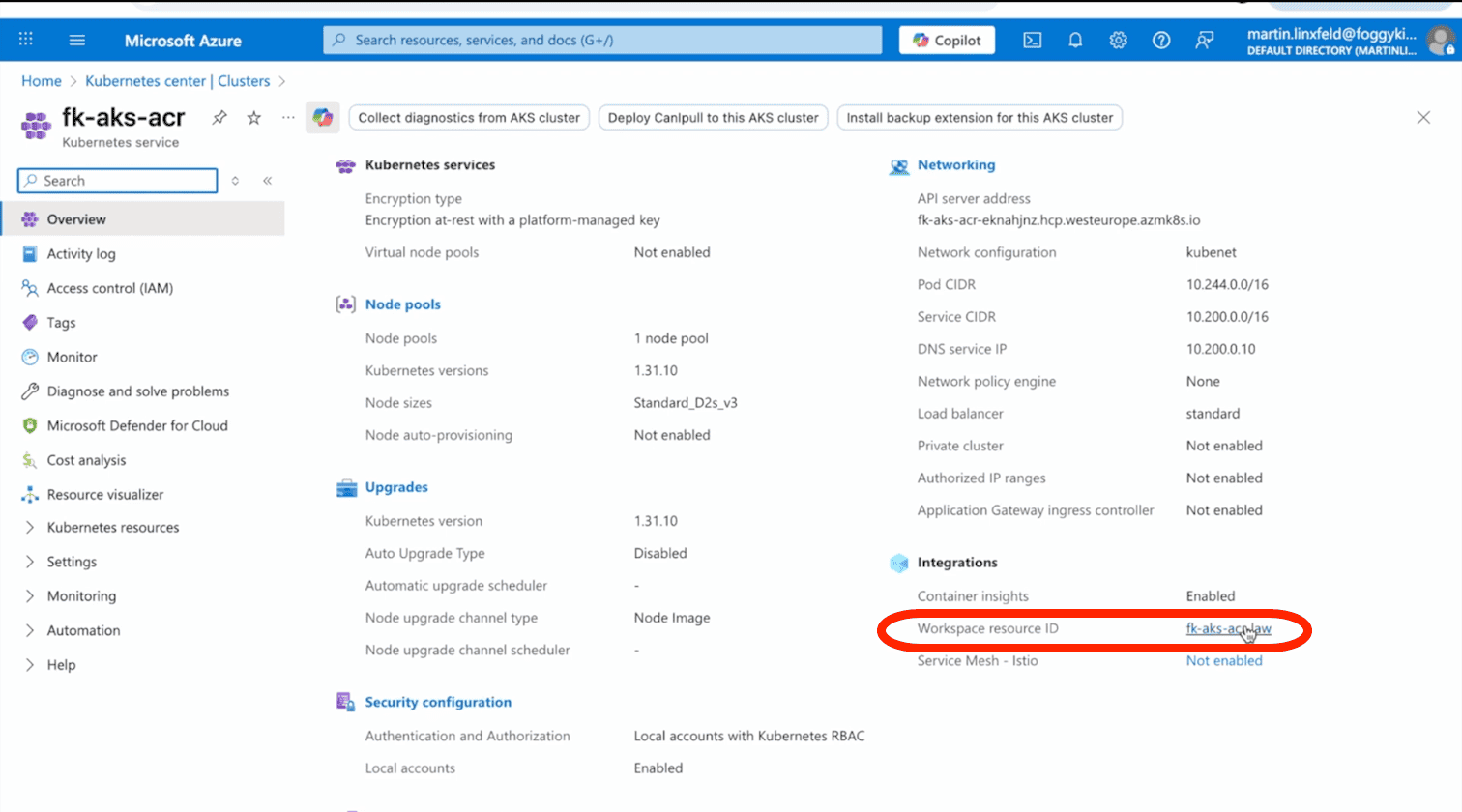
Figure 2. AKS Integrations in Azure Portal
Log Analytics → Logs
To confirm that AKS is sending telemetry to the workspace, open the Logs blade and run:
ContainerLog
| take 20
If container logs appear, the OMS agent and Azure Monitor integration are fully operational.
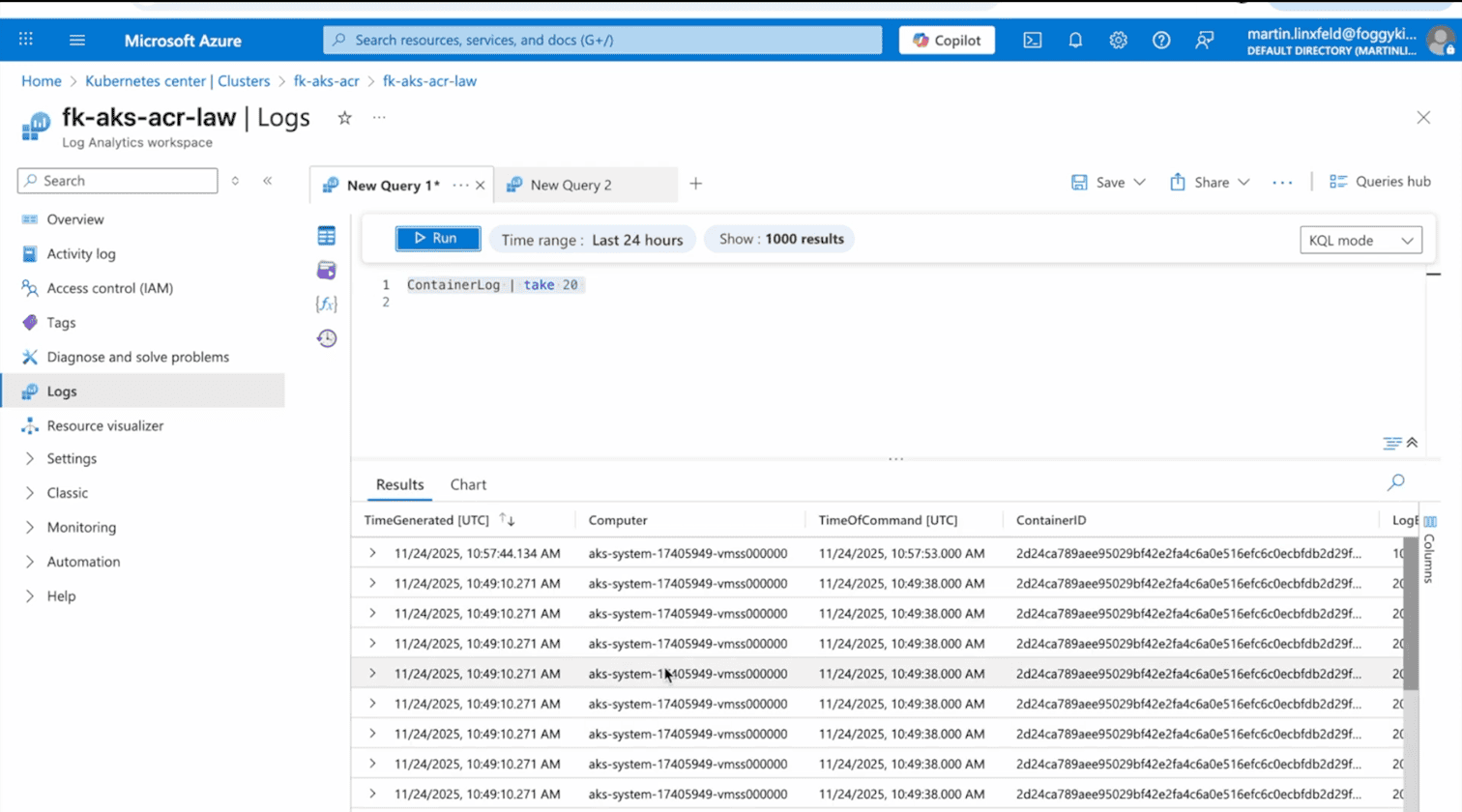
Figure 3. Log Analytics Workspace - KQL Query for Container Log output
AKS Log Analytics Terraform — Why This Matters
By embedding monitoring directly into the Terraform module, you ensure:
consistent setup across environments,
full automation with no click-ops,
reduced configuration drift,
and complete reproducibility for dev, stage and production clusters.
AKS monitoring becomes part of your cluster recipe — not an afterthought.
Read more about production AKS patterns with Terraform
If you’re following the AKS Terraform series, here are the previous articles:
🔗 AKS Kubenet vs Azure CNI — Networking trade-offs explained with Terraform
Understand how AKS networking choices impact Pod IP addressing, traffic flow, scalability, and what you actually observe in Azure Monitor. This guide explains the real production trade-offs between Kubenet and Azure CNI using Terraform examples.
🔗 AKS + Azure Container Registry with Terraform — Secure image supply chain for production clusters
Learn how to provision Azure Container Registry and integrate it with AKS using Terraform/OpenTofu. This guide covers private image pulls, secure authentication, and the baseline container supply chain for production AKS environments.
🔗 Creating an Additional AKS Node Pool with Terraform/OpenTofu
See how to split workloads across dedicated AKS node pools using labels, taints, and separate VM sizes. This article walks through isolating workloads, scaling node groups independently, and validating scheduling behavior in production-ready AKS clusters.
🔗 Persistent Volumes in AKS with Terraform — The Role of Azure Managed Disks
Understand how AKS provisions persistent storage using the Azure CSI driver and how to automate disk-backed PersistentVolumes with Terraform/OpenTofu. This is the baseline pattern for running stateful workloads on AKS in production.
🔗 Azure Bastion with Terraform — Secure Access to Private AKS Clusters
A hands-on guide to deploying Azure Bastion with Terraform — including the required subnets, NSG rules, and a practical workflow for connecting securely to private AKS nodes. If you're planning a private AKS cluster, this article explains the exact infrastructure you will need. It also includes screenshots and troubleshooting steps directly from the Azure Portal.
Want the full walkthrough?
The complete hands-on version of this lesson — including code review, deployment flow, KQL deep-dive, and real-world troubleshooting — is a part of my course: Azure Kubernetes Service (AKS) with Terraform/OpenTofu — Hands-On Fundamentals (2025 Edition).
Monitor AKS Like a Pro with Terraform/OpenTofu
Learn how to connect AKS to Azure Log Analytics Workspace, enable Kubernetes diagnostics, and build real observability pipelines powered by KQL, Metrics, and Container Insights — fully automated with Terraform.
Learn AKS with Terraform🔒 Lifetime • ⏱️ Self-paced • 🧪 Real labs