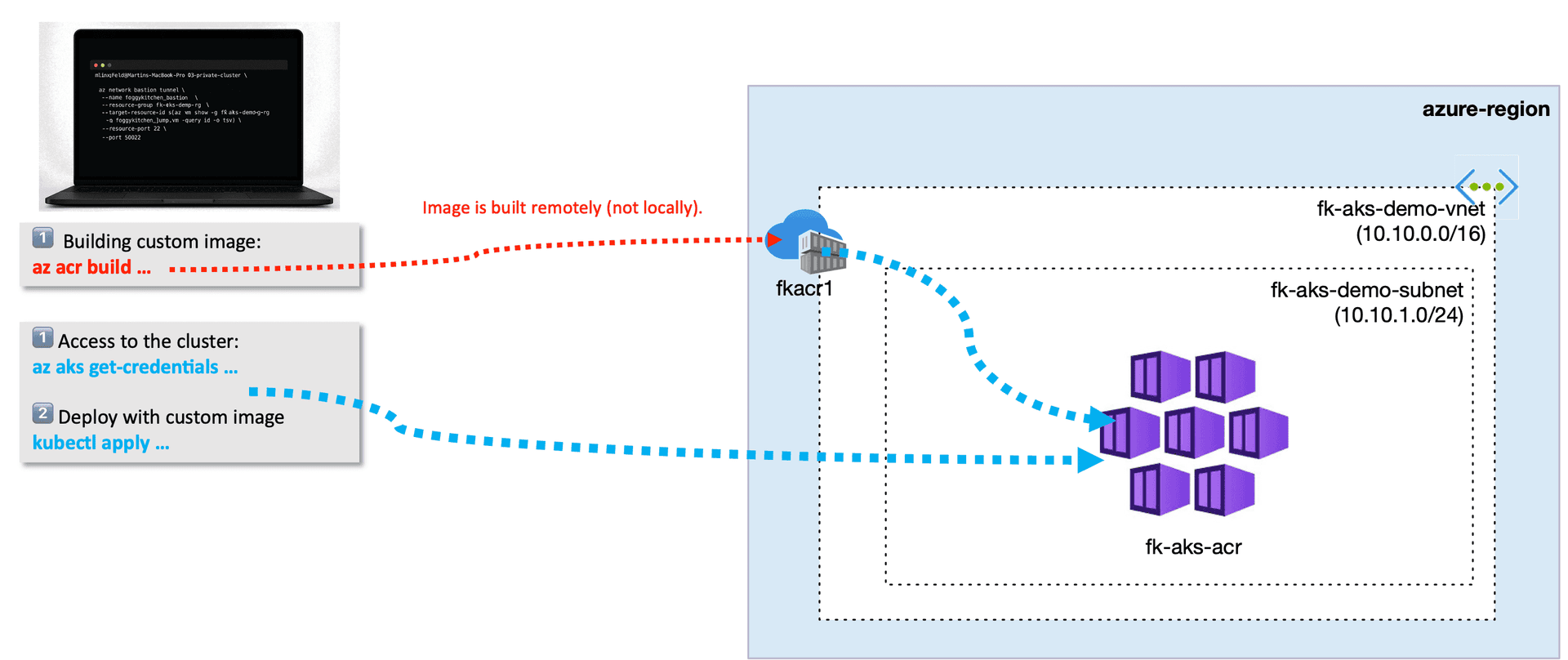
In this guide, you will learn how Azure Container Registry Terraform works with AKS when deploying workloads with Terraform — a crucial workflow for any real-world Kubernetes project. When you start automating workloads on Azure Kubernetes Service (AKS), the first real challenge is not the cluster itself — it’s your container image workflow.
Where do your images live?
How does AKS pull them?
How do you build, tag, and deploy them in a reproducible way?
In all production-like environments, the answer is the same:
👉 Azure Container Registry (ACR).
In my upcoming AKS + Terraform/OpenTofu course on FoggyKitchen.com, we build a full end-to-end pipeline:
generate application artifacts,
build a container image,
store it in ACR,
attach registry permissions to AKS securely,
deploy a workload via Kubernetes manifests,
expose it publicly through an Azure Load Balancer.
But before we get there, let’s look at the core building block.
ACR in Terraform — the Essential Piece
Here is the minimal Terraform code required to provision an ACR instance with managed identity integration:
resource "azurerm_container_registry" "fk_acr" {
  name                = "fkacr1"
  resource_group_name = azurerm_resource_group.rg.name
  location            = azurerm_resource_group.rg.location
  sku                 = "Basic"
  admin_enabled       = false
}
That's all we need at this stage — just the registry.
In the course, we go further:
AKS is configured to pull images using its managed identity,
no admin credentials are needed,
Terraform handles the relationship securely and automatically.
ACR + AKS — The Architecture at a Glance
The upcoming lesson ties everything together:
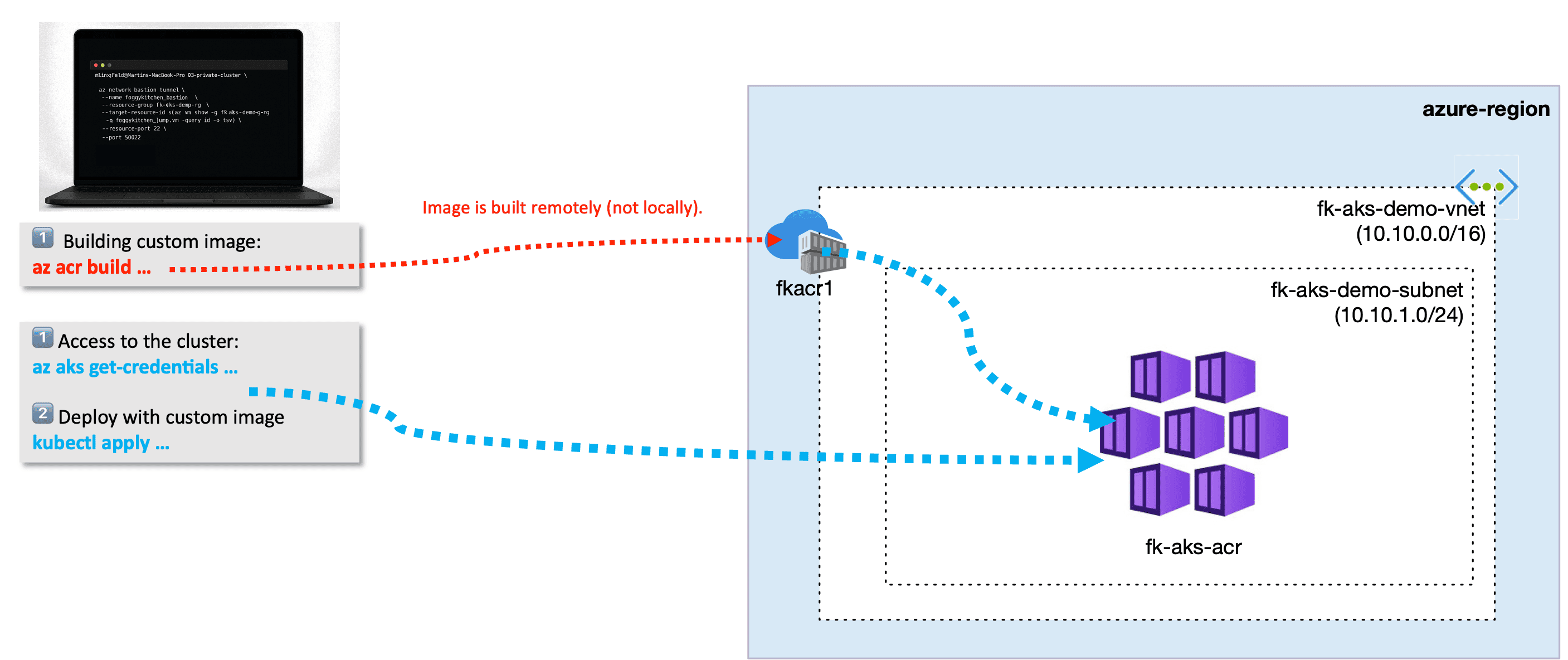
You push your image, attach the registry to AKS, deploy the workload — and Azure assigns a public IP so you can access your running app immediately.
But again: this full workflow is part of the paid course, so in this article we stay high-level.
Why Azure Container Registry + AKS + Terraform Matter
A real-world AKS environment always includes:
a private registry,
automated image builds (not local Docker),
identity-based access,
repeatable deployments.
Skipping ACR or hardcoding admin credentials is how “hello world” projects break when they meet real production requirements.
What’s Next
This blogpost is just a preview.
In the “AKS Fundamentals with Terraform/OpenTofu” course, we’ll walk step-by-step through:
provisioning ACR,
attaching it to AKS,
generating manifests with templatefile(),
building images in ACR using Azure’s cloud agents,
deploying workloads,
exposing them via public Load Balancer,
and tearing the whole stack down — fully automated.
Read more about Azure networking & AKS with Terraform
🔗 AKS Kubenet vs Azure CNI (Terraform)
A practical comparison of the two networking models available in AKS. Learn how Pod IPs, routing, scalability and Terraform configuration differ — essential knowledge before deploying production workloads.
🔗 Azure Bastion with Terraform
A hands-on guide to deploying Azure Bastion, including subnet design, NSG rules, routing and secure access to private AKS clusters. Perfect reference if you're planning private or hybrid AKS connectivity.
🔗 Azure VNet Peering vs OCI Local Peering (Terraform)
In this post, we compare Azure VNet Peering with OCI Local Peering using clear diagrams and fully automated Terraform examples. It’s an ideal deep dive if you want to understand how cross-cloud routing works, what traffic flows look like, and how CIDR planning affects hybrid architectures. This article is especially relevant if you're exploring multicloud designs that involve AKS or OCI resources.
🔗 Azure Bastion with Terraform
A hands-on guide to deploying Azure Bastion with Terraform — including the required subnets, NSG rules, and a practical workflow for connecting securely to private AKS nodes. If you're planning a private AKS cluster, this article explains the exact infrastructure you will need. It also includes screenshots and troubleshooting steps directly from the Azure Portal.
This post walks through building a production-ready Azure VNet using Terraform, including subnets, address spaces, and best practices for IaC modularization. It forms the foundation for all Azure deployments on FoggyKitchen — including AKS, PostgreSQL, and Bastion. If you're beginning with Azure networking, start here.
🔗 Azure File Storage (NFS) with Terraform
A deep, practical walkthrough of deploying Azure File Storage with NFS enabled — perfect for workloads that require POSIX-compatible shared storage. The tutorial includes Terraform code, mount instructions from a Linux VM, and key security considerations such as private endpoints. Ideal for AKS users exploring persistent storage options.
🔗 Azure PostgreSQL Flexible Server with Terraform
In this article, you provision Azure PostgreSQL Flexible Server using Terraform, complete with high-availability settings, VNet integration, and parameter tuning. It’s a great companion for AKS applications requiring managed relational databases with private networking. The post also covers best practices around subnet delegation and firewall rules.
🔗 Azure Managed Disk with Terraform
This tutorial focuses on creating and attaching Azure Managed Disks using Terraform. You’ll learn how disk types, performance tiers, and SKUs affect cost and throughput — and how to attach disks to compute instances in an automated, repeatable way. It's an essential building block for stateful Azure workloads.
Master AKS + ACR Automation with Terraform/OpenTofu
Learn how to build, push, and deploy container images to Azure Container Registry — fully automated with Terraform.
Understand ACR authentication via Managed Identity and run real Kubernetes workloads end-to-end on AKS.
🔒 Lifetime • ⏱️ Self-paced • 🧪 Real labs