
How to Autoscale Your Webservers in OCI with Terraform/OpenTofu (refreshed in 2025)
- Posted by Martin Linxfeld
- Categories Oracle Cloud Infrastructure (OCI), compute, terraform
- Date January 13, 2020
- Comments 2 comments
- Tags autoscale, autoscaling, Infrastructure as Code, instance pool, load balancer, oci compute, terraform
In this tutorial, you’ll learn how to configure OCI Compute Autoscaling Terraform to dynamically scale your backend servers based on load. During peak traffic hours, you want your infrastructure to automatically scale out, while at night or during low traffic periods, it should scale back in to save costs.
Oracle Cloud Infrastructure (OCI) offers a native Autoscaling Configuration integrated with Instance Configurations and Instance Pools, allowing you to automatically adjust the number of backend servers based on load metrics — for example, average CPU utilization.
In this article, I’ll show you how to set up a fully automated autoscaling mechanism for your webservers using Terraform/OpenTofu. This approach is based on my own IaC implementation inspired by a Todd Sharp video from the early OCI days. Instead of clicking through the console, everything will be declarative.
🏗 Architecture Overview
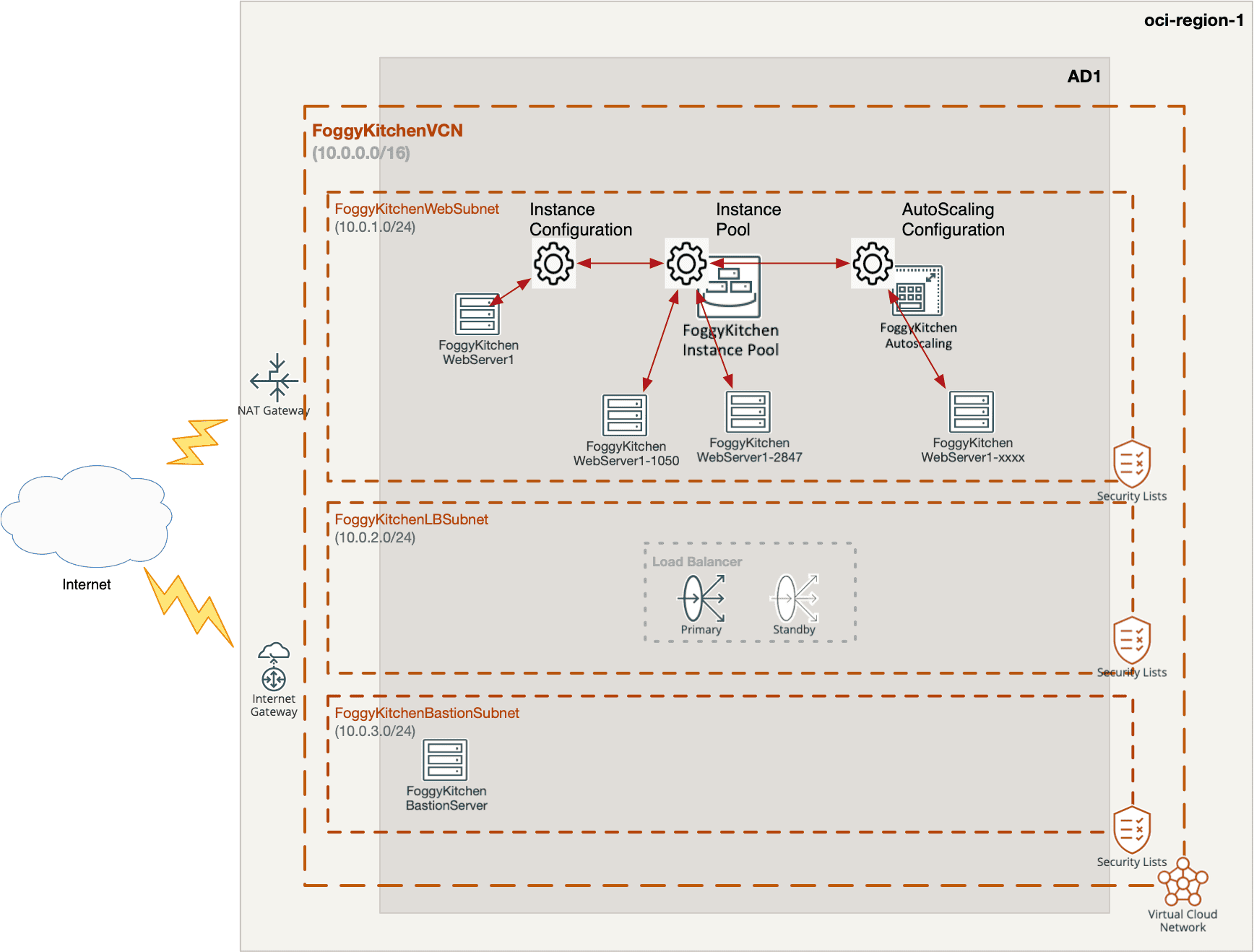
The core of this architecture, shown in Figure 1, resides inside the FoggyKitchenWebSubnet, which hosts the autoscaled fleet of backend webservers. This subnet contains all the resources that enable dynamic scaling:
Instance Configuration — defines the machine shape, image, metadata and the bootstrap logic. It acts as a blueprint for all backend instances.
Instance Pool — launches and manages a group of identical compute instances based on the Instance Configuration. The pool ensures that new servers can be created consistently and attached to the Load Balancer.
Autoscaling Configuration — monitors performance metrics, such as CPU utilization, and dynamically scales the Instance Pool up or down depending on the load. It’s the key mechanism that keeps the backend fleet right-sized over time.
The remaining components — Load Balancer, Bastion, and NAT Gateway — provide supporting infrastructure:
The Load Balancer serves as the public entry point, distributing traffic across backend instances.
The Bastion enables secure administrative access.
The NAT Gateway allows outbound internet traffic from the private subnet (e.g., for OS updates or package downloads).
By keeping the backend servers in a private subnet, we follow a best-practice design: only the Load Balancer is exposed to the internet, while the autoscaled instances remain isolated and protected by security lists.
Figure 1 – OCI Compute Autoscaling Terraform architecture in OCI using Instance Configuration, Instance Pool, and Autoscaling Configuration
🧠 OCI Compute Autoscaling Terraform Configuration
The full code is available in my GitHub repository:
👉 https://github.com/mlinxfeld/terraform-oci-autoscale
Below are the most important building blocks 👇
1️⃣ Webserver Instance Definition (webserver_instance.tf)
resource "oci_core_instance" "FoggyKitchenWebserver" {
  availability_domain = lookup(data.oci_identity_availability_domains.ADs.availability_domains[1], "name")
  compartment_id      = oci_identity_compartment.FoggyKitchenCompartment.id
  display_name        = "FoggyKitchenWebServer1"
  shape               = var.shape

  dynamic "shape_config" {
    for_each = local.is_flexible_shape ? [1] : []
    content {
      memory_in_gbs = var.flex_shape_memory
      ocpus         = var.flex_shape_ocpus
    }
  }

  subnet_id = oci_core_subnet.FoggyKitchenWebSubnet.id

  source_details {
    source_type = "image"
    source_id   = data.oci_core_images.InstanceImageOCID.images[0].id
  }

  metadata = {
      ssh_authorized_keys = tls_private_key.public_private_key_pair.public_key_openssh
      user_data = base64encode(file("./userdata/bootstrap"))
  }

  create_vnic_details {
     subnet_id = oci_core_subnet.FoggyKitchenWebSubnet.id
     assign_public_ip = false
  }
}
This file defines the base machine configuration used later by the Instance Configuration.
2️⃣ Instance Configuration (instance_configuration.tf)
resource "oci_core_instance_configuration" "FoggyKitchenWebserverInstanceConfiguration" {
    count = var.enable_instance_configuration ? 1 : 0
    compartment_id = oci_identity_compartment.FoggyKitchenCompartment.id
    display_name = "FoggyKitchenInstanceWebserverConfiguration"
    instance_id = oci_core_instance.FoggyKitchenWebserver.id
    source = "INSTANCE"
}
This acts as a template that the Instance Pool will use to launch multiple identical webserver instances.
3️⃣ Instance Pool (instance_pool.tf)
resource "oci_core_instance_pool" "FoggyKitchenInstancePool" {
    count = var.enable_instance_pool ? 1 : 0
    compartment_id = oci_identity_compartment.FoggyKitchenCompartment.id
    instance_configuration_id = oci_core_instance_configuration.FoggyKitchenWebserverInstanceConfiguration[0].id
    placement_configurations {
        availability_domain = lookup(data.oci_identity_availability_domains.ADs.availability_domains[1], "name")
        primary_subnet_id = oci_core_subnet.FoggyKitchenWebSubnet.id

    }
    size = "2"
    display_name = "FoggyKitchenInstancePool"
    load_balancers {
        backend_set_name = oci_load_balancer_backendset.FoggyKitchenPublicLoadBalancerBackendset.name
        load_balancer_id = oci_load_balancer_load_balancer.FoggyKitchenPublicLoadBalancer.id
        port = "80"
        vnic_selection = "PrimaryVnic"
    }
}
The pool maintains a group of VMs behind the Load Balancer.
4️⃣ Autoscaling Configuration (instance_autoscaling_threshold.tf)
resource "oci_autoscaling_auto_scaling_configuration" "FoggyKitchenThresholdAutoScalingConfiguration" {
    count = var.enable_threshold_autoscaling ? 1 : 0
    auto_scaling_resources {

        id = oci_core_instance_pool.FoggyKitchenInstancePool[0].id
        type = "instancePool"
    }
    compartment_id = oci_identity_compartment.FoggyKitchenCompartment.id
    policies {
        display_name = "FoggyKitchenThresholdAutoScalingConfigurationPolicies"
        capacity {
            initial = "2"
            max = "4"
            min = "2"
        }

        policy_type = "threshold"

        rules {
            action {
                type = "CHANGE_COUNT_BY"
                value = "1"
            }
            display_name = "FoggyKitchenThresholdAutoScalingConfigurationPoliciesScaleOutRule"
            metric {
                metric_type = "CPU_UTILIZATION"
                threshold {
                    operator = "GT"
                    value = "80"
                }
            }
        }

        rules {
            action {
                type  = "CHANGE_COUNT_BY"
                value = "-1"
            }
            display_name = "FoggyKitchenThresholdAutoScalingConfigurationPoliciesScaleInRule"
            metric {
                metric_type = "CPU_UTILIZATION"
                threshold {
                    operator = "LT"
                    value = "20"
                }
            }
        }
    }
    cool_down_in_seconds = "300"
    display_name = "FoggyKitchenThresholdAutoScalingConfiguration"
}
This configuration monitors CPU utilization and scales the pool out or in accordingly.
📝 Summary
By combining Instance Configurations, Instance Pools, and Autoscaling Configuration, you can build a resilient and cost-efficient web tier in OCI. Terraform makes this setup reproducible and easy to maintain across environments.
👉 Full code: https://github.com/mlinxfeld/terraform-oci-autoscale
Autoscaling is just one example of what you can achieve once you master the foundations of OCI networking and compute with Terraform. In my flagship OCI Infrastructure Automation course, you’ll build these foundations step by step — from VCNs and Bastion Hosts, through backend provisioning, to advanced IaC patterns.
Master the Foundations — Build Anything
Autoscaling is just the beginning. Learn how to design and automate OCI networking and compute from scratch with Terraform in my flagship course. It’s the solid base for advanced patterns like this one.
🔒 Lifetime • ⏱️ Self-paced • 🧪 Real labs
Check also other courses:



Leave A Reply Cancel reply
You must be logged in to post a comment.
2 Comments