Azure Forced Tunneling with Terraform — Controlling All Outbound Traffic
- Posted by Martin Linxfeld
- Categories Azure Networking
- Date April 9, 2026
- Comments 0 comment
- Tags azure egress control, azure forced tunneling, azure hub and spoke, azure network design, azure nva, azure outbound traffic, azure routing, azure security networking, azure udr, azure virtual appliance, hub spoke routing, multi vnet architecture, terraform azure networking
Introduction
This article demonstrates Azure forced tunneling Terraform in a practical hub-and-spoke architecture.
Azure forced tunneling with Terraform is a key pattern used to control outbound traffic in hub-and-spoke architectures.
In the previous article, we introduced routing between spokes using a central Virtual Appliance.
Traffic between VNets was no longer blocked — it was explicitly routed through the hub.
But there is still one critical gap in this design:
Outbound traffic is not controlled.
By default, Azure allows virtual machines to reach the internet directly, often bypassing your intended architecture.
Why Azure Forced Tunneling Matters
In a typical hub-and-spoke setup:
- Spoke VNets are connected to the hub
- Routing between spokes is defined using UDR
- Internal communication becomes predictable
However, outbound traffic still follows Azure’s default behavior.
This means:
- A virtual machine can initiate outbound connections independently
- Traffic may bypass central routing logic
- There is no guarantee of inspection, logging, or policy enforcement
Your architecture may be connected — but not governed.
For more details, see Azure documentation on User Defined Routes: 👉 https://learn.microsoft.com/en-us/azure/virtual-network/virtual-networks-udr-overview
Default Azure Outbound Behavior
By default, Azure provides implicit outbound connectivity for virtual machines.
Even without a public IP address, a VM can reach the internet using Azure-managed outbound access.
This has several implications:
- Outbound traffic does not require explicit design
- Traffic may bypass your architectural boundaries
- There is no centralized control point
In other words:
Your network may look structured — but outbound traffic still follows platform defaults.
Introducing Forced Tunneling
Forced tunneling addresses this limitation.
Instead of allowing outbound traffic to leave directly, we enforce a simple rule:
All outbound traffic must pass through the hub.
Forced tunneling is not about connectivity — it is about control over how traffic leaves your system.
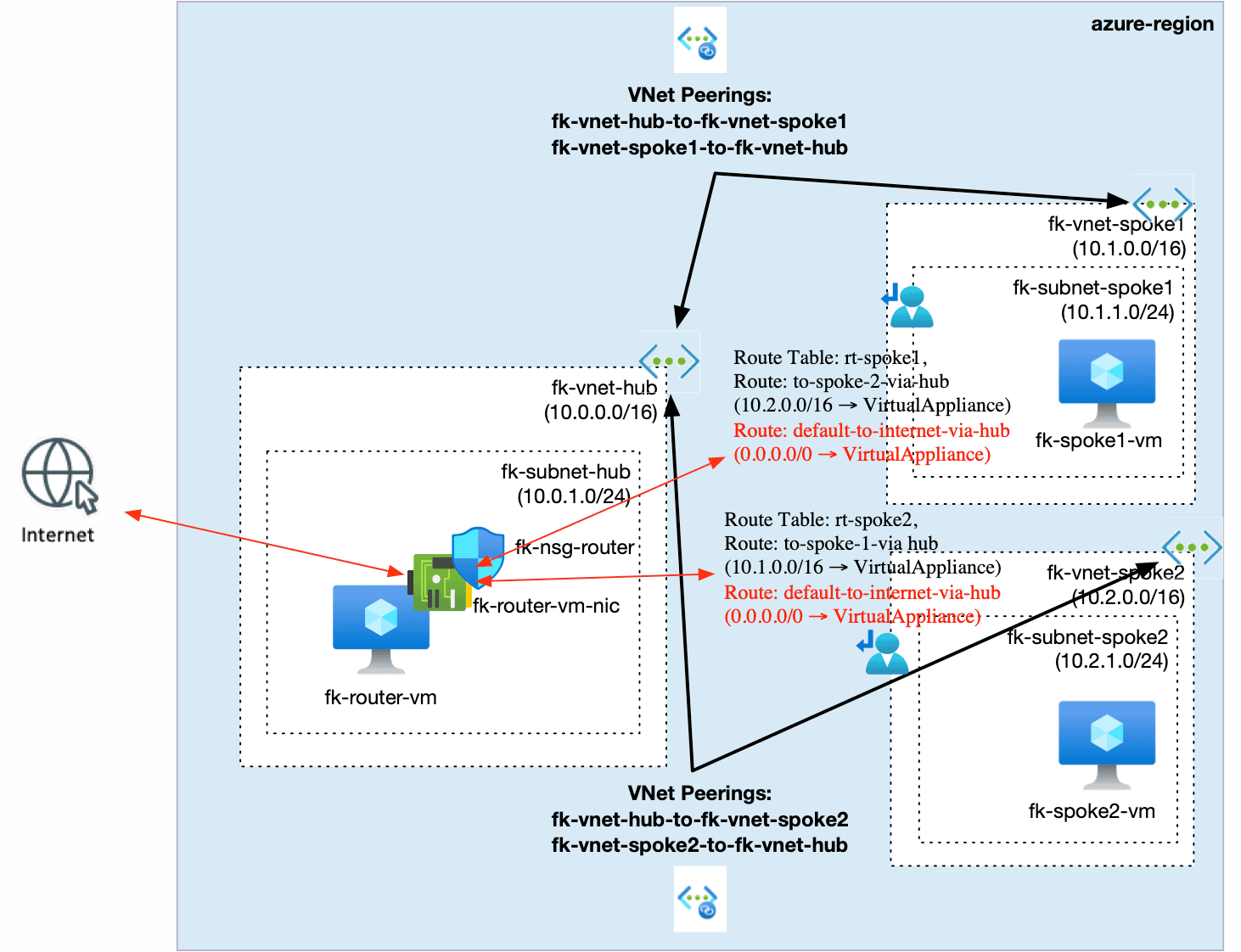
Figure 1. Forced tunneling using Azure Virtual Appliance and UDR
Azure Forced Tunneling in Hub-and-Spoke Architectures
Compared to the previous routing setup, we introduce one critical change:
Default Route Override
In each spoke subnet, we define:
0.0.0.0/0 → VirtualAppliance
This means:
- Any traffic not matching a more specific route
- Including all internet-bound traffic
- Is redirected to the hub
The Role of the Router VM
The router VM (Virtual Appliance) becomes a central component of the architecture.
It is responsible for:
- Receiving outbound traffic from spokes
- Forwarding traffic to external destinations
- Acting as a control point for network egress
Traffic flow now becomes:
- Spoke VM → Hub
- Hub → Router VM
- Router VM → Internet
The key difference is not just the path — but the fact that the path is now explicitly defined and enforced.
Implementing Forced Tunneling with Terraform
We extend the routing configuration by defining a default route in each spoke:
route {
name = "default-to-internet-via-hub"
address_prefix = "0.0.0.0/0"
next_hop_type = "VirtualAppliance"
next_hop_in_ip_address = var.router_private_ip
}
This route is applied to the spoke subnet route tables.
👉 Full working example: https://github.com/foggykitchen/terraform-az-fk-routing/tree/main/examples/03_forced_tunneling
What Does This Achieve?
Without forced tunneling:
- VM → Internet (direct) ❌
With forced tunneling:
- VM → Hub → Router → Internet ✅
The key difference is not connectivity — it is control.
This setup represents a practical implementation of Azure forced tunneling with Terraform in a hub-and-spoke architecture.
Why This Pattern Matters
Forced tunneling is widely used in enterprise environments.
It enables:
- Centralized traffic inspection
- Security enforcement
- Logging and auditing
- Controlled and predictable egress paths
This is where networking evolves into architecture.
Trade-offs of Forced Tunneling
Forced tunneling introduces control, but also changes system behavior.
It is important to understand the trade-offs:
- Increased routing complexity
- Dependency on the central appliance
- Potential performance bottlenecks
- Additional operational overhead
This pattern should not be applied blindly.
It should be introduced intentionally — when control and governance outweigh simplicity.
Key Takeaways
- Azure does not enforce outbound control by default
- UDR allows you to override default routing behavior
- Forced tunneling ensures all traffic flows through a central point
- The hub becomes a control layer, not just a connectivity layer
Without forced tunneling, your architecture is functional — but not controlled.
🚀 Continue Your Journey
If you want to understand the Azure baseline first:
👉 Azure Fundamentals with Terraform/OpenTofu
But if you are ready to move from simple connectivity to real traffic control:
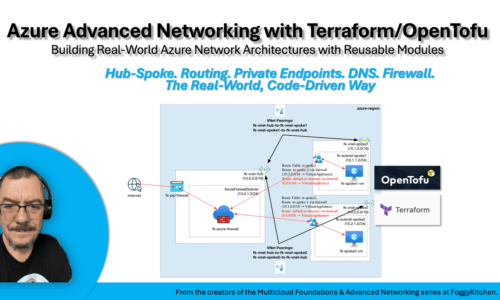
👉 Azure Advanced Networking with Terraform/OpenTofu
In the full course, we build hub-and-spoke topology, VNet peering, User Defined Routes, Private Endpoints, Private DNS, RBAC, and Azure Firewall step by step.
This article shows one important idea: outbound traffic should not escape the architecture accidentally.
Azure Advanced Networking shows how to turn that idea into a complete multi-VNet design.

Control Azure Outbound Traffic with Real Network Architecture
You’ve seen how forced tunneling redirects outbound traffic through a controlled path. Now build the full Azure Advanced Networking lab with Terraform and OpenTofu: hub-and-spoke topology, VNet peering, User Defined Routes, Private Endpoints, Private DNS, RBAC, and Azure Firewall.
This course shows how Azure networking moves from basic reachability to centralized routing, inspection, and control.
🧭 Forced Tunneling · 🔁 UDRs · 🧱 Hub-and-Spoke · 🔥 Azure Firewall