Azure Virtual Machines with Load Balancer and Bastion using Terraform/OpenTofu (2026 Edition)
- Posted by Martin Linxfeld
- Categories Azure Compute, opentofu, terraform
- Date December 23, 2025
- Comments 0 comment
- Tags azure bastion, Azure Fundamentals, Azure Load Balancer, Azure Networking, Azure Terraform, azure virtual machines, azure vmss, Compute Module, From VMs to AKS, IaC, Infrastructure as Code, Learn AKS, OpenTofu, Private AKS
Running Azure private VM Terraform looks simple — until you need to make them reachable for users without exposing public IPs. In this post, we build a production-ready foundation using a Load Balancer for application traffic and Bastion for secure SSH access.
The first decisions around networking and access control determine whether your environment stays safe or slowly turns into a collection of public endpoints and accidental risks.
In this post, we build a minimal but meaningful Azure compute foundation using Terraform/OpenTofu:
Private VMs in a private subnet
Public Load Balancer to expose HTTP traffic
Azure Bastion for SSH access — without Public IPs
Subnet-level NSG instead of ad-hoc security rules on each NIC
This is not a “hello world” example.
It’s the same architectural starting point that Azure teams use before moving toward autoscaling or Kubernetes workloads.
🌐 Network foundation
Before introducing private compute, the underlying virtual network must already define subnet boundaries and traffic zones.
This example assumes a purpose-driven network layout similar to the one described here:
👉 Azure VNet Terraform Module – Explained
Once the network contract exists, compute, security, and traffic layers can be composed without redesigning the network later.
🧭 Azure Private VM Terraform Architecture
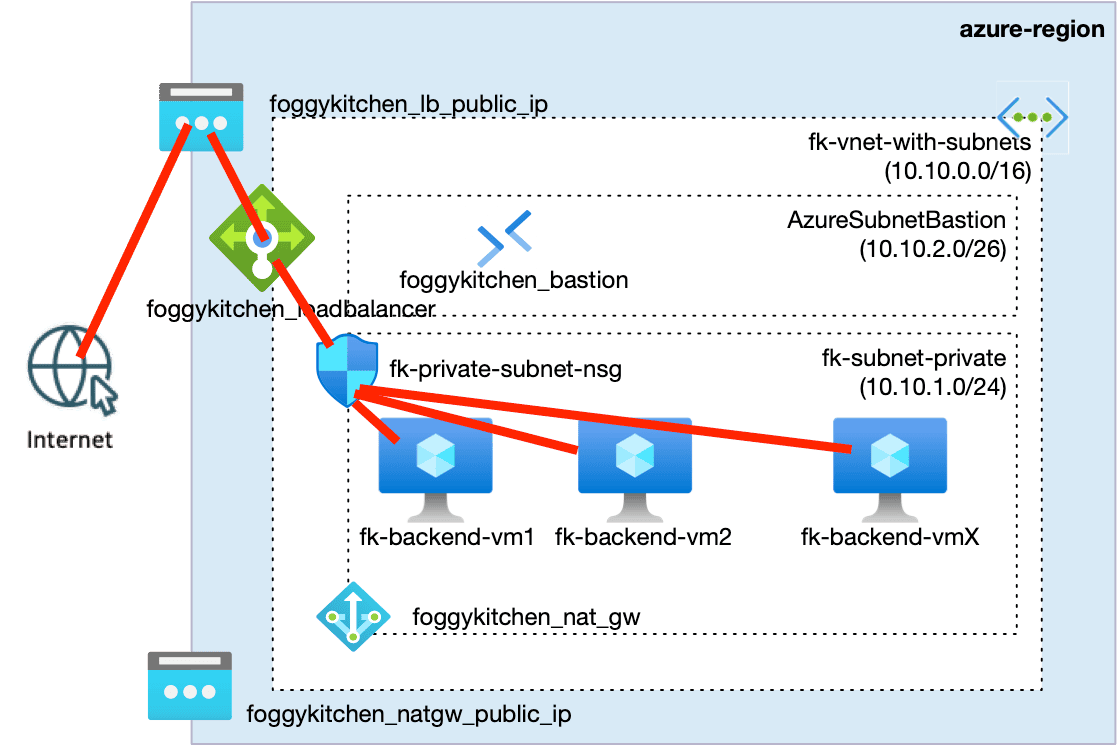
This pattern separates user traffic from administrative access:
HTTP traffic goes only through the Load Balancer
VM compute stays private
SSH access is tunneled through Bastion
No Public IPs are assigned to backend VMs
Before we scale compute or automate deployments, we need a baseline pattern that keeps virtual machines private while still making an application reachable from the internet.
The architecture on the right illustrates the separation between data plane access (HTTP via Load Balancer) and admin plane access (SSH via Bastion). This structure prevents exposing VM public endpoints while still allowing secure operational access.
In production environments, this private-first pattern becomes the foundation for VM Scale Sets, container nodes, and eventually AKS clusters — where private clusters and Bastion access remain the norm.
If you’re curious how Bastion changes the access model once private clusters enter the picture, I covered that topic in more detail here:
👉 Azure Bastion with Terraform — private cluster access patterns
👉 See the full Azure infrastructure with Terraform architecture model: Azure Infrastructure with Terraform – Architecture Model
Figure 1. Architecture for private Azure compute with public load balancing and secure administrative access. User traffic enters through the Public Load Balancer, reaches backend VMs in a private subnet, while SSH access is routed through Azure Bastion to avoid exposing Public IPs on virtual machines.
📂 Code used in this example
Two Terraform modules are involved:
Module
Responsibility
Virtual Network + subnets
VMs, NICs, LB attachment, Bastion-friendly layout
Repository:
git clone https://github.com/foggykitchen/terraform-az-fk-compute
cd terraform-az-fk-compute/examples/03_multiple_vms_with_lb
tofu init
tofu apply
After a few minutes, Terraform provisions:
2× private VMs
a public Load Balancer distributing HTTP
Azure Bastion as secure admin access path
subnet-level Network Security Group allowing HTTP only from LB
🚀 Validating the Load Balancer
Retrieve the public IP:
tofu output public_lb_ip
Test accessibility:
curl http://PUBLIC_LB_IP
Example output:
It works
Served by: fk-backend-vm2
Time: 2025-12-23T12:55:22+00:00
Reload a few times — backend responses switch between VMs,
confirming that the LB is routing to private compute under the hood.
🔐 SSH access via Azure Bastion (private VMs)
No Public IPs. No exposed SSH.
Access is performed through a Bastion tunnel.
First, extract your private key from terraform output (demo-only approach):
tofu console
nonsensitive(tls_private_key.public_private_key_pair.private_key_openssh)
Save as id_rsa and secure permissions:
chmod 600 id_rsa
Start a Bastion tunnel:
az network bastion tunnel \
  --name foggykitchen_bastion \
  --resource-group fk-rg \
  --target-resource-id $(az vm show -g fk-rg -n fk-backend-vm1 --query id -o tsv) \
  --resource-port 22 \
  --port 50022
Now you can connect:
ssh -i id_rsa -p 50022 [email protected]
You’re on a VM that never exposed port 22 to the internet.
🧠 Why this pattern matters
This foundation scales conceptually — even without changing primitives:
Concern
Addressed by
Public exposure of SSH
Bastion tunnel
Rudderless inbound rules
NSG per subnet
Multiple VMs as single app
Load Balancer
Secure maintenance access
Bastion instead of public jump host
It’s minimal, but not simplistic.
It’s the starting point for real Azure workloads — not an end state.
🧹 Cleanup
tofu destroy
🔭 What comes next?
What we built here is intentional limitation:
static private compute exposed through a Load Balancer.
If your workload needs elasticity, rolling updates, node replacement or mixed instance types,
the natural next move is Azure VM Scale Sets (VMSS) — still private, still behind LB, but with scaling logic built in.
And beyond that:
AKS nodes are VMSS under the hood.
So this compute foundation is not a detour — it’s the entry path toward container workloads.
🎓 Next step: from VMs to platform architecture
What you built here is not a detour — it’s the entry point to real Azure platforms.
AKS does not remove this layer. It depends on it.
Understanding this transition — from compute to platform — is what separates deployment from architecture.
➡️ Continue with Azure Fundamentals (Terraform / OpenTofu)
📎 References
Repository
Link
Compute module
Networking foundation
📐 Design notes
The short video below explains the architectural intent behind using private virtual machines in Azure — and why private compute is about controlled entry and clear boundaries, not just removing public IPs.
This design-level discussion complements the hands-on Terraform implementation described above.
Summary
You didn’t just deploy virtual machines. You defined how traffic enters your system, how administrators access it, and how workloads remain isolated.
This is what real Azure compute architecture looks like — not resources, but boundaries. And every production platform starts exactly here — before scaling, before Kubernetes.
From Private VMs to Real Azure Compute Architecture
This example shows how to build a private-first compute layer — separating user traffic, administrative access, and workload isolation.
This is the foundation every production Azure platform is built on — before scaling, before Kubernetes.
🔒 Lifetime • ⚙️ Compute & Networking Labs • 🧠 Architecture-first