Azure Virtual Machine Scale Sets with Load Balancer, Bastion and Terraform/OpenTofu (2026 Edition)
- Posted by Martin Linxfeld
- Categories Azure Cloud, opentofu, terraform
- Date December 29, 2025
- Comments 0 comment
- Tags Azure Autoscaling, azure bastion, Azure Load Balancer, Azure VM Scale Sets, Azure VMSS Terraform, From VMs to AKS, Infrastructure as Code, OpenTofu, Private Azure compute, terraform
In this post, we configure Azure VMSS autoscaling Terraform to scale private compute without exposing VMs to the internet.
Running workloads on individual Azure VMs is straightforward — but production teams rarely stop there.
Once your application grows, you need more than one VM, and you need them to scale without exposing compute to the internet.
That’s where Azure Virtual Machine Scale Sets (VMSS) become the natural continuation of the private-compute foundation we built previously:
Private VMs in a private subnet
Public Load Balancer handling HTTP traffic
Bastion for administrative access (no public SSH)
Subnet-level NSGs instead of rules on NICs
If you missed Part 1 — building private VMs behind a Load Balancer — start here:
Private Azure Virtual Machines with Terraform — No Public IPs
And if you come from the OCI world or work in multicloud, this pattern may feel familiar —
I first explored the same idea years ago using Oracle Cloud Infrastructure:
OCI Compute Autoscaling with Terraform — Private instances at scale
Let’s translate that concept into the Azure world — with VM Scale Sets.
🧩 When to choose Azure VMSS autoscaling Terraform?
Individual VMs work — until they don’t:
Problem
Impact
VMSS Solution
Traffic increases
manual VM provisioning
automated instance count
VM fails
downtime
auto-replacement
Patch/update cycle
per-machine workload
rolling upgrade
Burst workload
unpredictable performance
autoscaling
VMSS helps you scale compute while keeping VMs private — the Load Balancer remains the only public entry point.
🏗️ Architecture Overview
This architecture extends the previous foundation:
• HTTP traffic terminates on Public Load Balancer
• Backend traffic flows to VM Scale Set instances
• No VM exposes a public IP
• Operators connect via Azure Bastion, not the internet
• VMSS instance count can grow or shrink based on load
With this pattern we gain two critical improvements over fixed-size VMs:
1️⃣ Elastic capacity — VMSS automatically matches compute to demand, reducing cost during quiet periods and absorbing burst workloads without manual intervention.
2️⃣ Operational repeatability — instances are created from the same image and cloud-init, ensuring that scale-out events don’t introduce configuration drift.
This is the point where VM-based deployments start to resemble cluster deployments:
• instances become replaceable units
• scaling policies enforce workload boundaries
• networking stays private-by-default
Nothing prevents you from placing cluster workloads on top of this foundation — teams often do that before transitioning to managed Kubernetes.
In fact, this is the exact stepping stone real engineering teams use on their way toward private AKS clusters, where node pools behave like scaled VMSS groups and Bastion access remains the operational norm.
👉 See the full Azure infrastructure with Terraform architecture model: Azure Infrastructure with Terraform – Architecture Model
Figure 1. Architecture of private Azure compute using VM Scale Sets behind a Load Balancer with Bastion access and subnet-level NSGs.
🚀 Provisioning VM Scale Sets with Terraform/OpenTofu
Here’s the minimal configuration block — using the reusable terraform-az-fk-compute module:
module "compute" {
  source = "github.com/foggykitchen/terraform-az-fk-compute"

  deployment_mode         = "vmss"
  enable_autoscale        = true

  # initial & minimum capacity
  instance_count          = 2
  autoscale_min_instances = 2

  # upper limit for scale-out
  autoscale_max_instances = 5

  subnet_id               = module.network.private_subnet_id
  backend_pool_id         = module.lb.backend_pool_id
}
With this configuration:
Parameter
Meaning
deployment_mode = "vmss"
tells the module to manage compute via VMSS
enable_autoscale = true
activates autoscaling policy definition
instance_count = 2
initial desired capacity
autoscale_min_instances = 2
never go below 2 instances
autoscale_max_instances = 5
allow scaling up to 5 instances
This is the pattern real Azure teams use when workloads transition from simple testing → to steady production → to seasonal peaks.
📝 The complete example lives here:
https://github.com/foggykitchen/terraform-az-fk-compute/tree/main/examples/04_vmss_autoscaling
🔎 What changes compared to single VMs?
Component
Before
Now
Compute
1–3 standalone VMs
VMSS manages the instance fleet
Scaling
manual
policy-based autoscaling
OS/Patching
per VM
rolling upgrade through VMSS
Load Balancer
backend pool with NICs
backend pool attaches to VMSS instances
SSH access
per-VM IP or Bastion target
Bastion targets VMSS instances dynamically
🧭 Listing VMSS instances in Portal
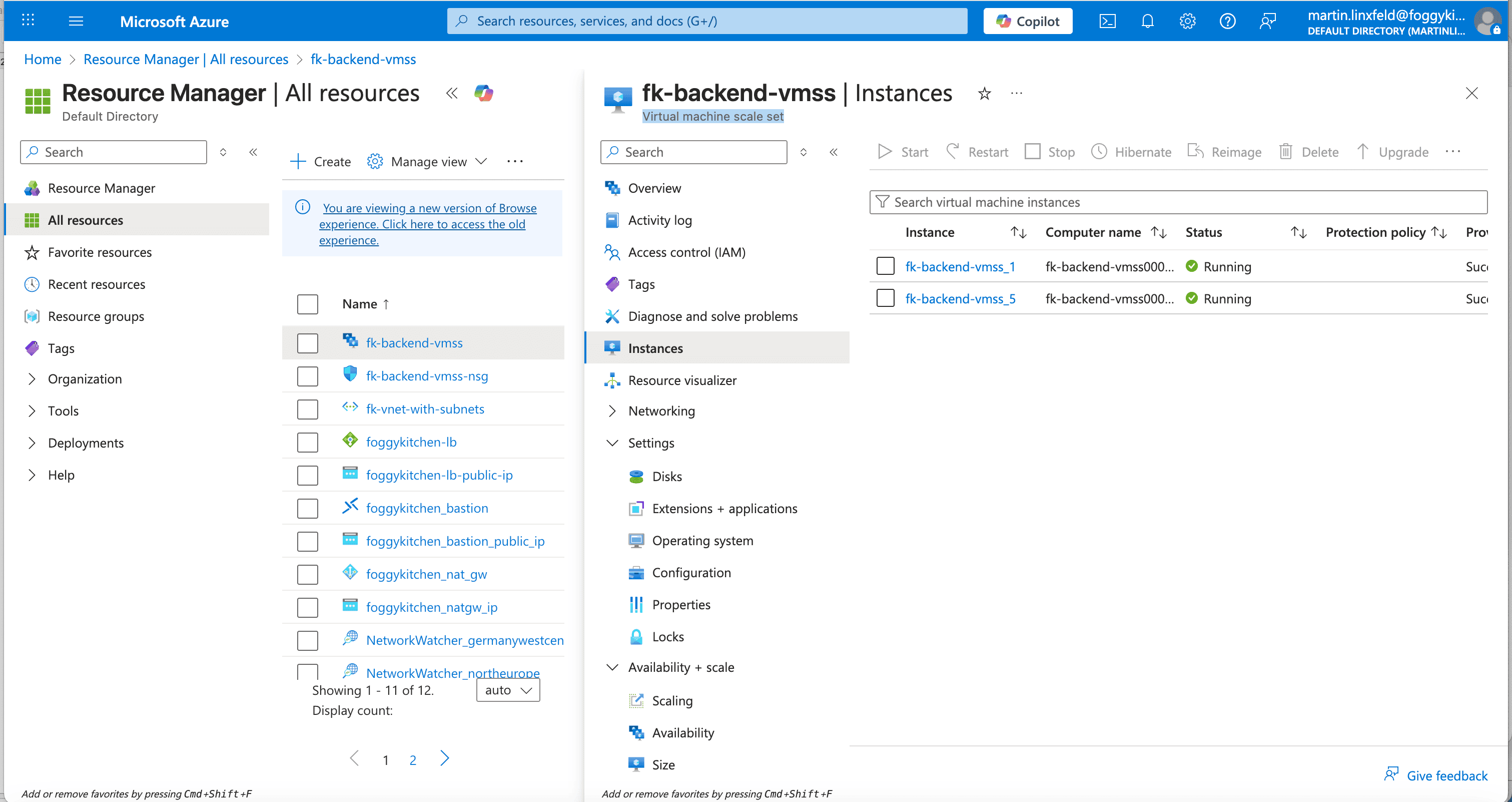
Figure 2. Azure Portal view showing multiple VMSS instances — ready to scale horizontally as workload grows.
🛠️ Connecting via Bastion
VMSS doesn’t assign stable VM names — each instance is dynamic.
To SSH, you first retrieve the instance resource ID:
az vmss list-instances \
-g fk-rg \
-n fk-backend-vmss \
--query "[].instanceId" \
-o tsv
Then open the Bastion tunnel to a specific instance (ID 1 in this example):
az network bastion tunnel \
  --name foggykitchen_bastion \
  --resource-group fk-rg \
  --target-resource-id vmss-id/virtualMachines/1 \
  --resource-port 22 \
  --port 50022
SSH locally:
ssh -i ~/.ssh/id_rsa -p 50022 azureuser@localhost
🧪 Testing application access
With VMSS instances registered in the backend pool, your HTTP service should respond:
curl http://
It works! Served by fk-backend-vmss000005
If you refresh repeatedly, the backend instance name should alternate —
confirming that VMSS instances are load-balanced horizontally.
📐 Design notes
The short video below explains the architectural limits of VMSS autoscaling — and why correct Terraform configuration alone is not enough in real systems.
This design-level discussion complements the hands-on Terraform implementation described above.
📌 Summary
You extended private Azure compute into scalable private compute — without exposing VMs.
This is the compute foundation real teams use:
before clusters
before autoscaling
before Kubernetes
Next step?
Turn private compute into private Kubernetes using the same patterns — VNet, private subnets, Bastion, NSGs.
🎓 Ready to go deeper?
From private VMs → to private Kubernetes → to AKS done right
Learn how to deploy, scale, and operate AKS privately — Terraform/OpenTofu first, YAML second, IaC always.
👉 Azure Kubernetes Service (AKS) with Terraform/OpenTofu — Hands-On Fundamentals (2025 Edition)
🔗 Related posts
Private Azure VMs with Terraform — No Public IPs
https://foggykitchen.com/2025/12/29/azure-private-vm-terraform/OCI Compute Autoscaling with Terraform (multicloud perspective)
https://foggykitchen.com/2020/01/13/oci-compute-autoscaling-terraform/Azure Bastion with Terraform
https://foggykitchen.com/2025/11/11/azure-bastion-terraform/
From VM Autoscaling to Real Azure Compute Architecture
This example shows how compute capacity scales based on demand — but real Azure platforms require consistent scaling design across networking, storage, and traffic layers.
VM Scale Sets are a core building block of production-grade Azure architectures.
🔒 Lifetime • ⚙️ Compute & Scaling Labs • 🧠 Architecture-first