Azure Blob Storage with Private Endpoint — Designing a Private Object Store with Terraform
- Posted by Martin Linxfeld
- Categories Azure Cloud, Azure Storage, opentofu, terraform
- Date January 19, 2026
- Comments 0 comment
- Tags Azure Blob Storage, Azure Networking, Azure Private Endpoint, Azure Storage, Cloud Security, FoggyKitchen, Infrastructure as Code, OpenTofu, Private DNS, Terraform Azure
Azure Blob Private Endpoint Terraform is often treated as a public service by default.
🔵 Terraform Azure Private Endpoint Example (Module-Based)
This is a minimal working example of Azure Blob Storage exposed via a Private Endpoint using FoggyKitchen Terraform modules:
– Private Endpoint for Blob (module-based)
– Private DNS integration
– Private access from compute inside a VNet
This example uses reusable modules instead of raw resources.
module "storage" {
  source = "github.com/foggykitchen/terraform-az-fk-storage"

  # storage account config
}

module "private_endpoint" {
  source = "github.com/foggykitchen/terraform-az-fk-private-endpoint"

  target_resource_id = module.storage.storage_account_id
  subresource_name   = "blob"
}
⚠️ This example shows only the storage layer in isolation. It does NOT include compute, networking boundaries, or access control across modules.
👉 Full working example:
Use this when:
✓ Private object storage (no public endpoint)
✓ Backend/app data access
✓ Secure data boundary
Avoid if:
• You only need public Blob access
👉 Full architecture (compute + networking + access patterns):
Azure Fundamentals course.
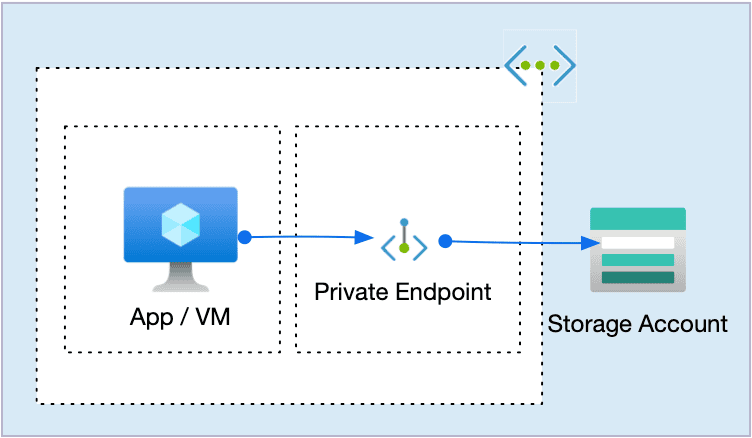
This article shows a clean baseline for Azure Blob Storage:
a private object store exposed only via a Private Endpoint, provisioned with Terraform / OpenTofu.
Private containers.
No sample uploads.
No permanent consumers.
And that is entirely intentional.
Why Azure Blob Private Endpoint Terraform is intentionally minimal
If this example feels quiet, that’s because it should.
Blob Storage is not a filesystem. It is not shared runtime state. It is not something that should be mounted or constantly consumed.
Blob Storage is a data boundary.
Its most important characteristic is not how it is used — but who is allowed to reach it at all.
This example focuses exclusively on that boundary.
What problem this pattern actually solves
In real Azure environments, Blob Storage often ends up being:
artifact storage for CI/CD pipelines
backend storage for AKS workloads
ingestion points for data platforms
intermediate storage between services
In all of those cases, the critical question is the same:
Should this data ever be reachable from the public internet?
If the answer is “no”, then Private Endpoint is not an optimization —
it is the baseline.
🧭 Architecture overview
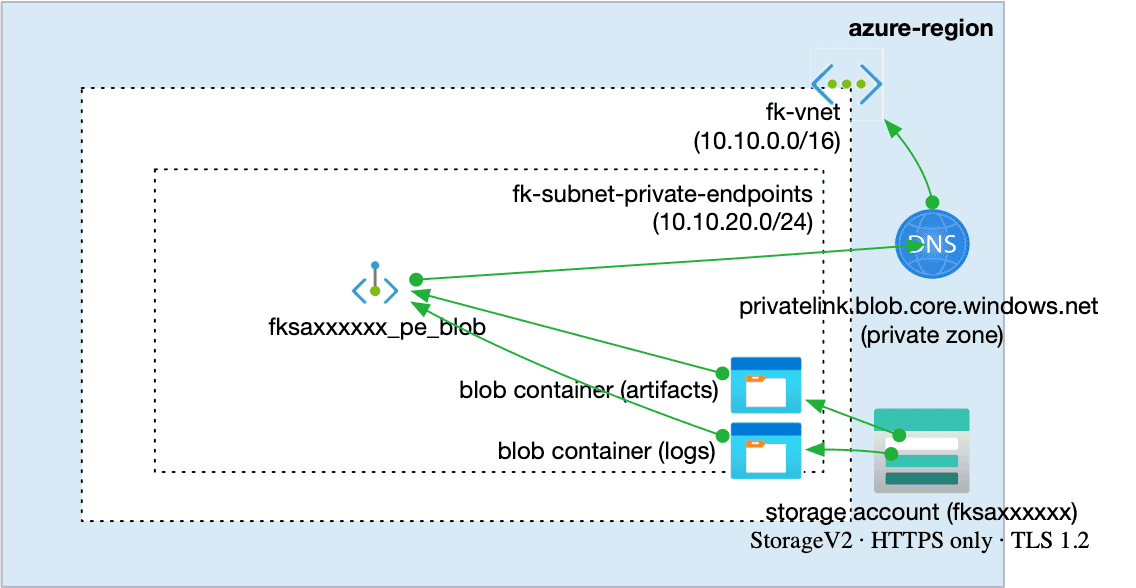
The architecture consists of:
One Azure Storage Account (StorageV2)
One or more Blob Containers
A Private Endpoint for the blob subresource
A Private DNS Zone (
privatelink.blob.core.windows.net)A Virtual Network with a dedicated Private Endpoint subnet
Blob Containers are created to express data intent, not consumption.
They define what kind of data will live here — before any workload exists.
No compute resources are attached. This is not an oversight. It is the correct starting point. This example intentionally stops before attaching any workload.
Blob Storage is rarely consumed continuously.
It is accessed by managed services, pipelines, and platforms — often under identities that do not even exist yet at infrastructure design time. That is why this example focuses on defining the storage boundary first, not on demonstrating consumption.
👉 See the full Azure infrastructure with Terraform architecture model: Azure Infrastructure with Terraform – Architecture Model
Figure 1. Private Azure Blob Storage accessed only via Private Endpoint and Private DNS.
Blob Storage as a private service, not a public endpoint
With a Private Endpoint in place:
the public Blob endpoint is no longer required for data access
name resolution is redirected to a private IP
traffic flows entirely inside the Azure backbone
From a networking perspective, Blob Storage becomes just another private service inside your virtual network.
This is the moment where Blob stops being “cloud storage”
and starts being infrastructure.
Storage defined via a reusable Terraform module
The storage layer is defined using the FoggyKitchen module: terraform-az-fk-storage
module "storage" {
  source = "github.com/foggykitchen/terraform-az-fk-storage"

  name                = local.storage_account_name
  resource_group_name = var.resource_group_name
  location            = var.location

  account_tier             = var.account_tier
  account_replication_type = var.account_replication_type
  account_kind             = var.account_kind
  access_tier              = var.access_tier

  https_traffic_only_enabled = true
  min_tls_version            = "TLS1_2"

  public_network_access_enabled = true
  enable_network_rules = true

  network_rules = {
    default_action = "Deny"
    ip_rules = [
      var.my_public_ip
    ]
    virtual_network_subnet_ids = [
      module.vnet.subnet_ids["fk-subnet-private-endpoints"]
    ]
    bypass = ["AzureServices"]
  }

  # Enable blob containers in this example
  create_containers = true
  containers        = var.containers

  create_file_shares   = false

  tags = var.tags
}
This expresses intent, not consumption:
Blob Storage exists
it is private
it is ready to be consumed later
No workload assumptions are baked in.
Why there is no consumer in this example
This is the part that often feels uncomfortable at first. There is no VM. No script. No upload test. That absence is deliberate.
Blob Storage is usually consumed:
temporarily,
by managed services,
under identity-based access,
and often at a different lifecycle than compute.
Attaching a permanent VM consumer here would blur that distinction.
This example stops exactly where infrastructure responsibility ends.
Blob vs Files — two very different roles
It helps to contrast this with Azure Files:
Azure Files
Azure Blob
Mounted filesystem
Addressed object store
Long-lived consumers
Ephemeral consumers
Shared runtime state
Data boundary
RWX semantics
Object semantics
That’s why the Azure Files example shows VMs mounting storage — and this one does not. Different services. Different intent. Different baseline.
Code example
The complete, runnable example lives here:
👉 terraform-az-fk-storage — Example 05: Private Endpoint for Blob Storage
https://github.com/foggykitchen/terraform-az-fk-storage/tree/main/examples/05_private_endpoint_blob
The example is intentionally short and focused on:
Private Endpoint wiring
Private DNS integration
clean storage boundaries
Network foundation
Before introducing Private Endpoints, the underlying network boundary must already exist.
This example assumes a purpose-driven VNet layout similar to the one described here:
👉 Azure VNet Terraform Module – Explained
A stable network contract ensures that private services like Blob Storage integrate cleanly with workloads without redesigning the network later.
The same applies to DNS — Private DNS Zones must be linked to the Virtual Network before private endpoints can resolve service names correctly:
Where this pattern is used next
Once defined, this private Blob endpoint becomes a building block:
AKS workloads pulling artifacts
Azure Functions reading/writing data
CI pipelines publishing build outputs
internal services exchanging data privately
The storage does not change. Only the consumers do. That is the point.
Final thought
Blob Storage does not need to be exposed to be useful. A well-designed private endpoint makes storage quietly integrate into your platform — without relying on public access. If your services still depend on public endpoints, you are not defining boundaries — you are working around them.
👉 Private connectivity is not an optimization. It is a fundamental architectural decision.
🚀 If you want to see how private endpoints, networking, and storage come together into a secure Azure platform — built step by step with Terraform/OpenTofu:
➡️ Explore the Azure Fundamentals course: https://foggykitchen.com/courses/azure-fundamentals-terraform-course/
From Private Blob Access to Secure Azure Architecture
Private endpoints are not just a feature — they define how services are securely integrated into your Azure platform.
This pattern is a core building block of real-world architectures.
🔒 Lifetime • ⚙️ Private Networking Labs • 🧠 Architecture-first