Azure Infrastructure with Terraform/OpenTofu: From Network Design to Scalable Compute
- Posted by Martin Linxfeld
- Categories Azure Foundations, Azure Design Notes, cloud architecture
- Date March 29, 2026
- Comments 0 comment
- Tags Azure Architecture, azure design patterns, Azure Infrastructure, Azure Load Balancer, Azure NAT Gateway, Azure Networking, azure nsg, Azure Private DNS, Azure Private Endpoint, Azure Storage, Azure VM Scale Set, Azure VNet, cloud architecture, Infrastructure as Code, OpenTofu Azure, Terraform Azure
Azure infrastructure Terraform is often presented as a set of individual resources — but real platforms are built as connected architectural layers.
When engineers start working with Azure and Terraform, most examples focus on individual resources.
A Virtual Network here. A VM there. Maybe a Load Balancer on top.
But real Azure platforms are not built from isolated resources.
They are built from connected architectural layers.
Over the past months, I published a series of Terraform/OpenTofu guides that together form a complete, production-aligned Azure infrastructure.
This article brings all those pieces together — into one coherent architecture.
Azure Infrastructure Terraform: The Architecture Model
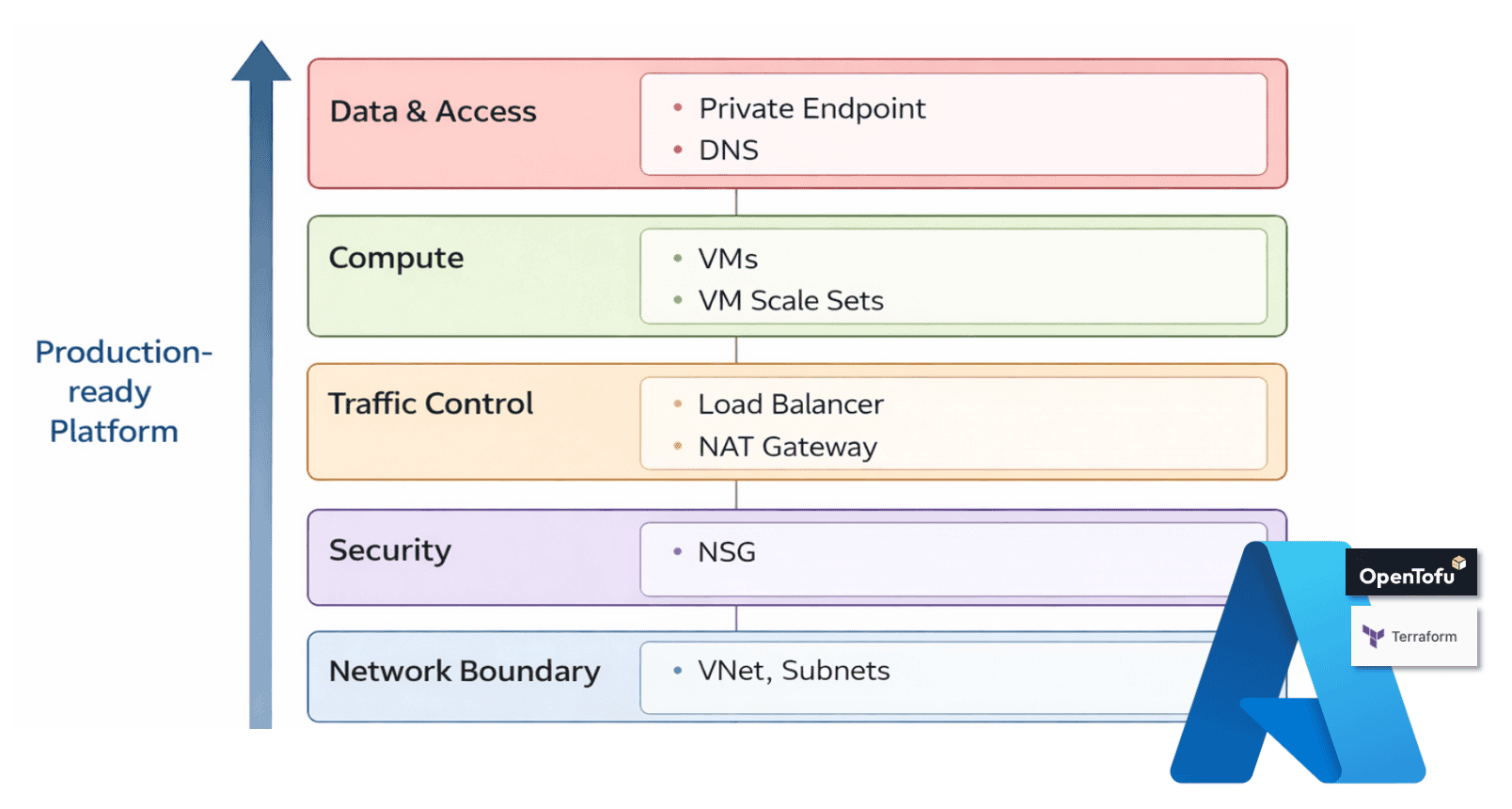
A production-ready Azure platform built with Infrastructure as Code usually consists of a few core layers:
- Network boundary (VNet, subnets)
- Security boundaries (Network Security Groups)
- Outbound connectivity (NAT Gateway)
- Compute layer (Virtual Machines, VM Scale Sets)
- Storage layer (Disks, Files, Blob)
- Private connectivity (Private Endpoints and DNS)
Each layer solves a different problem.
Together, they form a system.
The key idea is simple:
- You are not deploying resources.
- You are defining contracts between layers.
Explore the official Azure Architecture Center. (Microsoft Docs)
Figure 1. Layered Azure architecture model — from network boundary to data & access, defining contracts between infrastructure layers
Network Foundation — The VNet as an Isolation Boundary
Everything starts with the Virtual Network. The VNet defines:
- the address space of your platform
- how workloads are separated into subnets
- where connectivity is allowed and where it is not
A well-designed VNet is not just a container. It is a long-term contract for your architecture. If the network is unclear, everything built on top becomes fragile. If the network is clean, everything else becomes predictable.
Read the full guide: https://foggykitchen.com/2025/12/18/azure-vnet-terraform-module/
Security Boundaries — Defining Traffic Intent with NSG
Once the network is defined, security must become explicit. Network Security Groups define:
- what traffic is allowed
- what is denied
- where boundaries exist between tiers
This is where architecture starts to become visible. You are no longer deploying infrastructure. You are defining intent.
A common mistake is mixing responsibilities between subnet-level and NIC-level rules.
A clean design treats NSG as a boundary, not a patch.
Read the full guide: https://foggykitchen.com/2026/02/06/azure-nsg-design-patterns/
Outbound Connectivity — NAT Gateway as an Egress Contract
Most architectures focus on inbound traffic. But real systems also need controlled outbound access. NAT Gateway provides:
- a stable outbound IP
- controlled internet access for private workloads
- separation between internal resources and the public internet
It defines how your workloads leave the system. Without it, outbound traffic becomes unpredictable and hard to control.
Read the full guide: https://foggykitchen.com/2026/02/13/azure-nat-gateway-terraform/
Compute Layer — From Private VM to Scalable Workloads
With networking and security in place, compute can be introduced. This layer evolves in stages. First, a single private VM:
- no public exposure
- access via Bastion
- controlled environment for administration
Then, multiple VMs behind a Load Balancer:
- separation of user traffic from management access
- basic horizontal scaling
Finally, Virtual Machine Scale Sets:
- autoscaling
- workload replication
- production-ready compute layer
Each step builds on the previous one. This is not a shortcut. It is the actual path Azure engineers follow.
Read the guides:
Storage Layer — Data as a First-Class Concern
Compute without storage is incomplete. Azure provides different storage patterns depending on workload needs:
- Managed Disks — for stateful compute
- Azure Files — for shared access across VMs
- Blob Storage — for object storage and application data
Each of these plays a different role in architecture. The key is not choosing one. The key is understanding when and why each is used.
Read the guides:
- Managed Disks: https://foggykitchen.com/2026/01/21/azure-managed-disks-terraform/
- Azure Files with Private Endpoint: https://foggykitchen.com/2026/01/16/azure-files-private-endpoint-terraform/
- Azure Blob with Private Endpoint: https://foggykitchen.com/2026/01/19/azure-blob-private-endpoint-terraform/
Private Connectivity — Services Without Public Exposure
Production platforms avoid exposing services publicly whenever possible. Private Endpoints and Private DNS enable:
- access to Azure services via private IP
- internal name resolution
- secure communication between platform components
This is where architecture becomes truly “private-first”. Without DNS, Private Endpoints do not work correctly. Without Private Endpoints, services remain exposed. This layer connects everything together.
Read the guides:
Putting It All Together
When combined, these layers form a clear architecture:
Network → Security → Connectivity → Compute → Storage → Private Access
Each Terraform module represents one layer. Together, they create a production-ready system.
This is the difference between: deploying resources and designing architecture
From Individual Components to Real Azure Architecture
If you followed the articles above, you already built individual parts of Azure infrastructure.
You configured a VNet. You defined NSG rules. You deployed compute. You exposed services privately.
But production environments are not built as isolated steps.
They are built as connected systems:
- modules working together
- consistent design decisions
- repeatable deployment patterns
This is the missing layer between tutorials and real-world engineering.
Next Step — From Architecture to Full Platform
If your goal is to move beyond individual Terraform examples and understand how these pieces fit together into a real platform:
this is exactly what I cover in the Azure Fundamentals course.
The course builds a complete Azure architecture step by step:
- from network design
- through security and connectivity
- to scalable compute and real workloads
No shortcuts. No portals.
Just Terraform/OpenTofu and real architecture decisions.
👉 Start here: https://foggykitchen.com/courses/azure-fundamentals-terraform-course/
Chef’s Corner
Infrastructure is not a collection of resources.
It is a set of decisions.
Terraform doesn’t create architecture.
It reveals whether you have one.
Ready to build this architecture yourself?
This article showed the architectural model behind production-ready Azure platforms.
In the course, we implement each layer step by step using Terraform/OpenTofu modules — from network boundary to private connectivity.
🔒 Lifetime access • 🧠 Architecture-first • ⚙️ Real Terraform modules
Check also other courses:

Tag:Azure Architecture, azure design patterns, Azure Infrastructure, Azure Load Balancer, Azure NAT Gateway, Azure Networking, azure nsg, Azure Private DNS, Azure Private Endpoint, Azure Storage, Azure VM Scale Set, Azure VNet, cloud architecture, Infrastructure as Code, OpenTofu Azure, Terraform Azure