Azure Load Balancer as a Traffic Contract — A Clean Terraform Module Baseline
- Posted by Martin Linxfeld
- Categories Azure Foundations, opentofu, terraform
- Date February 1, 2026
- Comments 0 comment
- Tags Azure Load Balancer, Azure Networking, cloud architecture, Infrastructure as Code, OpenTofu, Terraform Azure, terraform module, traffic contract
Using a Terraform Azure Load Balancer Module as a Clean Baseline
This article shows how to use a Terraform Azure Load Balancer module to define an explicit traffic contract between the public edge and independently managed backend virtual machines.
Azure Load Balancer is often introduced too late in the infrastructure lifecycle — after virtual machines already exist, after ports are opened, after someone says “let’s just test connectivity first”.
In production architectures, this order leads to unclear traffic boundaries and implicit assumptions about routing and availability.
This article intentionally takes a different approach.
The goal of this example is not high availability tuning, autoscaling, or feature completeness.
It focuses on one core concept:
A Load Balancer is a separate Azure resource that defines a traffic contract between the public edge and independently managed compute instances.
What this example is — and what it is not
Before looking at Terraform, it is important to understand the scope.
What this example focuses on
an explicit public traffic entry point
explicit backend membership
an explicit health contract
no hidden coupling between compute and traffic
What this example intentionally avoids
❌ autoscaling
❌ availability zones discussion
❌ Application Gateway / WAF
❌ TLS termination
❌ portal-driven configuration
This is a foundation pattern, not a feature showcase.
If you’re looking for a low-level walkthrough using raw Terraform resources, see
Azure Load Balancer with Terraform — using raw resources.
This article builds on top of that foundation by wrapping the Load Balancer into a reusable, contract-first Terraform module.
Architecture overview
The deployment consists of a minimal but complete traffic path from the public internet to private backend compute.
The architecture includes:
One Virtual Network with a private subnet
Multiple Linux Virtual Machines acting as backend instances
One Public Azure Load Balancer (Standard SKU)
One public frontend IP
One backend address pool with VM NICs attached
One TCP health probe
One load balancing rule (TCP/80 → TCP/80)
Each backend VM runs an identical NGINX service but remains an independent compute unit.
The Load Balancer does not “own” compute.
It only routes traffic according to an explicit contract.
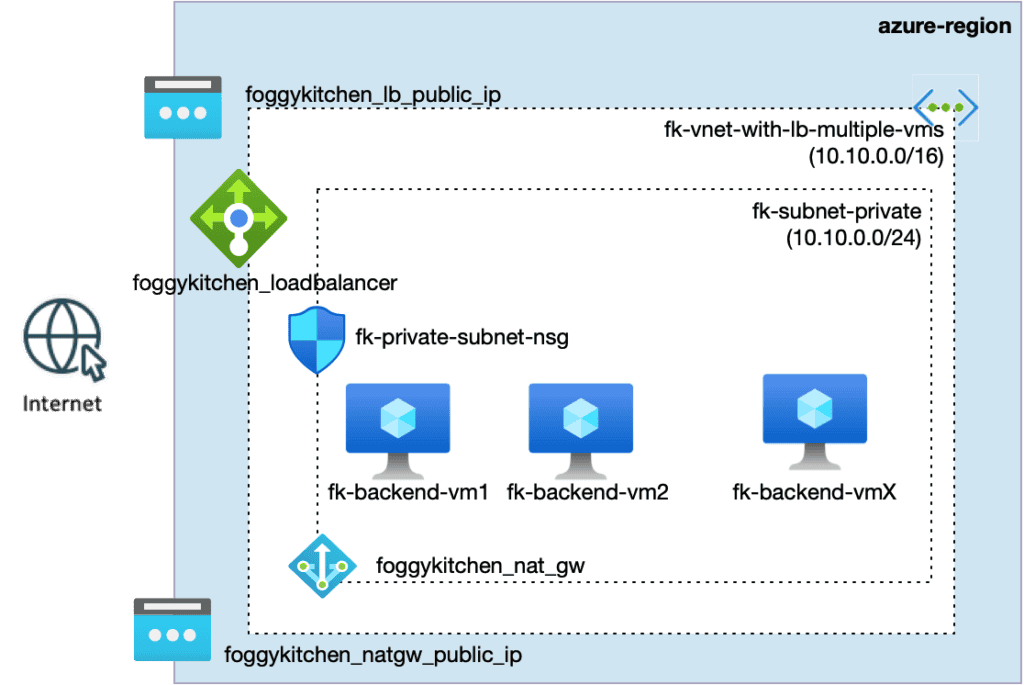
Figure 1. Public Azure Load Balancer distributing inbound traffic to multiple backend Virtual Machines.
The Load Balancer as a traffic boundary
In this baseline, the Load Balancer is treated as a traffic boundary, not a convenience feature.
It answers three explicit questions:
Where does traffic enter the platform?
Which backends are eligible to receive traffic?
Under what conditions is traffic routed?
All three answers are declared in Terraform.
Using the terraform-az-fk-loadbalancer module
At the center of this example is the terraform-az-fk-loadbalancer module.
The entire Load Balancer configuration is expressed through a small, explicit interface.
module "loadbalancer" {
  source = "github.com/foggykitchen/terraform-az-fk-loadbalancer"

  name                = "fk-public-lb"
  resource_group_name = azurerm_resource_group.foggykitchen_rg.name
  location            = azurerm_resource_group.foggykitchen_rg.location

  public_lb = true

  probe = {
    name                = "http-health-probe"
    protocol            = "Tcp"
    port                = 80
    interval_in_seconds = 5
    number_of_probes    = 2
  }

  rule = {
    name          = "http-rule"
    protocol      = "Tcp"
    frontend_port = 80
    backend_port  = 80
  }
}
This block is intentionally small — but every attribute has architectural meaning.
Public edge selection
The flag:
public_lb = true
explicitly declares that this Load Balancer represents a public edge.
There is no ambiguity about where inbound traffic enters the platform.
The public IP exists solely to expose the Load Balancer — not the backend VMs.
Health probes define routing eligibility
The probe configuration is not monitoring.
It is a routing gate.
probe = {
  name                = "http-health-probe"
  protocol            = "Tcp"
  port                = 80
  interval_in_seconds = 5
  number_of_probes    = 2
}
Only backend instances that satisfy this probe are considered eligible to receive traffic.
If a backend VM stops responding on TCP/80:
it is removed from the routing path
traffic is not sent “best effort”
no additional logic is required
Health probes are not observability tools.
They define who is allowed to receive traffic.
Load balancing rules as an explicit contract
The rule configuration defines the public contract of the service:
rule = {
  name          = "http-rule"
  protocol      = "Tcp"
  frontend_port = 80
  backend_port  = 80
}
There are no implicit ports.
There is no hidden protocol translation.
The rule explicitly states:
which protocol is accepted
which frontend port is exposed
which backend port is targeted
This clarity is intentional.
Backend independence
One of the most important design choices in this baseline is decoupling compute from traffic.
Backend Virtual Machines:
are created independently
are managed independently
do not “belong” to the Load Balancer
Traffic routing is achieved by attaching NICs to the backend address pool.
This means:
compute can be replaced without redefining the edge
traffic policy remains stable
responsibilities stay separated
The Load Balancer routes traffic to independently managed compute instances — nothing more, nothing less.
Validation and behavior
After tofu apply:
the public IP responds on TCP/80
refreshing the page returns responses from different backend VMs
stopping NGINX on one VM removes it from routing within seconds
No autoscaling.
No orchestration.
Just explicit contracts.
Why this belongs in Azure Foundations
This pattern is often skipped or abstracted away — and that is a mistake.
Without an explicit Load Balancer:
private compute becomes unreachable or incorrectly exposed
routing rules become implicit
health semantics are unclear
This is why Load Balancer configuration belongs in Azure Foundations, not only in “advanced networking”.
Everything built later — autoscaling, zonal architectures, Application Gateway, AKS ingress — builds on top of this contract.
They do not replace it.
👉 See the full Azure infrastructure with Terraform architecture model: Azure Infrastructure with Terraform – Architecture Model
Closing thoughts
This example intentionally stays minimal.
Not because Azure Load Balancer is simple —
but because foundations should be.
By expressing the traffic boundary explicitly through a Terraform module, the architecture becomes:
predictable
reviewable
composable
And most importantly: understandable.
Azure Load Balancer behavior and limitations are documented in the official Microsoft documentation.
Explore more Azure Foundation patterns
🔹 Networking foundation
Azure Virtual Network as an Isolation Boundary (Terraform)
How a purpose-driven Terraform module terraform-az-fk-vnet defines Azure VNet intent, subnet boundaries, and future workload placement.
🔹 Compute foundation
Private Azure Virtual Machines with Terraform (No Public IPs)
Building a private Azure compute foundation using the terraform-az-fk-compute module, with explicit VM, NIC, and Load Balancer attachment responsibilities.
🔹 Storage foundation
Azure Storage with Private Endpoint — A Clean Terraform Baseline
Building a private Azure storage foundation using the terraform-az-fk-storage module, with Private Endpoint, Private DNS, and explicit data access paths.
🔹 Traffic / edge
Azure Load Balancer with Terraform — Using Raw Resources
A pre-module, low-level walkthrough using raw Terraform resources, originally part of the Multicloud Foundations series, showing the same traffic contract before abstraction.
From Load Balancer to Real Azure Traffic Architecture
This example shows how traffic is distributed across backend workloads — but real Azure platforms require consistent traffic design across networking, compute, and storage.
Load Balancer is a core building block of production-grade Azure architectures.
🔒 Lifetime • ⚙️ Networking & Compute Labs • 🧠 Architecture-first